 Export Guide
 By
By AOL Mail exports your contacts as a CSV. Open Contacts, click More and choose Export to CSV file, and the whole address book downloads as one CSV. To use those contacts on a phone, in Excel or in Outlook, convert the CSV to vCard, Excel or PST with Univik CSV Converter.
You want a copy of every contact in your AOL address book, whether to back them up, move them to a phone or open them in Excel. The good news is that AOL Mail does the export for you, free and built in. Two clicks in the Contacts menu save the whole list as a single CSV file on your computer.
A CSV is the honest starting point, because it is what AOL hands you. From there you can open it, read it or turn it into whatever the next app needs. This guide shows the built-in export first, then how to reshape that file into a vCard for a phone, an Excel sheet or an Outlook import.
- AOL Exports Your Contacts as a CSV
- Export the Whole Address Book
- Step 1: Open Contacts and click More
- Step 2: Choose Export to CSV file
- Step 3: Save the CSV and open it to check
- What the Exported CSV Holds
- Use the Exported Contacts Anywhere
- Check the Export Worked
- Fix Common Export Problems
- AOL Contacts Export Questions
AOL Exports Your Contacts as a CSV
AOL Mail has a built-in export, and it writes one format: a CSV file. Head into Contacts and open the More menu, where Export to CSV file is waiting. There is no vCard or Excel choice here, only the CSV, which is fine because a CSV is easy to open and convert. The export takes the whole address book at once, so you do not pick contacts one by one.
Think of the CSV as the master copy. Once it is on your computer you can read it, keep it as a backup or reshape it for a phone or another mailbox. The steps below save it, and the sections after show what to do with it.
Export the Whole AOL Address Book
This is the built-in route and it takes two clicks. Nothing is installed and nothing is uploaded.
Open Contacts and click More
Log in to AOL Mail and choose Contacts from the menu down the left side. Along the top of the contact list, click More, the three-dots button, to open its menu.
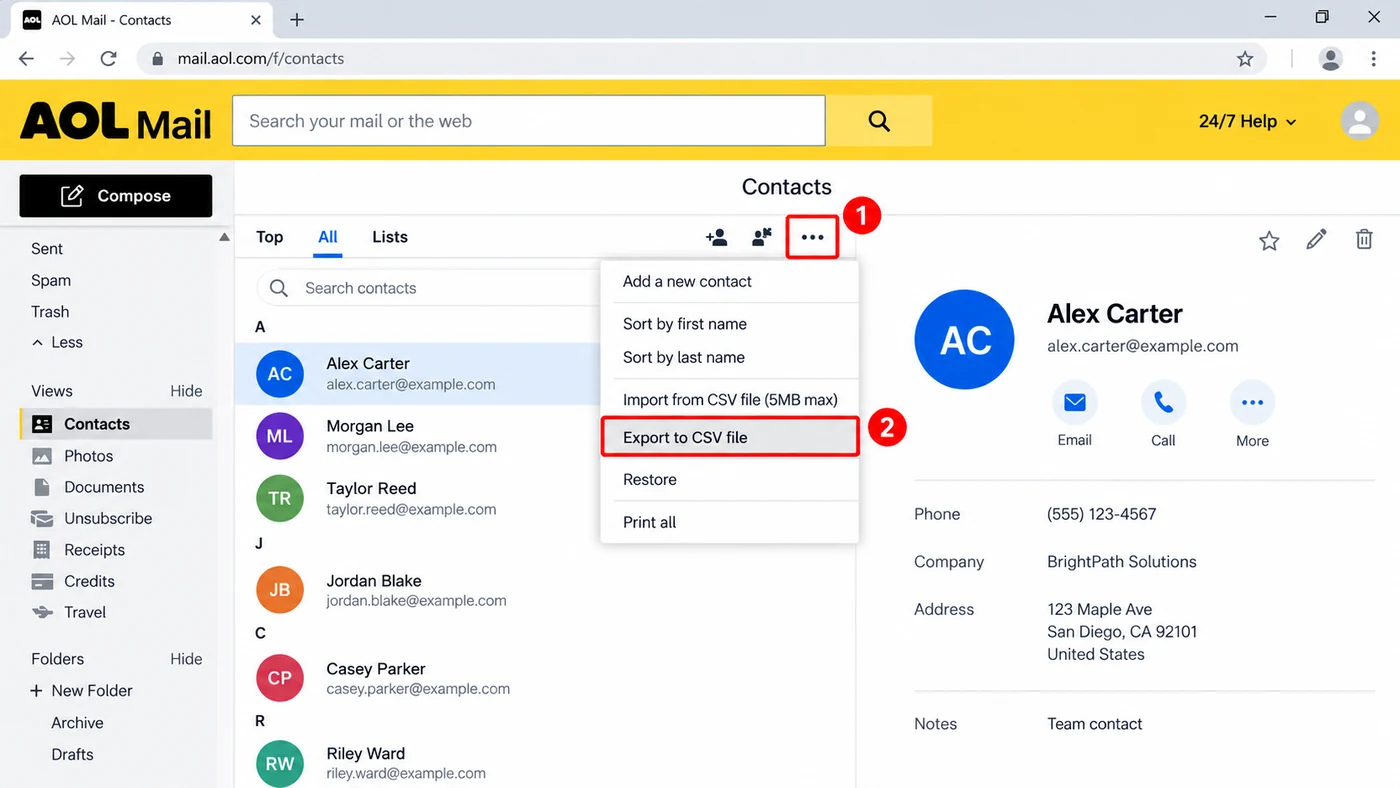
Two clicks Open More on the Contacts toolbar and choose Export to CSV file.
The same menu holds Import, Restore and Print. The one you want is Export, which sits a line below Import.
Choose Export to CSV file
Click Export to CSV file. Your browser downloads a CSV named for your account, holding every contact in the address book. It saves to your Downloads folder unless you have set another spot.
Save the CSV and open it to check
Open the downloaded CSV in Excel, Numbers or Google Sheets. You should see a header row and one row for each contact. If the names, emails and phone numbers are there, the export worked. Keep this file somewhere safe, because it is now your backup.
What the Exported CSV Holds
The export is thorough. Each contact becomes a row, and every field you filled in becomes a column. Name and email sit up front, followed by phone numbers, company, job title, postal address and any notes. Blank fields stay blank, so a sparse contact leaves those cells empty. Photos do not ride along in a CSV, because it is a text format, though every typed detail does.
Use the Exported Contacts Anywhere
A CSV is the right master file, but the app you are headed to may want a different shape. Here is how the common ones line up, and where a quick conversion helps.
For a new phone, an iPhone or Android address book wants a vCard, so turn the CSV into a .vcf. Import it into iCloud for an iPhone or a Google account for Android, and the contacts sync to the phone on their own. That is how most people transfer AOL contacts to a new phone. For a spreadsheet, Excel and Google Sheets open the CSV as it is, so you can sort, clean or print the list. For Outlook, you can import the CSV straight in, or convert it to a PST. And to move the contacts into another mailbox such as Gmail, most services import a CSV or a vCard.
Univik CSV Converter opens the CSV that AOL gives you and writes the format the next app needs: a vCard for a phone, an Excel workbook, an Outlook-ready file and more. It keeps the columns lined up, so names, emails and numbers land in the right place.
Windows 11 / 10 · reads a plain CSV · the free trial converts a sample so you can see the output before you buy
Going the other way? If you need to put a vCard back into this account, the import VCF contacts to AOL guide covers it. And printing all AOL contacts turns the same list into a page you can hold.
Check the AOL Contacts Export Worked
- A CSV file lands in your Downloads folder right after you click Export to CSV file
- Opening it in a spreadsheet shows a header row and one row for each person in your address book
- A contact you know well shows the right email, phone and company across its columns
Keep the CSV with your other backups, and export a fresh one now and then so the copy stays current. A contacts backup is only as good as its last export.
Fix Common AOL Contacts Export Problems
Three problems cover most exports that do not go to plan. Each card pairs the symptom with its fix.
Do this: Open Contacts first, not the mailbox, then click the three-dots More button on the Contacts toolbar. Export to CSV file sits below Import from CSV file.
Do this: Open it in Excel, Numbers or Google Sheets instead of a plain text editor. A CSV is columns of data and reads properly in a spreadsheet.
Do this: That target wants a different format. Convert the CSV to a vCard for a phone, or import it into Outlook, with Univik CSV Converter or Outlook's own import wizard.
Not sure which format the next app needs? Tell our support team where the contacts are going and we will name the file to convert to.
AOL Contacts Export Questions
How do I export all my contacts from AOL Mail?
In AOL Mail, go to Contacts, open the More menu on the toolbar and pick Export to CSV file. The whole address book downloads as one CSV. Every contact leaves at once, so there is nothing to select first.
What format does AOL export contacts in?
AOL Mail exports contacts as a CSV file only. There is no built-in vCard or Excel export. A CSV opens in any spreadsheet and converts cleanly to a vCard for a phone, an Excel workbook or an Outlook import when you need one of those.
How do I back up my AOL contacts?
Exporting to CSV is the backup. Open Contacts, use More then Export to CSV file and keep the downloaded CSV with your other backups. Export a fresh copy every so often, since the file only holds the contacts you had at the time.
How do I sync AOL contacts to my iPhone or transfer them to a new phone?
Export the contacts to CSV, then convert that CSV to a vCard, which is the format phones use. Import the vCard into iCloud for an iPhone or a Google account for Android, and the contacts sync to the phone by themselves. That is the usual way to transfer AOL contacts to a new phone.
Can I export AOL contacts to Excel?
Yes. Export to CSV file, then open the CSV in Excel, which reads it straight away. To save it as a true .xlsx workbook, use Excel's Save As. Or convert the CSV to Excel with Univik CSV Converter.
Where does the exported AOL contacts file save?
Your browser downloads it to your Downloads folder unless you have picked another location. The file is a CSV named for your account. Move it somewhere memorable if you plan to keep it as a backup.
 About This Guide
Written and maintained by Leena Taylor Paul and the Univik team, developers of Windows data conversion and recovery software since 2013. We ran this export ourselves in September 2026 and confirmed Export to CSV file sits in the More menu on the Contacts toolbar. Last verified September 9, 2026. Need a hand? Contact our support team.
Sources checked: AOL Mail help centre · Univik CSV Converter