 AOL Mail Guide
 By
By To download one AOL email, open it, click More and either View raw message and save the page as a file, or Print message and save it as a PDF. To download several emails you pick, connect AOL over IMAP at imap.aol.com on port 993 with an app password, or use a backup tool that filters your mail and saves the ones you choose to EML, PST or PDF in a single run.
AOL Mail has no download button beside a message, so saving your mail to your computer takes a short workaround. The right way to download AOL emails depends on how many you need. For one message that matters, your browser can save it right from your inbox. For a folder you want to keep, or all your AOL email at once, a mail connection or a backup tool does the job without opening each message. This guide walks every route, with the exact clicks and a screenshot where it helps.
A local copy is worth having before you need it. It keeps your mail safe if the account lapses, if a provider outage locks you out or if you move to a new email app, and it lets you read old messages on any computer. That is why so many people want to back up AOL email to a hard drive rather than trust it to the cloud alone.
A quick verdict before the steps: for a single message the raw-message route is the honest one-file method, and Print to PDF is better when you only need a readable copy. Past a handful of messages, saving them one at a time stops being worth the time, so the last two methods pick up there.
- Two Ways to Save One AOL Email
- View Raw Message: The Steps
- Step 1: Open the email and view the raw message
- Step 2: Save the raw message from your browser
- Step 3: Rename it to .eml to open it anywhere
- Save an AOL Email as a PDF
- Download Several or Selected AOL Emails
- Save the Batch You Pick in One Run
- AOL Email Download Methods Compared
- If Your Mail Lives in AOL Desktop Gold
- Check the AOL Email Download Worked
- Fix Common AOL Email Download Problems
- AOL Email Download Questions
Two Ways to Save One AOL Email to Your Computer
AOL Mail gives you two honest ways to save a single message to your computer. View raw message hands you the email as a file, with its headers, date, sender and any attachments held inside. Print message gives you a clean PDF of the text, which is easier to read and share but drops the attachments as separate files. Pick the raw-message route when the message must be kept exactly as sent, for a record or evidence. Pick PDF when a plain readable copy is enough.
Download an AOL Email with View Raw Message
This is the built-in way to download a single AOL email as a file, straight from a browser. It takes three short steps and needs nothing installed.
Open the email and view the raw message
Sign in to AOL Mail in your browser and open the folder that holds the email. Tick the box next to the message you want, or open it. On the toolbar, click the More button (the three dots), then choose View raw message from the menu.
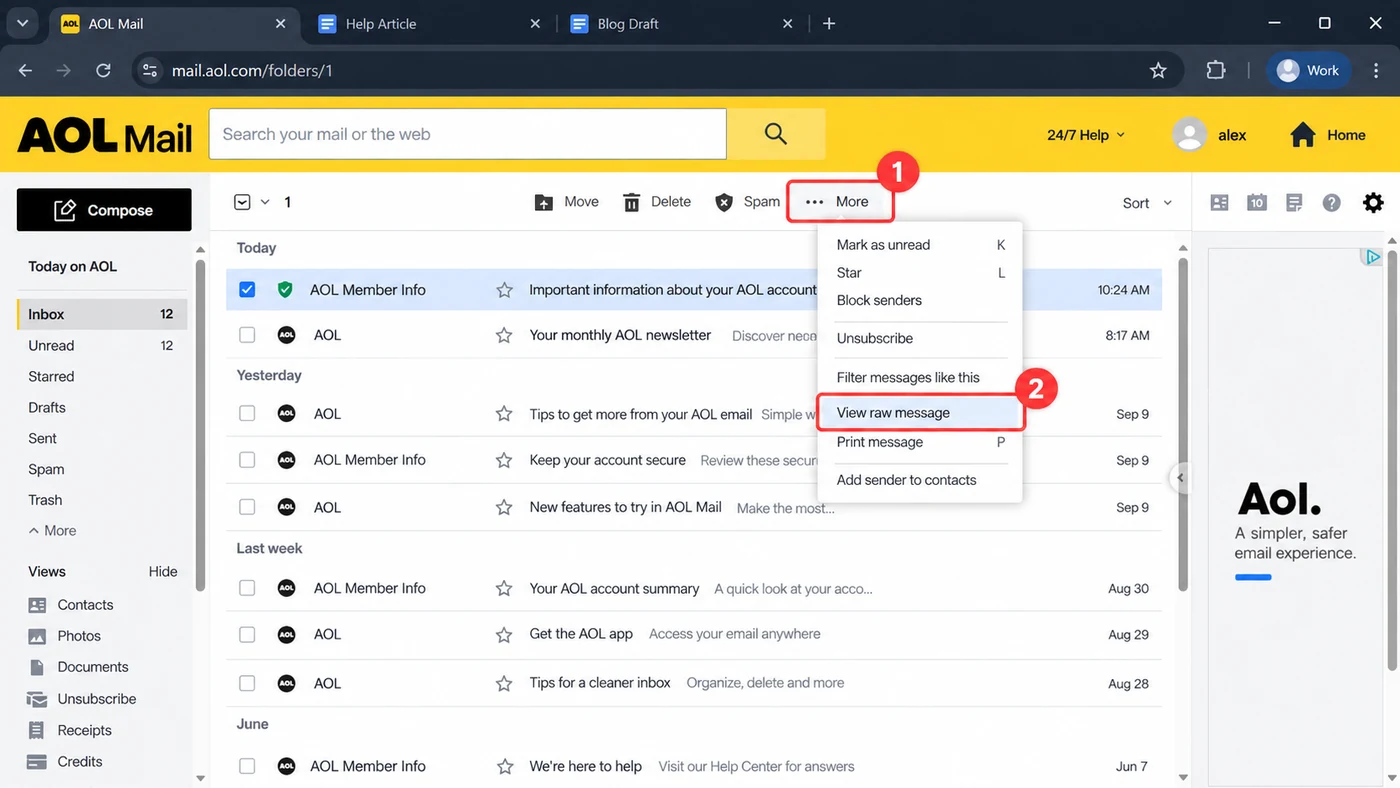
One email, step 1 Tick the message, open More and choose View raw message.
View raw message shows the full source of the email: the headers at the top, then the body, then any attachments as encoded text. That is the whole message, which is exactly what you want to save.
Save the raw message from your browser
The raw message opens in a new browser tab at an address that starts with mail.aol.com. Right-click anywhere on the page and choose Save as, or press Ctrl and S together. Pick a folder on your computer and save the file. Your browser saves it as a text file by default.
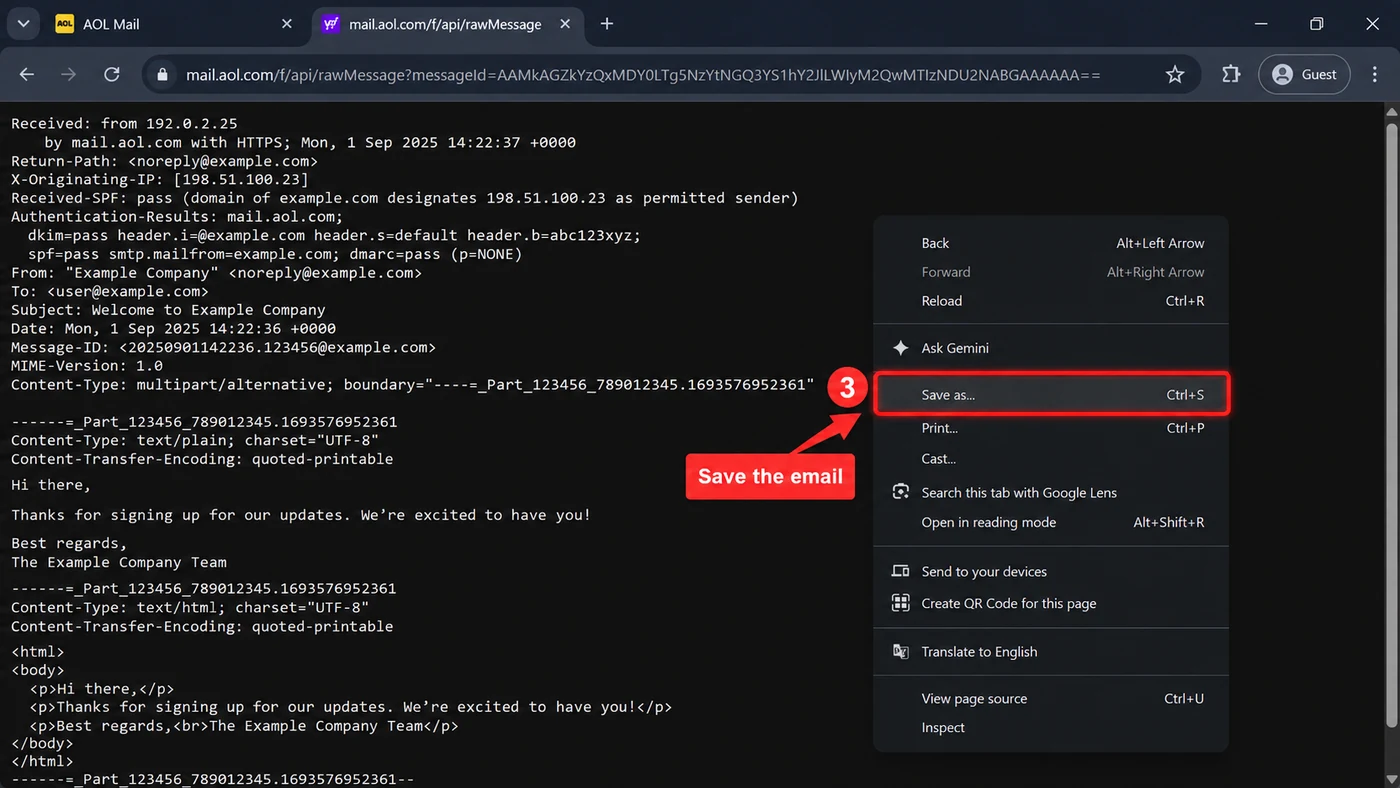
One email, step 2 Right-click the raw message and choose Save as to keep the file.
The saved file holds everything: the sender, the date, the subject and the message body, plus any attachments packed inside. Nothing is uploaded and nothing leaves your machine.
Rename it to .eml to open it anywhere
The file saves with a .txt ending. Change that ending to .eml and the message opens in Outlook, Thunderbird, Apple Mail or a free EML viewer as a normal email, with the headers and attachments intact. If your computer hides file endings, turn on File name extensions in File Explorer's View menu first, then rename. Leaving it as .txt is fine too if you only need to read the source.
Save an AOL Email as a PDF
When you want a readable copy rather than the raw source, save the email as a PDF. Open the message, click More and choose Print message. In the print window that opens, change the printer to Save as PDF (or Microsoft Print to PDF on Windows), then click Save and pick a folder. You get a tidy PDF of the message text that opens on any device. A PDF is the better pick for a record you will file or send on, though it keeps the body and not the attachments as separate files. To save AOL mail as PDF in large numbers, the bulk route below is faster than printing each one.
Download Several AOL Emails or Your Whole Mailbox
The raw-message and print routes are one message at a time. For several emails you pick, a whole folder or all your AOL email at once, repeating them by hand gets slow and easy to get wrong. Two better routes transfer the mail you choose to your hard drive in far less time.
The first is a mail app. Connect your AOL account to Outlook, Thunderbird or Apple Mail over IMAP, then select the messages you want and drag them to a local folder or save them as files. AOL will not accept your normal password from another app, so make an app password in your AOL account security settings first and use these settings: incoming imap.aol.com, port 993, SSL; outgoing smtp.aol.com, port 465. Our AOL Mail server settings page has the full list. This works well once the app is set up, but the setup and the per-message dragging still take a while.
Save the Emails You Pick in One Run with a Backup Tool
The fastest route for several emails is an AOL backup tool that connects for you and saves only the messages you choose. You sign in once, filter by date, folder or sender, tick what you want and start it. The tool downloads the selected mail to your computer in one run. Folders and attachments are kept, and it writes the format you need.
Univik Email Backup connects to AOL Mail over IMAP, filters by date, folder or sender and saves the messages you choose to EML, PST, MBOX or PDF, with the folder tree and attachments kept. There is no mail app to set up in Outlook first.
Windows 11 / 10 · uses your AOL app password · the free trial saves 25 items per folder first, so you can check the output before buying
This is the route we reach for when someone needs a real backup rather than one saved message: it turns a folder of AOL mail, or the fifty you ticked, into a set of files on disk without opening a single one.
AOL Email Download Methods Compared
| Method | What you get | Best for | Cost | You need |
|---|---|---|---|---|
| View raw message, then Save as | One .eml file with full headers and attachments | A single message kept exactly as sent | Free | A browser |
| Print message, then Save as PDF | One readable PDF of the text | A record to file or share | Free | A browser |
| Outlook or Thunderbird over IMAP | The messages you drag out, as files | A few you pick, if an app is set up | Free | App and AOL app password |
| Univik Email Backup | The mail you filter, as EML, PST, MBOX or PDF | Several, a whole folder or a routine backup | Trial, then licence | AOL app password |
| Univik AOL Desktop Gold Converter | The Saved on My PC store, as EML, PST or PDF | People who use the Desktop Gold app | Trial, then licence | Desktop Gold installed |
If Your Mail Lives in AOL Desktop Gold
Everything above is for AOL Mail in a browser. If you read your mail in the AOL Desktop Gold app instead, your messages sit in a Saved on My PC store on your hard drive, in a database Outlook cannot read. The download question there is really a conversion question. The Univik AOL Desktop Gold Email Converter reads that local store and writes your chosen folders to PST, MBOX, EML or PDF. Two guides cover the common targets: AOL Desktop Gold to Outlook and PST and AOL Desktop Gold to PDF.
Check the AOL Email Download Worked
- The saved file opens in a mail app or a viewer with the right sender, date and subject, not a blank page or a page of code
- An attachment from the message is inside the saved .eml file, or saved next to the PDF
- For a batch, the count of saved files matches the number you ticked and a message from the oldest date still opens cleanly
Keep the originals in AOL for a few weeks after a large download, in case a filter left something out. A quick way to spot-check a saved file is to open it in a free viewer before you delete anything from AOL. To move the saved copy off your main computer, drag the folder of files onto an external hard drive or a USB stick, which gives you an offline backup that survives a lost password.
Fix Common AOL Email Download Problems
Three problems cover most stuck AOL downloads. The red line is what you see and the fix follows it.
Do this: That page is the raw email. Right-click it and choose Save as, then rename the .txt to .eml. The code is the message with its headers, which is what you are saving.
Do this: AOL refuses your normal password from other apps. Make an app password in your AOL account security settings and use that, with imap.aol.com on port 993 and SSL on.
Do this: Stop saving by hand. Filter the mail with a backup tool and save the batch in one run, or drag the messages out through Outlook over IMAP.
Not sure which route fits your mailbox? Tell our support team how many messages you need and whether you read AOL in a browser or the Desktop Gold app. We will point you at the fastest one.
AOL Email Download Questions
How do I download a single email from AOL?
Open the email in AOL Mail, click More and choose View raw message. On the page that opens, right-click and choose Save as, then rename the saved .txt file to .eml so it opens in a mail app. For a readable copy instead, use More then Print message and save it as a PDF.
Can I download all my AOL emails at once?
Not from AOL Mail's own menus, which work one message at a time. To download many emails or a whole folder, connect AOL to Outlook or Thunderbird over IMAP. You can also use a backup tool such as Univik Email Backup that filters your mail and saves the batch you pick to EML, PST or PDF in one run.
How do I save AOL emails to my computer without a program?
Use the browser. View raw message then Save as gives you one email as a file, and Print message then Save as PDF gives you a readable copy. Both save straight to your hard drive with nothing installed. They only handle one message at a time, so they suit a few important emails rather than a full mailbox.
What file format does a downloaded AOL email use?
View raw message saves the message as text that you rename to .eml, the standard single-email format that Outlook, Thunderbird, Apple Mail and most viewers open. Print message saves a PDF. A backup tool can also write PST for Outlook, MBOX for Thunderbird or Apple Mail and a PDF for records.
Why does AOL reject my password in Outlook or Thunderbird?
AOL blocks your normal account password from third-party apps for security. Generate an app password in your AOL account security settings and use that in Outlook or Thunderbird, with imap.aol.com on port 993 for incoming and smtp.aol.com on port 465 for outgoing.
How do I download AOL emails with attachments?
A saved .eml from View raw message already holds the attachments inside the file, so they travel with the message. A backup tool keeps attachments too when it writes EML, PST or PDF. A PDF from Print message keeps the body text but not the attachments as separate files, so use .eml or a backup tool when the attachments matter.
How do I download all my AOL emails for free?
Connect AOL to Thunderbird over IMAP with an app password, then drag whole folders to a local folder on your computer. Another free route is to import AOL into a Gmail account over IMAP and use Google Takeout to download the mail as an MBOX file. Both are free but slow for a large mailbox, so a backup tool is worth it once you are past a few hundred messages.
How do I save AOL emails to an external hard drive?
Save the emails to a folder on your computer first, using any method here, then copy or drag that folder onto the external hard drive. With a backup tool you can point its output folder straight at the external drive, so the mail lands there in one step. Keeping the copy on a separate drive gives you an offline backup of your AOL email.
 About This Guide
Written and maintained by Leena Taylor Paul and the Univik team, developers of Windows data conversion and recovery software since 2013. The AOL Mail steps here were run in a current browser session, and the IMAP and SMTP settings were checked against AOL's published server names in September 2026. Last verified September 9, 2026. Need a hand? Contact our support team.
Sources checked: AOL Mail help centre · Univik AOL Mail server settings