 Email Settings Guide
Quick answer: the AOL IMAP server is imap.aol.com, port 993, SSL. SMTP is smtp.aol.com, port 465, SSL. POP is pop.aol.com, port 995, SSL. Your username is the whole @aol.com address, paired with an app password. Apps that open an AOL branded sign in window use OAuth instead and need no code at all.
What Changed Recently#
Related email providers: Mail.com email settings, CompuServe IMAP settings, Netscape email settings, Gmail IMAP settings, Outlook email settings, Yahoo IMAP settings
AOL server addresses have been stable for years. What changed is who runs the platform and what it accepts as a password.
Latest update
Your AOL account password no longer works in most email apps. AOL accepts it only where an app opens the AOL branded sign in window. Everywhere else you need a generated app password. This is the single reason most AOL setups fail and the error your app shows will still say the password is wrong.
The Yahoo connection
AOL Mail runs under the same owner as Yahoo Mail. That is why app passwords behave identically across both and why AOL support pages now sit alongside Yahoo policy pages. Your servers stay imap.aol.com and smtp.aol.com though, so do not borrow Yahoo hostnames from a general guide.
The Gmail change
Gmail stopped collecting AOL mail for you. Google removed the POP fetching that let Gmail pull in outside accounts, so an @aol.com address read inside Gmail went quiet. Nothing already imported is lost. Set AOL up in a desktop or phone app with the values below. Or bring the mail over to Gmail for good if that is where you live now.
Before You Begin#
Two AOL rules decide whether your setup works and 1 of them catches people out badly because it has nothing to do with your settings at all.
1. Generate an app password first
Unless your app opens an AOL branded sign in window, your ordinary AOL password will be refused. Make the code before you start, so you are not hunting for it halfway through a setup wizard.
Where: App password steps below →
2. Use a browser AOL already trusts
AOL decides whether you may create an app password at all, judging partly by the browser you are sitting in. A private window or a browser you rarely sign in with can block it and support cannot override that decision.
Where: Why the button fails →
About AOL Mail#
AOL Mail is one of the oldest consumer email services still running. The @aol.com addresses people set up in the dial up era still work exactly the same way.
Two things about AOL matter more than its age when you are setting up an email app. It runs on the same infrastructure as Yahoo Mail under the same owner, which is why the password rules match. And AOL still sells a paid support product, which makes the fake helplines crowding search results harder to tell apart than they are for other providers.
| Service Name | AOL Mail |
| Runs On | The same platform as Yahoo Mail, under the same owner |
| Email Domains | @aol.com and @aim.com, plus older AOL domains that sign in the same way |
| Webmail URL | mail.aol.com |
| Protocols Supported | IMAP, POP3, SMTP |
| Password for Email Apps | App password or OAuth2 where the app opens AOL's own sign in window |
| Attachment Limit | 25 MB for the whole message, counting attachments, formatting and signature |
| Also Serves | verizon.net addresses, with 1 server difference covered below |
AOL Webmail Login#
Everything you need for an email app starts in the browser, because that is where app passwords are made:
When the App Password Button Will Not Work#
Here is the AOL problem no settings guide warns you about. You follow the steps, reach the security page and the option to generate an app password either is not there or refuses to complete. Nothing is wrong with your account. AOL decides whether you are eligible to create one and part of that decision is the browser you are sitting in.
AOL states this plainly in its own documentation. Use a browser you have signed into AOL Mail with on several consecutive days and avoid private browsing. And understand that customer care cannot override the eligibility check. There is no ticket to raise and no agent who can unlock it. Stuck? Read your mail in webmail or the AOL app for a few days, signing in normally each time. Then come back to the security page.
AOL Mail IMAP Settings#
IMAP is the incoming protocol to pick for an AOL account you actually read on more than 1 device. AOL keeps the mailbox and each device you connect reads from it.
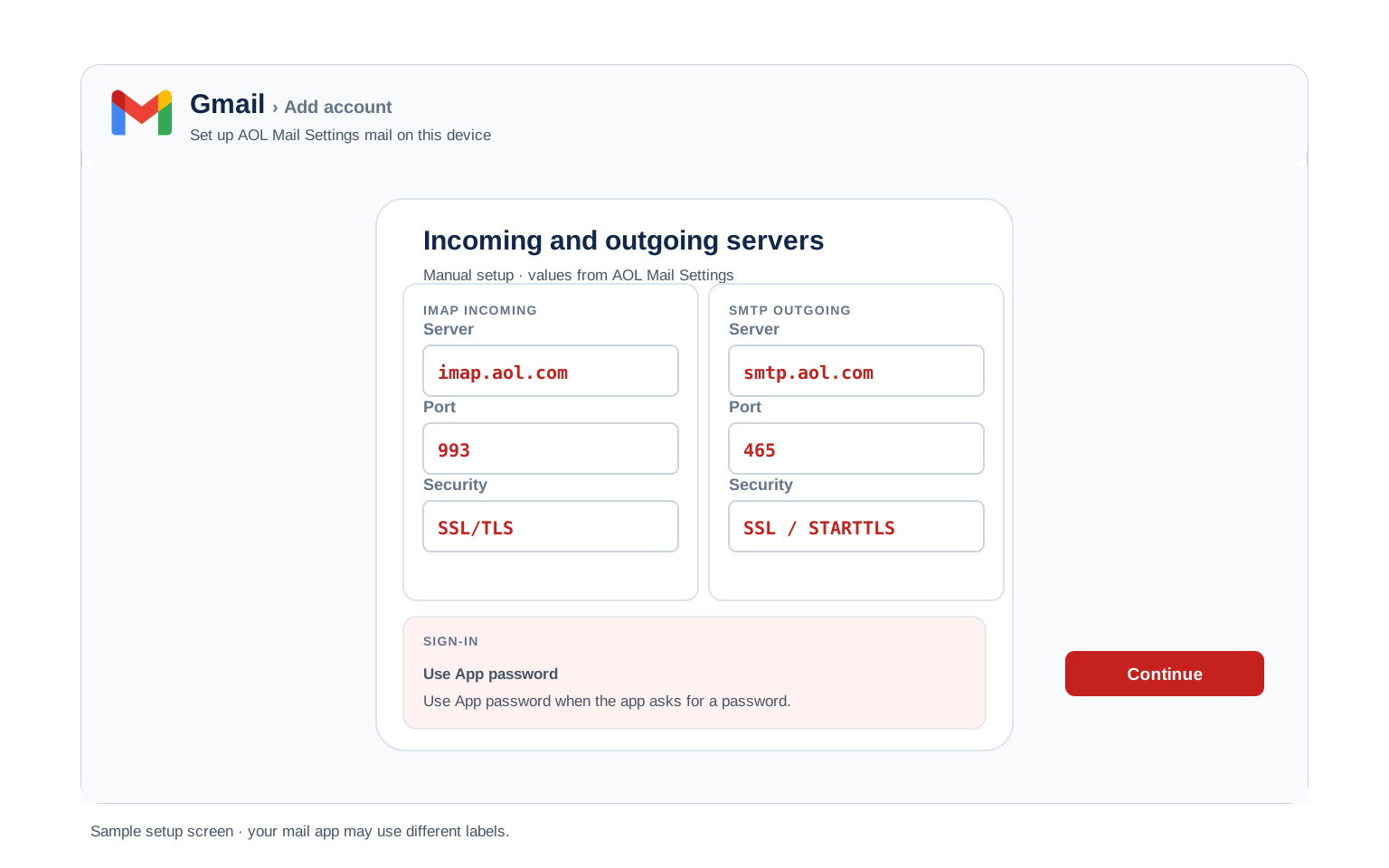
| IMAP Server | imap.aol.com | |
| Port | 993 | |
| Encryption | SSL/TLS (required) | |
| Username | Your full address, including @aol.com | |
| Password | App password | |
| Authentication | Required |
AOL Mail POP3 Settings#
POP3 downloads mail to 1 device and AOL adds a limitation worth knowing before you choose it: POP collects the Inbox only, never your other folders. AOL documents the workaround, which is to move mail into the Inbox first. Not sure which to pick? See the comparison below.
| POP3 Server | pop.aol.com | |
| Port | 995 | |
| Encryption | SSL/TLS (required) | |
| Username | Your full email address | |
| Password | App password |
AOL Mail SMTP Settings#
SMTP handles outgoing mail. AOL publishes a single outgoing port, 465 with SSL and no alternate. If you hold a verizon.net address, this is the 1 field that changes, as the section below explains.
| SMTP Server | smtp.aol.com | |
| Port | 465 with SSL, the only port AOL documents | |
| verizon.net addresses | Use smtp.verizon.net on 465 instead | |
| Encryption | SSL or STARTTLS (required) | |
| Username | Your full email address | |
| Password | Same as incoming mail | |
| Authentication | Required. AOL rejects unauthenticated sending, so keep outgoing authentication ticked. |
Check AOL Mail IMAP Settings Online#
You can check AOL IMAP settings online right here, where every value is verified and copies in 1 tap. AOL also runs mail for addresses that do not say aol.com, so check yours below if you are unsure.
Does my email address use these settings?
Runs in your browser only. Your address is never sent anywhere or stored.
Two checks settle whether the account itself is fine. Sign in at mail.aol.com, then open the security page and confirm you can reach the app password screen. Clear both and the tables above will connect.
Look Up IMAP Settings for Any Email Domain#
The tables here cover @aol.com addresses. Configuring something that is not an AOL address as well? imapsettings.com is our free lookup for any domain you type in.
imapsettings.com
Complete email settings database, by Univik
Enter any email address and get the incoming and outgoing server settings for that domain in 1 step:
Your address is used only to find the settings for that domain. Nothing is stored or shared.
AOL App Password Setup#
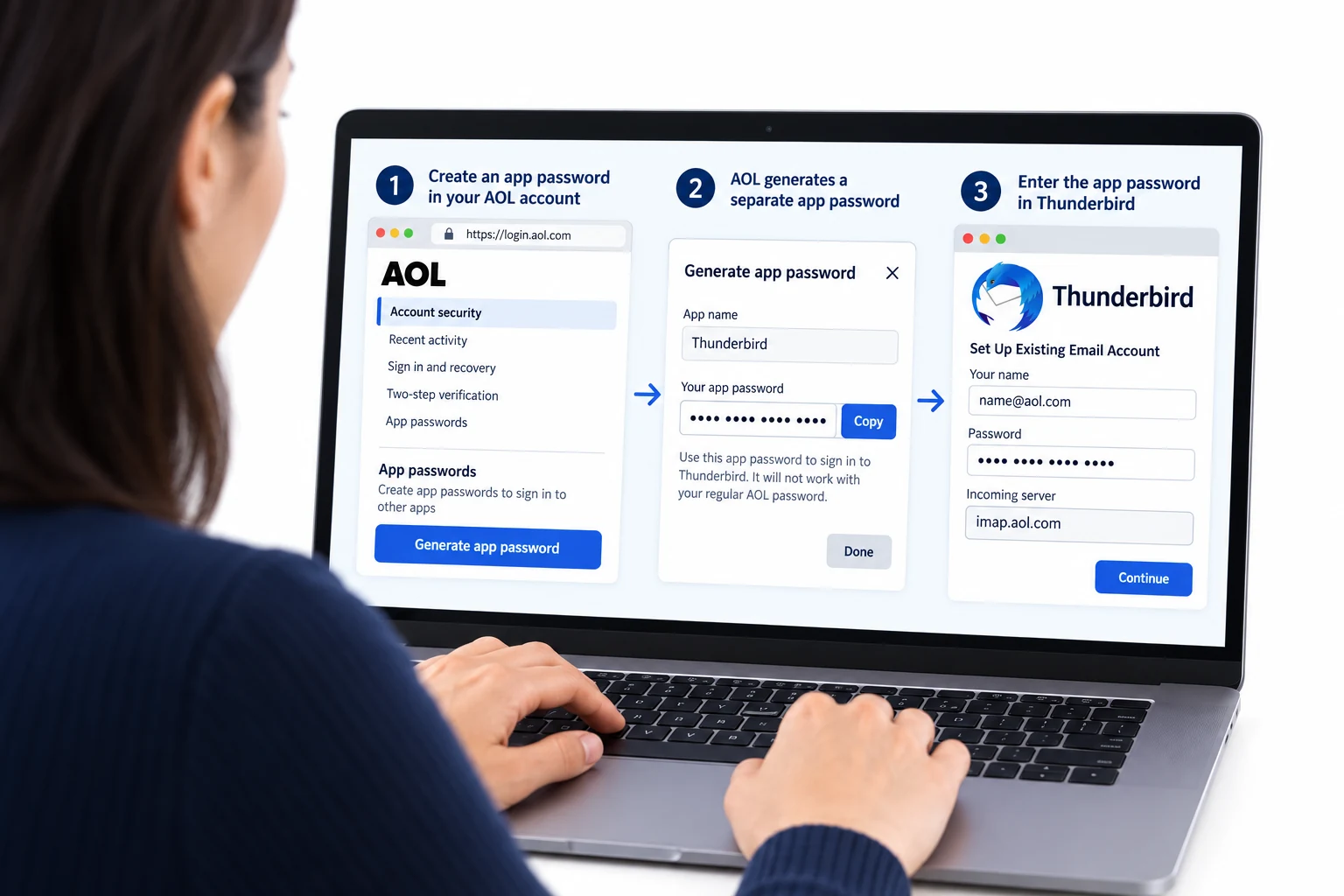
An app password is a generated code that AOL accepts in place of your real password. Any app that does not open AOL's own branded sign in window needs one. That covers manual IMAP setups, older desktop clients, scanners and most phone setups done by hand.
- Open your AOL Account Security page in a browser you use regularly.
- Choose Generate app password or Generate and manage app passwords if you already have some.
- Select Get Started and type a name for the app, so you can tell your codes apart later.
- Select Generate password and copy the code AOL shows you.
- Put it in your email app where the password goes, using your full @aol.com address as the username. You enter it once and the app remembers it.
Set Up AOL Mail in Email Clients#
AOL appears by name in several clients, which is the shortcut because it triggers AOL's own sign in window and skips the app password entirely. The manual routes below are for everything else. Choose your client:
Outlook (Windows and Mac)
- Outlook: File → Add Account or Settings → Accounts → Add account in new Outlook.
- Enter your @aol.com address. If a browser window opens asking you to sign in to AOL, use it and you are finished. Otherwise open Advanced options and tick the manual setup box.
- Choose IMAP and enter
imap.aol.comport993(SSL) andsmtp.aol.comport587(STARTTLS). - Paste the app password where Outlook asks for a password and tick outgoing server authentication.
- Send yourself 1 test before trusting it, since sending is where verizon.net profiles usually break.
Apple Mail (macOS)
- On a Mac, open Mail and go to Settings → Accounts to add one.
- Pick AOL from the list if Apple Mail offers it, which hands the sign in to AOL and needs no code.
- Only take Other Mail Account when AOL is not offered and use the app password there.
- Should server fields appear, they take imap.aol.com and smtp.aol.com.
- Enable Mail in the checkbox list and finish.
iPhone and iPad
- On an iPhone, the path is Settings → Apps → Mail → Mail Accounts, then Add Account.
- Tap AOL on iPhone and sign in through the window that appears.
- Choose Other → Add Mail Account if you would rather configure it by hand.
- Leave IMAP chosen and enter both servers when iOS asks.
- Tap Save and let iOS check the account against AOL.
Android
- On Android, open your mail app and add an account, choosing AOL if it is listed.
- Fall back to Other or Personal (IMAP) when it is not.
- Give it your address and app password, switching to Manual setup if the app cannot work it out.
- Enter the servers:
imap.aol.com993 SSL incoming,smtp.aol.com465 SSL outgoing. - Finish and pull to refresh so the folder list appears.
Thunderbird
- Thunderbird hides this under Account Settings, then Account Actions → Add Mail Account.
- Fill in name, @aol.com address and app password and continue.
- Check the ports it guessed. Thunderbird knows AOL, but confirm outgoing is 465 with SSL.
- Select Done and give the first sync a minute to pull folders in.
- Select Done. Folders sync on first open.
AOL Mail Webmail Settings#
Those tables get your apps connected. These settings shape what AOL itself does with your mail and they live at mail.aol.com behind the Options or gear menu.
Signature
Settings → Compose. AOL keeps this separate per account and it applies to webmail only. Outlook and your phone keep whatever you set there.
Vacation Auto Reply
Settings → Auto Reply. AOL answers from its own servers, so it keeps running with every device switched off. Give it an end date.
Filters and Folders
Settings → Filter Settings. AOL applies these on its own servers, filing mail before any device syncs. Worth checking if mail seems to be going missing.
Spam and Blocked Senders
Settings → Blocked Addresses. AOL also files suspected spam automatically, so check that folder before deciding a message never arrived.
AOL POP3 vs IMAP#
| Feature | IMAP | POP3 |
|---|---|---|
| Where mail lives | On AOL servers (imap.aol.com) | Downloaded to 1 device (pop.aol.com) |
| Multiple devices | ✅ Everything stays in sync | ❌ Each device sees different mail |
| Sent and deleted mail | ✅ Synced everywhere | ⚠️ Stays only on that device |
| Offline reading | ⚠️ Cached mail only | ✅ Full local copy |
| Server storage used | Yes, counts against your quota | Can be freed after download |
| Best for | Phone + computer, everyday use | Single PC, local archives |
AOL Mail Size and Sending Limits#
AOL publishes less about its limits than most providers, so here is what holds up and what to check for yourself:
| Message size | 25 MB for the entire message. That figure covers attachments, formatted text and your signature together, which is why a 24 MB file can still be refused once encoding is added |
| Mailbox storage | AOL does not publish a single figure and it varies by account. Treat the quota shown inside your own mailbox as the real number |
| What counts toward it | Everything, including Sent, Spam and Trash. Emptying Trash is the quickest space you will ever recover |
| POP coverage | The Inbox only. Other folders are never collected over POP |
| Encryption | SSL on every port. AOL documents no unencrypted option |
Troubleshooting AOL Mail Connections#
Find the exact error your email app shows, then apply the fix:
| Error you see | What it means | Fix |
|---|---|---|
| Invalid credentials, though the password is right | The app sent your real AOL password and AOL only accepts those through its own sign in window | Paste an app password instead or delete the account and add it again choosing AOL by name so the branded sign in appears. |
| No option to generate an app password | AOL has judged this browser session ineligible | Not an account fault and not fixable by support. Sign in to webmail normally from the same browser across a few days, avoid private windows, then return to the security page. Full explanation here. |
| Receives fine, sending fails | Usually a verizon.net address using AOL's outgoing server | Switch outgoing to smtp.verizon.net on 465 with SSL. On an aol.com address, make sure outgoing authentication stays ticked. See the comparison. |
| Only the Inbox came down | The account is set up over POP, which never collects other folders | Move the mail you want into the Inbox and collect again, which is AOL's own workaround or rebuild the account over IMAP and get everything. |
| Outlook keeps asking for the password after you entered the app password | Windows is handing Outlook an old saved credential before your new one gets a chance | Open Windows Credential Manager, find the stored entries for AOL or Outlook and remove them, then start Outlook and enter the app password once. A loop that survives 3 correct attempts is nearly always cached credentials rather than a bad code. |
| Worked for years, stopped recently | Almost always the password rule catching up with an old profile | Old clients kept working on the account password until AOL stopped accepting it. Generate an app password and update that 1 field. Nothing else in the profile needs touching. |
| Mail stopped arriving with no error | The mailbox is at its storage quota | Check the quota indicator in webmail, then empty Trash and Spam first. Back up before deleting anything you might want later. |
Reader Reported Fixes
Two fixes that come up repeatedly in real AOL support threads, for when the standard steps stall.
Add the account by choosing AOL, not by typing servers. Clients that list AOL by name open its sign in window and settle the password question before it starts. People reach for manual IMAP out of habit, then spend an hour on a code they never needed.
Stuck on the eligibility block? Use the AOL app for a few days. Signing in through webmail or the official app builds the history AOL looks for and the generate option tends to appear afterwards. Waiting works where raising a support ticket does not.
Using a verizon.net Address?#
AOL runs verizon.net mail, so those accounts sign in through AOL and read their mail at mail.aol.com. The servers are not identical though and the difference is easy to miss because it sits in only 1 field.
So a verizon.net account collects mail from imap.aol.com like everyone else, but sends through smtp.verizon.net. Copy an AOL guide wholesale and you will build a profile that receives perfectly and fails on the first message you try to send. Everything else on this page, including the app password rules and the eligibility check, applies to verizon.net accounts unchanged.
Leaving AOL for something else? Point the Univik Email Migration Tool at both accounts and it rebuilds your AOL folder tree inside the new one. Email Migration Services team does the lot and reports back when every folder has landed.
Use These Settings in Univik Email Backup#
An @aol.com address that has been running since the dial up era usually holds mail nothing else has a copy of. The values printed above are what you hand a backup tool. Univik Email Backup writes the mailbox to PST, MBOX, EML or PDF on your own disk, which is the only copy that survives an account closing.
- Install Univik Email Backup on a Windows machine.
- Select AOL in the source list. Where it is missing, choose IMAP and paste the servers above
- Username is the whole @aol.com address, paired with an app password, since a backup tool has no sign in window to offer you.
- Typing servers by hand?
imap.aol.comon993with SSL, exactly as the table shows. - Set the output format to PST, MBOX, EML or PDF, choose where it lands and start. Large mailboxes download in the background.
Univik Tools That Use These Settings#
Long running AOL accounts tend to get archived or moved eventually. All 3 tools sign in with the settings above:

Email Backup
Write the whole @aol.com mailbox out to PST, MBOX, EML or PDF while the account is still open.
Email Backup Tool →
Email Migration Tool
Lift the whole AOL folder tree into Gmail, Microsoft 365 or any IMAP mailbox without rebuilding it by hand.
Email Migration Tool →
Email Converter Tool
Holding an export from AOL Desktop or an old client? It turns into PST, PDF or any format your current app understands.
Email Converter Tool →Want the move handled start to finish?
Not planning to spend your evening on security pages and port numbers? Hand it over. They map the account, move it, verify the folder count on arrival and send you the summary. Running since 2013, from 1 long neglected AOL account upward.
Email Settings Glossary#
IMAP
Internet Message Access Protocol. The protocol behind imap.aol.com. AOL holds everything server side, so folders and read state match wherever you open it.
POP3
Post Office Protocol version 3. The pop.aol.com route. On AOL it fetches the Inbox and nothing else, which is its biggest limitation. The veteran protocol, hobbled on AOL by the Inbox only rule.
SMTP
Simple Mail Transfer Protocol. Sends your outgoing mail. The outgoing half. AOL uses smtp.aol.com on 465 or smtp.verizon.net for verizon.net addresses.
SSL / TLS / STARTTLS
The security wrapper on the connection. How the connection is secured. AOL uses SSL on all 3 of its ports and documents no unencrypted alternative.
App Password
A generated code AOL accepts in place of your real password. It outlives password changes, so deleting it is how you cut off a device.
OAuth
AOL's branded sign in window. Where an app offers it, you skip the app password entirely. The route AOL recommends first.
How We Verify These Settings#
Univik has built email backup and migration software since 2013 and long lived AOL accounts are a steady part of that work. Every archive job opens a real session against imap.aol.com, which is how a changed AOL rule reaches us quickly.
Nothing goes on this page until it clears 3 checks. It starts with a real IMAP and SMTP session opened by Univik Email Backup. A line by line match against AOL's own help articles. And a fresh app password created through the current security flow. Anything AOL announces sends us back through all 3.
Spotted a value AOL now shows differently? Say so and it goes back through all 3 checks, with the outcome noted in what changed recently.
 Help & Support
AOL Mail Settings: FAQ
Use imap.aol.com on port 993 with SSL and smtp.aol.com on port 465 with SSL for sending. Your username is the full @aol.com address and the password is an app password. The IMAP settings section lists every field in full.
Because AOL accepts your account password only through its own sign in window. An app typing it into a plain password field gets refused, however correct it is. Generate an app password and use that instead.
AOL decides who may create one and a private browsing window or an unfamiliar browser can block it. Support cannot override the decision. Sign in to webmail normally from the same browser over a few days, then try the security page again. The eligibility section explains what AOL is checking.
No. AOL keeps them active through a password change, so changing your password does not cut off a device you have lost. Deleting the app password is the only way to revoke it, on the same security page where you made it.
The account is connected over POP and AOL POP collects the Inbox alone. Your other folders stay on the server. Move the mail you want into the Inbox and collect again, which is AOL's documented workaround or set the account up over IMAP and everything comes across.
Almost. Incoming is imap.aol.com for both, but a verizon.net address sends through smtp.verizon.net and collects POP from pop.verizon.net. That 1 outgoing field is why verizon.net setups often receive mail yet cannot send. See the side by side comparison.
IMAP and the folder limitation makes it more clear cut than usual. IMAP mirrors every folder across your devices, while POP fetches the Inbox and leaves the rest behind. POP only makes sense for a single machine that wants its own downloaded copy.
Connect over IMAP with a backup tool and write the mailbox out as PST, MBOX, EML or PDF. That matters more for old AOL accounts than most, since two decades of mail often exists nowhere else. See the walkthrough.
Yes. An email migration tool logs into both accounts over IMAP and recreates the folder structure at the destination. This page supplies the AOL half, including the app password any tool will ask for.
Other Email Provider Settings
Summary: AOL Mail Settings at a Glance
- IMAP: imap.aol.com, port 993, SSL/TLS
- POP3: pop.aol.com, port 995, SSL/TLS
- SMTP: smtp.aol.com, port 465 or 587
- Username is always your full email address
- App password required for third party apps
- Pick IMAP for phone + computer sync
- Message limit: 25 MB including signature
- Username is always the full email address