 Email Settings Guide
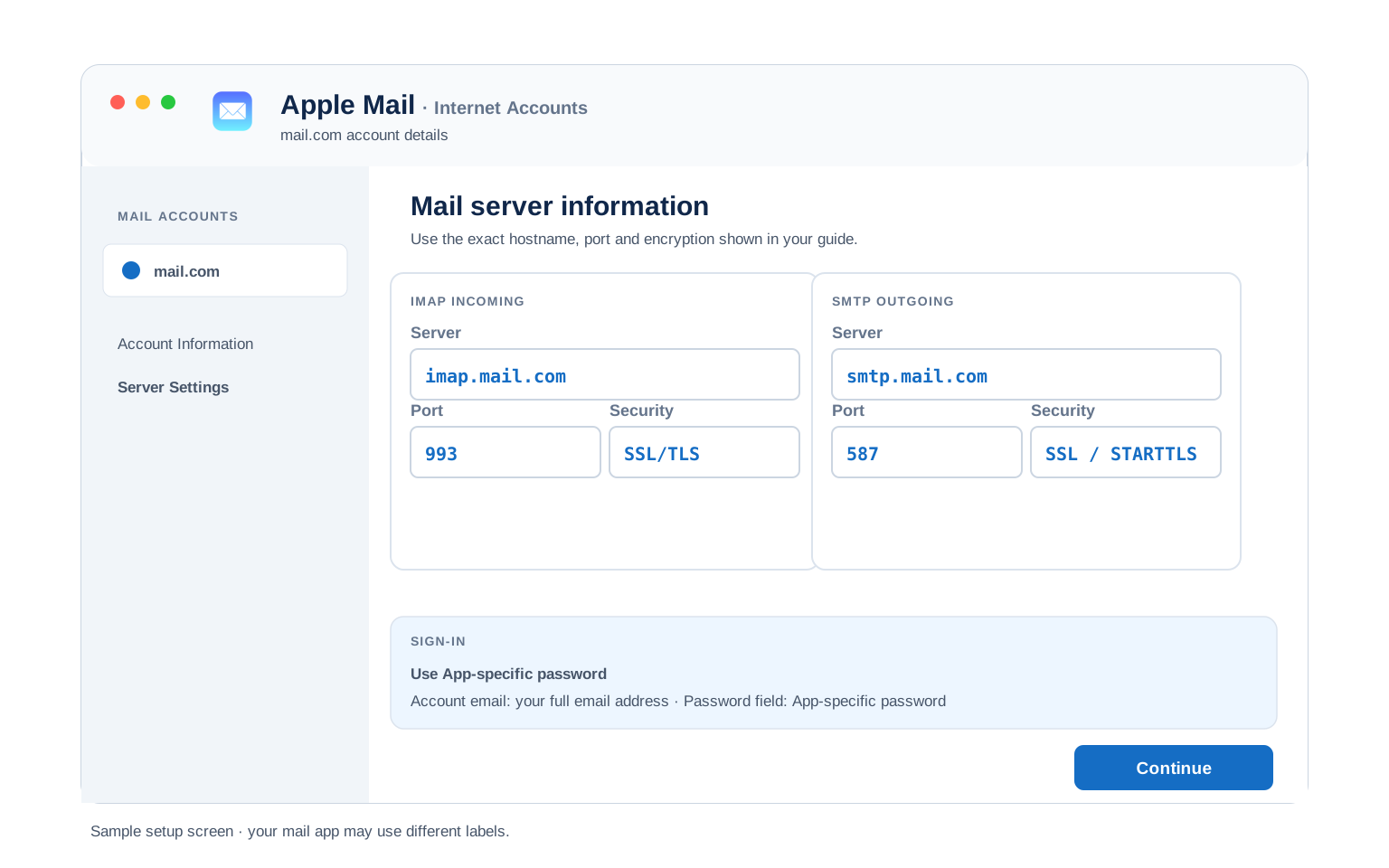
Quick answer: the mail.com IMAP server is imap.mail.com on port 993 with SSL/TLS. The outgoing server is smtp.mail.com on port 587 with STARTTLS, the port mail.com recommends. Port 465 with SSL works too. The POP3 server is pop.mail.com on port 995. Your username is the full address, whichever of the 100 plus mail.com domains it ends in. The password is your ordinary account password. Before any of that matters though: IMAP and POP3 are Premium features on mail.com. On a free account there is nothing here you can use.
What Changed Recently#
Related email providers: CompuServe email settings, Netscape IMAP settings, Gmail email settings, Outlook IMAP settings, Yahoo email settings, iCloud IMAP settings
mail.com has kept its server addresses stable for years. What has moved is who is allowed to use them.
Latest update
IMAP and POP3 sit behind Premium. mail.com says so across its own support pages and its blog. A free account gets webmail and the official mobile apps. Nothing else connects. Users have described receiving mail with a subject along the lines of action required to continue POP or IMAP service, telling them a subscription was now needed to carry on.
Earlier change
Some older accounts appear to have been left alone. There are credible reports of accounts created around 2015 still reaching IMAP without a subscription. If yours is one of those, treat it as a survival rather than a policy. New accounts do not get the same treatment.
Earlier change
GMX, the sibling brand, does include IMAP for free. Both services belong to 1&1 Mail & Media and run on shared infrastructure, which is why the storage figures and features line up so exactly. Client access is where they diverge. If free IMAP is what you are after, the GMX settings are the page you want.
Before You Begin#
Two conditions have to be met here, not one. Guides that mention only the first leave people stuck on the second.
1. A Premium subscription
mail.com states plainly that IMAP and POP3 are Premium features. A free account can use webmail and the official apps, nothing else. No server value changes that.
Where: The Premium gate below →
2. The POP3 and IMAP switch
Premium alone is not enough. A checkbox inside webmail has to be ticked before any outside client connects. Turning on two-factor authentication resets it, so check it again afterwards.
Where: Email → Settings → POP3 & IMAP
About mail.com Mail#
mail.com is a free, advertising supported mail service run by 1&1 Mail & Media, part of the German group United Internet. Its distinguishing feature is the address itself, with more than 100 domains to pick from rather than one.
The domain list is the reason most people are here. Instead of a generic address you can take something like @dr.com, @engineer.com, @consultant.com or @usa.com, all at no cost, all served by the same mail platform. The catch arrives when you try to leave webmail behind. Connecting Outlook, Apple Mail or Thunderbird needs a Premium subscription, because mail.com treats IMAP and POP3 as paid features rather than standard ones.
| Service Name | mail.com Mail |
| Owned By | 1&1 Mail & Media, part of United Internet. Same owner as GMX |
| Launched | Long running. mail.com is one of the older free mail brands still operating |
| Email Domains | More than 100, including @mail.com, @email.com, @usa.com, @post.com, @dr.com, @engineer.com, @consultant.com |
| Webmail URL | mail.com |
| Protocols Supported | IMAP, POP3, SMTP, on Premium only. Free accounts get webmail plus the official apps |
| App Password Needed | Only with 2FA switched on. Without it, your ordinary account password works |
| Free Storage | 65 GB of email storage, plus 2 GB of separate cloud storage. Up to 10 addresses in one account |
@mail.com, @usa.com, @dr.com, @techie.com or any of the rest, the hosts on this page are the ones you want. There is no imap.usa.com. The domain you chose changes the username you type and nothing else, which is worth knowing because the domain list is long enough that people assume each one has its own servers.
mail.com Webmail Login#
Webmail is the one route that works on any mail.com account, paid or not. These are the pages the company runs:
mail.com IMAP Settings#
IMAP is the one to choose for incoming mail. Messages stay put on the server, so every device you own reads the same inbox.
| IMAP Server | imap.mail.com | |
| Port | 993 | |
| Encryption | SSL/TLS (required) | |
| Username | Your full email address, including @mail.com | |
| Password | Your ordinary mail.com account password | |
| Requires | A Premium subscription, plus the POP3 and IMAP box ticked |
mail.com POP3 Settings#
POP3 hauls mail onto one machine. Suited to a single computer holding a local copy, not much else. Weighing it up? Compare the two below.
| POP3 Server | pop.mail.com | |
| Port | 995 | |
| Encryption | SSL/TLS (required) | |
| Username | Your full email address | |
| Password | The same account password |
mail.com SMTP Settings#
SMTP carries outgoing mail. Reading fine while sending fails points here. mail.com publishes 587 with STARTTLS as its recommended outgoing setup.
| SMTP Server | smtp.mail.com | |
| Port (STARTTLS) | 587, which mail.com recommends | |
| Port (SSL) | 465, an alternative if 587 is blocked | |
| Encryption | SSL or STARTTLS (required) | |
| Username | Your full email address | |
| Password | Same as incoming. There is no separate outgoing credential | |
| Authentication | Required. Outlook calls it the outgoing server authentication tickbox. |
Check mail.com IMAP Settings Online#
You don't need to download anything to check mail.com IMAP settings online. This page is the lookup: every value is verified, current and copyable straight from your browser. Not sure your address uses mail.com servers? Type it below and find out instantly.
Does my email address use these settings?
Runs in your browser only. Your address is never sent anywhere or stored.
Want to verify the account itself before configuring an app? Sign in at mail.com webmail, which confirms your address and password work, then confirm an app password exists. If both pass, any email app connects with the tables above.
Look Up IMAP Settings for Any Email Domain#
This page covers mail.com. For every other address, work email on a company domain included, we run a free online lookup database: imapsettings.com.
imapsettings.com
Complete email settings database, by Univik
Enter any email address and get the incoming and outgoing server settings for that domain in 1 step:
The address is checked in your browser to work out the domain. It goes nowhere else.
Your mail.com Password and Sign In#
Which credential your client needs depends on whether two-factor authentication is on. Both routes work. Only one of them involves generating anything.
| Where you sign in | Free | Premium, 2FA off | Premium, 2FA on |
|---|---|---|---|
| mail.com webmail in a browser | ✓ Password | ✓ Password | Password plus a code |
| Official mail.com mobile apps | ✓ Password | ✓ Password | Code entered once |
| Outlook, Apple Mail, Thunderbird | ✗ No access | ✓ Password | App-specific password |
| Calendar and contacts (CalDAV, CardDAV) | ✗ No access | ✓ Password | App-specific password |
Turning On Access. Getting an App Password
- Check the subscription first. Without Premium the setting below either will not appear or will not take effect. See the Premium gate above.
- Sign in to mail.com webmail in a browser on a computer. The mobile apps do not expose this option.
- Open Email, then Settings, then POP3 & IMAP. It sits a few items down the email settings list.
- Enable access to the account via POP3 and IMAP, then save. You may see this presented as separate enable links for each protocol.
- With 2FA off, use your ordinary password. Nothing needs generating. Your normal account password is the credential.
- With 2FA on, generate an application-specific password. Click the profile icon at the top right of webmail, open Security Options, then Manage application-specific passwords, then create a new one and name it. mail.com shows it once, so write it down there and then. These cover external mail programs over POP3 and IMAP as well as calendar and contacts over CalDAV and CardDAV.
Set Up mail.com in Email Clients#
Every client wants the same three hosts. Only the menus change. All of this assumes Premium is active, since none of it connects otherwise. Pick your app:
Outlook (Windows and Mac)
- In Outlook choose File, then Add Account. New Outlook keeps it under Settings, then Accounts.
- Enter your mail.com address, open Advanced options and check "Let me set up my account manually".
- Choose IMAP and enter
imap.mail.comon port993with SSL, thensmtp.mail.comon port587with STARTTLS. - Enter your ordinary mail.com password, then tick outgoing server authentication under More Settings.
- Send one message to yourself at the end. That exercises incoming and outgoing together.
Apple Mail (macOS)
- Apple Mail route: Settings, then Accounts, then Add Account.
- Choose Other Mail Account. Apple does not list mail.com among its built in providers.
- Enter your name, full address and password, then continue.
- Asked for host names? They are in the IMAP and SMTP tables above.
- Keep Mail checked among the offered services, then finish.
iPhone and iPad
- iOS route: Settings, then Apps, then Mail, then Mail Accounts, then Add Account.
- Tap Other, then Add Mail Account. iOS carries no mail.com entry.
- Enter your details using your ordinary password, then tap Next.
- Stay with IMAP, adding both host names if iOS asks for them.
- Tap Save and let iOS run its verification.
Android
- Open your Android mail app and choose Add account.
- Select Other, then IMAP. mail.com will not be in the provider list.
- Enter your full address and password. Where automatic setup fails, switch to Manual setup.
- Enter the servers:
imap.mail.com993 SSL incoming,smtp.mail.com587 STARTTLS outgoing. - Close out the setup, then swipe down on the inbox to fetch mail.
Thunderbird
- Thunderbird route: Account Settings, then Account Actions, then Add Mail Account.
- Enter your name, full address and password, then select Continue.
- Let Thunderbird detect the servers, checking it settled on IMAP rather than POP3.
- No luck with detection? Hit Configure manually and supply the table values.
- Press Done. The folder list fills on the first sync.
mail.com Webmail Settings#
The values above connect your apps. This next group governs the mailbox itself. Unlike the protocols, all of it is available on a free account. Everything sits under Email, then Settings, in webmail.
Signature
Found in the email settings list. With up to 10 addresses on one account, this is worth setting per address rather than once, so a message from your @consultant.com address does not sign off as the @usa.com one.
Vacation Auto Reply
Give the auto reply a start and an end date so it stops without you remembering. It runs server side, so it keeps answering with every device of yours turned off.
Filters and Folders
Rules built in webmail run on the server, filing mail before any device fetches it. This matters more than usual here, because with 10 addresses arriving in one mailbox, server side rules are what stop it becoming unusable.
Spam and Blocked Senders
Block individual senders or whole domains from the same settings area. mail.com also has a Mail Collector that pulls other mailboxes in, which is the free way to read several accounts in one place without any IMAP at all.
mail.com POP3 vs IMAP#
| Feature | IMAP | POP3 |
|---|---|---|
| Where mail lives | On the mail.com server | Downloaded to 1 device |
| Multiple devices | ✅ Everything stays in sync | ❌ Each device sees different mail |
| Sent and deleted mail | ✅ Synced everywhere | ⚠️ Stays only on that device |
| Offline reading | ⚠️ Cached mail only | ✅ Full local copy |
| Server storage used | Yes, counts against your quota | Can be freed after download |
| Best for | Phone + computer, everyday use | Single PC, local archives |
mail.com Plan and Storage Limits#
mail.com publishes its storage figures clearly and stays quiet on sending. Here is what can be established, including one number other guides get wrong:
| IMAP and POP3 access | Premium only. Free accounts are limited to webmail plus the official apps |
| Mailbox storage | 65 GB, on the free tier. Some guides print 2 GB, which is the separate cloud storage figure rather than the mailbox |
| Cloud storage | 2 GB, counted apart from mail |
| Email addresses per account | Up to 10, chosen from more than 100 domains |
| What Premium adds | An ad free inbox, telephone support, more cloud storage, plus the protocols on this page |
| Sending limits | Not published. Treat it as a personal mailbox rather than a sending platform |
Troubleshooting mail.com Connections#
On mail.com the first question is always whether the account is entitled to connect at all. Work down from there.
| Error you see | What it means | Fix |
|---|---|---|
| Login fails with a password you know is right | The account is on the free tier | Check this before anything else. IMAP and POP3 need Premium on mail.com. No server value or password will get a free account connected. |
| Premium active but still refused | The POP3 and IMAP checkbox is unticked | Subscription and switch are separate. Sign in to webmail, go Email, Settings, POP3 & IMAP, then enable access and save. |
| Worked before, stopped recently | A lapsed subscription. Failing that, a grandfathered free account catching up with policy | Both have been reported. Check the account tier first rather than rebuilding the client. |
| Cannot connect to server | Wrong port or encryption | Check IMAP 993 SSL and SMTP 587 STARTTLS. Antivirus software and VPN apps block these ports fairly often. |
| Password keeps being asked | No Premium. Failing that, 2FA is on and the client holds the wrong credential | Check the tier first, since the Premium gate shows itself as a password prompt. If Premium is active and you have 2FA on, the client needs an application-specific password rather than your account one. |
| Messages stuck in Outbox | SMTP authentication is off | Turn on outgoing authentication, feeding it the same credentials as incoming. |
Reader Reported Fixes
Hours lost to a password that was never wrong. The failure mode here is cruel. A free account gives an ordinary authentication error, so people reset the password, rebuild the account, try a different client, then start doubting the server names. None of it helps, because the account is not permitted to use IMAP at all. Checking the subscription tier takes ten seconds and saves the evening.
Paying for Premium and still being refused. The subscription and the protocol switch are two separate things. Paying does not tick the box for you. People reasonably assume the upgrade completes the job, then hit the same error and conclude the payment failed. Sign in to webmail and turn the setting on.
Moving To or From mail.com#
Consolidating other accounts into mail.com? The Mail Collector pulls other mailboxes into your inbox and needs no subscription, so it is the free route to reading several accounts in one window. It is not a migration though. Folder structure does not survive.
Moving mail out of mail.com? This is where the Premium requirement bites hardest. A migration tool is another IMAP client, so it needs the same subscription and the same switch as Outlook does. Budget for one month of Premium if you are leaving with years of mail behind you.
Leaving for good? Back the mailbox up before you cancel. Once the subscription lapses, IMAP goes with it. Forwarding messages one at a time through webmail is a poor substitute for a 65 GB archive.
Taking your mail to a new account? The Univik Email Migration Tool copies every folder from the old account to the new one. Enter the IMAP settings from this page for the mail.com side and your new provider's settings for the other.
Rather not do it yourself? Our Email Migration Services team scopes the transfer, executes it, then confirms every folder made the trip.
Use These Settings in Univik Email Backup#
The same IMAP settings above let you download your complete mail.com mailbox to your computer. Univik Email Backup puts the mailbox into PST, MBOX, EML or PDF. Those files outlast any subscription.
- Set up Univik Email Backup on a Windows PC.
- Choose mail.com as the source. Absent from the list? The plain IMAP option behaves the same.
- Sign in with your full email address and your ordinary account password. A backup tool is an IMAP client, so it needs Premium active like anything else.
- If the tool asks for server details, use
imap.mail.comwith port993and SSL from the IMAP table above. - Choose the file format and where it goes, then run it. A 65 GB mailbox keeps working through in the background.
Univik Tools That Use These Settings#
A good number of readers are mid move or mid archive. Each of these 3 tools runs on the IMAP values above:

Email Backup
Download your complete mail.com mailbox to PST, MBOX, EML or PDF before switching or closing the account.
Email Backup Tool →
Email Migration Tool
Copy every folder from mail.com straight into Gmail, Microsoft 365 or any other account. No manual export needed.
Email Migration Tool →
Email Converter Tool
Have MBOX, EML or OST from a past export? Turn it into PST, PDF or whatever your next app wants.
Email Converter Tool →Prefer to hand the whole migration to experts?
There is no requirement to become fluent in ports and subscription tiers. Univik's migration team runs the job throughout, scoping it, transferring, verifying, then handing over a report of where each folder ended up. Operating since 2013, from one mailbox to an entire organisation.
Email Settings Glossary#
IMAP
Internet Message Access Protocol. Reads mail kept on the server, which is what keeps folders and read marks matching across devices.
POP3
Post Office Protocol version 3. Downloads mail to 1 device and can remove it from the server. Older method, still useful for local archives.
SMTP
Simple Mail Transfer Protocol. Sends your outgoing mail. Every account needs it next to IMAP or POP3, which only receive.
SSL / TLS / STARTTLS
Encryption for the connection. SSL/TLS encrypts from the start (ports 993, 995, 465). STARTTLS upgrades a plain connection (port 587).
App Password
A separate code standing in for your real password inside an app, revocable on its own. mail.com issues these once two-factor authentication is active, covering mail clients as well as calendar and contacts.
OAuth
Signing in through a browser window rather than typing a password into the app. Several large providers have moved this way. mail.com has not, so the password goes in directly.
How We Verify These Settings#
Univik has built email backup, migration and converter software since 2013. Our tools sign in to mail.com over IMAP and SMTP every day for thousands of users, so a changed server, port or login rule shows up in our connection logs before most guides notice it.
Every value on this page is confirmed with 3 checks: a live IMAP and SMTP connection from Univik Email Backup, a comparison against mail.com's own support pages and a sign in run through current webmail. Any announcement triggers a recheck. We revisit the page quarterly regardless.
Something here not matching your screen? Flag it. We test again, amend the page, then record the change in what changed recently.
 Help & Support
Frequently Asked Questions
Use imap.mail.com on port 993 with SSL/TLS, with your full address as the username and your ordinary account password. That holds for any of the 100 plus mail.com domains. One condition applies first though: IMAP needs a Premium subscription. The complete table sits in the IMAP settings section.
On mail.com this is usually not a password problem at all. IMAP and POP3 are Premium features, so a free account is refused with what looks like a credential error. Check the account tier before touching the password. If Premium is already active, the other cause is the POP3 and IMAP switch sitting unticked in webmail, because the subscription does not enable it for you.
IMAP for almost everyone. It keeps your phone, computer and webmail in sync. POP3 fits only a single computer setup where you want a local download. Full comparison here.
Yes. That holds across every mail.com domain as well. An @usa.com or @dr.com address uses the same hosts as @mail.com. There is no separate server per domain, however long the domain list gets. Only menu names differ by device, which the client setup guides handle.
Not if 2FA is on. mail.com shows an application-specific password once and never again, so generate a replacement from Security Options under the profile icon, then delete the old entry. With 2FA off there is nothing of that kind to recover. You would reset the account password itself from the sign in page instead.
Yes, on the encrypted ports listed here. It is safer still with two-factor authentication on, because your client then holds an application-specific password rather than the credential that opens your whole account. Bear in mind that switching 2FA on also requires re-enabling POP3 and IMAP access, so budget a few minutes rather than doing it in a hurry.
An IMAP client pulls mail down as it syncs, though a dedicated backup tool moves faster and writes standard files that open anywhere. Either route needs Premium on mail.com. See how to back up your mail.com mailbox. Sitting on an export in the wrong format? An email converter turns it into PST, PDF or whatever your next app wants.
Two causes account for most of these on mail.com. A Premium subscription lapsed, taking IMAP with it. Or the account was one of the older ones reaching IMAP for free and has now been brought in line with current policy. Both look identical from inside your mail client. Check the subscription before rebuilding anything. See what changed recently too.
An email migration tool copies mail directly between the 2 accounts over IMAP. You need the mail.com IMAP settings and your account password for this side, plus the same details for the destination account. Remember the migration tool counts as an IMAP client, so Premium has to be active while the transfer runs. Every folder, label and date stays intact.
Feeling exposed? Facing a pile of mailboxes? Our managed email migration service takes the lot.
Other Email Provider Settings
Summary: mail.com Settings at a Glance
- IMAP: imap.mail.com, port 993, SSL/TLS
- POP3: pop.mail.com, port 995, SSL/TLS
- SMTP: smtp.mail.com, port 587 STARTTLS
- Username is always your full email address
- Premium required for IMAP and POP3
- Plus the POP3 and IMAP switch in webmail
- 2FA on means an app-specific password
- All 100+ domains use these same hosts