A modern site needs five icon files, a multi size favicon.ico, a 180 pixel Apple touch icon, 192 and 512 pixel manifest PNGs and optionally an SVG. Design the art once as a 512 pixel square and everything else is generated from it. The Create Favicon Package tool in the Univik ICO Converter produces the whole set from one image in a single pass.
Search for favicon sizes and you find two kinds of advice, short lists and thirty file monsters. The long lists are leftovers from a decade of device specific icons that the platforms themselves have since retired. This guide gives you the small set that current browsers, phones and install prompts actually request, what each file does, and the one habit that makes the whole thing painless, drawing the art once at full size.
The Five Files and What Each One Does
That set matches what the current generation of favicon size references converge on, and it covers browser tabs, bookmarks, phone home screens and installable app flows without a single wasted file.
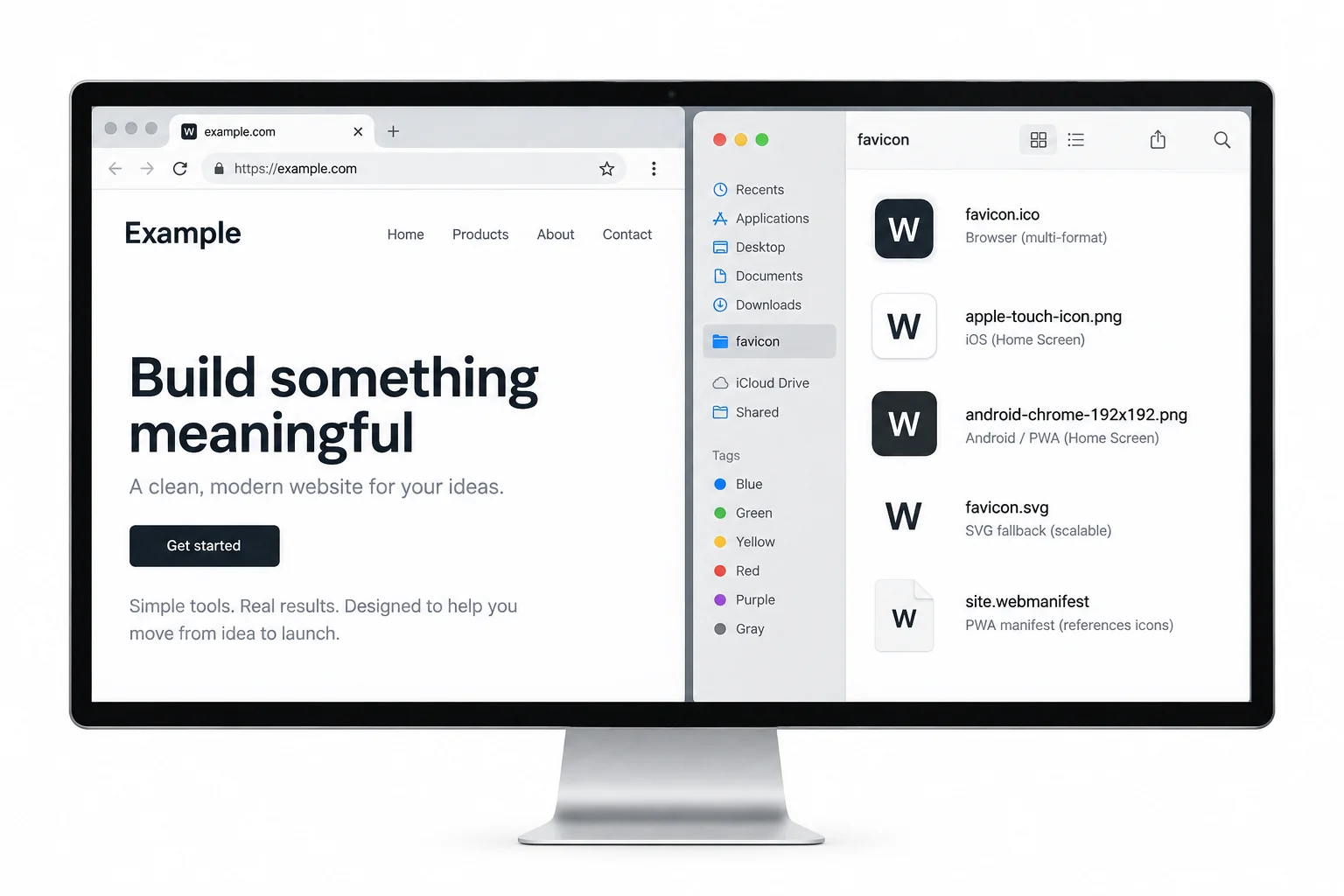
Wiring the files up takes four lines in the page head plus the manifest reference.
<link rel="icon" href="/favicon.ico" sizes="any">
<link rel="icon" href="/icon.svg" type="image/svg+xml">
<link rel="apple-touch-icon" href="/apple-touch-icon.png">
<link rel="manifest" href="/site.webmanifest">
The manifest file then names the 192 and 512 PNGs, and every surface finds its icon from there.
The favicon.ico Layer, Still the Foundation
The oldest file in the set refuses to retire for a good reason. When a page declares nothing, browsers still request favicon.ico from the site root, and older clients read nothing else at all. One ICO file carries the 16, 32 and 48 pixel entries together, and the browser picks the frame it wants, the same container trick Windows icons have always used. Building that file from your logo is exactly what converting a PNG to a real ICO walks through, and the container format itself is written up on the ICO file extension page.
The Apple Touch Icon, One Size Only
iOS home screens use a single 180 pixel PNG named apple-touch-icon.png. The lists of 57, 76, 114 and 152 pixel variants in older tutorials describe devices Apple consolidated years ago, and shipping them today adds requests for platforms that no longer ask. Two habits matter here. Ship a full square, because the device applies its own rounded corner mask, and pre rounding your art makes it shrink inside the mask. And keep the art bold, since a subtle design turns to noise on a busy home screen.
The Manifest Pair, 192 and 512
Installable sites declare their icons in a web app manifest, and the spec asks for two, as the current minimal set guides spell out. The 192 pixel PNG becomes the launcher icon on an Android home screen. The 512 pixel PNG carries the install prompt and the splash screen, which makes it the largest and most visible copy of your icon anywhere. Even a plain content site benefits from shipping the pair, they cost two small files and future proof the day someone adds installability.
Draw the icon as a 512 pixel square with a transparent background and a little safe margin inside the edges. Every other file in the set is a downscale of that one master, which keeps all five visually identical.
One Image In, the Whole Package Out
Generating five files by hand in an editor is exactly the kind of chore that gets skipped, which is why half the web has a sharp tab icon and a blurry install prompt. The Create Favicon Package tool in the Univik ICO Converter takes one square image and writes the complete set in a single pass, the multi size favicon.ico and each PNG at its exact size, transparency intact throughout. Drop the files at the site root, wire up the link tags and the job is finished.
Create Favicon Package turns a single square image into favicon.ico plus every PNG size the modern set calls for, named and ready to upload.
Free Download See All FeaturesThe Sizes to Stop Shipping
Old checklists survive by copy and paste, so it is worth naming what fell off the required list. The parade of Apple sizes below 180 pixels serves retired devices. Windows tile markup for pinned sites belongs to browsers that are gone. And hand exported 64, 96 and 128 pixel PNGs duplicate work the ICO entries and the SVG already do. Trimming a bloated set back to the five files removes requests from every page load and changes nothing a visitor can see.
The Square and Margin Rules
Two design rules cover most favicon quality problems. Every surface draws a square, so the art must be square from the start, a rectangle gets squeezed or padded. And several surfaces mask the icon, rounding corners on iOS or cropping to circles on some Android launchers, so anything important must sit inside a safe margin away from the edges. A logo that hugs the border of the canvas loses its edges on half the phones that display it.
Checking a Live Site's Set
The fastest education is looking at how established sites ship their icons, and the fastest audit of your own site is fetching what a visitor gets. Both jobs use the same techniques, the root file check and the page source read, walked through in the guide to getting the favicon from any website. And when an audit turns up an old ICO you no longer have the source art for, converting the ICO back to PNG recovers the artwork at every size it holds.
Frequently Asked Questions

Written and maintained by Leena Taylor Paul and the Univik team, developers of Windows data conversion and recovery software since 2013. Designing the favicon package generator meant auditing what today's browsers and phones actually request, and this five file set is what survived that audit. Last verified August 2026. Favicon set acting up? Contact our support team.