Most favicons are one address away. Type the site's domain followed by /favicon.ico and the classic fallback file loads right in the browser, ready to save. When that address is empty, the page source lists the real icon files in its link tags. The Univik ICO Converter does the whole hunt for you, paste a website address into Open Website Favicon and it pulls the icon with every size inside.
You are writing documentation, mocking up a design or building a bookmark board, and you need a site's little icon as a file. There is no download button for it, but the icon is public, your browser fetches it on every visit. This guide covers the three ways to grab it, from the ten second trick to the method that works when a site buries its icon three folders deep on an asset server.
The Ten Second favicon.ico Trick
Browsers have checked one address for decades when a page does not say where its icon lives, the file named favicon.ico at the root of the site. That convention is why the fallback still sits there on a huge share of the web, as the current favicon implementation guides still recommend.
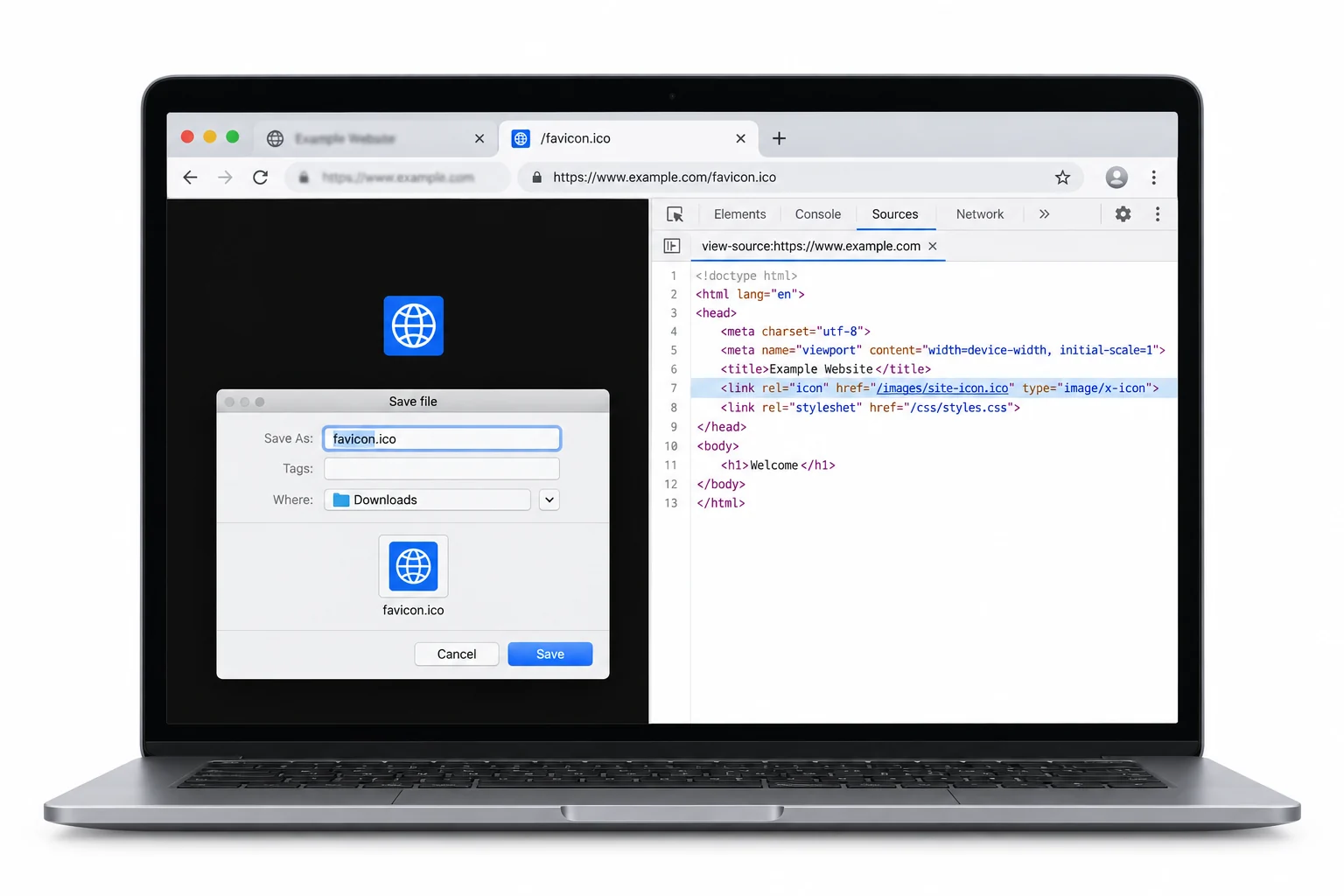
- Build the addressTake the site's domain and add /favicon.ico to the end, nothing else in between.
- Open itPaste the address into the browser. If the file exists, the icon renders right in the tab.
- Save itRight click the image and save it. The file lands as a real .ico on your disk.
- Convert if neededAn .ico is a container, not a plain image. Export the size you want as a PNG when a document or design tool needs it.
When the Root File is Missing, Read the Page Source
The root file is only the fallback, and plenty of modern sites skip it entirely. Their icons are declared in the page's head instead, one link tag per file, covering the tab icon, the Apple touch icon and the manifest icons for installable apps, the same family of files the favicon size references describe.
- Open the sourceRight click the page and choose View page source or press Ctrl U.
- Search for iconPress Ctrl F and search the word icon. The matches cluster in the head section near the top.
- Pick a fileEach link tag names a file and its size. A 512 or an apple touch icon at 180 beats the tiny tab file for quality.
- Open and saveClick or copy the address, open it and save the file the same way as before.
A link tag address that starts with a slash is relative to the site, so put the domain in front of it before opening. An address that starts with https is complete as it stands.
Paste the Address, Get Every Size
The manual hunt has a faster version. The Univik ICO Converter has an Open Website Favicon option that takes a site address, finds the favicon and opens it like any other icon file, with every size it carries laid out in the grid. From there any frame exports as a clean transparent PNG, or the whole set saves at once. No source reading, no address rebuilding, no browser save dialogs.
The same tool solves the after problem too. A saved .ico is still a container, and the step of getting a normal image out of it is exactly what the ICO to PNG guide walks through.
Paste any website address into Univik and get its favicon opened with every size inside, ready to export as PNG for docs, decks and designs.
Free Download See All FeaturesWhich of the Site's Icons to Take
A site rarely has just one icon file, and they differ a lot in usefulness once saved.
So the order runs large to small. Take the 512 manifest icon when it exists, fall back to the 180 Apple touch icon, and keep the root .ico for when the small tab art is genuinely all you need.
The Cases That Refuse to Cooperate
A few sites resist every trick above, and knowing why saves the frustration. Some serve their icons from a separate asset domain, so the address in the link tag points somewhere unexpected but still opens fine. Some ship only an SVG icon, which saves as a vector file rather than a pixel image and converts cleanly at any size. And a handful block direct file requests from outside the page, in which case the browser's developer tools network tab shows the icon arriving and lets you save it from the response. Online fetcher services like favicon.im will also hand you a copy on a one off basis, though they commonly return the small default rather than the full size set.
A Word Before You Reuse It
A favicon is a company's logo at small size, and grabbing the file does not grab the rights to it. Using a site's icon to reference that site, in documentation, a comparison table or an internal deck, is ordinary practice. Presenting it as your own branding or baking it into a product crosses into trademark territory. The wider question of reusing icons you did not draw is taken up in the guide to whether extracted icons are legal to use.
Grabbing Ideas for Your Own Site
Half the people saving favicons are building one of their own and want to study how good sites do it. Two guides carry that project from here. The full set of files a modern site needs, and the sizes each one wants, is mapped in the favicon sizes guide. And turning your own logo into the root .ico is the exact job covered in converting a PNG to a real ICO.
What You End Up Holding
Depending on the site and the route, the saved file is an ICO, a PNG or an SVG, and each behaves differently afterward. The PNG is ready for anything immediately. The SVG scales forever and opens in design tools directly. The ICO needs one unpacking step first, since it is a container of sizes rather than a picture, and the container itself is documented on the ICO file extension page with its PNG counterpart on the PNG file extension page.
Frequently Asked Questions

Written and maintained by Leena Taylor Paul and the Univik team, developers of Windows data conversion and recovery software since 2013. The Open Website Favicon feature came from watching how many odd places sites actually stash their icons, and this guide is the field notes from building it. Last verified August 2026. Site icon refusing to show itself? Contact our support team.