 Thunderbird Guide
 By
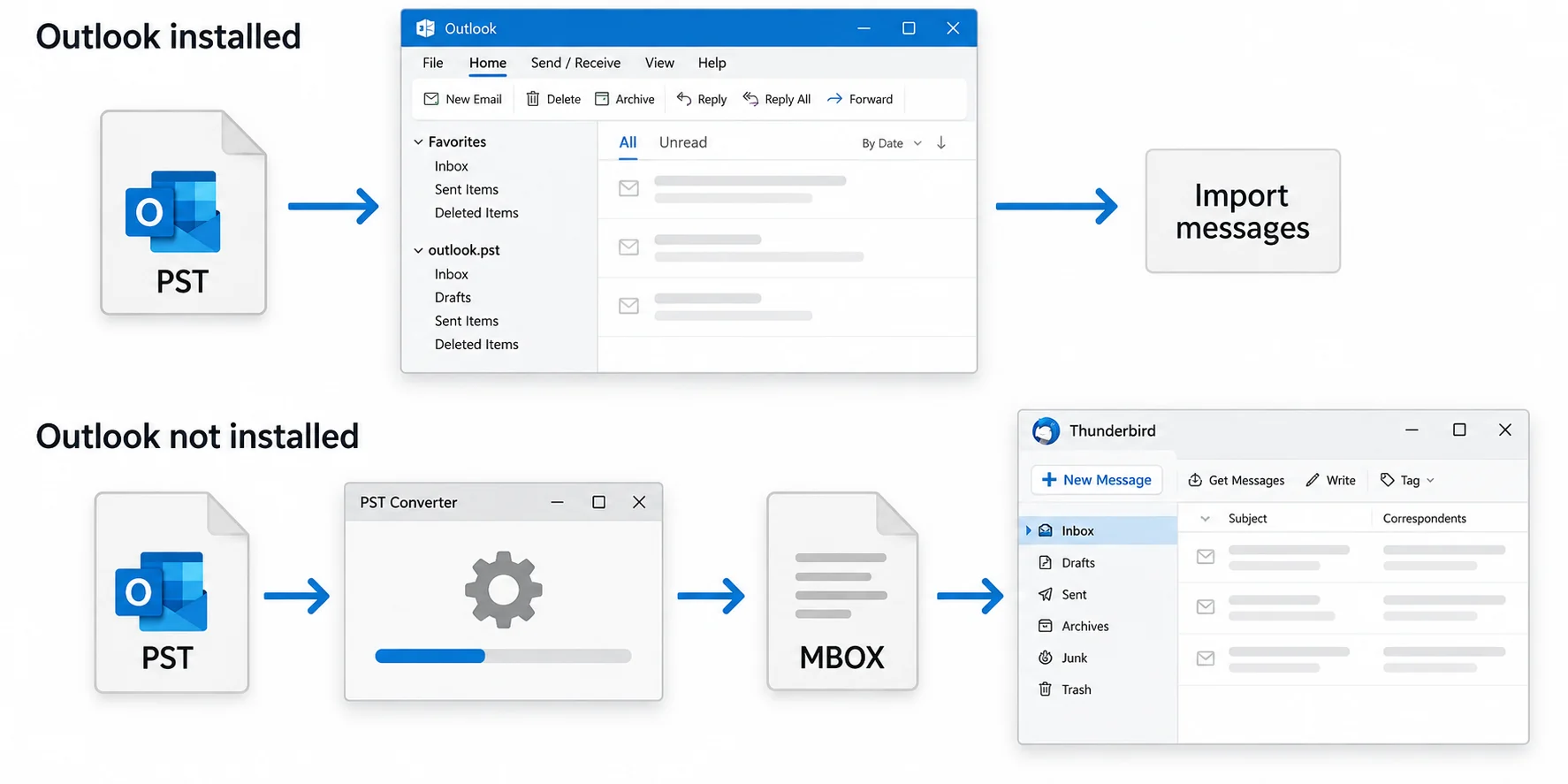
By Thunderbird cannot open a PST file on its own. If Outlook is installed on the same Windows PC with the PST attached, use Thunderbird's Import tool under menu, Tools, Import and choose Outlook. It pulls the mail and address book through Outlook. If Outlook is not installed, or the PST is an orphan from an old machine, convert the PST to MBOX with Univik PST Converter and add the MBOX files to Thunderbird with the ImportExportTools NG add-on. Both routes keep folders, dates and attachments when done right.
Someone wants to switch from Outlook to Thunderbird and migrate years of mail, and that mail sits in a PST file. Maybe Outlook still runs on the PC, maybe it was uninstalled last year, maybe the PST came from a colleague who has left. Thunderbird has no PST reader of its own, so the route depends on one question: is there a working Outlook on this machine? This guide covers both answers with the screens for each, and the checks that show the import worked.
- Before you import PST to Thunderbird
- Import from Outlook in 4 steps
- Step 1: Attach the PST in Outlook
- Step 2: Open Thunderbird's Import tool
- Step 3: Choose Outlook and what to import
- Step 4: Check folders in Local Folders
- Import PST without Outlook
- Method comparison
- After the import
- Fix common problems
- PST to Thunderbird questions
Before You Import PST to Thunderbird
One question decides the route. Pick the card that matches your PC.
- Thunderbird 102 or laterThe redesigned Import tool arrived in version 102 and is in 115 and 128 ESR. Older versions had a broken Outlook importer, so update first.
- The PST file itself, or Outlook with it attachedRoute 1 needs classic Outlook to see the PST in its folder pane; New Outlook has no MAPI for Thunderbird to read through. Route 2 needs only the .pst file on disk, plus its password if one was set. If the mail lives in a Microsoft 365 or Exchange account rather than a PST, export the mailbox to PST first.
- Free disk space equal to the PSTMBOX is a plain text format and can be a little larger than the PST. Thunderbird also copies imported mail into its profile, so allow room for two copies.
- A Local Folders account in ThunderbirdImported mail lands under Local Folders, not in your IMAP account. If you want it on the server, drag folders into the IMAP account after the import.
- PST
- Outlook Data File. One binary file for a whole mailbox with folders. Only Outlook and tools built for the format can read it.
- MBOX
- The plain text mailbox format Thunderbird uses on disk. One file per folder, messages appended one after another. Thunderbird can import it directly.
- Import tool
- Thunderbird's built-in importer under menu, Tools, Import. It is the Thunderbird import PST path when Outlook is present, because the Outlook option uses Outlook itself to read the data.
- ImportExportTools NG
- A free Thunderbird add-on that adds import and export of MBOX and EML files to the folder right-click menu. The standard way to bring MBOX files in.
- Local Folders
- Thunderbird's on-disk account that is not tied to a mail server. Imports and MBOX files land here first.
Import PST to Thunderbird from Outlook in 4 Steps
This is the free route and it works when classic Outlook is installed on the same Windows PC and can open the PST. Thunderbird reads the mail through Outlook, so Outlook does the PST work and Thunderbird writes the result into Local Folders.
Attach the PST in Outlook and note the folders
Open classic Outlook and attach the file through File, Open & Export, Open Outlook Data File. It appears in the folder pane. Write down the folder names and item counts you care about, because you will compare them after the import. Then close Outlook, so Thunderbird can take control of the MAPI session without a fight.
You should seethe PST's folders in Outlook with counts on the right. If Outlook cannot open the file, run ScanPST on it first. Thunderbird will not import what Outlook cannot read.
Open Thunderbird's Import tool
In Thunderbird click the menu button, then Tools, then Import. The Import page lists the sources it can read: another Thunderbird profile, SeaMonkey, Outlook and files. Select Outlook and click Continue.
Step 2The Import tool. Outlook reads accounts, address books and messages through your installed Outlook.
Choose Outlook and what to import
Thunderbird finds the Outlook profile and offers three boxes: accounts and settings, address books and messages. For a PST move you want messages, and the address book if the PST holds contacts. Click Start import. Progress runs folder by folder. A large PST of 10 GB takes roughly half an hour on a normal PC, longer if the drive is slow.
You should seethe Outlook folders listed with item counts before you start. If the page says No Profile found, Outlook and Thunderbird disagree on 32 or 64-bit. Or Outlook is not the default mail app. Jump to the converter route rather than reinstalling things.
| Outlook folder | Items | Import to |
|---|---|---|
| Archive 2019-2024 \ Inbox | 18,204 | Local Folders \ Outlook Import \ Inbox |
| Archive 2019-2024 \ Sent Items | 6,911 | Local Folders \ Outlook Import \ Sent Items |
| Archive 2019-2024 \ Projects | 2,377 | Local Folders \ Outlook Import \ Projects |
Step 3Messages ticked, folder list shown, Start import highlighted.
Check the imported folders under Local Folders
When the import finishes, a new folder tree named Outlook Import sits under Local Folders. Open each folder and compare the message count with the numbers from Step 1. Open a message with an attachment and one with pictures in the body. If you want the mail on your IMAP server, drag the folders from Local Folders into the account and let Thunderbird upload them.
| 📎 | Subject | Correspondents | Date |
|---|---|---|---|
| 📎 | Re: Q1 vendor invoice | Sarah Chen | 11/03/2024, 09:14 |
| Renewal timeline | Mike Turner | 11/03/2024, 11:02 | |
| 📎 | Contract terms and conditions | Legal, Vendor | 12/03/2024, 08:41 |
| Meeting follow-up | Thomas Wright | 13/03/2024, 10:22 |
Step 4Imported Inbox under Local Folders, original dates and a PDF attachment intact.
Import PST to Thunderbird Without Outlook
No Outlook on the PC. An orphan PST from an old machine. An import that keeps failing on a profile error. Any of the three and this is the route. Thunderbird reads MBOX natively, so the job is to turn the PST into MBOX files (one per folder) and add them.
- Convert the PST to MBOXOpen Univik PST Converter, add the PST file and choose MBOX as the output. The tool writes one .mbox file per Outlook folder with the same names, keeping headers, dates, HTML bodies and attachments. It reads the PST directly, so Outlook is not needed. It also handles orphan files and both ANSI and Unicode PST files.
- Install ImportExportTools NGIn Thunderbird open Add-ons and Themes, search for ImportExportTools NG and add it. It puts an import and export menu on every folder's right-click menu.
- Import the MBOX filesRight click Local Folders, choose ImportExportTools NG, then Import mbox file. Pick the .mbox files from the converter's output folder. Each becomes a folder with the MBOX file's name. For a whole tree at once, use Import all messages from a directory with subdirectories.
- Rebuild the folder index if counts look offRight click an imported folder, Properties, Repair Folder. This rebuilds Thunderbird's index so counts and search match the MBOX contents.
Converter routeImport mbox file on the ImportExportTools NG menu. One MBOX becomes one folder.
The converter also writes EML, so if you prefer, export the PST as EML folders and use Import all messages from a directory instead. MBOX is faster for large folders; EML keeps each message as its own file for archiving. The MBOX files import into Thunderbird on Windows, Mac or Linux, so the converter can run on one Windows PC while the target machine is something else. To see what a PST holds before you start, a free online PST viewer shows its folders in the browser.
Univik PST Converter reads PST and orphan OST files without Outlook, writes one MBOX per folder with dates and attachments intact. It also exports EML, PDF and 12 more formats.
Windows 11 / 10 · no Outlook on the PC · the free trial converts part of each folder for a test import
PST to Thunderbird Method Comparison
| Method | Needs Outlook | Keeps folders | Orphan PST | Address book | Best for |
|---|---|---|---|---|---|
| Thunderbird Import from Outlook | Yes, installed | Yes | No | Yes | One PC, Outlook still present |
| PST Converter to MBOX + ImportExportTools NG | No | Yes | Yes | Via VCF export | No Outlook, orphan files, many PST files |
| Drag from Outlook to Thunderbird | Yes, open | Manual | No | No | A few dozen messages |
| IMAP relay through a server | Yes | Yes | No | No | Small mailboxes, slow |
After the PST Import into Thunderbird
- Every Outlook folder appears under Local Folders with the same folder structure and a matching message count
- The Date column shows the original dates and messages with attachments show the paper clip
- Search finds an old message by a word in its body, which proves the folder index is built
Keep the PST until you have used Thunderbird for a few weeks. If the mail should live on the server, drag the imported folders into your IMAP account and wait for the upload to finish before deleting anything local. Going the other way, from Thunderbird into Outlook, is covered in how to convert EML to PST. If the file is an OST rather than a PST, the sibling guide is how to import OST into Thunderbird.
Fix Common PST to Thunderbird Problems
Three snags stop most PST to Thunderbird imports. Locate your symptom in a red box and follow its Do this fix.
Do this: A 32-bit Outlook is paired with a 64-bit Thunderbird (or the reverse), or Outlook is not set as the default mail app. Set the default, close Outlook and retry once. If it fails again, convert the PST to MBOX and import that instead.
Do this: Thunderbird's index is stale. Right click the folder, Properties, Repair Folder. If counts stay low, the PST had items Outlook could not read; run ScanPST or convert with a tool that logs skipped items.
Do this: The messages came through a route that rewrote headers, usually a drag and drop or an IMAP relay. Re-import through MBOX, which preserves the original Date header.
Stuck between Outlook and Thunderbird with a PST that will not import? Tell our support team the Thunderbird version, whether Outlook is installed and the PST size. We will point you to the route that works.
PST to Thunderbird questions
 About This Guide
Written and maintained by Leena Taylor Paul and the Univik team, developers of Windows data conversion and recovery software since 2013. Thunderbird's Import tool behaviour and requirements in this guide were checked against Mozilla's current support documentation. Last verified September 7, 2026. Need a hand? Contact our support team.
Sources checked: Mozilla Support, Import settings and data into Thunderbird · Mozilla Support forum, Cannot import Outlook to Thunderbird · gHacks, Thunderbird 102 improved Import tool