A .qbw file opens without QuickBooks in a program that reads the QuickBooks company database. Put a copy on a local drive and open the copy in that program.
Excel and Windows cannot read a .qbw. A report from the owner and a trial install are the other routes. Both still need QuickBooks on some PC.
Can You Open a QBW File Without QuickBooks?
A .qbw file can be opened without QuickBooks. The .qbw is the company file of QuickBooks Desktop. It is a database, so any program that understands that database can read it. Windows has no such program built in, which is why a double-click ends in a question about which app to use.
Which of these is your week?
An accountant or auditor receives a .qbw by email or on a drive. The client's QuickBooks login is not part of the package.
Compare the routes →A new laptop or a fresh Windows install has no QuickBooks Desktop yet and the company file is needed today.
Open the file →A closed business or a former bookkeeper left a .qbw on a drive and nobody has the matching QuickBooks edition.
Prepare the copy →Get the QBW File Ready First
- Find the file Search the drive for *.qbw. Intuit names two helper files that can sit beside it, a .tlg transaction log and an .nd network data file.
- Copy before you open Work on a duplicate in a local folder. The delivered file stays as it came.
- Note the version Univik's tests covered 2019 and 2024 editions. A note of your version tells you how far to trust a result.
- Check your right to open it The books belong to the business, so open them only with permission.
The QBW file guide explains each helper file and the other QuickBooks extensions.
Why Does a QBW File Not Open in Excel or Windows?
Excel cannot open a .qbw because it is a database and not a worksheet. In the 2019 and 2024 company files Univik examined, the engine inside is SQL Anywhere. Data sits in 4096-byte pages and the final four bytes of each page hold a check value that exposes damage.
| Cause | What happens |
|---|---|
| Wrong program | Excel and Notepad cannot read database pages, so they show an error or unreadable characters. |
| QuickBooks missing | The Open or Restore Company command lives inside QuickBooks Desktop. A PC without it has no command that accepts the file. |
| A backup instead of a company | A .qbb must be restored before QuickBooks treats it as a company. For that case read how to open a .qbb file without QuickBooks. |
| Protected fields | Tax IDs of vendors plus card numbers, account numbers and employee SSNs are stored encrypted. Only the QuickBooks Admin password opens them. The rest of the file reads without it. |
A file reader removes the first three causes. The fourth stays in every program, because protected fields need the Admin password wherever they are read.
Which Routes Open a QBW File Without QuickBooks Installed?
Four routes exist. The first three need QuickBooks Desktop on a PC somewhere. The fourth is a file reader that does not.
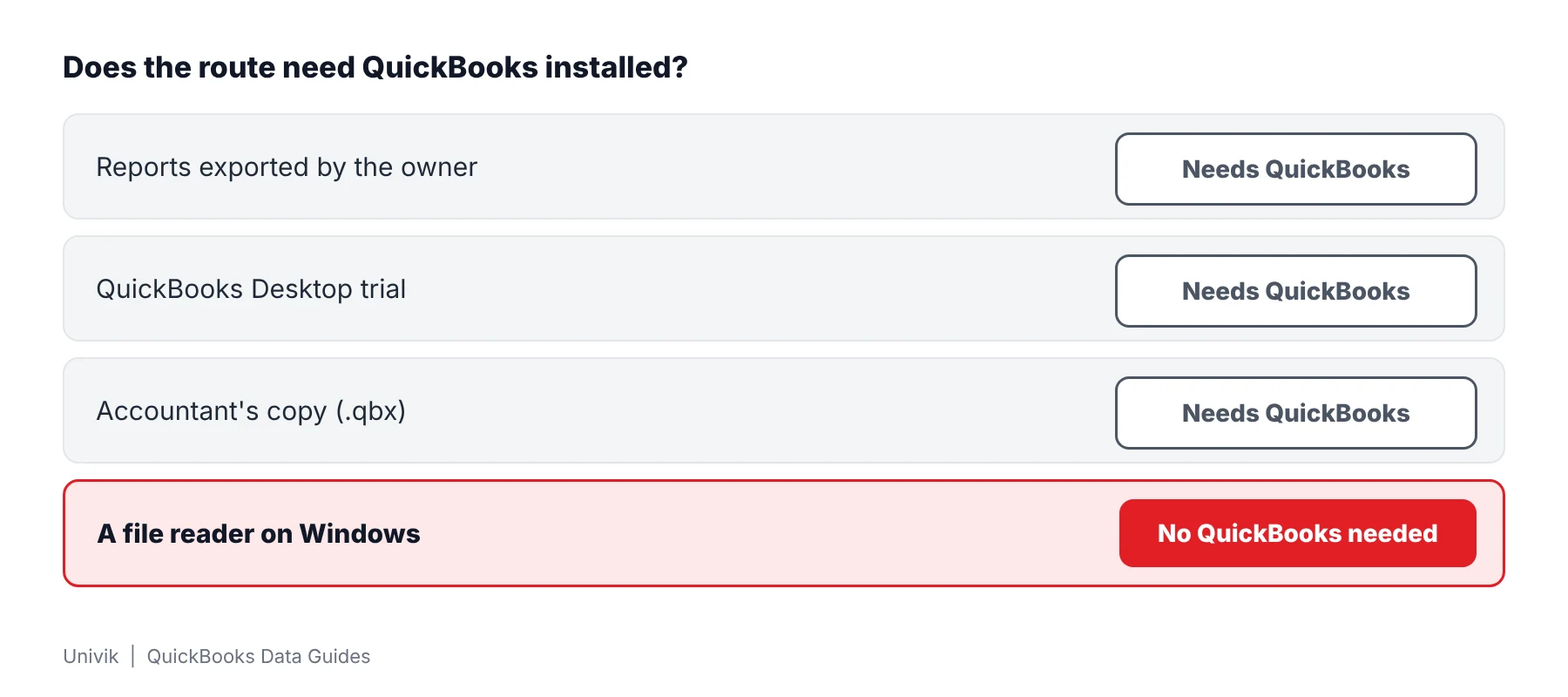
| Route | QuickBooks needed? | Who does the work | What you get | Limit |
|---|---|---|---|---|
| Reports exported by the owner | Yes, on the owner's PC | The owner | Excel workbooks of the reports the owner picks | One report per export. Lists can go to IIF files, but Intuit says transactions cannot |
| QuickBooks Desktop trial | Yes, installed on your PC | You | The company opened in QuickBooks | Intuit does not say which company files the trial opens and warns against registering it |
| Accountant's copy (.qbx) | Yes | The owner makes it and you open it in QuickBooks | A review copy of the company | Made inside QuickBooks and opened in QuickBooks |
| A file reader | No | You | Lists, transactions and nine reports on screen, saved as Excel, CSV, HTML or .iif | Windows only. Tested on 2019 and 2024 company files. Trial exports hold 25 items per list |
Intuit describes report export in its Excel workbook article. IIF limits and the trial come from two more Intuit articles: IIF files and the trial download page.
Limitations: the first three routes fit when the owner is reachable and a few reports are enough. They stop when only the file arrived and you need lists, transactions or a full export.
Open a QBW File on Windows When QuickBooks Is Missing
Univik QBooks Recovery opens a .qbw on a Windows PC that has no QuickBooks. The software reads the file and never writes to it. Univik tested it on a 53 MB QuickBooks 2024 sample company. The read took 3.3 seconds and returned 145,103 records.
- Copy the file Put a duplicate of your .qbw in a folder on a local drive. Your original stays as delivered and every later step uses the duplicate.
- Install the reader Run setup-qbooks-recovery.exe on Windows 10 or 11 with .NET Framework 4.8 or newer. QuickBooks is not on the list of requirements.
- Select the copy Press Open File or Select QuickBooks File and pick your copy. Dragging a .qbw onto the window works too. A progress bar and a log show your database being read.
- Answer the password box A company with protected fields opens a box titled Encrypted fields found. Enter the QuickBooks Admin password to decrypt the protected fields. Press Skip to load everything else.
- Browse and check Your summary screen shows record counts. Pick Customers & Jobs, Invoices or Chart of Accounts in the left panel. Match one count and one report total against a printout from the owner before you rely on any data.
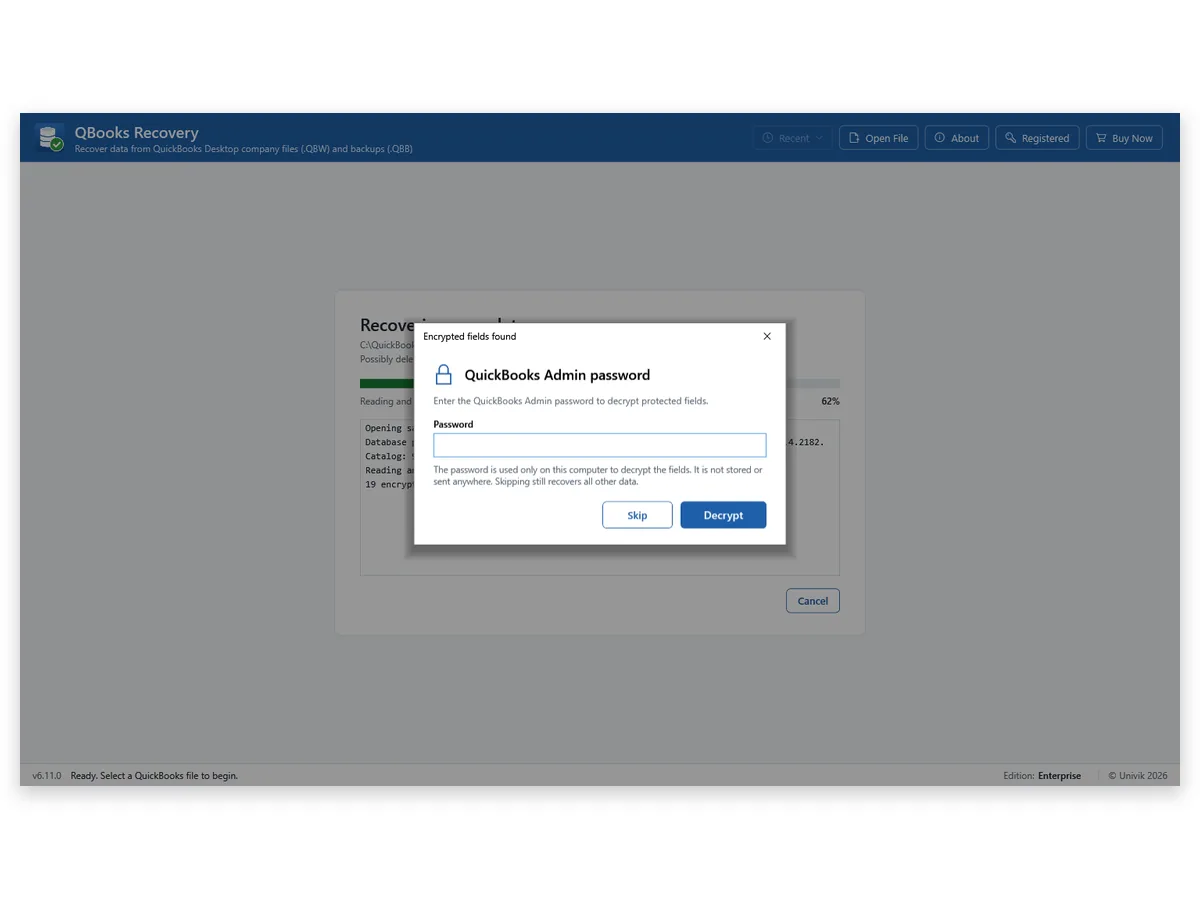
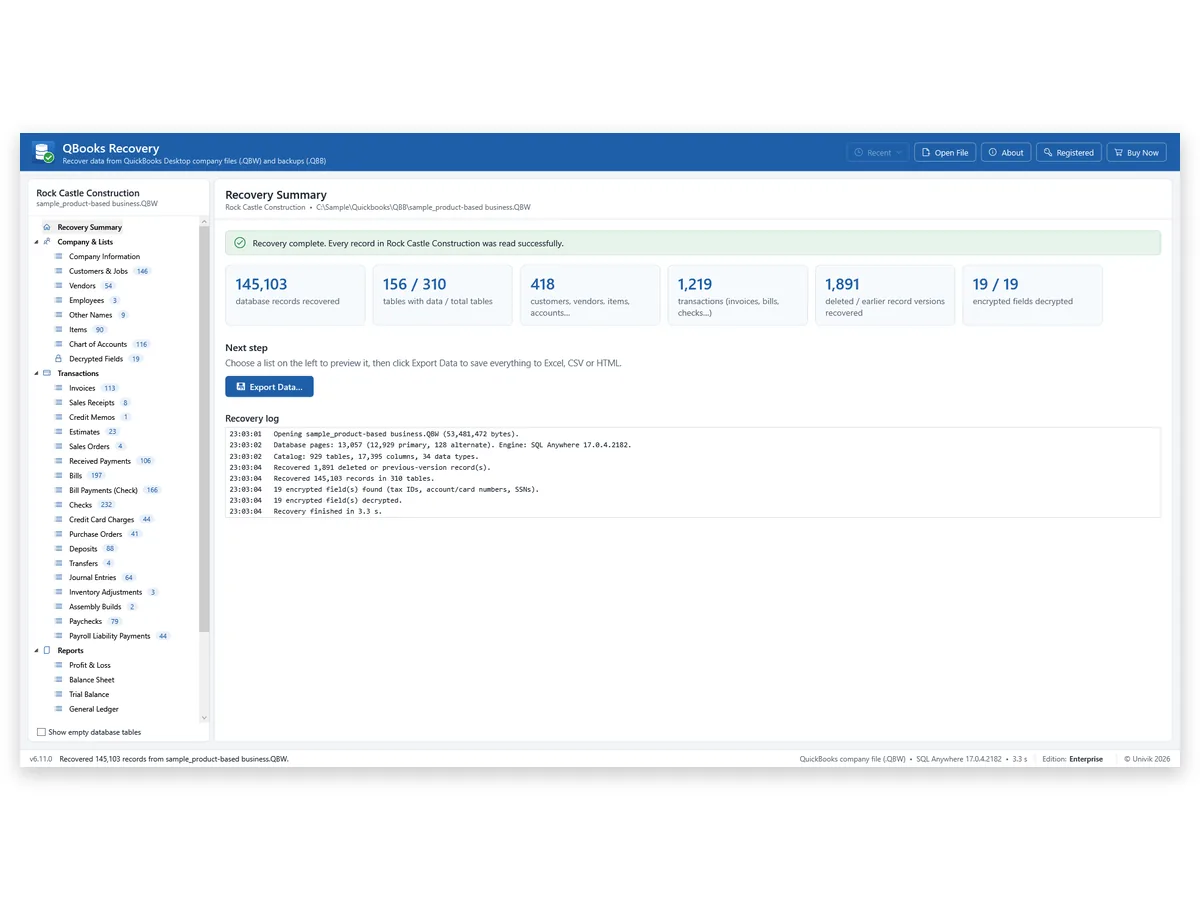
Note: your original stays untouched and a password you type is used only on that PC, as the box itself says. To save lists as a workbook, see the QuickBooks data converter page.
Univik QBooks Recovery lists the customers, invoices and reports of a company file the way QuickBooks stored them.
Download Free Trial Select a Licence - From $99For Windows 10 and 11. The trial shows all data on screen and holds 25 items per list in each export.
What Can You See Once the QBW File Opens?
Univik QBooks Recovery sorts a company into Company & Lists, Transactions, Reports and All Database Tables. Company & Lists opens people lists first, then Items and Chart of Accounts. Transactions cover 21 types, including invoices, bills, checks, deposits and journal entries. Univik QBooks Recovery builds nine accrual-basis reports from those transactions. Four are aging reports for receivables and payables. Five are Balance Sheet, Profit & Loss, Trial Balance, Journal and General Ledger.
In Univik's own test on a 2024 sample, Trial Balance had 80 rows, Balance Sheet 71 and Profit & Loss 74. Each matched the same report from QuickBooks Enterprise 24 row for row across all dates.
I compared the Balance Sheet of the 2024 sample with the same report from QuickBooks Enterprise 24. Both gave 71 rows. I still tie one total to a printout before I rely on a .qbw.
A .qbw is a database, so what it needs is a reader for that database and not QuickBooks itself. We read a 53 MB 2024 sample in 3.3 seconds and the file was only read. Copy yours first and open the copy.
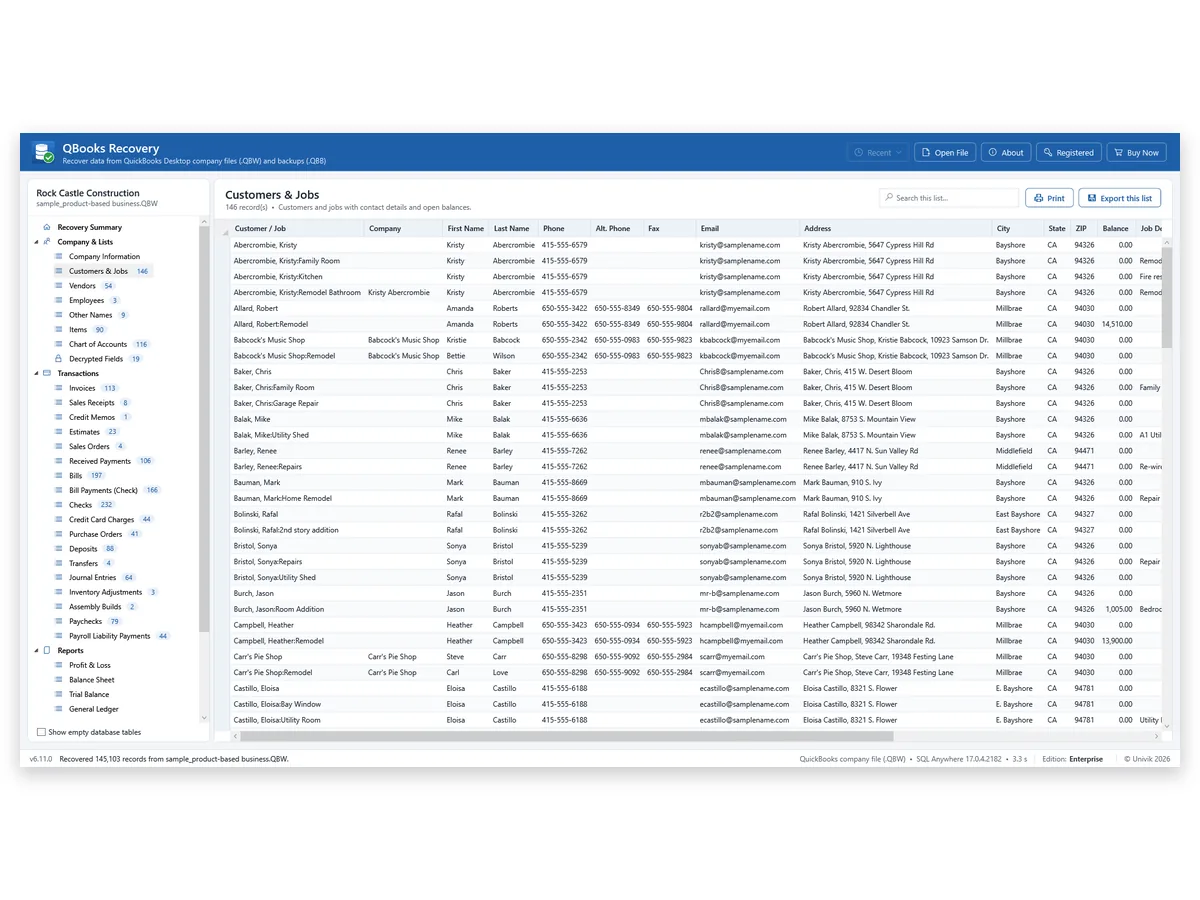
A check box on the start screen adds rows from old database pages. Univik marks them unverified, because such a row may be a deleted record or an earlier version. The option found 1,891 rows in the sample. The QuickBooks forensics software page shows where they are listed.
Limitations: Univik QBooks Recovery does not post transactions or edit the company. It also does not make the file open in QuickBooks again. Tests covered 2019 and 2024 company files only.
- The original file is untouched and only a duplicate was opened.
- The company name on your summary screen matches the file you were sent.
- One list count and one report total match a printout from the owner.
- Your notes record the file name and the date you opened it.
What If the QBW File Still Does Not Open?
1. The reader lists few or no records
Do this: The file may be damaged. Univik QBooks Recovery flags rows from damaged pages and reports unreadable parts in its Recovery log. A 2024 sample with 40 corrupted pages still gave 144,860 of 145,103 records. See the QuickBooks data recovery software page for the full test.
2. Only a .qbb came with the data
Do this: The file is a backup and not a company. Univik QBooks Recovery reads the backup directly and needs no restore first. Select the .qbb the same way as a .qbw.
3. The file came from QuickBooks for Mac
Do this: Intuit lists QB2016 and QB2019 as the Mac company files, so the extension is not .qbw. Mac company data was not part of Univik's tests and is not supported.
Key Takeaways: Opening a QBW File Without QuickBooks
- A .qbw file opens without QuickBooks in a reader of the company database. Excel and Windows cannot read it.
- Univik QBooks Recovery built a Trial Balance of 80 rows, a Balance Sheet of 71 and a Profit & Loss of 74 from the 2024 sample. Each matched QuickBooks Enterprise 24.
- Mac company files are outside the tests. Only 2019 and 2024 company files were checked.
Unsure which file you hold? Contact Univik support with the extension and the QuickBooks version if you know it.
FAQ: Open a QBW File Without QuickBooks
Can a .qbw file be opened without QuickBooks installed?
Yes. A program that reads the company database opens it. Univik QBooks Recovery does this on Windows 10 or 11 with no QuickBooks and no Intuit licence on the PC.
Can Excel open a .qbw file?
No. A .qbw is a database and Excel has no reader for that format. Open the file in a QuickBooks file reader first and save the lists as a workbook afterwards.
Can I open a .qbw file online?
An online tool needs your file sent to it, so the books leave your PC. Check where a site sends the file before you upload financial data. Univik QBooks Recovery reads the file on your own PC.
Does a QuickBooks Desktop trial open a .qbw file?
Intuit offers a 30-day trial download and presents it for moving data to QuickBooks Online. Its article warns against registering the trial and does not say which company files the trial opens.
Do I need the QuickBooks Admin password?
Not for lists and transactions. Only the protected fields need it, meaning vendor tax IDs, card and account numbers and employee SSNs. Press Skip in the Encrypted fields found box and everything else loads.
Does opening the file change it?
Univik QBooks Recovery only reads the source file. A copy still protects the original from other programs on the same PC.
Which QuickBooks versions does this cover?
Univik's tests covered 2019 and 2024 company files of QuickBooks Desktop. Other versions are untested. Mac company files and .qbm portable files are not supported.
Can I open a .qbb backup the same way?
Yes. Univik QBooks Recovery reads a .qbb directly, with no restore step first. The backup route has its own guide in the related list.
How much does Univik QBooks Recovery cost?
The trial shows all data on screen and holds 25 items per list in each export. A Personal licence costs $99 for 2 PCs, a Business licence $299 for 10 PCs and an Enterprise licence $599 for 50 PCs.

Product details and test figures come from Univik's own build and test runs. Statements about QuickBooks follow Intuit help articles that were opened on November 11, 2026.
Sources we read: Intuit: QuickBooks Desktop file types · Intuit: export reports to Excel · Intuit: IIF files · Intuit: QuickBooks Desktop trial
QuickBooks and Intuit are trademarks of Intuit Inc. Univik has no tie to Intuit.