 Help Guide
The demo opens the whole ACT! database, shows the full contact count and writes 10 records per export. The status bar reads Edition : Demo until a key is registered. A licence costs $39 one time, covers 2 PCs and removes the 10 record limit. Click Register in the top right, enter the key and export again. Refunds are available for 30 days.
This page answers the questions that arrive after the first export: why the file has 10 contacts, what the red text at the bottom of the window means, what the licence costs and how to enter the key. It also lists what the software does not do, so nobody buys it for the wrong job.
Prices and messages below are from Univik ACT ADF Converter version 6.9.0 in September 2026.
- What Does the Free Demo Do and Not Do?
- What Does the Licence Cost and Cover?
- How Do I Register a Licence Key in 3 Steps?
- Step 1: Buy the licence and keep the key
- Step 2: Click Register and enter the key
- Step 3: Export again and check the count
- What Do the Status Bar and Log Messages Mean?
- What Does Univik ACT ADF Converter Not Do?
- Demo and Licence Questions
What Does the Free Demo Do and Not Do?
The demo is the same program as the licensed edition with one brake on it. It installs without a name or email, opens the .adf in full and shows every contact in the list on the left with its details on the right. The status bar counts the whole database.
The brake is on the export. Each run writes the first 10 records, then the log prints a red line saying the demo version exports only 10 records. Every one of the 58 export formats is available in the demo, so you can test the exact output you need before paying.
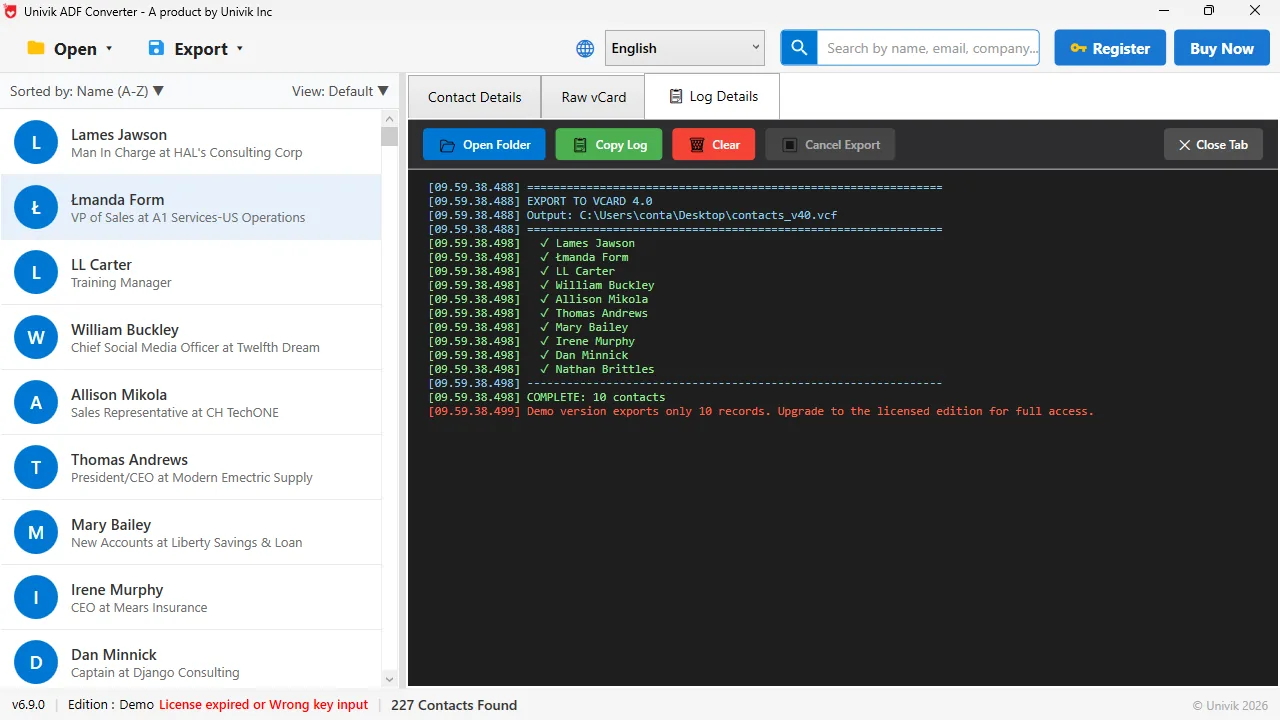
The demo, end to endBottom left reads v6.9.0, Edition : Demo and the red licence line. The log above ends with COMPLETE: 10 contacts and the demo notice, while the status bar still counts 227.
What Does the Licence Cost and Cover?
A licence for Univik ACT ADF Converter is $39, paid once. There is no subscription and no renewal. The Personal edition covers 2 PCs. Business and Enterprise editions cover more PCs. Every edition comes with a 30-day money-back guarantee.
| Demo edition | Licensed edition | |
|---|---|---|
| Price | Free, no registration | $39 one time |
| Opens the full database | Yes | Yes |
| Contact count in the status bar | Full count, for example 227 | Full count |
| Records written per export | 10 | All of them |
| Export formats | All 58 | All 58 |
| Red notice at the end of the log | Yes | No |
| PCs covered | Any | 2 with the Personal edition, more with Business or Enterprise |
| Time limit | None | None, one-time payment |
| Refund | Not needed | 30-day money-back guarantee |
The Buy Now button in the top right of the program and the Buy Now button on the product page both lead to the order form.
How Do I Register a Licence Key in 3 Steps?
Registration happens inside the program and takes under a minute.
Buy the licence and keep the key
Click Buy Now in the program or on the product page and complete the order. Save the licence key you receive somewhere you will find it again. You will need it on every PC you register.
Click Register and enter the key
Open Univik ACT ADF Converter, click the blue Register button in the top right and paste the key. Type it by hand only if paste is not possible, and watch for a letter O read as a zero.
Export again and check the count
Run the export you tried in the demo. The log should end with a COMPLETE line whose number matches the contact count in the status bar, and the red demo notice should be gone.
The demo is a full read of the database with a short export. If the count in the status bar is right and the 10 sample records look right, a licence gives you the rest of the same file. Nothing else changes.
What Do the Status Bar and Log Messages Mean?
Every message the program shows in the demo, where it appears and what to do about it.
| Where | Message | What it means |
|---|---|---|
| Status bar, left | v6.9.0 | The installed version. Quote it when you write to support |
| Status bar | Edition : Demo | No licence key has been registered on this PC |
| Status bar, red | License expired or Wrong key input | Shown in the demo before any key is entered, and after a key that did not match. Register a valid key to clear it |
| Status bar, right | 227 Contacts Found | The total number of contacts in the open database, demo or licensed |
| Log, last line, red | Demo version exports only 10 records. Upgrade to the licensed edition for full access. | The export stopped at 10 because the edition is Demo |
| Log | COMPLETE: 10 contacts | How many records were written in this run |
- Check the status bar still reads Edition : Demo, which confirms the key did not register
- Paste the key again from the purchase email rather than retyping it
- Make sure the program is v6.9.0 or later, shown bottom left
- Copy the text from the Log Details tab with Copy Log and send it to Univik support with your order number
What Does Univik ACT ADF Converter Not Do?
Being clear about this saves refunds. The software reads the SQL Server era .adf and .alf pair and exports contacts. Outside that, these are the limits in version 6.9.0.
- ACT! 6 and older
- Those versions stored data in .dbf files. The converter reads .adf only, which starts at ACT! 2005.
- Calendar and activities
- The Export menu has no calendar or activity option. A Birthday Calendar (ICS) under Special is the only date export.
- Attachments
- Files that were attached to ACT! records have no entry in the Export menu.
- Mac and Linux
- The program is Windows only, Windows 7 to 11 with .NET Framework 4.8.
- An .adf without its .alf
- The pair must be together in one folder or the database will not open.
Open the .adf, check the count, run a 10 record export in the format you need. If the sample looks right, the $39 licence writes the rest of the same file.
$39 one time · 2 PCs · 30-day money-back guarantee · Windows 11 / 10 / 8 / 7
The short version
- Demo: full open, full count, 10 records per export, no time limit.
- Licence: $39 one time, Personal edition for 2 PCs, Business and Enterprise for more, 30-day money-back guarantee.
- Register in the top right takes the key. Edition : Demo in the status bar is how you know it has not been entered yet.
- License expired or Wrong key input is the normal demo text as well as the reply to a mistyped key.
- Not covered: .dbf databases from ACT! 6 and earlier, calendar activities, attachments, Mac or Linux.
Try Univik ACT ADF Converter free
Demo and Licence Questions
 About This Help Page
Maintained by the Univik team, developers of Windows data conversion and recovery software since 2013. The status bar text, log messages and demo behaviour on this page come from Univik ACT ADF Converter v6.9.0 on Windows 11, and the prices from the univik.com product page, both checked in September 2026. Last verified September 20, 2026. Need a hand? Contact our support team.
Sources checked: Univik ACT ADF Converter product page and pricing · Open an ACT! database in Univik ACT ADF Converter · Export contacts from Univik ACT ADF Converter