 Open & Read Guide
 By
By An ACT! database is made of three files. The .adf holds all the data, the contacts, companies, notes and history. The .alf is the companion file that pairs with it. The .pad is a small pointer that tells ACT! where the database lives. To read the data you need the .adf and the .alf together. The .pad can be left behind.
Open an old ACT! backup and you may find files ending in .adf, .alf and .pad, with no clue which one holds your contacts. The names look confusing, and a web search makes it worse because other programs use .adf too.
This page keeps it simple. It explains what each ACT! file is, why ACT! splits the database this way and which files you actually need to open your data.
What Is an ACT! ADF File?
The .adf is the ACT! database. Its name stands for ACT! Data File, and it holds everything you typed into ACT!: contacts, companies, groups, opportunities, notes and history. When people say they need to get their data out of ACT!, the .adf is the file that has it.
One thing confuses people. The .adf extension is shared by unrelated programs, an Amiga disk image and an Azure Data Factory file among them. An ACT! .adf has nothing to do with those. If it came from ACT!, it is a contact database.
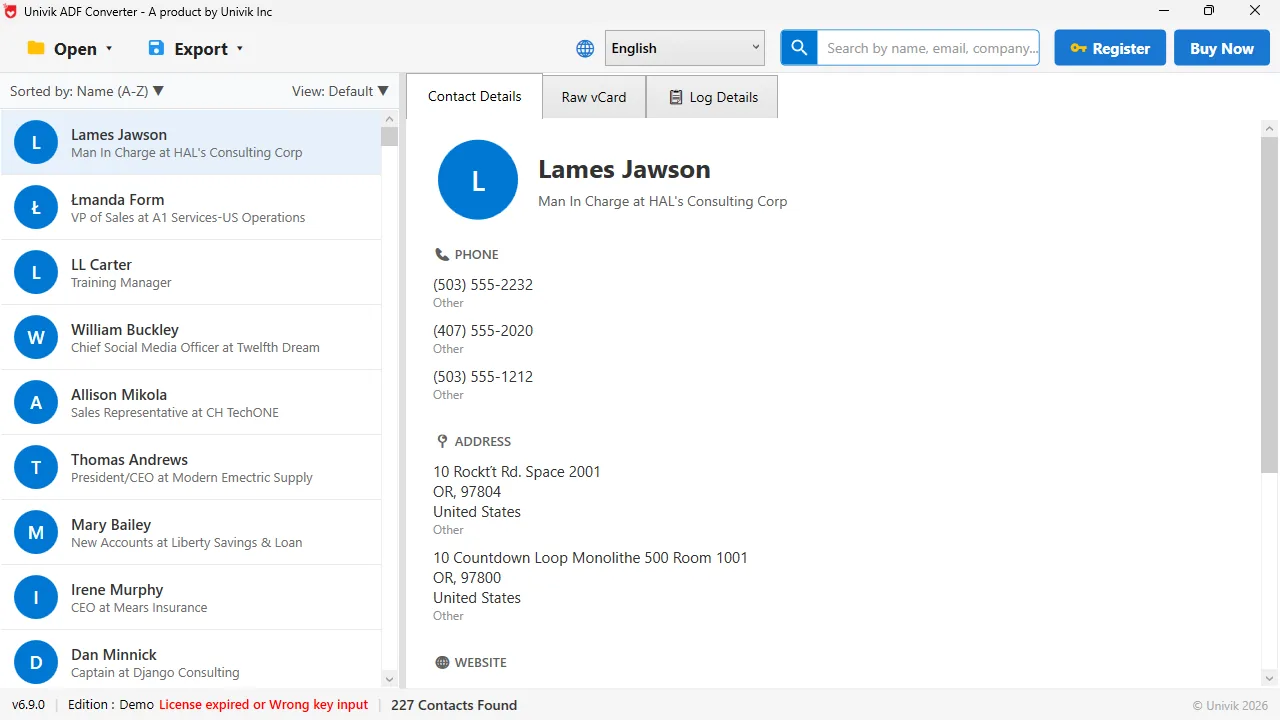
What the .adf holds Opened without ACT!, the .adf file shows every contact with phone numbers, addresses and company. That record of your data is what the ADF file stores.
What Is the ACT! ALF File?
The .alf is the companion file that travels with the .adf. It shares the database name and holds the extra information ACT! uses to find, back up and restore the database. On its own it is not your contacts, but the database expects it nearby, so you copy the .adf and the .alf as a pair. Move one without the other and the database may refuse to open.
What Is the ACT! PAD File?
The .pad is a tiny pointer file. PAD stands for Pointer to ACT! Database, and all it does is tell ACT! where the real database sits. It holds none of your contacts. If the .pad is missing, ACT! can still open the .adf directly, and a new pointer can be made. Think of it as a shortcut, not the data.
Why ACT! Splits the Database Into These Files
ACT! 2005 and later keep the database inside Microsoft SQL Server. The .adf holds the data and the .alf holds the details ACT! needs to manage it, and the two always stay together as a pair. The .pad is a small extra file that points to them, so ACT! can list the database by name.
Older ACT! versions, up to ACT! 6.0, used a different setup with several smaller files. If your files are a single .adf with a matching .alf, you are looking at the modern SQL Server based format.
Where ACT! Stores the ADF, ALF and PAD Files
By default ACT! keeps the database in your Documents folder, under a path like Documents\ACT\ACT Data\Databases. The .adf and .alf sit there together, named for your database. The .pad may live in the same place or in the ACT! program data. To move a database to another PC, copy the .adf and the .alf, and let ACT! or a reader make a new pointer.
How to Open These ACT! Files
To read the data you open the .adf, with the .alf beside it. Inside ACT! you load the database through File then Open or Share Database. Without ACT!, a reader built for the format opens the .adf on its own and lists every contact. Univik ACT ADF Converter uses that second way and can also export the data.
People panic when they see .adf and .alf files and no way to read them. They are only the ACT! database and the file that goes with it. Keep the pair together and the data opens fine.
Univik ACT ADF Converter opens the .adf file with no ACT! installed and shows the contacts, companies, notes and history it holds. Export any of it to CSV, Excel, vCard, PDF or PST.
Windows 11 / 10 / 8 / 7 · reads the .adf directly · the free trial opens the database and exports a sample
Which ACT! File Do You Actually Need?
Here is the whole thing in one view.
| File | What it holds | Do you need it | Works like |
|---|---|---|---|
| .adf | All the data: contacts, companies, notes, history | Yes, this is the database | The SQL Server database |
| .alf | The extra details ACT! needs to manage the .adf | Yes, copy it with the .adf | A required companion file |
| .pad | A pointer to where the database lives | No, it can be made again | A shortcut file |
The short version
- The .adf is the ACT! database file. It holds contacts, companies, notes and history.
- The .alf is the companion file that pairs with the .adf. Copy both together.
- The .pad is a small pointer file. It is not your data and can be left behind.
- ACT! 2005 and later store all of this in Microsoft SQL Server.
- To read the .adf without ACT!, use a converter built for the format.
Try Univik ACT ADF Converter free
ACT! Database File Questions
What is an ACT! ADF file?
The .adf is the ACT! database file. ACT! Data File is the full name, and it holds all your ACT! data: contacts, companies, groups, opportunities, notes and history. The .adf extension is also used by unrelated programs, but an ACT! .adf is a contact database.
What is the difference between the ADF and ALF files?
The .adf is the database and holds your data. The .alf is the companion file that pairs with it and holds the extra information ACT! uses to open and manage the database. You need both together, and the .adf is the one with your contacts in it.
Do I need the PAD file?
No. The .pad is a small pointer file that tells ACT! where the database lives. It holds none of your data. If it is missing, ACT! can open the .adf directly and make a new pointer.
Where does ACT! store the ADF and ALF files?
By default they sit in your Documents folder, under a path like Documents\ACT\ACT Data\Databases, named for your database. Keep the .adf and .alf side by side when you move the database to another PC.
Is an ACT! ADF file a SQL Server database?
For ACT! 2005 and later, yes. ACT! keeps the database in Microsoft SQL Server, with the .adf as the data and the .alf as its companion file. Older ACT! versions up to 6.0 used a different file layout.
How do I open an ADF file to see my contacts?
Open the .adf with the .alf beside it. Inside ACT! you load the database through File then Open or Share Database. Without ACT!, a reader such as Univik ACT ADF Converter opens the .adf on its own and lists every contact.
 About This Guide
Written and maintained by Leena Taylor Paul and the Univik team, developers of Windows data conversion and recovery software since 2013. We checked these file roles against the Act! Knowledge Base and confirmed them by opening real ACT! databases in September 2026. Last verified September 19, 2026. Need a hand? Contact our support team.
Sources checked: Act! Knowledge Base · Univik ACT ADF Converter