 Open & Read Guide
 By
By An ACT! ADF file is the ACT! database. ACT!'s own way to open it needs ACT! installed and set up first. To open the .adf without ACT!, copy the .adf and its matching .alf file, then load the .adf in a reader built for the ACT! format. Every contact, company and note appears, ready to export to CSV, Excel, vCard or PST.
You have an .adf file from ACT! and you want to see what is inside it. Maybe a client handed you the database, maybe it came off an old PC. The problem is that a .adf is not a document you can double click, and ACT!'s own instructions assume you already run ACT!.
There is a way to open the file and read every contact with no ACT! on the machine at all. This guide covers that way first. It then shows the ACT! way for people who still have it and explains how to get the data out once the file is open.
- Can You Open an ACT! ADF File Without ACT!?
- How Do You Open an ACT! ADF File in 3 Steps?
- Step 1: Copy the .adf and .alf files together
- Step 2: Load the .adf in a reader that does not need ACT!
- Step 3: View the contacts, then export what you need
- How Does ACT! Itself Open an ADF File?
- What Do You Do With the ADF File Once It Is Open?
- Which Way Should You Use to Open an ACT! ADF File?
- How Do You Know the ADF File Opened Properly?
- What If the ACT! ADF File Will Not Open?
- ACT! ADF File Questions
Can You Open an ACT! ADF File Without ACT!?
Yes, but not by double clicking it. A .adf is a database, not a document, so Windows has no built-in way to show what is inside. ACT!'s own method needs the ACT! program installed, and even then you have to load the database into ACT! before you can read it.
The easy way is a reader made for the ACT! format. It opens the .adf file straight from your computer, lists every contact and lets you export the data. No ACT! licence, no login and nothing sent online.
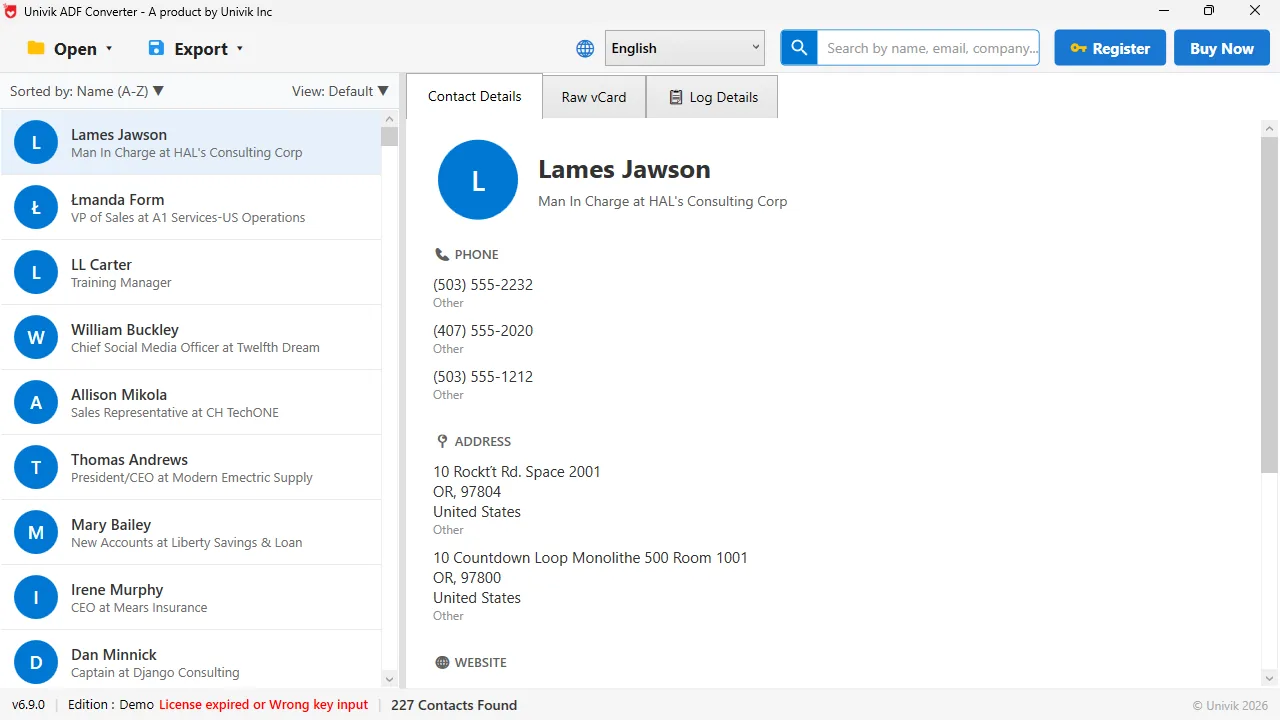
The .adf opens on its own Open the .adf file in Univik ACT ADF Converter and the whole contact list appears, with no ACT! and no login. This database held 227 records.
How Do You Open an ACT! ADF File in 3 Steps?
This way works even when ACT! was never installed on the PC.
Copy the .adf and .alf files together
Find the .adf file and the .alf file with the same name, then copy both to a folder you can find again. The .alf is the file that goes with the database, and the .adf needs it close by. A .pad file may sit with them, but it is only a pointer and is not needed to read the data.
Load the .adf in a reader that does not need ACT!
Open Univik ACT ADF Converter and browse to the .adf file. The tool reads the database on its own and fills the left panel with every contact. There is no ACT! login and no extra setup step.
View the contacts, then export what you need
Click any name to see the full record: phone numbers, addresses, company and notes. When you are ready, use the Export menu to write the data to a CSV, an Excel sheet, a vCard or a PST.
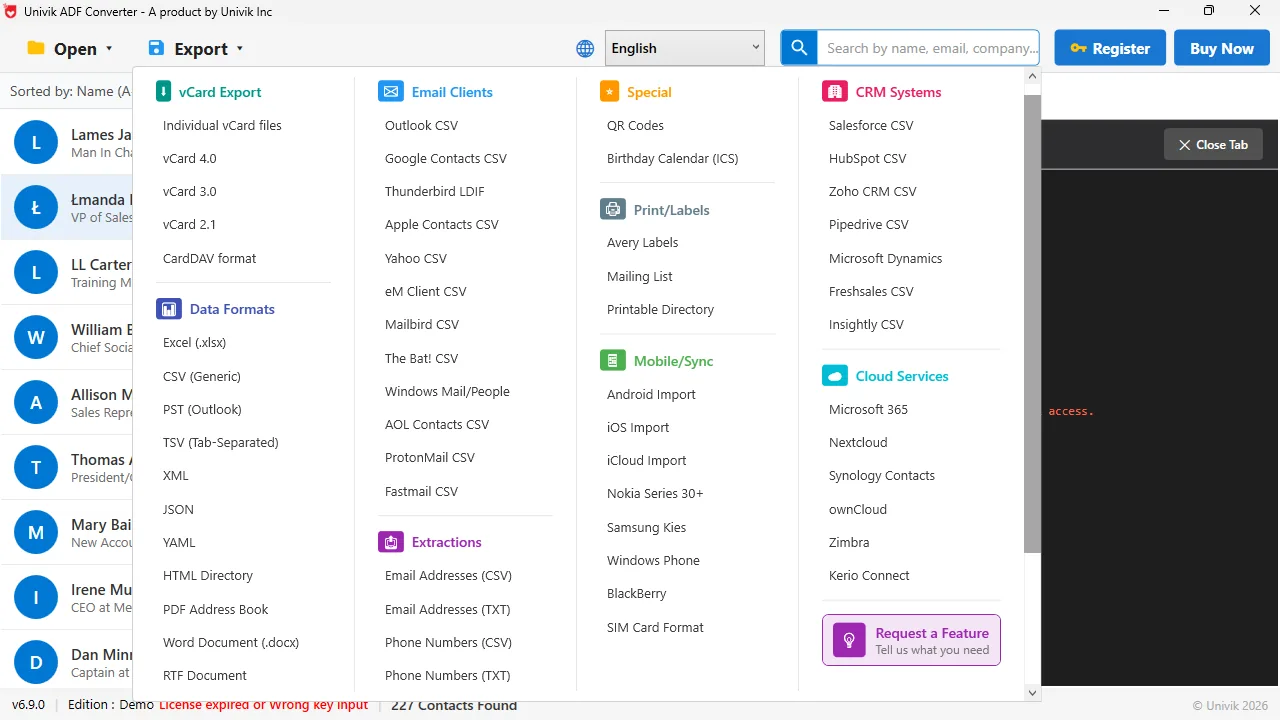
Then save it anywhere Once the .adf is open, the Export menu turns it into a CSV, an Excel sheet, a vCard or a PST. It also writes CRM-ready files.
How Does ACT! Itself Open an ADF File?
If ACT! is installed and still opens, you can load the database inside it. Launch ACT!, click File then Open or Share Database, choose the option that says the database you want is not listed, then browse to the .adf file. ACT! opens it and shows the contacts.
This is the official way from the Act! Knowledge Base. It works well when you have a running ACT!, but it stops working as soon as ACT! will not install, the licence has run out or the version does not run on Windows 11. That is when a reader that needs no ACT! is the better choice.
What Do You Do With the ADF File Once It Is Open?
Seeing the contacts on screen is useful, but most people open a .adf because they want the data somewhere else. A reader that also exports means you do not need a second tool. From the open database you can write a CSV for a spreadsheet or a CRM import, a vCard for a phone, a PDF for a printed record or a PST for Outlook. For step by step help, see importing an ACT! database into Outlook and exporting ACT! contacts to vCard.
A client sent us an .adf, an .alf and a .pad file, with no ACT! disc anywhere. The converter opened the .adf on the first try and every contact was there. You do not need the original software to read your own data.
Univik ACT ADF Converter reads the .adf file straight from your computer, with no ACT! and no login. See every contact, company, note and history record, then export to the format you need.
Windows 11 / 10 / 8 / 7 · reads the .adf directly · the free trial opens the database and exports the first 10 contacts
Which Way Should You Use to Open an ACT! ADF File?
There are three ways. The right one depends on whether you have ACT! and how much you know about databases.
| Way to open the .adf | Needs ACT! installed | Best for |
|---|---|---|
| Install ACT! and load the database | Yes | You still have an ACT! licence |
| Connect the .adf to SQL Server yourself | Yes, plus SQL knowledge | A database expert who knows SQL |
| Univik ACT ADF Converter | No | You want to see and export the data |
One note on the SQL Server way. A modern ACT! database is a Microsoft SQL Server file underneath, so a database expert can connect the .adf to SQL Server and read it there. That takes real SQL knowledge and gives you plain database tables, not a contact list. For most people a reader built for the format is faster.
How Do You Know the ADF File Opened Properly?
- The contact list fills up and the total count matches what you expected
- Clicking a name shows the phone, email, company and notes for that person
- The export writes a file you can open in Excel, a phone or Outlook
If the count looks short, make sure the .alf file sat next to the .adf when you opened it. The two files must stay together.
What If the ACT! ADF File Will Not Open?
Three problems cover most .adf files that will not open. Find the one you see and apply the fix under it.
Do this: A .adf is a database, not a document, so no normal viewer can show it. Open it in ACT! or in a reader built for the ACT! format instead.
Do this: The .alf file was missing. Copy the .adf and the .alf with the same name into one folder, then open the .adf again.
Do this: A password set inside ACT! still applies. If you do not have it, a reader that opens the file directly can still list the contacts from the .adf.
Not sure which files you have? Send our support team the list of file names and we will tell you which ones you need to open the database.
The short version
- The ACT! .adf file is your database, but ACT!'s own way to open it needs ACT! installed.
- To open the .adf without ACT!, copy the .adf and its .alf file, then load them in a reader built for the format.
- Univik ACT ADF Converter opens the .adf on its own and shows every contact, company and note.
- Once it is open, export to CSV, Excel, vCard, PDF or PST.
- The .pad is only a pointer, so the .adf and .alf are the files that matter.
Try Univik ACT ADF Converter free
ACT! ADF File Questions
How do I open an ACT! ADF file without ACT! installed?
Copy the .adf file and its matching .alf file into one folder, then open the .adf in a reader built for the ACT! format, such as Univik ACT ADF Converter. It lists every contact with no ACT! installed and lets you export the data to CSV, Excel, vCard or PST.
Can I open a .adf file by double clicking it?
No. A .adf is a database file, not a document, so Windows has no built-in program for it. Double clicking it does nothing useful or opens it as unreadable text. You need ACT! or a reader made for the format.
What is the .alf file next to my .adf?
The .alf is the file that goes with the .adf. Keep the two side by side, or the database may refuse to open. The .adf is the one holding your contacts.
Do I need the .pad file to open the database?
No. The .pad only points ACT! to the database and holds none of your contacts. The .adf and the .alf are the files you actually need. Our ADF, ALF and PAD files guide breaks down each one.
Can I open an ACT! database if the file is password protected?
A password set inside ACT! still applies when you open the database in ACT!. A reader that opens the file directly can often still list the contacts straight from the .adf. Try it on a copy of the file first.
Is the ACT! ADF file a SQL Server file underneath?
Yes, for ACT! 2005 and newer. The .adf sits inside Microsoft SQL Server, so a database expert can connect it to SQL Server directly. The ADF, ALF and PAD files guide has the full breakdown.
 About This Guide
Written and maintained by Leena Taylor Paul and the Univik team, developers of Windows data conversion and recovery software since 2013. We opened ACT! databases on a Windows 11 PC with no ACT! installed in September 2026, using only the .adf and .alf files, and confirmed the contacts read out. Last verified September 19, 2026. Need a hand? Contact our support team.
Sources checked: Act! Knowledge Base · Univik ACT ADF Converter