 Compare Guide
 By
By There are four routes out of an ACT! database. Act!'s own export is free but writes contacts only. A migration consultant brings notes, history and cleanup for a fee that runs from hundreds to several thousand dollars. Attaching the .adf to SQL Server is free if you have a database person. A direct .adf reader costs a one-time licence and exports every table in an afternoon.
Ask on a forum how to get your data out of ACT! and you get four answers, each from someone selling something or someone who did it the hard way. None of them is wrong. Each one fits a different situation.
This guide puts the four side by side with what they cost, what they get out and where each one breaks down. The aim is that you pick once and do not pay twice.
- What Does Act!'s Own Export Give You for Free?
- What Does an ACT! Migration Consultant Cost and Deliver?
- Can You Attach the .adf to SQL Server Yourself?
- What Does a Direct .adf Reader Do Differently?
- Which ACT! Export Route Fits Your Situation?
- How Do You Decide in 3 Steps?
- Step 1: Count what you need, a contact list or the notes and history too
- Step 2: Check whether Act! still opens on any PC you control
- Step 3: Match the route to your budget and deadline
- How Do You Check the Route You Chose Got Everything?
- ACT! Export Route Questions
What Does Act!'s Own Export Give You for Free?
If Act! still opens, File then Export writes your contacts, companies or groups out as a delimited text file. It is free, it is quick and for a plain contact list it is all you need. It has one hard limit: notes, history, opportunities and attachments are not on the list of things it exports. Act! consultants confirm there is no setting that adds them.
It also needs a working licence. Once the subscription lapses, Act! resellers warn that you can no longer access your data through the program, so this route closes.
What Does an ACT! Migration Consultant Cost and Deliver?
Act! Certified Consultants and CRM migration firms take a backup of your database, extract every table with their own tooling, clean duplicates, map custom fields to the new CRM and load it. One Australian Act! specialist puts a full migration at $3,000 to $12,000 and above. Automated services such as SyncMatters or Data2CRM quote by the size of the migration.
You pay for judgement and labour, not for the extraction itself. For a 20-user database with years of custom fields and a deadline, that judgement is worth having. For one user and one database, it is paying a plumber to change a tap washer.
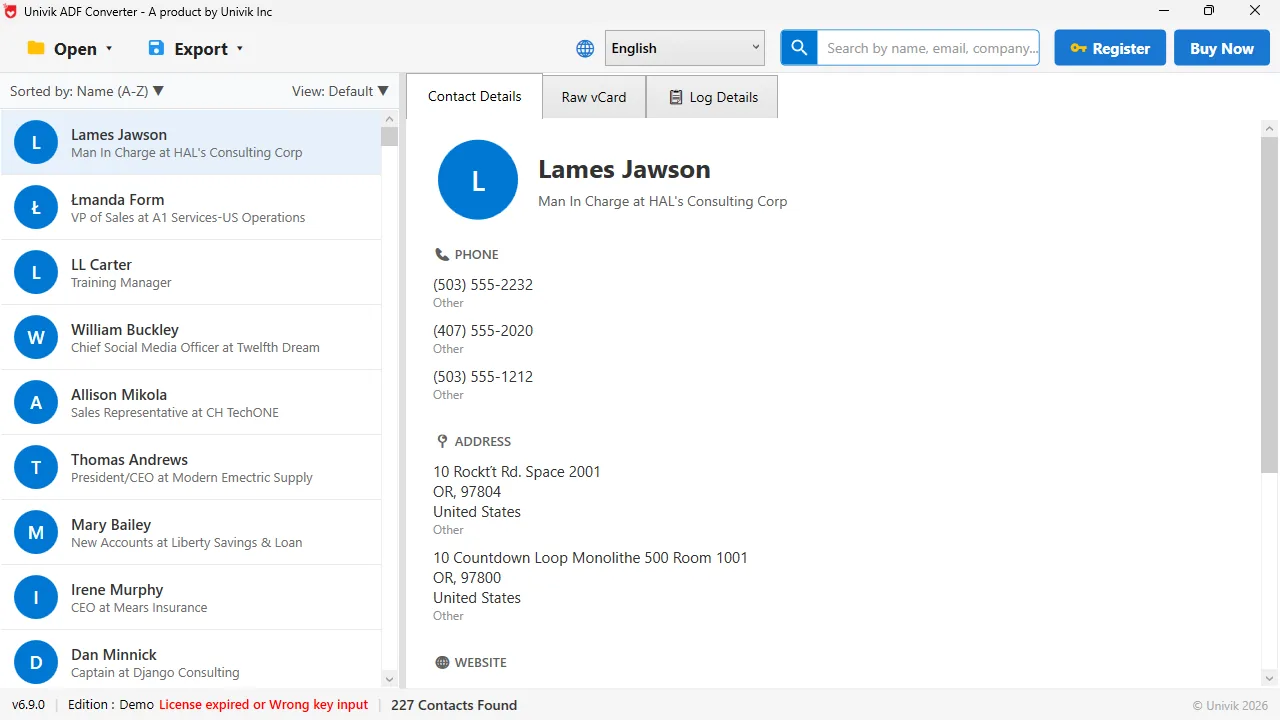
Route four, on screen The .adf opened directly on Windows 11. 227 contacts with titles, phones and addresses, no consultant and no SQL Server.
Can You Attach the .adf to SQL Server Yourself?
Yes, because since ACT! 2005 the .adf is a Microsoft SQL Server data file. Install SQL Server Express and Management Studio, attach the .adf, and the tables are there: contacts, notes, history and the rest. Then the work starts. The tables link to each other by internal IDs, names are split across fields and notes are stored as formatted text. Turning that into a clean spreadsheet is a few hours of SQL for someone who does it often and a lost weekend for someone who does not.
It is the right route when you have that person on staff and want raw access to everything. It is the wrong route when you wanted a CSV by Friday.
What Does a Direct .adf Reader Do Differently?
Univik ACT ADF Converter parses the .adf file itself. There is no Act!, no SQL Server, no login and no database update. It shows the record counts, then exports contacts, companies, groups, opportunities, notes and history to Excel, CSV, vCard, PDF or PST. Notes and history come out with their dates and the contact they belong to, which is the part the free export misses and the consultant charges for.
The trade-off is honest: it exports records, not judgement. Duplicates come out as they are, custom fields come out as extra columns you map yourself and attached documents stay as files in Act!'s supplemental folder.
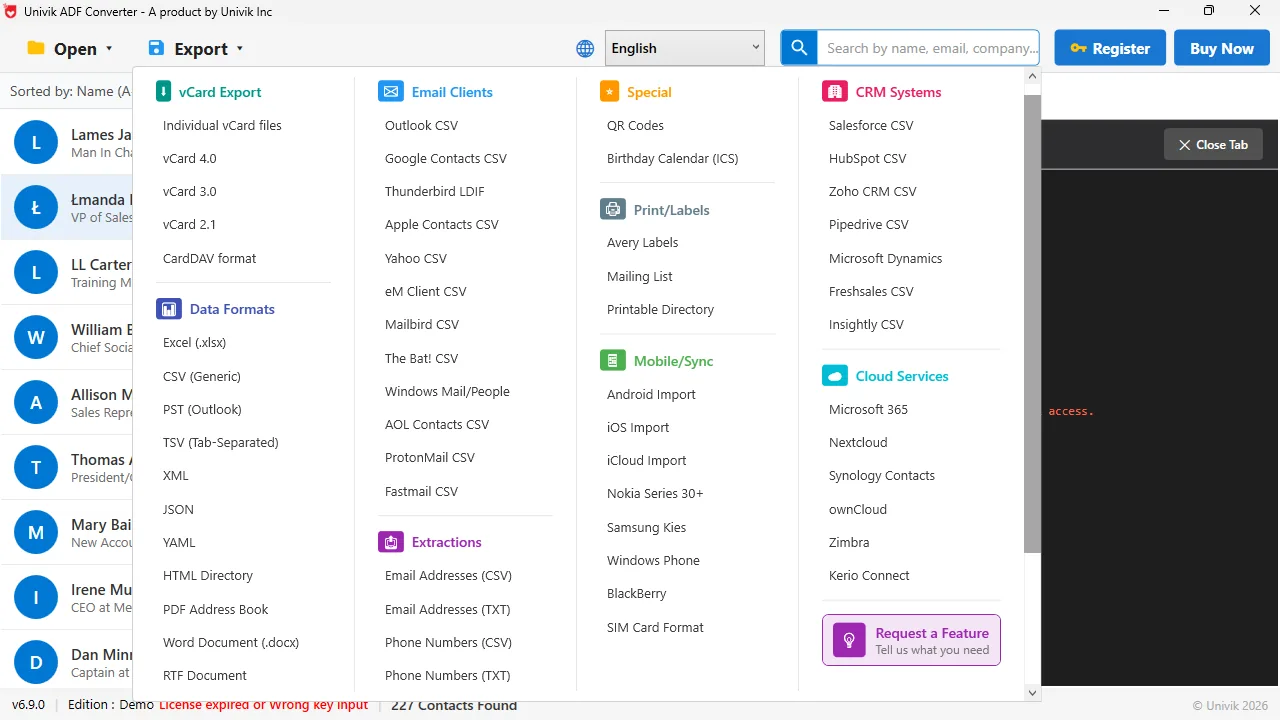
Every format a consultant would hand you Excel, CSV, vCard, PST and PDF from one menu. The CRM CSV names columns for Salesforce, HubSpot and Zoho.
A consultant is worth the fee when the job is bigger than the export: dedupe, custom field design, twenty users, attachments. When the job is the export itself, the tool does it for the price of lunch.
Univik ACT ADF Converter opens the .adf with no Act! and no SQL Server, shows every table and exports to six formats. One licence, $39, 30-day money-back guarantee.
Windows 11 / 10 / 8 / 7 · reads every table in the .adf · the free trial shows the counts and exports the first 10 contacts
Which ACT! Export Route Fits Your Situation?
The same four routes in one table.
| Route | Needs Act! running | Contacts | Notes, history, opportunities | Typical cost | Time |
|---|---|---|---|---|---|
| Act! File, Export | Yes, with a live licence | Yes | No | Free | 30 minutes |
| Migration consultant or service | No, they take the backup | Yes | Yes, mapped and cleaned | Hundreds to $12,000 and above, quoted | 1 to 4 weeks |
| Attach .adf to SQL Server Express | No, needs SQL Server and skill | Yes, as tables | Yes, as raw tables to join yourself | Free plus your hours | Half a day to several days |
| Univik ACT ADF Converter | No | Yes | Yes, with dates and the linked contact | $39 one time | 1 to 3 hours |
Two of these are free and both have a catch. Act!'s export needs a live licence and drops the notes. SQL Server needs skill. The paid routes differ by a factor of a hundred, and what the bigger fee buys is people, not data.
How Do You Decide in 3 Steps?
Three questions settle it for almost everyone.
Count what you need, a contact list or the notes and history too
If the History tab is empty and you never wrote notes, the free Act! export covers you, provided Act! still opens. If years of calls and meetings sit there, you need one of the other three routes, because the free export will not carry them.
Check whether Act! still opens on any PC you control
An expired subscription, a retired Pro version or a Windows 11 PC that refuses the installer all close the free route. Check this before you plan around it. If Act! is gone, you are choosing between a consultant, SQL Server and a direct reader.
Match the route to your budget and deadline
Many users, deep custom fields, a firm go-live date in a new CRM: get a quote from a consultant. One database, one or two people and the data wanted this week: read the .adf directly and import the CSVs yourself. Our guides cover HubSpot and Zoho and Salesforce step by step.
How Do You Check the Route You Chose Got Everything?
- The contact count in the output equals the count Act! showed on its status bar or in the converter's summary
- The oldest note you remember writing is in the export with its date
- Custom fields you relied on appear as columns, not as blanks
Whichever route you take, keep the .adf and .alf pair. It is the only complete copy of the database and it costs nothing to store.
The short version
- Act!'s own export is free and fine when Act! still opens and you need the contact list only.
- A consultant or migration service brings notes, history, cleanup and mapping, at a quoted fee that Act! specialists put from hundreds to $12,000 and more.
- Attaching the .adf to SQL Server works for a database person and costs time, not money.
- A direct .adf reader exports every table for a one-time $39 and needs no Act!, no SQL Server and no login.
- Decide by three questions: what data, does Act! still open, what is the deadline.
Try Univik ACT ADF Converter free
ACT! Export Route Questions
How much does an ACT! data migration consultant cost?
It is quoted per project. One Act! migration specialist publishes a range of $3,000 to $12,000 and above for a full migration. Automated migration services price by record count and start lower. The fee covers extraction, cleanup and mapping, not only the export.
Is there a free way to export an ACT! database?
Two. Act!'s own File, Export writes contacts to CSV while your licence is active, without notes or history. Attaching the .adf to SQL Server Express is free but needs database skills to turn the tables into usable files.
Can I export ACT! notes and history without a consultant?
Yes. Univik ACT ADF Converter opens the .adf on its own and writes notes and history to their own sheet or CSV with dates and linked contacts. It costs $39 once and needs no Act! installed.
Do I need SQL Server to read an ACT! database?
Only for the SQL Server route. Univik ACT ADF Converter reads the .adf without any database engine, so SQL Server, Act! and an Act! login are not needed.
Which ACT! export route works when my subscription has expired?
Any route that does not run Act!: a consultant working from your backup, SQL Server or a direct .adf reader. Act!'s own export needs an active licence.
What does a consultant do that a $39 tool does not?
Dedupe, custom field design, mapping into the new CRM, moving attachments, training and support for a team. The tool exports the records. If those extras are what you need, the fee is fair.
 About This Guide
Written and maintained by Leena Taylor Paul and the Univik team, developers of Windows data conversion and recovery software since 2013. We opened ACT! databases directly on Windows 11 in September 2026 and checked the consultant pricing and Act! export limits quoted here against the vendors' own pages on the same day. Last verified September 19, 2026. Need a hand? Contact our support team.
Sources checked: Tech Benders: Act! export · Univik ACT ADF Converter