An MDF file will not open in Excel, because it is a binary SQL Server database file rather than a spreadsheet. To get its data into CSV without installing SQL Server, read the .mdf file directly with a Windows tool that exports table data. Univik MDF Converter opens the file at the binary level, lists every table and exports one table or all tables at once to CSV, with no upload and no SQL Server instance needed. Deleted rows the file still holds are included and shown in red before you export.
Why an MDF File will Not Just Open in Excel
An MDF file is the primary data file of a SQL Server database. It stores tables, rows, indexes and system metadata packed into 8 KB pages, all in a binary layout that only SQL Server is built to read. Double clicking it does nothing useful, and opening it in Excel or Notepad shows a wall of unreadable characters.
The normal route is to attach the .mdf to a running SQL Server instance and query it. When you have no instance to attach it to, or you were handed a loose .mdf with no server behind it, that route is closed. Getting the data out then means reading the file itself. For the deeper anatomy of the format, our guide to the MDF file extension covers the page structure and how MDF, NDF and LDF files relate.
One quick check before you go further. Not every .mdf is a database. Disc imaging software like DAEMON Tools and Alcohol 120% uses the same extension for a Media Descriptor File, a CD or DVD image that travels with a .mds file. Engineering tools add a third meaning, where ASAM MDF measurement files, usually carrying a .mf4 extension, hold automotive sensor and CAN bus data. Neither of those holds database tables, and neither becomes a CSV the way a database does. This guide is about the SQL Server database .mdf. If you only want to look at the data rather than extract it, the free MDF viewer opens tables read only.

“CSV export is tested on databases between 100 MB and 5 GB, and the check is on the rows, not the file size. Every SQL Server version and edition in our lab is a source, so a difference between versions shows up in the run.”
Nick Rogers
|Founder, Univik, building file conversion tools since 2013
Three Ways to Convert MDF to CSV
Three approaches convert an MDF file to CSV, and they differ in what they demand from you before they work.
The native route uses SQL Server’s own tools. Once the database is attached to an instance, a few paths reach CSV. Inside SQL Server Management Studio, the Import and Export Wizard writes a table to a flat file, and right clicking a query result grid gives Save Results As for a quick export. From the command line, the bcp utility does the same for a table or a query. These are fast and free, and they share two costs. They need a live SQL Server instance with the database attached, which is exactly what many people stuck with a loose .mdf do not have. And the output carries no schema, just rows with no record of the table structure that produced them.
The online route uploads the .mdf to a web service that returns a zip of CSV files, one per table. It runs without SQL Server and needs nothing installed. The cost sits in the upload itself. A production .mdf holds real records such as customer data, financial history and employee details. Sending that whole file to a third party server is a privacy and compliance exposure most business environments cannot accept.
The direct read route uses a desktop tool that parses the .mdf on your own machine. No instance to attach, no file leaving the computer. This is the approach built into Univik MDF Converter, and it is the one this guide follows.
Reading the MDF Directly Then Exporting to CSV
A direct read converter opens the .mdf at the binary level and walks its 8 KB pages the way SQL Server would, reconstructing each table and its rows in memory. Because it never asks SQL Server to mount the file, it works on a machine that has never had SQL Server installed, and it works on a file that was detached, copied off a dead server or pulled from a backup drive.
The flow is short. Point the converter at the .mdf and let it scan. It then lists every table it finds with row counts. Preview a table to confirm the data looks right, choose CSV as the output and export. Univik MDF Converter handles this end to end on Windows without an internet connection, which makes it the cleanest way to convert MDF to CSV when there is no SQL Server to lean on. The full feature set, supported SQL Server versions and scan modes live on the MDF Converter product page rather than being repeated here.
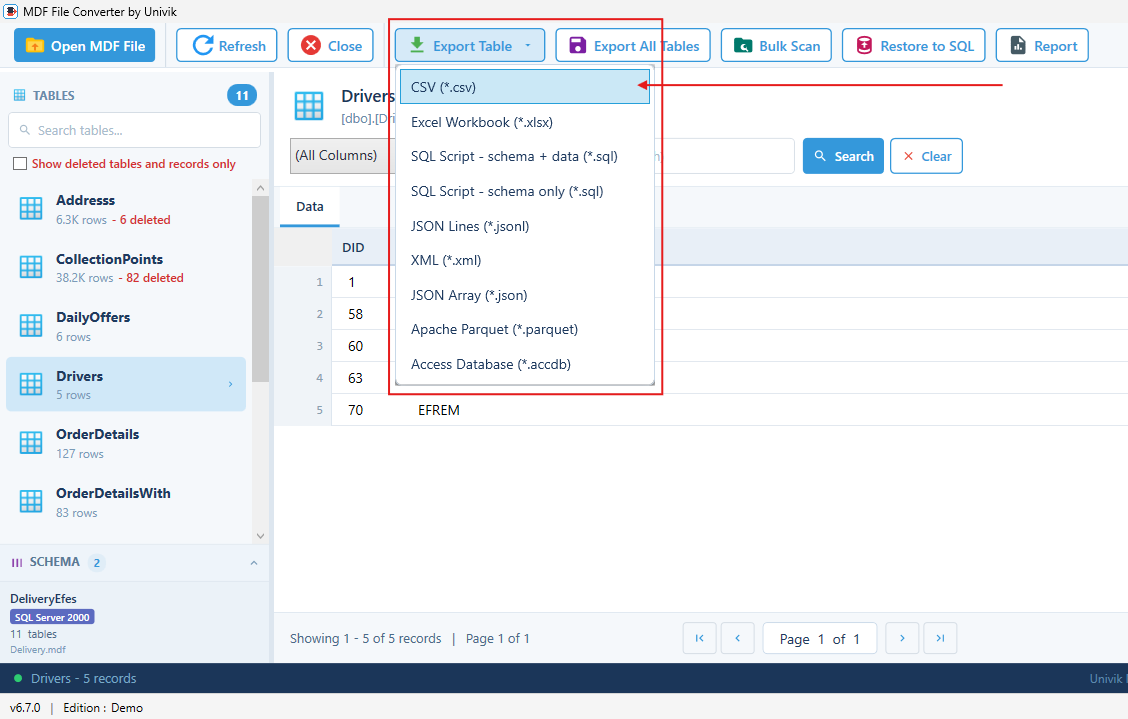
One detail worth knowing upfront. A direct read of the file can surface rows that a live query would hide, including records left behind by a DELETE that the page has not yet overwritten. Univik shows these in red so you can see what is recovered data before it lands in the CSV.
One Table or Every Table at Once
A database is many tables. CSV is a single flat sheet with no way to hold more than one table in one file. That mismatch shapes how the export works, and it is why the Export button offers two scopes.
Export Table writes the table you are viewing to one CSV file. Export All Tables writes every data table in the database, producing one CSV per table named after the table it came from. The internal system tables SQL Server keeps for its own bookkeeping are not the target here. For a database with forty data tables you get forty CSV files in a folder, ready to open individually or load into another system.
What Survives the CSV Conversion and What does Not
CSV is plain text. Rows and column values come across cleanly, with the column names as the header line. Everything that made those rows a database rather than a spreadsheet does not.
Data types, primary and foreign keys, indexes, relationships between tables, stored procedures, views and triggers have no place to live in a CSV. The file records that a column held the value 1024, not that the column was an integer, not that it was a foreign key pointing at another table. This is not a limit of one tool. Microsoft notes that even bcp data files carry no schema or format information, so a table dropped after export cannot be rebuilt from the CSV alone. Any MDF to CSV path flattens the database to values.
Handling Unicode, Dates, NULLs and Large Text
Plain values are easy. A few column types need a decision before they land in the CSV cleanly.
Text outside the basic Latin set, stored in nvarchar columns, needs UTF-8 output to survive. Names in Arabic, Chinese or Cyrillic turn into question marks if the export drops to a legacy encoding. Excel also reads UTF-8 more reliably when the file carries a byte order mark, so a converter that writes one saves you a garbled first open.
Dates want a consistent format. ISO 8601, written as YYYY-MM-DD, sorts correctly as text and imports the same way everywhere, which a locale specific format like 03/04/2025 does not. NULL needs a rule too. A NULL and an empty string are different things in a database, and Microsoft documents that bcp itself swaps the two during extract, writing a null as an empty string and the reverse. A good export lets you set the token that marks a real NULL so the distinction is not lost. Large binary columns, images and files stored as varbinary do not fit a text cell at all and are the one type to plan around before you export.
When the MDF is Corrupt or Missing Its Log
A clean .mdf reads straight through. A damaged one does not, and the symptom shapes the fix. If SQL Server refuses to attach the file, or the file was orphaned without its LDF log, a plain conversion can stall on the same corruption that blocks the server.
A direct read converter has an advantage here, since it can often extract readable tables to CSV even when SQL Server rejects the file outright. When the damage runs deeper than that, the file needs repair before extraction. For a database that will not come online at all, start with recovering a SQL database without a backup. For a file that lost its log, attaching an MDF without the LDF covers rebuilding it. Our SQL database recovery tool is built for the salvage case, and for a file too damaged even for that, a data recovery service is the honest next step rather than another tool.
Choosing CSV Over the Other Export Formats
CSV is the right target when you want data out fast for a spreadsheet, a quick analysis, a move onto a system that does not run SQL Server or a file to hand to someone. It is the wrong target for three specific jobs, and the MDF Converter offers eight other formats for exactly those.
To keep the structure, not just the values, SQL Script schema plus data rebuilds the tables, keys and all, when you run it back into a database. For a table past Excel’s ceiling of 1,048,576 rows per sheet, an Excel Workbook still hits that wall while CSV does not, so a very large table belongs in CSV or Parquet rather than xlsx. For analytics at scale, Apache Parquet stores columnar and compresses hard, which CSV cannot match. Access Database output drops the tables into an .accdb file for anyone working in Access. The full nine format list and when each fits sits on the MDF Converter product page.
Read your MDF and export it, no SQL Server needed
Univik MDF Converter opens the .mdf directly on Windows, lists every table and exports to CSV or any of nine formats. Deleted rows shown in red. Nothing leaves your machine.
Frequently Asked Questions
Can I Convert an MDF to CSV Without Installing SQL Server?
Yes. A direct read converter parses the .mdf file itself rather than asking SQL Server to mount it, so no instance is required and none needs to be installed. Univik MDF Converter reads the file on Windows and exports table data to CSV. The native bcp route, by contrast, needs the database attached to a running SQL Server instance before it can export anything.
Do I Need the LDF Log File to Export an MDF to CSV?
For a clean .mdf that was shut down properly, no. The data lives in the MDF and reads without the log. If the database was not closed cleanly, or the .mdf is being treated as corrupt, the LDF can matter for a consistent read. When the log is gone and the file will not attach, see our guide on attaching an MDF without the LDF before converting.
How are Multiple Tables Saved in the CSV Output?
One CSV file per table. CSV has no way to hold more than one table in a single file, so Export All Tables produces a separate .csv for each table, named after that table. A database with forty tables becomes forty CSV files in one folder.
Will Deleted Rows Show Up in the CSV Export?
They can. A direct read of the file surfaces rows left behind by a DELETE when the page holding them has not been overwritten yet. Univik shows these in red during preview so you can decide whether to keep them before they land in the CSV. A live SQL Server query would not return them at all.
Is There a Row Limit When Exporting to CSV?
CSV itself has no row limit, which is one reason it suits very large tables. The limit shows up later, when you open the CSV in Excel, since an Excel worksheet caps at 1,048,576 rows and truncates the view beyond that. For tables past that size, keep the data in CSV or Apache Parquet rather than an Excel Workbook.
What If My .mdf is Not a SQL Server Database File?
Then there is no table data to export, so CSV conversion does not apply. Two other file types share the .mdf extension. Disc images from software like DAEMON Tools and Alcohol 120%, paired with a .mds file, hold a CD or DVD image. ASAM MDF measurement files, usually with a .mf4 extension, hold automotive sensor and bus data. This guide and the MDF Converter are for the SQL Server database .mdf.