An MDF file is a SQL Server database, not a script, so it holds no readable SQL until you generate it. A SQL script export turns the database back into CREATE TABLE and INSERT statements you can run on another instance to rebuild it, structure and all. The native way is the SSMS Generate Scripts wizard, which only runs against a database already attached to a live instance. To script an MDF that will not attach, or on a machine with no SQL Server, Univik MDF Converter reads the .mdf directly and writes a .sql file in two modes, schema only or schema plus data.
What a SQL Script Gives You That a CSV does Not
A CSV export hands you the data. A SQL script hands you the database. That difference decides which one you want.
A CSV of an MDF is rows and column values in flat text, with no record of the structure that held them. A SQL script is the structure itself, written as statements. CREATE TABLE rebuilds each table with its columns and data types, and INSERT statements load the rows back in. Keys, indexes, constraints, views, stored procedures and triggers can all be scripted, which means the script can stand a working database back up rather than just fill a spreadsheet.

“A SQL script export is tested by running it. We generate scripts from databases up to 5 GB, execute them on each SQL Server version in the lab and compare row counts and sample rows with the original.”
Nick Rogers
|Founder, Univik, building file conversion tools since 2013
MDF to SQL can Mean Two Different Things
The phrase MDF to SQL splits into two goals that need different tools, and most people searching it want the first one.
The common goal is to get the MDF mounted on a SQL Server instance so the database runs again. That is a different job, and our guides on recovering a SQL database without a backup and attaching an MDF without the LDF cover it. The other goal, the subject here, is to turn the MDF into a portable .sql script, a text file of SQL statements that rebuilds the database somewhere else. If you want the database live on a server you already have, attach it. If you want a script you can carry to another server, read on.
Schema Only or Schema Plus Data
A SQL script comes in two shapes, and choosing the right one keeps the file size down and the outcome clear.
Schema only writes the structure with no rows. It is the choice for standing up an empty copy, for putting a database design under version control or for preparing a target before you load data separately. Schema plus data writes the structure and every row as INSERT statements, which is what a migration, an environment clone or a full working copy needs. The trade is size. A schema only script is small. A schema plus data script grows with the row count, and a large table produces a large file.
Three Ways to Convert MDF to a SQL Script
Three routes convert MDF to SQL script, and each one asks for something different before it runs.
The native route is the SSMS Generate Scripts wizard. With the database attached to an instance, right click it, point to Tasks and choose Generate Scripts. A Choose Objects step lets you script the whole database or only the objects you need, a handful of stored procedures for instance. In Set Scripting Options then Advanced, the Types of data to script setting offers Schema only, Data only or both, with Schema only as the default. It is free and it is the standard way. A few catches come with it. It needs SQL Server running with the database already attached. Scripting schema plus data is memory heavy on a large database, a limit Microsoft notes can exceed what SSMS can allocate. And on a complex database the generated script can need its object order adjusted so dependent objects build in the right sequence.
The online route sends the .mdf to a web service and gets a script back, usually a dump aimed at another engine rather than SQL Server. No SQL Server needed, but the whole database goes to a server you do not control. The direct read route keeps it all local. A desktop tool reads the .mdf and writes the .sql on your machine, with no attach step and nothing uploaded.
Reading the MDF Directly to a SQL Script
A direct read tool skips SQL Server and parses the .mdf itself. For a script it renders each table it recovers as CREATE TABLE for the structure and INSERT statements for the rows, in whichever of the two modes you pick. Where a CSV export flattens everything to values, this keeps the shape of the database intact.
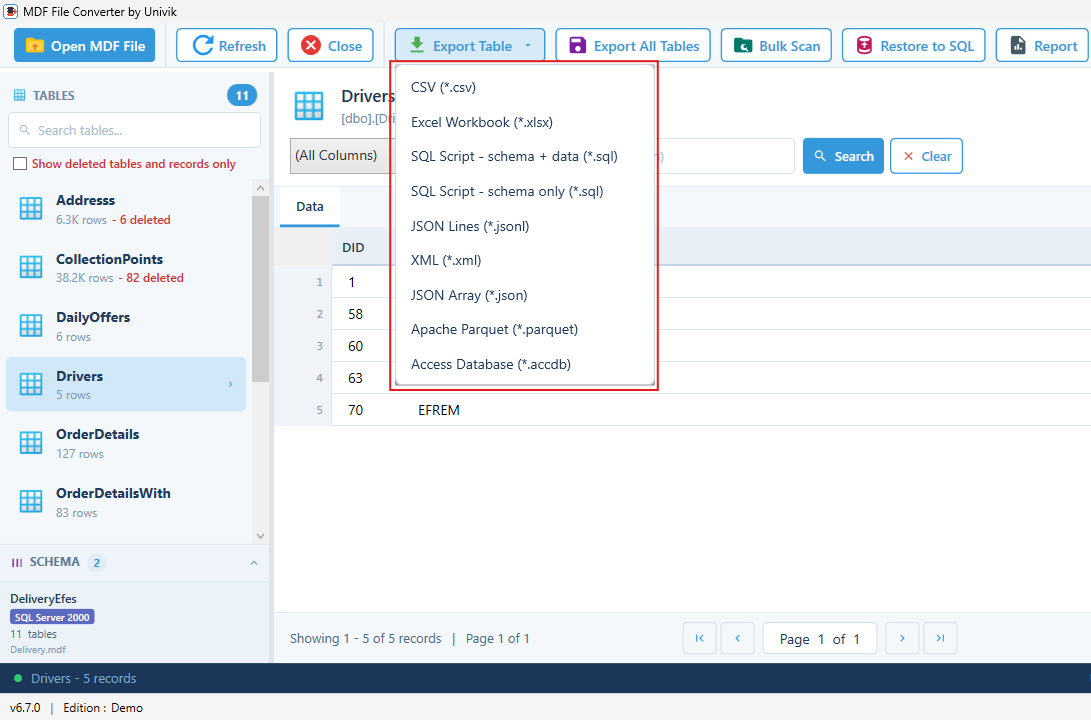
Because it never mounts the file, it can script a database whose instance is long gone, a file that was detached and archived or a copy recovered from an old backup. Univik MDF Converter does this on Windows with no internet connection, and offers both SQL Script schema plus data and SQL Script schema only in the export list. The full feature list and version support sit on the MDF Converter product page instead of being restated here.
Moving a Database Down a Version
SQL Server will not attach or restore a database onto an older version than the one that created it. Try it and you meet error 948, which reports that the database is a higher version and that a downgrade path is not supported. A backup does not rescue you either, since a .bak from a newer server will not restore on an older one.
A SQL script is the way around this. Because it is plain SQL statements rather than a version stamped binary, a schema plus data script from the newer database runs on the older SQL Server and rebuilds the tables and rows there. A script that leans on a data type or feature the older version lacks needs a small edit first, but the path stays open where a binary attach is blocked outright. When the newer server is still running, the Generate Scripts wizard has a Script for Server Version option in its advanced settings that targets the older release and comments out anything it cannot support. Reading the .mdf directly to a script does the same job when the newer server is already gone and only the file survives. This is one of the few clean routes to move a database backward across versions.
When the Target is MySQL or PostgreSQL
The script Univik writes is SQL Server compatible, built from the CREATE TABLE and INSERT syntax SQL Server uses. MySQL and PostgreSQL speak a different dialect, so that script will not run on them unchanged. Data types, identifier quoting and some statement forms differ between engines.
For a move to MySQL or PostgreSQL, two clean paths work. One is to export the tables to CSV and import that, since every database reads CSV. The other is to run the SQL Server script through a dialect converter that rewrites the syntax for the target. Online services that advertise MDF to MySQL take the second path for you and return a ready dump, at the cost of uploading the database to their servers.
When the MDF is Corrupt or will Not Attach
Scripting assumes a readable file. When the .mdf is damaged, the wizard route collapses first, since it cannot start until SQL Server attaches the database, and a corrupt file is the kind SQL Server refuses to attach.
A direct read tool fares better, pulling scriptable tables from a file the server rejects outright. Past a certain level of damage though, the file has to be repaired before any script comes out of it. When the database no longer starts at all, begin with recovering a SQL database without a backup, then turn to our SQL database recovery tool if the file itself needs salvaging. If you only need to look at the tables rather than script them, the free MDF viewer opens them read only. For the format itself, our MDF file extension guide covers the anatomy.
Script an MDF to .sql, no SQL Server needed
Univik MDF Converter reads the .mdf directly on Windows and writes a SQL script in two modes, schema only or schema plus data. It also exports CSV, Excel, Parquet and more. Nothing leaves your machine.
Frequently Asked Questions
Can I Generate a SQL Script From an MDF Without SQL Server?
Yes. Because a direct read tool works from the file rather than a live database, it writes the SQL statements with no instance in the picture and nothing to install. Univik MDF Converter runs on Windows and produces both schema only and schema plus data scripts. The SSMS Generate Scripts wizard cannot, since it only works once the database is already attached and online.
What is the Difference Between Schema Only and Schema Plus Data?
Schema only writes the table structure, keys and objects with no rows, which suits version control or preparing an empty target. Schema plus data adds every row as INSERT statements, which is what a migration or a full working copy needs. Schema only stays small. Schema plus data grows with the number of rows.
Does the SQL Script Recreate Keys, Indexes and Stored Procedures?
Yes, and this is the main reason to choose a script over a CSV. A SQL script can carry primary and foreign keys, indexes, constraints, views, stored procedures and triggers alongside the tables. A CSV holds none of that. Run the script and the structure comes back with the data.
Can a SQL Script Move a Database to an Older SQL Server Version?
Yes, and for a move down a version it is the standard workaround. SQL Server blocks attaching or restoring a database onto an older version, which shows up as error 948. A SQL script is plain statements with no version stamp, so a schema plus data script from the newer database runs on the older server and rebuilds it there.
Can I Import the SQL Script Into MySQL or PostgreSQL?
Not unchanged. The script uses SQL Server syntax, and MySQL and PostgreSQL use a different dialect for data types, quoting and some statements. For those engines, export to CSV and import that, or run the script through a dialect converter that rewrites it for the target. Some online services output a MySQL dump directly from the MDF.
How do I Run the .sql Script to Rebuild the Database?
Open the .sql file in SQL Server Management Studio, connect to the target instance and execute it. The script creates the tables and, if you chose schema plus data, inserts the rows. For a very large script, running it from the sqlcmd command line avoids the memory load of opening the whole file in the editor.