Renaming a .png to .ico only changes the name, not the file, so Windows still sees a PNG and refuses it as an icon. A browser may draw it anyway, but it is never a real multi size ICO. The Univik ICO Converter rebuilds the image as a proper .ico in one step.
It is the first thing everyone tries. You have a PNG, you need an .ico, so you edit the file name and hope. Sometimes it even looks like it worked, which is where the confusion starts.
The honest answer has two halves. Windows never accepts a renamed PNG as an icon, and a browser sometimes does, and the reason for both comes down to how a program decides what a file really is.
Does Renaming a PNG to ICO Work?
For a Windows icon, no. A folder icon, a desktop shortcut, an icon baked into a program, none of those will take a PNG that has simply been renamed. For a website favicon, it can appear to work in some browsers, which is what fuels the myth that renaming is enough.
Either way you do not end up with a true ICO. What you have is a PNG with a misleading name, and it behaves like one wherever the reader is strict about formats.
The Extension Is Just a Label
The letters after the dot in a file name are a hint, not the format. What actually sets the format is a short run of bytes at the very start of the file, called a signature or magic number. A program reads those bytes to learn what it is holding, and the list of file signatures catalogues them.
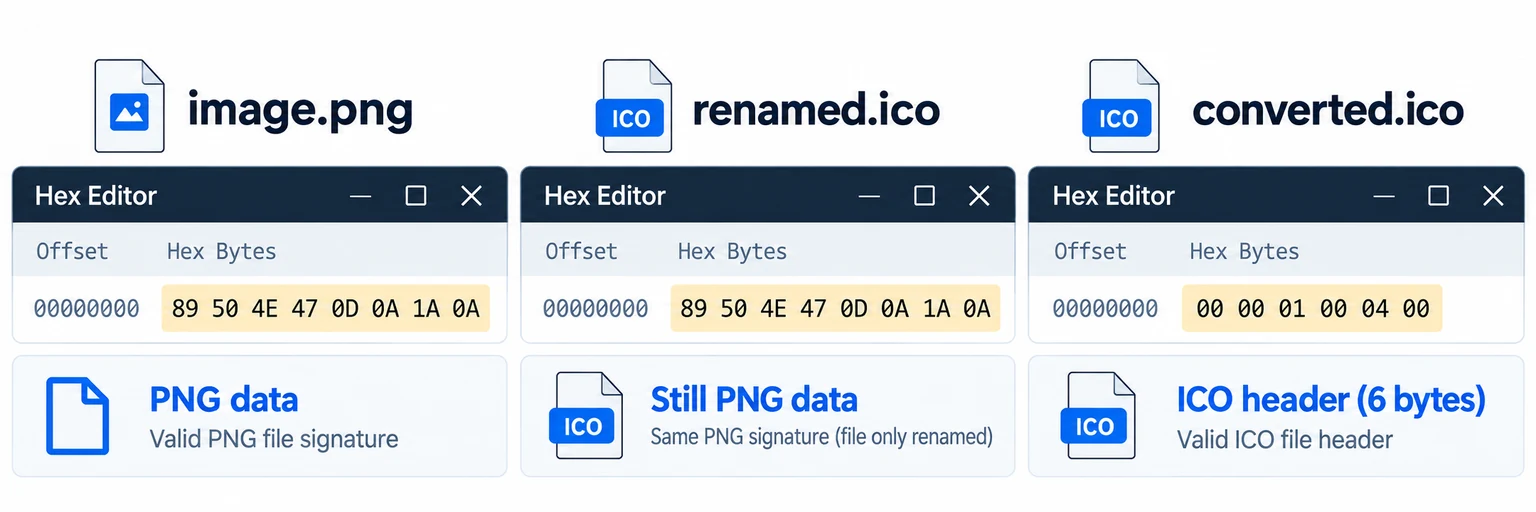
89 50 4E 47 0D 0A 1A 0A
00 00 01 00
That is the whole knot in one picture. Editing the name changes nothing inside the file, so a program that trusts the bytes, which is most of them, keeps reading it as a PNG no matter what the name claims.
What a Real ICO Contains
An ICO is not a single picture, it is a small container. It opens with a directory that lists how many images are inside and where each one sits, then the image data follows. The ICO format reference lays out that directory and its entries.
That directory is why an .ico can hold a 16, a 32, a 48 and a 256 in one file. It is also why Windows can pick the right one for each place. A PNG has no such index. It is one image, and there is nowhere for the extra sizes or the lookup table to live.
Why Windows Rejects a Renamed PNG
When Windows draws a folder icon or the icon on a shortcut, it opens the file and looks for that directory at the start. A renamed PNG opens with the PNG signature instead, so Windows finds no icon directory, gives up and falls back to a default. The name on the file never enters into it.
The same holds when an icon is built into a program. The build tool needs a real ICO to embed, and a PNG in disguise is refused or dropped. Putting an icon into an EXE is handled in the EXE icon guide.
Why Browsers Seem to Accept It
Here is the half that spreads the myth. Browsers are forgiving. When one fetches your favicon, it inspects the bytes and, if it recognises a PNG, it will draw it regardless of the .ico on the name. This behaviour has a standard behind it, the MIME sniffing rules browsers follow.
So a renamed PNG can slip by as a favicon in Chrome and still fail elsewhere. And even where it renders, you have handed the browser a single fixed image, not the multi size icon a real favicon.ico gives you. The result is a coin flip dressed up as a fix.
But an ICO Can Hold a PNG
One fact muddies all this, and it is worth clearing up. A modern ICO is allowed to store PNG data inside for the large 256 pixel image, an option added back in Windows Vista. So the phrase you may have heard, that an ICO can contain a PNG, is true.
It is not the same thing as a renamed file. In a real ICO the PNG sits inside the directory structure, listed and pointed to by an entry. A bare PNG with an .ico name has no directory wrapped around it at all, which is exactly what Windows goes looking for and cannot find.
How to Actually Convert It
A real conversion rebuilds the file. It wraps your image in the directory an ICO needs and writes out each size, so the bytes at the start become an icon header rather than a PNG one. The Univik ICO Converter does that from a PNG or almost any image.
- Load the imageOpen the converter and add your PNG.
- Choose the sizesPack in 16, 32, 48 and 256 for full coverage.
- Export a real ICOThe converter builds the directory and writes the icon.
- Check itOpen it in the free viewer to confirm the sizes are there.
The full walkthrough, transparency and sizing included, sits in the PNG to ICO guide, and a vector source takes the same rebuild in the SVG to ICO guide. To confirm a file really is an icon, the free ICO viewer shows the sizes inside, and a renamed PNG shows none.
Turn a PNG into a true multi size .ico with the directory and sizes Windows expects, the icon that works in Explorer, on a shortcut and in every browser alike.
Free Download See All FeaturesHow to Spot a Renamed File
If an icon is misbehaving, these signs point to a rename rather than a real conversion.
Any of these means the file is still a PNG underneath. Run it through a real conversion and the icon behaves the same everywhere. The ICO format itself is broken down on the ICO file page, and for web use the guide on adding a favicon to a website covers the whole set.
Frequently Asked Questions

Written and maintained by Leena Taylor Paul and the Univik team, developers of Windows data conversion and recovery software since 2013. The renamed PNG is one of the most common icon mix ups we see. The reason it sometimes shows in a browser yet never in Windows comes down to how each one reads a file, so this guide takes that apart byte by byte. Last verified August 2026. Icon still refusing to show? Contact our support team.