 Recovery Guide
 By
By A corrupt MDF file is a SQL Server database with broken 8 KB pages, so SQL Server marks it suspect. Restore from your last good backup first, because Microsoft says it loses the least. With no backup, run DBCC CHECKDB REPAIR_REBUILD, which is safe, then REPAIR_ALLOW_DATA_LOSS as a last resort, which can delete data. If you have no backup and cannot lose any rows, a repair tool reads the file and recovers what it can.
SQL Server will not open your database. It reports the file as suspect, or throws an I/O error with a page number. The application behind it is down. The data is still on disk. The question is which repair path brings back the most data with the least loss.
This guide puts the methods in order, from the one that loses nothing to the one Microsoft calls a last resort, and says what each one keeps and what it deletes.
- What Makes an MDF File Corrupt?
- How Do You Know an MDF File Is Corrupt?
- Which Repair Method Should You Use?
- How Do You Restore a Corrupt MDF From Backup?
- How Do You Repair an MDF With DBCC CHECKDB?
- How Do You Repair a Suspect Database in Emergency Mode?
- How Do You Recover an MDF With No Backup and No Data Loss?
- Step 1: Open the corrupt MDF file
- Step 2: Let the tool scan around the damage
- Step 3: Preview the recovered tables and records
- Step 4: Save or export the recovered data
- What Can a Repair Not Recover From a Corrupt MDF?
- How Do You Prevent MDF File Corruption?
- MDF Repair Questions
What Makes an MDF File Corrupt?
A corrupt MDF file is a SQL Server database whose pages no longer fit together. SQL Server stores your data in 8 KB pages, and a database is only usable when those pages are internally consistent. When a write is cut off or the disk under the file is damaged, a page is left half written or unreadable, SQL Server detects the mismatch and blocks the whole database rather than serve wrong data.
The usual causes are hardware and power faults, not mistakes in the data. Power loss during a write leaves a page half done. A failing disk creates bad sectors where the file is stored. A drive that runs out of space fails a write partway through. A crash of the SQL Server service stops it in the middle of a write. Copying the .mdf while the database is live makes a half changed copy that is broken. For each of these in more detail, read what causes SQL Server corruption.
How Do You Know an MDF File Is Corrupt?
SQL Server tells you in one of two ways. At startup, a database that fails its consistency check is marked SUSPECT or RECOVERY_PENDING and will not come online, so the application behind it stops. During use, SQL Server throws an I/O error that names the exact page it could not read:
- Error 823: a hard I/O error, the operating system could not read or write the page at all.
- Error 824: a logical consistency error, the page was read but its checksum or structure is wrong.
- Error 825: a read-retry warning, the read succeeded only after several tries, which means the disk is failing.
Any of these means the MDF has damaged pages. Run DBCC CHECKDB against the database, with no repair option, to get the full list of errors before you decide how to repair it. The output names every damaged page and the objects on it.
Some corruption shows only at startup. SQL Server then marks the database SUSPECT or RECOVERY_PENDING, or it reports error 5171 (SQL Server rejects the .mdf as a primary data file), error 3414 (recovery failed at startup) or error 9004 (the transaction log is damaged). A database stuck in suspect or stuck in recovery comes from the same damaged pages that fail the consistency check.
Which Repair Method Should You Use?
Five methods exist, and they differ mainly in how much data they lose. Try them in order, from the top down. Methods near the top of the list lose less data.
| Method | Data loss | Needs | Best when |
|---|---|---|---|
| Restore from backup | None, up to the last backup | A recent, good backup | You have a backup. Microsoft's first choice |
| DBCC CHECKDB REPAIR_REBUILD | None | A database that still attaches, single user mode | Index-level damage and no backup |
| DBCC CHECKDB REPAIR_ALLOW_DATA_LOSS | Yes, deletes the pages it cannot fix | A database that attaches, single user mode | Last resort, no backup, damage REPAIR_REBUILD cannot fix |
| Emergency-mode repair | Yes, rebuilds the log and can lose data | A suspect database that will not come online | Very last resort, the database is stuck suspect |
| Read the file with a repair tool Our tool | None to the source, keeps every intact row | The .mdf file only | No backup and you cannot accept deleted rows |
Microsoft is clear on the order. Its documentation says to restore from the last known good backup first, and calls REPAIR_ALLOW_DATA_LOSS an emergency option to use only when a backup is not available.
How Do You Restore a Corrupt MDF From Backup?
If you have a recent backup, this is the method that loses the least, which is why Microsoft lists it first. You do not repair the corrupt file at all. You restore a clean copy over it from a .bak backup:
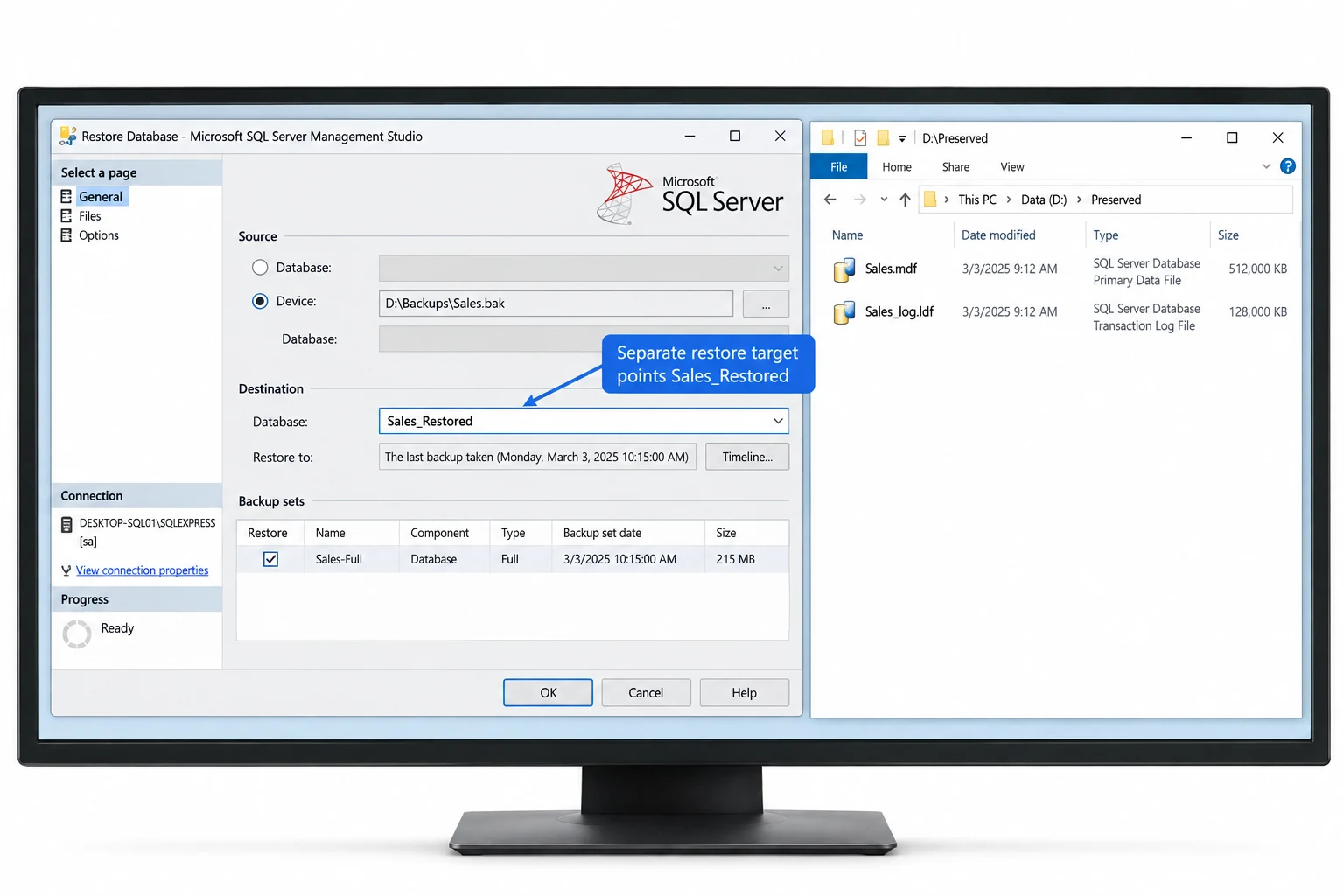
RESTORE DATABASE [YourDatabase]
   FROM DISK = N'D:\Backups\YourDatabase.bak'
   WITH REPLACE, RECOVERY;
The only data you lose is whatever changed between the backup and the failure. If the database was in the full recovery model and the transaction log is intact, you can restore the backup and then its log, losing almost nothing. Our guide on how to restore a SQL database from a .bak file covers the full sequence. This route is better than every repair below, because a repair works on damaged data while a restore brings back known good data.
How Do You Repair an MDF With DBCC CHECKDB?
When there is no backup and the database still attaches, DBCC CHECKDB can repair it. There are two repair levels, and the safe one comes first. Put the database in single user mode, then try REPAIR_REBUILD, which fixes index-level damage with no data loss:
ALTER DATABASE [YourDatabase] SET SINGLE_USER WITH ROLLBACK IMMEDIATE;
GO
DBCC CHECKDB (N'YourDatabase', REPAIR_REBUILD) WITH ALL_ERRORMSGS, NO_INFOMSGS;
GO
ALTER DATABASE [YourDatabase] SET MULTI_USER;
If REPAIR_REBUILD cannot fix the damage, the next level up is REPAIR_ALLOW_DATA_LOSS. The name says exactly what it does. Microsoft's documentation says it can lose more data than restoring from a backup, and forces the database consistent by discarding the pages it cannot repair. Rows on those pages are gone. Run it inside a transaction, which Microsoft recommends, so you can review the result before you accept it:
ALTER DATABASE [YourDatabase] SET SINGLE_USER WITH ROLLBACK IMMEDIATE;
GO
BEGIN TRANSACTION;
DBCC CHECKDB (N'YourDatabase', REPAIR_ALLOW_DATA_LOSS) WITH ALL_ERRORMSGS, NO_INFOMSGS;
-- review the output, then COMMIT or ROLLBACK
GO
Back up the .mdf and .ldf files before you run either level. A repair that goes wrong should never touch your only copy of the file.
How Do You Repair a Suspect Database in Emergency Mode?
A database marked SUSPECT will not come online, so DBCC CHECKDB cannot run against it the normal way. The option for this is EMERGENCY mode, which Paul Randal, who wrote DBCC CHECKDB, calls the very last resort. Set the database to EMERGENCY, then SINGLE_USER, then run the data-loss repair:
ALTER DATABASE [YourDatabase] SET EMERGENCY;
GO
ALTER DATABASE [YourDatabase] SET SINGLE_USER;
GO
DBCC CHECKDB (N'YourDatabase', REPAIR_ALLOW_DATA_LOSS) WITH ALL_ERRORMSGS, NO_INFOMSGS;
GO
This can rebuild the transaction log and break transactional consistency, and it cannot be rolled back once it runs. Randal's own advice is to take a copy of the database files before doing this, because he has seen it fail on real databases. Copy the .mdf and .ldf first, every time.
With no backup, the real choice is REPAIR_ALLOW_DATA_LOSS deleting rows to force the database consistent, or reading the file and keeping every row that is still intact. We built the second path and test it on databases we corrupt on purpose, page by page.
How Do You Recover an MDF With No Backup and No Data Loss?
Every SQL Server method above asks the engine to force the database consistent, and the only way it can do that on unfixable damage is to delete the bad pages. When you have no backup and cannot accept deleted rows, the other approach is to read the file instead of repairing it. Univik MDF Repair Tool opens the corrupt .mdf as raw bytes, works around the damaged pages and reconstructs the table layout from the file, then brings back the tables, records, dropped tables and deleted rows that are still readable. No SQL Server instance is involved, nothing is attached and there is no backup to find.
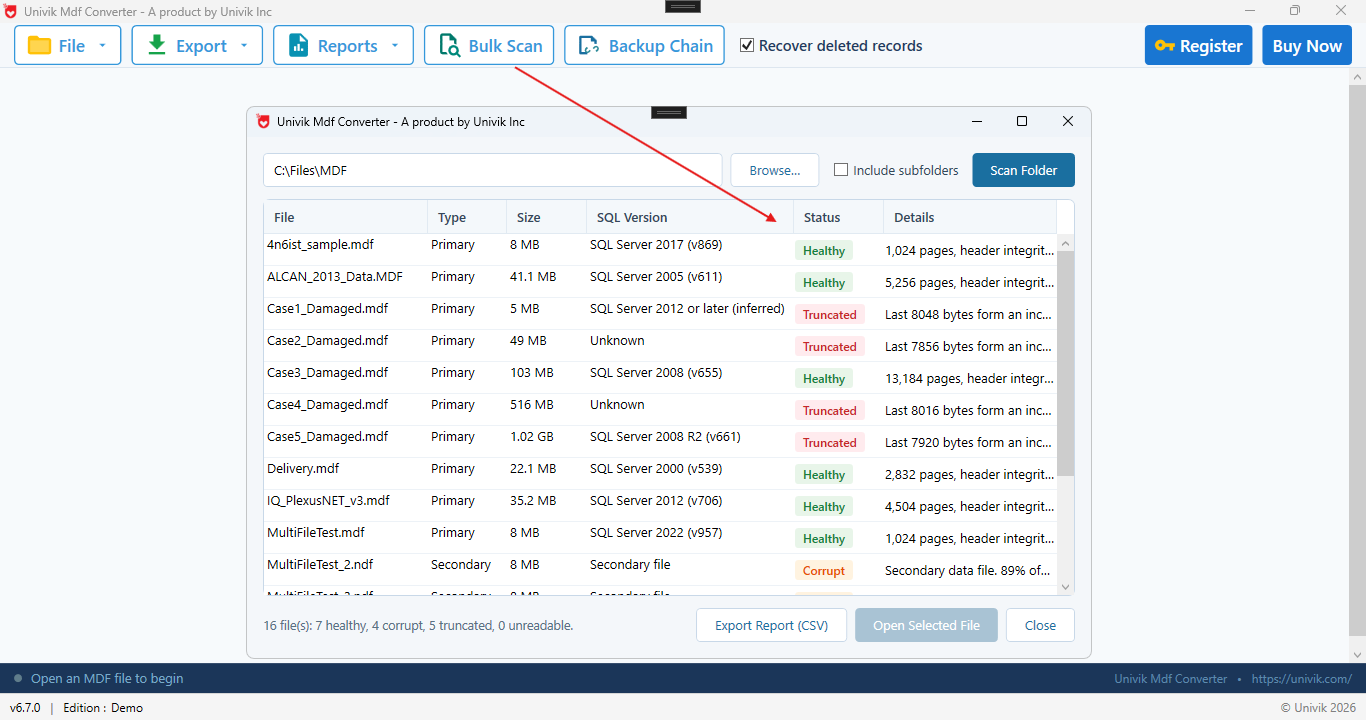
It checks the file first The scan flags each MDF as healthy, truncated or corrupt, with its SQL Server version and page count. Here it reports 16 files: 7 healthy, 4 corrupt and 5 truncated, so you see the damage before you recover.
Open the corrupt MDF file
Install Univik MDF Repair Tool, click Open and pick the corrupt .mdf. Add the .ndf files if the database has any. The file is opened read only, so the recovery cannot make the damage worse. Work on a copy of the file, never the only one you have.
Let the tool scan around the damage
The tool works through the MDF one page at a time, skips the pages that are damaged and rebuilds the table layout from the file. A database that SQL Server marks suspect, or one that will not attach because of a version or log problem, still opens here, because nothing is attached. A database that will not attach without its LDF opens here the same way.
Preview the recovered tables and records
Browse the recovered tables in a grid, with the row count next to each one. Dropped tables and deleted rows show too, flagged separately, so you can see exactly what came back before you commit to saving anything.
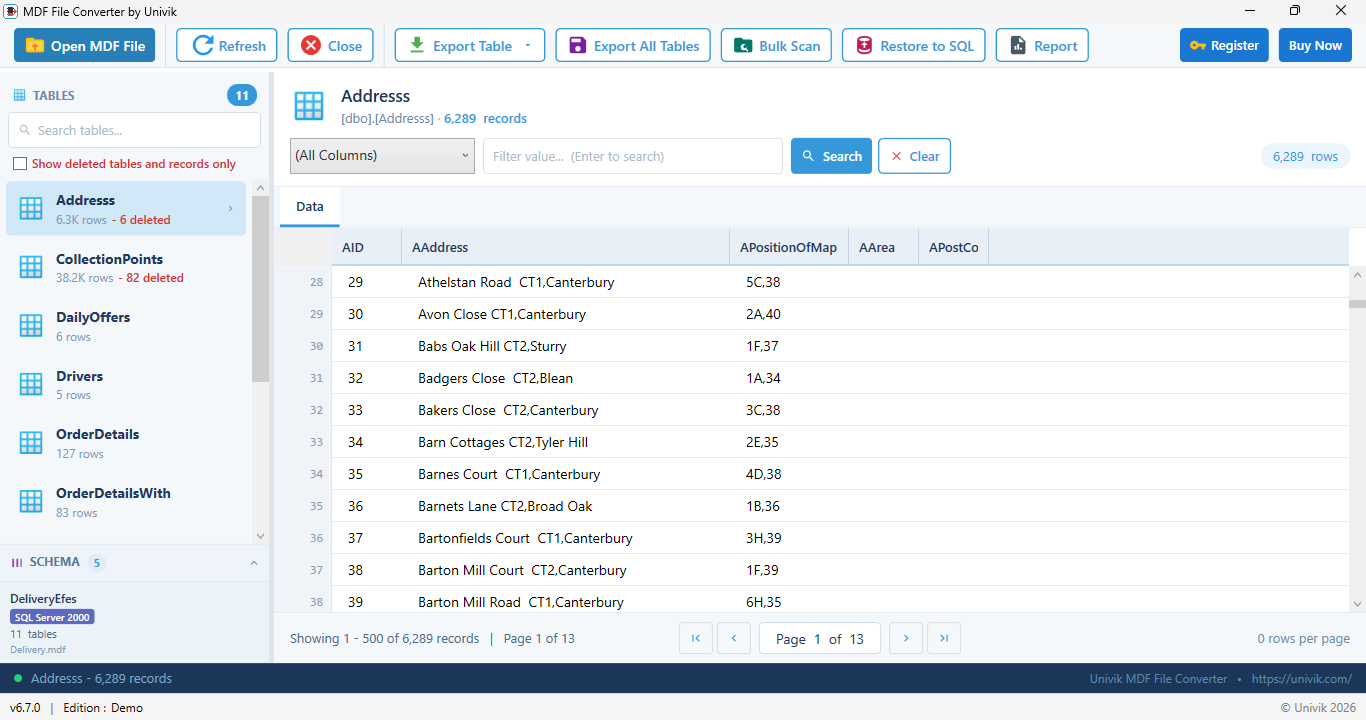
Every table that survived The recovered tables load with their rows, read straight from the intact pages. The count next to each table tells you how much came back before you save.
Save or export the recovered data
Save the recovered tables to a new SQL Server database, to a SQL script with the schema and INSERT statements or to CSV and Excel files. Point the export at a healthy server or drive, never back at the damaged file.
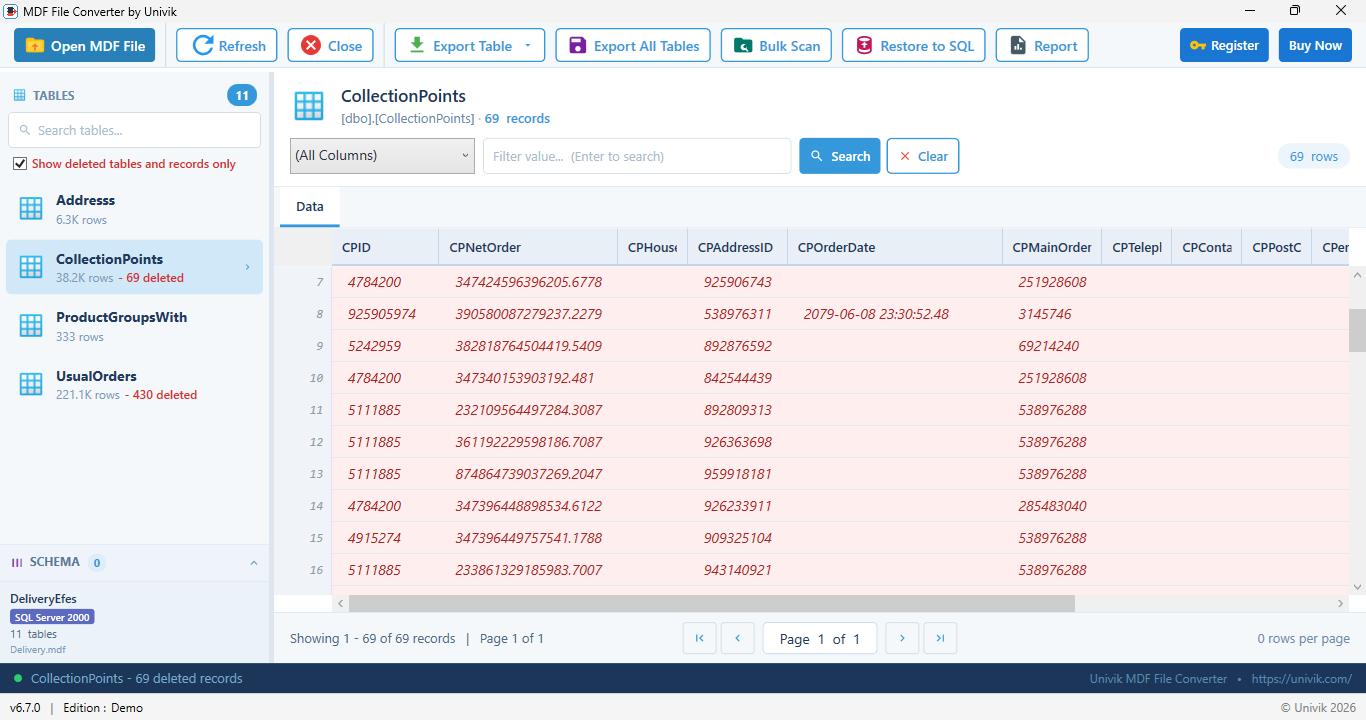
Deleted rows too Rows marked deleted but not yet overwritten are recovered and flagged, so a corruption repair doubles as a way to get back records that were removed before the file broke.
Univik MDF Repair Tool reads the corrupt .mdf at the binary level, skips the broken pages and recovers the tables, records, dropped tables and deleted rows it can still read. No SQL Server, no attach, no backup.
Windows 11 / 10 / 8 / 7 · reads the file read only · the free demo scans and previews what it can recover
What Can a Repair Not Recover From a Corrupt MDF?
No method can recover data that is physically gone. A page that was overwritten, zeroed or never written to disk is gone, because the bytes that held your rows are no longer there. No repair and no reader can recreate them. This is why a copy made before the corruption spread, or a backup, is always better than any repair.
Two more limits are worth naming. A database protected with Transparent Data Encryption is stored encrypted, so nothing reads its pages without the certificate. And a file that is truncated, so that whole ranges of pages are missing from the end, gives back only what is still present. A repair recovers what survived on the disk, not what the failure already destroyed.
The short version
- A corrupt MDF is a SQL Server database with broken 8 KB pages. It shows as suspect, or as error 823, 824 or 825.
- Restore from a good backup first. Microsoft says it loses the least, because it brings back known good data.
- No backup and the database attaches: DBCC CHECKDB REPAIR_REBUILD is safe, REPAIR_ALLOW_DATA_LOSS deletes pages.
- A suspect database that will not open: emergency-mode repair is the very last resort, and it can lose data.
- No backup and you cannot lose rows: read the file with a repair tool that keeps every intact row. Copy the file first.
Get the free Univik MDF Repair demo
How Do You Prevent MDF File Corruption?
You cannot stop every hardware fault, but a few habits catch corruption early and keep a clean copy ready. Turn PAGE_VERIFY CHECKSUM on for every database, so SQL Server flags a bad page the moment it reads one. Take regular backups and test that they restore, because a backup you have never restored is not proven yet. Run DBCC CHECKDB on a schedule, so damage shows up in days instead of months. Keep the database on reliable storage behind a UPS, so a power cut does not leave a write half finished. Never copy a live .mdf as a backup, take a real backup instead. For the full list of what triggers it, read what causes SQL Server corruption.
MDF Repair Questions
Can DBCC CHECKDB repair a corrupt MDF file?
Yes, if SQL Server can still attach the database. REPAIR_REBUILD fixes index-level damage with no data loss. REPAIR_ALLOW_DATA_LOSS fixes the rest but can delete pages and rows to force the database consistent. Both need the database in single user mode, and Microsoft recommends running them inside a transaction so you can review the result.
Does REPAIR_ALLOW_DATA_LOSS delete my data?
It can. Microsoft's own documentation says REPAIR_ALLOW_DATA_LOSS can lose more data than restoring from a backup, and calls it an emergency last resort to use only when a backup is not available. It forces the database consistent by discarding the pages it cannot fix, so rows on those pages are gone.
How do I repair an MDF file that is marked suspect?
A suspect database will not come online, so DBCC CHECKDB cannot run against it normally. You set the database to EMERGENCY then SINGLE_USER, then run DBCC CHECKDB with REPAIR_ALLOW_DATA_LOSS. This rebuilds the transaction log and can lose data, so copy the .mdf and .ldf files first. A binary repair tool reads the file without this step.
Can I repair a corrupt MDF file without SQL Server?
Yes. A binary repair tool such as Univik MDF Repair Tool reads the MDF as raw pages, works around the broken ones and reconstructs the schema from the file to recover the tables, records, dropped tables and deleted rows that survive. It works with no SQL Server running, nothing attached and no backup.
Can I repair a corrupt MDF file without a backup?
Yes, with two routes. Either ask SQL Server to force the database consistent with DBCC CHECKDB REPAIR_ALLOW_DATA_LOSS, which can delete data. Or read the file directly with a repair tool that keeps every row still intact. Copy the file before either route, because a repair that goes wrong should never be run on your only copy.
What SQL Server errors mean the MDF file is corrupt?
Error 823 and error 824 are I/O errors that name a page SQL Server could not read cleanly, and error 825 is a read-retry warning. A database that fails recovery at startup is marked SUSPECT or RECOVERY_PENDING. Any of these means the MDF has damaged pages and needs repair or recovery.
Is it safe to run DBCC CHECKDB REPAIR?
REPAIR_REBUILD is safe because it has no data loss. REPAIR_ALLOW_DATA_LOSS is not, because it can delete data and cannot be rolled back once committed. Back up the .mdf and .ldf files first. Put the database in single user mode and run the command inside a transaction so you can review the result before you accept it.
What can a repair not recover from a corrupt MDF?
Nothing brings back a page that was physically overwritten, zeroed or never written to disk, because the bytes are gone. A database protected with Transparent Data Encryption cannot be read without its certificate. A repair recovers what is still on the disk intact, not data the corruption already destroyed.
Can I repair an MDF file without the LDF file?
Often yes. If SQL Server will not attach the .mdf because the .ldf is missing or damaged, you can rebuild a fresh log with the ATTACH_REBUILD_LOG option, or use a binary repair tool that reads the .mdf on its own and rebuilds the data with no log at all. Copy the .mdf first, then try the rebuild.
What should I do after repairing a corrupt MDF file?
Run DBCC CHECKDB once more to confirm the database now comes back with no errors. Rebuild the indexes and recheck the constraints, because a repair can leave them stale. Take a fresh full backup straight away, so the recovered database has a clean restore point. If a failing disk caused the damage, move the database to healthy storage before you go live again.
 About This Guide
Written and maintained by Leena Taylor Paul and the Univik team, developers of Windows data conversion and recovery software since 2013. The repair methods and command syntax were checked against Microsoft's DBCC CHECKDB documentation and the sources below, and the screens on this page come from Univik MDF Repair Tool reading a real corrupt SQL Server database. Last verified September 20, 2026. Need a hand? Contact our support team.
Sources checked: Microsoft Learn: DBCC CHECKDB and its REPAIR options · Univik: What causes SQL Server database corruption · Univik MDF Repair Tool