 Univik Marg Data Recovery Toolkit, Viewer Module for Windows
 At a Glance
 Key Features
Finds the Data Folder for You
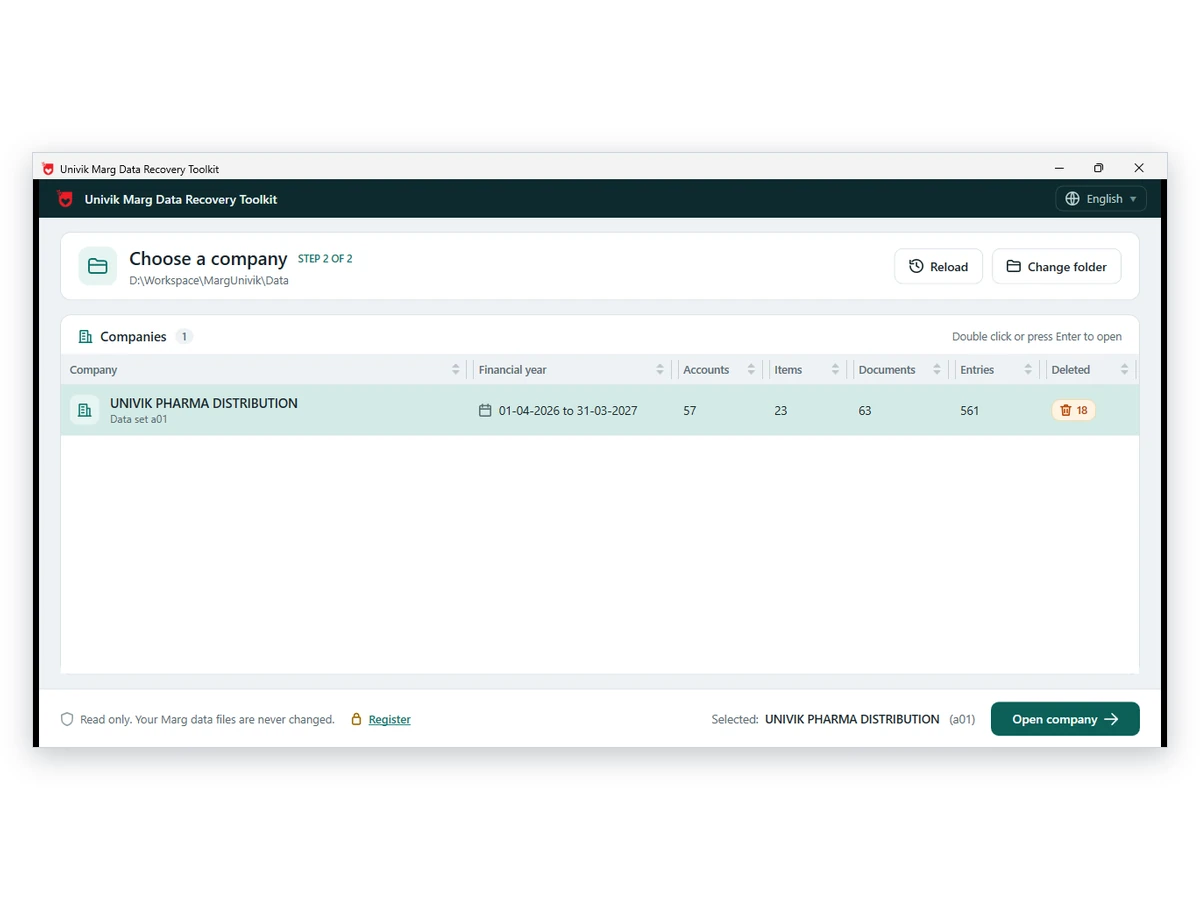
The viewer scans the fixed drives for Margwin.exe and the Data folder beside it. If nothing turns up, choose the folder by hand.
Univik Marg Data Recovery Toolkit, Viewer Module for Windows
Univik Marg Data Recovery Toolkit includes a free viewer for Windows. It opens company data folders from Marg ERP with nothing else installed. Accountants and distributors browse accounts, items, batches and bills. A licence adds saving to PDF, Excel, CSV or JSON.
Read-OnlyFree to ViewRuns OfflineNo Marg Needed
*Browsing is free. A free copy saves only the first 10 items of every section. Any licence lifts that limit and can be refunded inside 30 days.

At a Glance
6
Data Views
Accounts, items, batches, documents, ledger entries and outstanding bills.
0
Program Installs
The folder is read directly, so neither an ERP program nor its licence is needed.
4
Export Formats
PDF, Excel, CSV and JSON with a licence.
1.0
Current Version
Works on Windows 11 or 10 after .NET Framework 4.8 is installed.
$0
To Browse
Browsing costs nothing. Saving stops at 10 items per section until a licence ($99 and up) lifts it.
Key Features
The viewer scans the fixed drives for Margwin.exe and the Data folder beside it. If nothing turns up, choose the folder by hand.
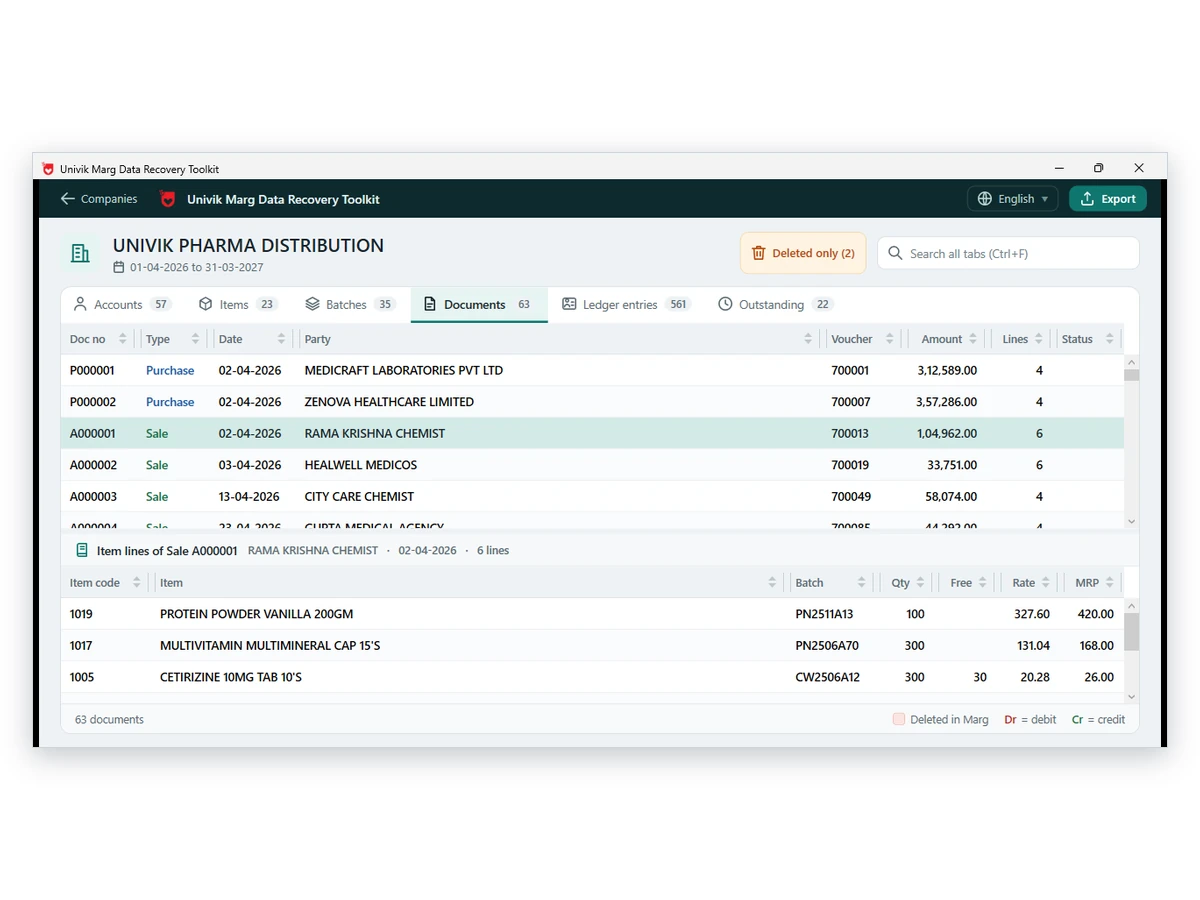
Each tab lists its rows with opening, debit, credit and balance. Batches show expiry and MRP, and the stock column turns red below zero.
Pick a sale or purchase bill and its lines appear underneath: item, batch, quantity, free quantity and rate. A divider drags to give either part more room.
Press Ctrl+F and type a party, item or amount. Matches show in every tab together. The Outstanding tab adds days overdue for each pending bill.
Rows that were deleted but still sit in the files carry a Deleted in Marg flag. One switch lists only those rows.
The folder opens read-only. The footer of the window repeats that the data files are never changed, so each file keeps the state it arrived in.
The Core Problem
Because a company is a heap of table files with extensions such as a01, and only Marg assembles them into books. Two obstacles block anyone who tries.
Trap 1: Excel Cannot Read These Files
Excel does not open order.a01 or gledger.a01 as a workbook, because the letters after the dot name a company and a period. The Marg data file guide explains the naming.
Trap 2: Marg Exports Report by Report
Reports go to Excel one at a time, as users ask on Techjockey. The Tally and BUSY export sits under Utilities and needs the program running, per Marg Care.
The Fix: Open the Data Folder Straight From Disk
Univik Marg Data Viewer reads the table files itself, so no other program is needed. Our advice: open a copy. Duplicate the folder onto a local drive and browse the duplicate while the original stays put. The tool writes to neither.
Our verdict: look before you export. The three-company sample folder Univik tested held 75, 195 and 113 accounts, so a company letter alone tells you little. Open each company and check its name and period first.
What It Opens
order.a01
Account Master
Every party, bank and expense head with its opening, debit, credit and balance.
gledger.a01
Voucher Entries
Each debit or credit leg is its own row, carrying the date, the account and the narration.
mdis / dis
Bills and Item Lines
Bill totals sit in one file and the item lines of each bill in the other.
snmanrc1.ini
Company and Period Lists
Two small files name the companies and the dates of each period.
Three Steps
View the books on a PC without the ERP program, straight from the folder.
Install the Viewer
Run the toolkit setup on a Windows 11 or 10 PC. No other software is required.
Pick the Data Folder
Let the viewer search the drives for Margwin.exe, or choose the Data folder by hand. Copy it from a pen drive or another PC first.
Open a Company
Choose a company and period from the list. Browse the six tabs, search across them and switch on deleted records. Saving needs a licence.
Windows 11 or 10 · no other program installed · the folder is only read
Real Situations
A Client Hands Over a Data Folder
The office PC of a CA carries no accounting program. Open the received folder and read its accounts and bills ahead of the first meeting.
Who Deleted That Entry?
A partner suspects a bill vanished after posting. Switch on deleted records and each one shows its flag beside the live rows.
Only the Old Drive Survived
The shop PC died and a drive holds the Data folder. See what the folder contains before the software goes back on.
Finding Your Files
A default Marg install sits in C:\MARGERP with Margwin.exe as the program. Companies and periods live in the Data folder inside it. A file named order.a01 belongs to company A.
Lost the path? Search the drive for order.a01. For what each table file holds, see the Marg data file guide. For a folder that came from a client, follow the blog on opening this data without the program step by step.
Compare Your Options
Keep Marg for daily billing. Use the viewer when the program is gone from the PC or a whole period must be read at once.
| What you need | Open It in Marg | Excel or Power BI | Univik Marg Data ViewerFREE |
|---|---|---|---|
| Price | Included with Marg | A Microsoft licence | Free to browse, from $99 to export |
| Marg must be installed | Yes | Does not apply, the files will not load | No |
| Understands the table files | Yes, within the program | No, not directly | Yes |
| Whole company at once | No, report by report | Does not apply | Yes, as one workbook or CSV files |
| Changes the Data folder | Yes, each entry alters it | Does not apply | Never, read-only |
| Output choices | Excel per report plus Tally and BUSY export | Does not apply | PDF, Excel, CSV and JSON once licensed |
Bills are entered in Marg, which also exports to Tally and BUSY from its Utilities menu, as Marg Care describes. The viewer covers the case where the program is absent. Moving data to Tally is a separate job for the Marg Data Converter.
What You Need
Operating System
Use Windows 11 or Windows 10. The .NET Framework 4.8 runtime, or anything newer, completes the list.
No ERP Program
Marg itself may be missing, expired or unlicensed. The viewer never calls on it.
Folder Access
Read permission on the folder is enough. A pen drive or network share works best once copied to a local disk.
Saving Needs a Licence
Opening a company costs nothing and saving needs a licence. CAs and accountants take Personal ($99). Commercial recovery companies and business houses take Technician ($199). Both are for 2 PCs.
| Software | Univik Marg Data Recovery Toolkit, viewer module |
| Version | 1.0 |
| Operating system | Windows 10 or Windows 11 |
| Framework | Microsoft .NET Framework 4.8 or newer |
| Opens | Marg ERP Data folders with table files such as order.a01 and gledger.a01 |
| Saves as (licence needed) | PDF, Excel, CSV or JSON |
Questions
More Tools
An evidence report for deleted records, entry stamps and file fingerprints.
Prepared by Univik Product team
This page was written on 12 October 2026, using the product itself and Marg Care, the vendor's help site, linked where it is cited. The viewer never changes your folder. A 30-day refund policy covers every licence.
Last reviewed 15 October 2026
Making Software Since 2013Folder Left UntouchedRuns on Your PCRefund Within 30 Days
Marg is a trademark of its owner, and Univik has no tie to Marg Compusoft.


 The Core Problem
 What It Opens
 Three Steps
 Real Situations
 Finding Your Files
 Compare Your Options
 More Tools