 Univik Marg Data Recovery Toolkit, Forensic Module for Windows
 At a Glance
 Key Features
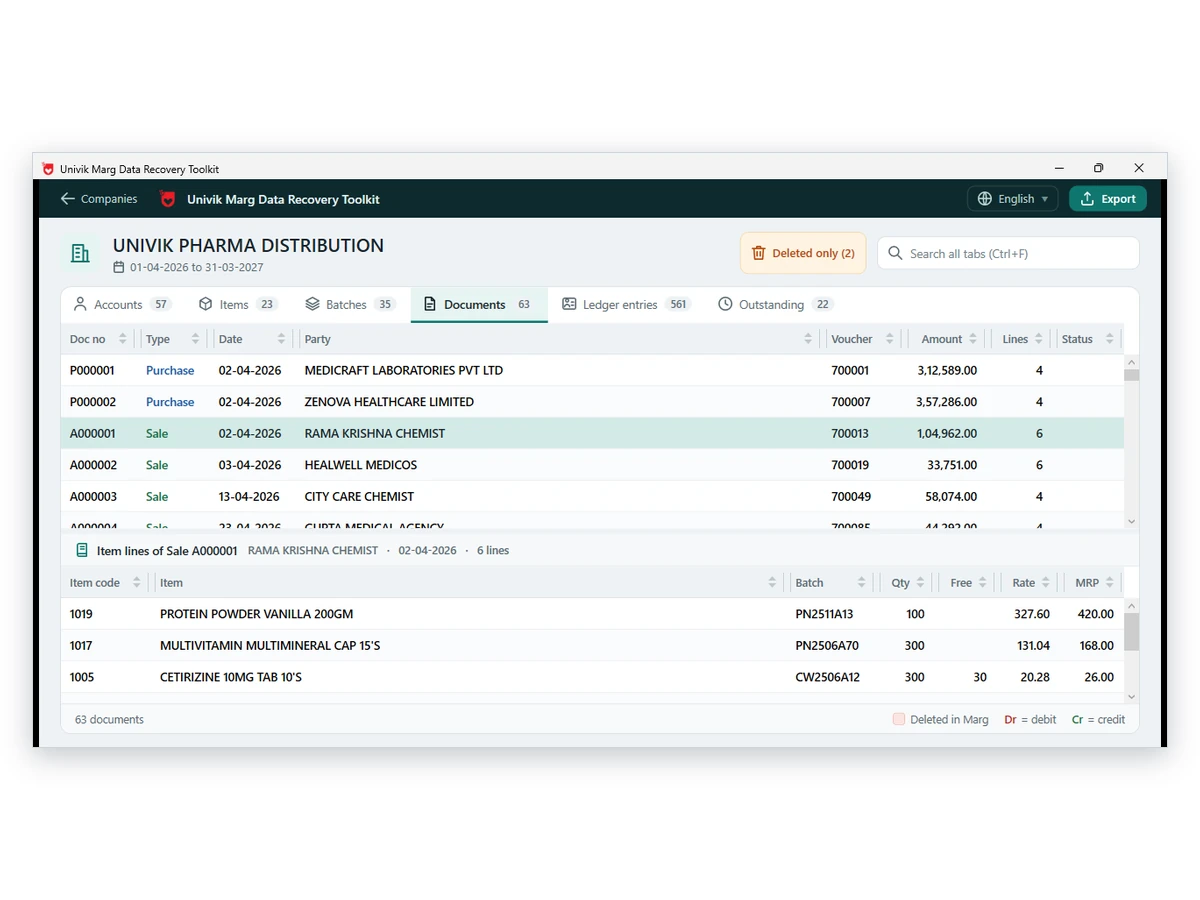
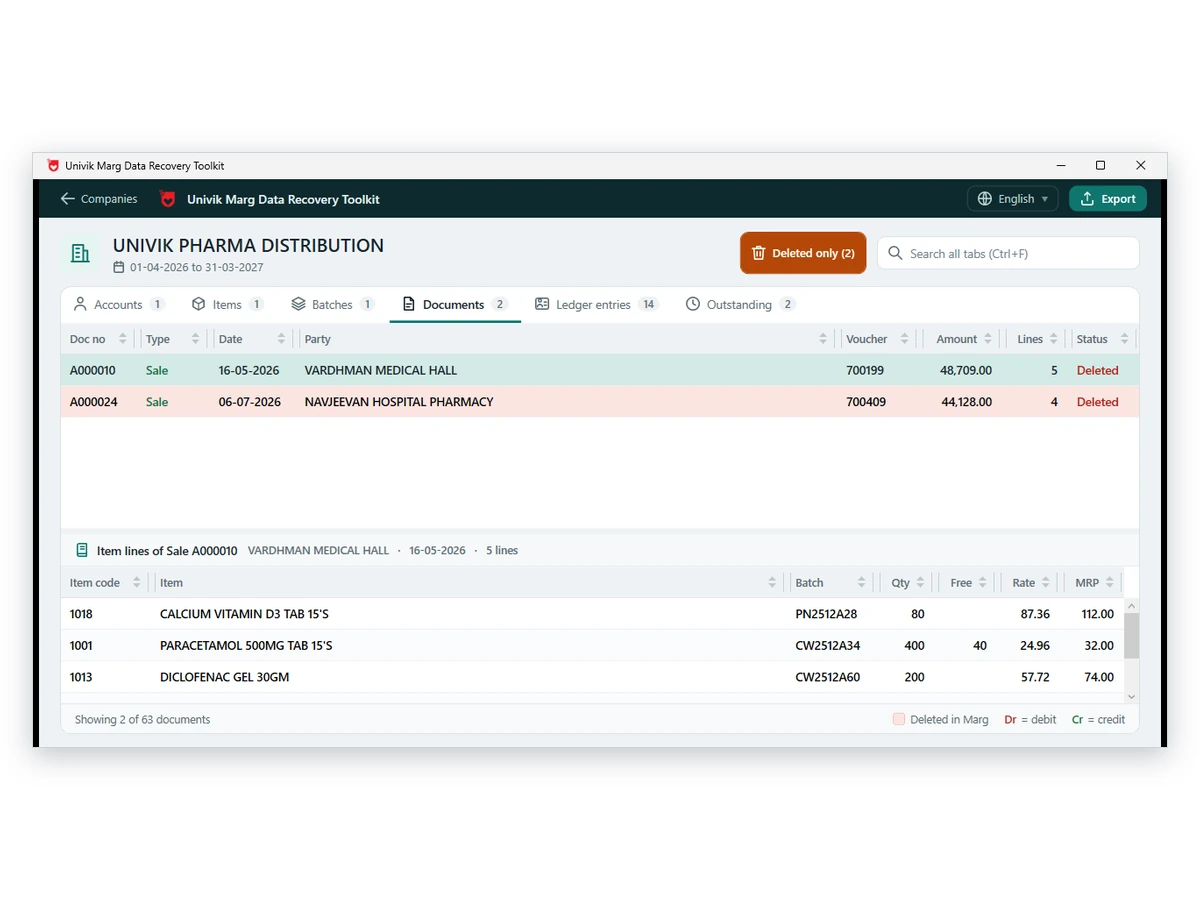
Lists Deleted Records
Invoices, ledger entries, accounts, items and batches with a delete mark are listed with their row numbers. A deleted entry under a live voucher shows that the voucher was edited.
Univik Marg Data Recovery Toolkit, Forensic Module for Windows
Univik Marg Data Forensic Analyzer shows what a Marg company folder still holds: deleted records, who entered and changed entries, gaps in invoice numbers and a fingerprint for every file. It reads a copy and writes nothing back to it.
Evidence ReportNo Marg NeededRead-OnlyRuns Offline
*The free copy builds the full analysis on screen. Each section of the saved report holds 10 items until a licence lifts the cap, and a refund can be requested for 30 days.

At a Glance
12
Built-in Checks
Debit against credit, balances, number gaps and date checks.
6
Written Limits
The last page of each report says what it cannot show.
2
Report Files
The Evidence report saves as PDF and as an Excel workbook.
1.0
Current Version
Runs under Windows 11 or 10, provided .NET Framework 4.8 is installed.
$0
To Try It
The analysis opens free. The Forensics licence costs $599 and covers 2 PCs.
Key Features
Invoices, ledger entries, accounts, items and batches with a delete mark are listed with their row numbers. A deleted entry under a live voucher shows that the voucher was edited.
Each record carries who entered it and when. Edited records add who changed them, when and on which PC. An Operators section totals the work of each login.
Each invoice series is scanned for numbers that no record uses. Deleted records count as used, so a gap points at something never issued or removed for good.
Entries made over 30 days after the voucher date, dated after the day they were entered or dated outside the financial year are listed with the reason.
An older and a newer copy of one company are matched record by record. Old and new values stand side by side, with the entry stamp beside them.
The size, last written time and SHA-256 of each file of the year go into the report. Take them again later and equal values show nothing moved.
The Core Problem
Because the program keeps no change history, and the usual clean-up routines remove what an examiner needs.
Trap 1: No Earlier Values
Marg stores the current value of a field and not the one before an edit. Without an older copy of the company, nobody can say what an entry said last month.
Trap 2: Packing Erases Deleted Rows
Deleted rows stay in the files until the company data is packed or rebuilt. After that they are gone for good, so the first copy of a folder is the best evidence there will be.
The Fix: Examine a Sealed Copy
Univik Marg Data Forensic Analyzer reads a copy of the folder and writes nothing to it. Our advice: copy first, fingerprint the files and keep the original untouched. Run the analysis on the copy and keep the fingerprints with the case notes.
Our verdict: treat every flag as a lead and never as a finding. A deleted mark, a number gap or a late entry tells you where to look. The report says the same on its last page, with a line for the examiner to sign.
What It Examines
mdis / dis
Invoices
Invoice heads and lines are read with their party, amount, entered date and operator.
gledger.a01
Ledger Entries
Each entry is tested against its voucher and its account, then listed when deleted.
order.a01
Accounts
Account balances are tested against opening, debit and credit. Deleted accounts show who still uses them.
pro / probat
Items and Batches
Deleted items and batches are listed with the entries that still use their codes.
What Is Inside the Marg Evidence Report?
| Section | What it lists |
|---|---|
| What the data files hold | Rows, active rows and deleted rows for every table |
| Do the numbers match each other | Twelve checks, each marked OK, Review or Info |
| Vouchers whose debit and credit differ | Only when a voucher is out of balance |
| Invoices deleted in Marg | Party, amount, entered date and operator, left-over postings |
| Ledger entries deleted in Marg | Whether the voucher is still active, which means it was edited |
| Accounts, items and batches deleted | Entries that still use the deleted code |
| Records changed after first saved | Entered and changed stamps with operator and PC |
| Missing invoice numbers | Gaps inside each series |
| Entries with unusual dates | Entered over 30 days late, future dated or outside the year |
| Who entered and changed records | Operators with counts, first and last time and PCs seen |
| Source file fingerprints | Size, last written time and SHA-256 per file |
| Rows that were repaired or doubtful | Appears only when the year came from damaged files |
Three Steps
Examine a sealed copy of the Data folder using a PC with no Marg installed.
Copy the Folder
Copy the Data folder of the company onto the examining PC and keep the original sealed. Add an older copy of the same company when you hold one.
Open the Year and Run the Report
Open the company year in the software. Enter a case reference and the examiner name, then choose the Evidence report. For two copies, choose Compare two copies.
Review the Flags and Sign
Read each Review line and the written limits on the last page. Check any flag against the books, then add your name and signature to the printed report.
Windows 11 or 10 · read-only access to your data · Univik support can explain any line of the report
Real Situations
A Bill Has Vanished
A partner says an invoice was posted and is now gone. The deleted list and the number gaps show whether the record is still in the files.
Who Posted This Voucher?
An auditor asks which login entered a voucher and from which PC. The stamps answer that, as far as the PC clock and login can be trusted.
Two Backups, One Doubt
A year-old copy and today's folder disagree on a party balance. Compare the two and read each changed field with old and new values.
Before You Start
Take the whole Data folder and not one table. Hold every period of the company, such as gledger.a01 and gledger.a02, and leave the original untouched. Keep the copy on the examining PC.
Packing the company removes deleted rows for good, so do not clean or pack the live company before you copy it. For a plain description of each file, read the Marg data file guide. A folder that is damaged goes to the recovery software. The blog on deleted and changed entries explains what the files keep.
Compare Your Options
A general compare tool sees bytes. Univik Marg Forensic Software reads the records and says what changed in accounting terms.
| What you need | General file compare tool | Hash tool alone | Univik Marg Forensic SoftwareTRIAL |
|---|---|---|---|
| Understands Marg records | No, it compares raw bytes | No | Yes |
| Lists deleted rows | No | No | Yes, by table |
| Shows operator and PC | No | No | Yes, from the entry stamps |
| Shows old and new value by field | Bytes, not fields | No | Yes, with Compare two copies |
| File fingerprint | Rarely | Yes | SHA-256 for each file of the year |
| Cost | Free to low | Free | Free to try, Forensics licence $599 |
The viewer lists deleted rows too, as described in the Marg data viewer. The Evidence report adds checks, stamps and fingerprints. Two saved copies line up as the blog on comparing backups describes in detail.
What You Need
System and Memory
Run it on Windows 11 or 10 and keep .NET Framework 4.8 or higher installed. A year with many invoices wants spare memory while the checks run.
A Sealed Copy
Copy the folder before you open it and keep the original aside. Fingerprints taken later can then be matched with the first set.
An Older Copy
Compare two copies needs an older or a newer copy of the same company. Without one the report still lists deleted records and stamps.
Licence Tiers
The analysis opens free. Law enforcement and digital forensics investigators buy Forensics ($599). The licence runs on 2 PCs.
| Module | Univik Marg Data Recovery Toolkit, forensic module |
| Version in use | 1.0 |
| Supported systems | Windows 11, Windows 10 |
| Dependency | .NET Framework 4.8 or newer |
| Examines | Marg ERP Data folders, one company and financial year at a time |
| Report formats (licence needed) | PDF and Excel, with SHA-256 file fingerprints |
Questions
More Tools
Compiled by Univik Product team
This page was prepared on 12 October 2026, working from the product and its report layout. The software never changes the Data folder. A flag is a lead and not proof, and the report states its limits on the last page. Licences carry a 30-day refund policy.
Checked on 15 October 2026
In Business Since 2013Originals Stay SealedOffline Examination30-Day Money-Back Window
Marg belongs to its owner. Univik is a separate company from Marg Compusoft. Use the software only on data you may lawfully examine.


 The Core Problem
 What It Examines
 Three Steps
 Real Situations
 Before You Start
 Compare Your Options
 Questions
 More Tools