 Univik Marg Data Recovery Toolkit, Converter Module for Windows
 At a Glance
 Key Features
Everything in One Excel Workbook
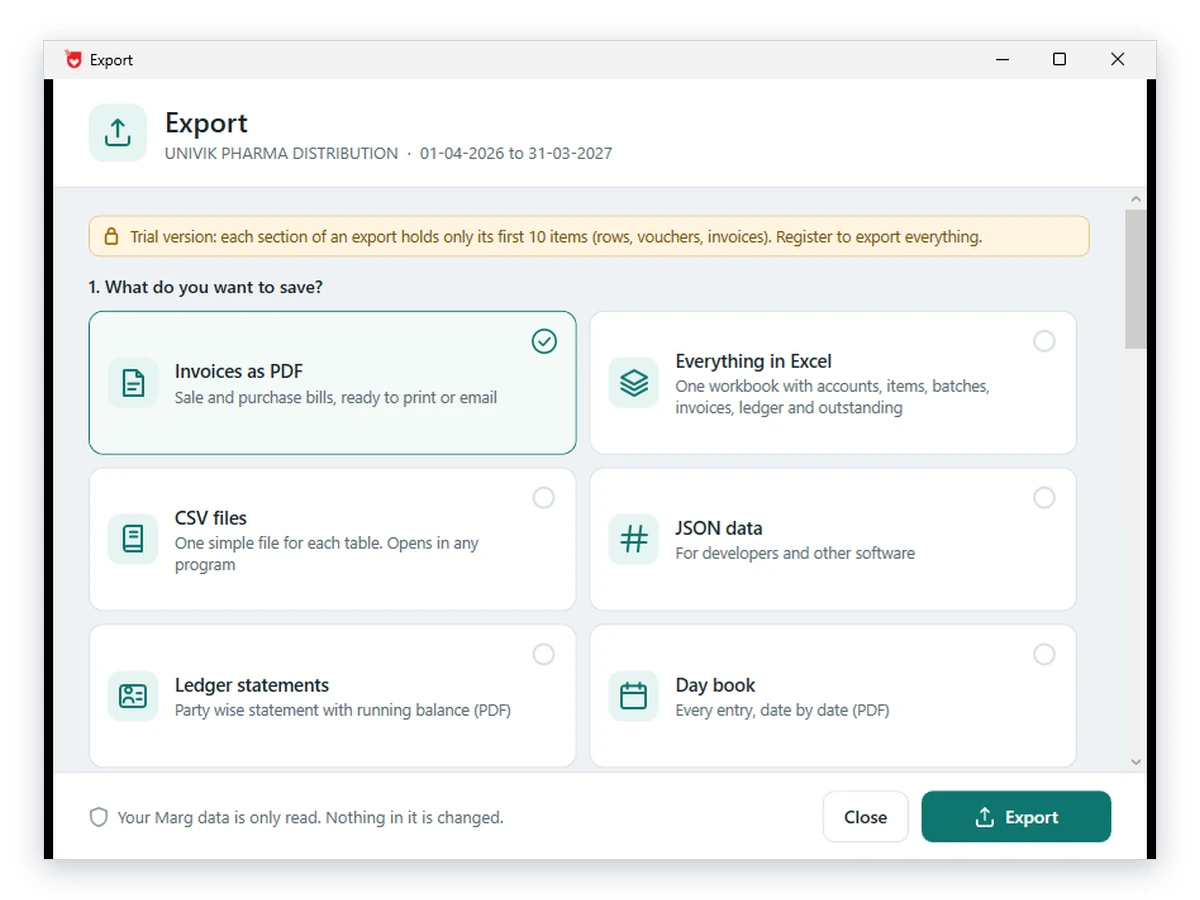
One workbook carries the accounts, items, batches, invoices, ledger and outstanding bills. It replaces a long list of single-report exports.
Univik Marg Data Recovery Toolkit, Converter Module for Windows
Univik Marg Data Recovery Toolkit includes a batch converter for company data from Marg ERP. Pick a folder and it writes invoices, ledgers, the day book, outstanding bills and stock to PDF, Excel, CSV or JSON. Tally XML and a BUSY Excel set come out as well, for a move to another program.
Whole Company at OnceFree to TryRuns OfflineNo Marg Needed
*The free copy converts a sample of 10 items per section. Any licence removes that cap, and a refund can be asked for within 30 days.

At a Glance
13
Export Choices
Invoices, reports, data files, migration sets, a comparison and an evidence report.
0
Program Installs
Reads the folder itself. The ERP program stays off the PC.
6
File Formats
PDF, Excel, CSV, JSON, Tally XML and BUSY Excel.
1.0
Current Version
Meant for Windows 11 or 10 PCs that carry .NET Framework 4.8.
10
Free Items per Section
A free copy saves a sample. Licences start at $99 and lift the cap.
Key Features
One workbook carries the accounts, items, batches, invoices, ledger and outstanding bills. It replaces a long list of single-report exports.
Sale and purchase bills come out ready to print or email, in one file or one file per bill. Seller details are typed once and kept on the PC.
Ledger statements with a running balance, the day book, outstanding bills with days late, stock with expiry and a one-page trial balance.
Plain files that Power BI, a database or a script can load. Filters for dates and voucher types apply to them as well.
Masters go first and vouchers follow. The file suits TallyPrime or Tally.ERP 9 and comes with a short how-to-import note.
Account groups, accounts and items lead. Sheets for sales, purchase, receipt, payment, contra and journal vouchers follow for BUSY's Excel import.
The Core Problem
Because the program was built to keep books, not to hand them over. Two obstacles show up in every migration or audit request.
Trap 1: Marg Exports One Report at a Time
A report goes to Excel on its own, as users ask on Techjockey. A full company means dozens of runs, each with its own date range and filters.
The Fix: Convert From the Data Folder, Not From Marg
Univik Marg Data Converter reads the table files directly and needs no running program. Our advice: convert a copy of the folder. Place the Data folder on a local drive, aim the converter at that duplicate and leave the original where it was.
Our verdict: convert one month first. Set the date range to a single month, import the result into the target program and compare the totals. Ten minutes on a small slice saves a week of undoing a full-year import.
What It Writes
Invoices and Reports
Bills, ledger statements, day book, outstanding, stock with expiry and the trial balance.
.xlsx
Workbook and BUSY Set
One company workbook, plus the sheet-per-voucher-type set that BUSY imports.
.csv / .json
Data for Other Tools
Plain tables for Power BI, a database or a script.
.xml
Tally Import File
Masters first, then vouchers, with an import note.
Three Steps
Turn a company into files for Excel, PDF or another accounting program, without Marg on the PC.
Open the Company
Run the setup on Windows 11 or 10, pick the Data folder and double-click a company and period from the list.
Choose What to Export
Click Export, pick a card such as Everything in Excel or Invoices as PDF, then set the date range and the voucher types.
Save and Open the Result
Check the folder shown and save. Then open the file or the folder from the result screen. A free copy saves 10 items per section.
Windows 11 or 10 · source files stay as they are · help from the Univik support team
Real Situations
Month-End Pack for a Distributor
Party-wise ledger statements and the outstanding list go to PDF for the collection team, with days late on every bill.
Moving a Business to TallyPrime
The old Marg PC is retiring. Write the Tally XML from a copy of the folder and import masters before vouchers.
Feeding Power BI or a Database
An analyst wants clean tables. CSV or JSON files load without a connector for Marg's own files.
Invoice Details
Marg keeps no seller name, address, GSTIN or drug licence number in its data files, so the converter asks for them once and saves them on the PC. Phone, email and terms are optional lines.
PDF text uses Latin letters only and the rupee sign prints as Rs. Check the first PDF against a bill you know. The Excel export guide covers the spreadsheet side.
Compare Your Options
Marg's own export suits one report on a working PC. Use the converter when the whole company has to leave in one run or the program is missing.
| What you need | Marg's Own Export | Excel by Hand | Univik Marg Data ConverterTRIAL |
|---|---|---|---|
| Needs Marg running | Yes | Not applicable | No |
| A whole company in one run | No, report by report | No, copy and paste | Yes |
| Tally XML | Yes, from Utilities | No | Yes, masters then vouchers |
| BUSY Excel set | Through Marg2BUSY and a script | No | Yes, a sheet per voucher type |
| Reads a copy of the folder | Only what Marg can open | No | Yes, from the table files |
| Cost | Part of Marg | Your time | Free sample, licences from $99 |
Both migration routes are described step by step in the blogs on Marg to Tally and Marg to BUSY.
What You Need
Windows and .NET
Windows 11 or 10 is required. The PC also needs .NET Framework 4.8 or any later runtime.
No ERP Program Needed
The converter works from a copy of the Data folder, so the ERP program does not need installing.
An Output Folder
Choose any folder with room for the files. Large invoice runs can write one PDF or one PDF per bill.
Licence Tiers
Converting 10 items per section costs nothing. After that a CA or accountant picks Personal ($99). A recovery service or business house picks Technician ($199). Both licences cover 2 PCs.
| Application | Univik Marg Data Recovery Toolkit, converter module |
| Release | 1.0 (current) |
| Platform | Windows 11 or Windows 10 |
| Runtime | Microsoft .NET Framework 4.8 or higher |
| Input | Marg ERP Data folders made of table files such as order.a01 and gledger.a01 |
| Output | PDF, Excel, CSV, JSON, Tally XML and BUSY Excel |
Questions
More Tools
Written by Univik Product team
The writing date is 12 October 2026. Sources are the product and the Marg Care and BUSY help pages linked in the text. The converter never changes the Data folder. Licences carry a 30-day refund policy.
Page dated 15 October 2026
Built by Univik Since 2013Source Files Never AlteredWorks Without Internet30 Days to Ask a Refund
Each of the names Marg, BUSY and Tally belongs to its owner. Univik has no tie to Marg Compusoft.


 The Core Problem
 Three Steps
 Real Situations
 Invoice Details
 Compare Your Options
 Questions
 More Tools