Marg sends one report to Excel at a time, so a full company takes dozens of exports.
To get everything at once, use a tool that parses the Data folder and saves one workbook with separate sheets for accounts, items, batches, bills, ledger entries and unpaid invoices. Then compare row counts and the trial balance.
An auditor wants every bill in a sheet, or a new accountant wants the full year and not a stack of PDFs. The books sit in Marg, which hands over one report at a time, so the work becomes a long run of exports that all look slightly different and never quite line up.
Who Needs All Marg Data in One Excel File?
Where are you stuck? Pick the card and jump to the part that helps.
You want every account, bill and ledger entry in a sheet, so you can filter and sample without asking the client for report after report.
See why reports are slow →The new person works in Excel and wants the full year, not a stack of PDFs.
Run the export →A partner will ask whether anything is missing from the workbook, so you need counts and totals that tie back to the books before you send it.
Check the result →Excel is where most accountants sort, filter and sample, but the books live in table files that Excel cannot open. This guide shows you how to get a whole company into a workbook, what the workbook holds and how to tell that nothing was lost on the way.
Why Does Exporting Marg Data to Excel Take So Long?
The program sends one report to Excel at a time. A user on Techjockey asks how to get more than that and gets the same answer. A full company then means dozens of runs with their own dates and filters, and every sheet takes its shape from the report that made it.
Limitations of the built-in export: one report per run, Marg kept open on that company for the whole job and no single file that holds the whole year.
Marg Care does document a bulk export, but it is for TallyPrime. Under the Utilities menu the program writes a masters file and a day book file in XML. That is a migration tool and not a spreadsheet export, so it does not answer the Excel question. The Tally transfer guide covers it in full.
Which way should you use? If one report is all a meeting needs and Marg is open, export it from the report screen. If you need the whole company, or Marg is not on the PC, use the converter. If you are moving to Tally, use the XML route and not Excel.
Which Ways Get Marg Data Into Excel?
| Route | Covers | Effort | Main risk |
|---|---|---|---|
| Export each report from the program | One report per run | High for a full year | Dozens of files with different layouts |
| The Utilities export for Tally | Masters and day book as XML | Medium | It is made for Tally and not for a spreadsheet |
| Retyping or copying from screens | Whatever you copy | Very high | Typing errors |
| Univik Marg Data Converter | The whole company in one workbook, plus CSV, JSON and PDF cards | Low | Windows only. Saving beyond the sample needs a licence |
How to Export All Marg Data to One Excel Workbook
Univik Marg Data Converter belongs to Univik Marg Data Recovery Toolkit and parses the table files on its own, so Marg can stay uninstalled. The steps below take about ten minutes for a mid-size company, and most of that is waiting for the workbook to write.
The workbook was checked against the books it came from: ledger debit and credit equalled the sum of month postings in 100% of ledgers, bill total equalled the sum of bill lines in 100% and the batch name repeated the item name in 214 of 214 batches. The bill sample is small, 6 and 3 bills in two companies and none in the third, so treat the bill rules as held so far rather than proven at scale.
- Copy the Data folderCopy the folder to a local drive, with every table file and both ini lists. Run the export on the copy and keep the original as received.
- Open the company and periodRun the Univik toolkit and choose the copied folder. Double-click the company and period you want from the list.
- Pick the Everything in Excel cardClick Export and choose Everything in Excel. Choose the dates and select which voucher types to include. Add deleted records only if you need them.
- Save the workbookCheck the output folder and save. A free copy writes ten items per section. That is plenty to see how the sheets look.
- Tie the workbook to the booksMatch the row counts on the Summary sheet with the viewer tabs. Compare the trial balance with one the client printed from Marg.
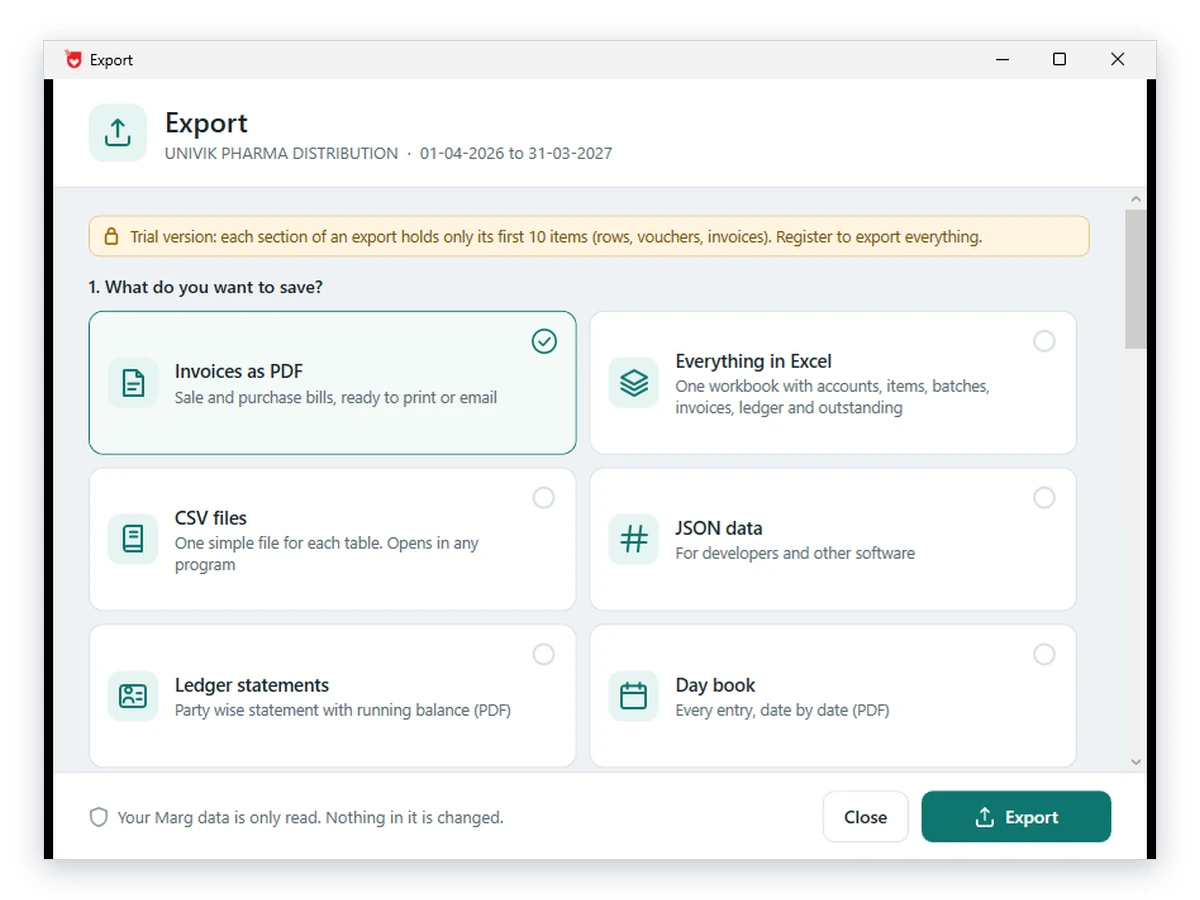
Univik Marg Data Converter reads the Data folder and writes the workbook without Marg on the PC.
Download Free Trial Order Now - From $99Needs Windows 11 or 10. A free build writes the first ten items per section. Converter page
What Is Inside the Workbook?
| Sheet | What each row is | Useful for |
|---|---|---|
| Summary | The company, the financial year, the date of export and the row count of every sheet | A first check that nothing is missing |
| Accounts | A party, bank or expense head with GSTIN, opening, debit, credit and balance | Party balances and trial balance checks |
| Items | A stock item with its pack and rates | Stock listings |
| Batches | A batch with expiry, MRP and stock | Expiry and slow-moving checks |
| Documents | A bill header (party, date and total) with who entered it and when | Sales and purchase sampling |
| Document lines | One item line of a bill | Item-wise sales and purchase checks |
| Ledger entries | One debit or credit leg of a voucher | Vouchers, day book, narration search |
| Outstanding | A pending bill with the days it is overdue | Collection follow-up |
Balances are shown without a sign and marked Dr or Cr. Note: a Recovery notes sheet is added only when some rows came from damaged files, so if you see it, read it before you trust the totals.
Other cards write the same records as CSV or JSON for Power BI and similar tools, and as PDF reports for the day book, ledgers, outstanding bills, stock and trial balance. See the Power BI guide for the CSV and JSON route.
How to Check That the Excel Export Is Complete
- The row count of each sheet matches the Summary sheet and the matching viewer tab
- The trial balance from the workbook matches one printed from the program
- The date range you set covers the whole financial year
- Deleted records were either left out on purpose or marked clearly
- You kept the folder name, the export date and the period beside the file
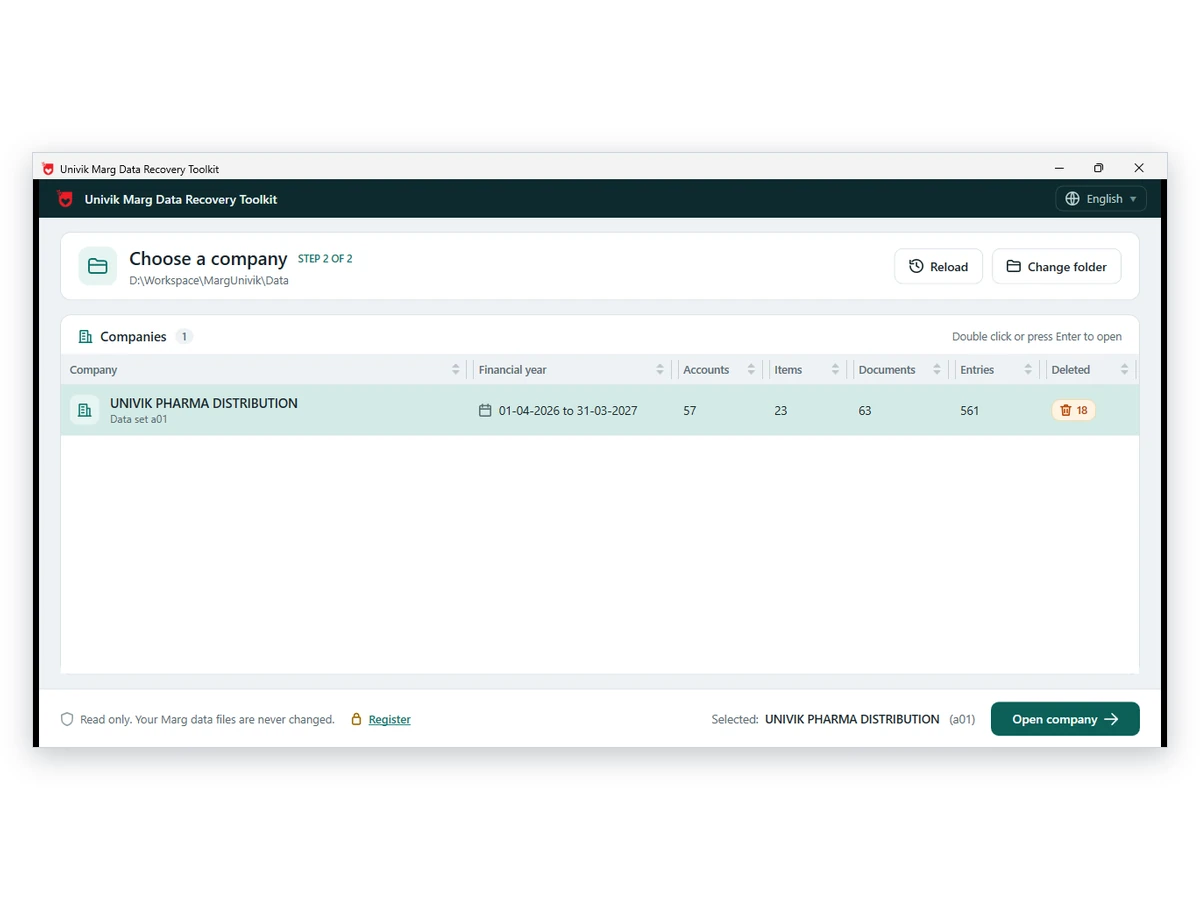
A company and period make one export. In the sample folder Univik tested, order.a01 held 75 accounts, order.b01 held 195 and order.c01 held 113, because a, b and c were three different companies and not three years. The company or year guide explains the naming.

Fix Common Problems When Exporting Marg Data
Do this: That is the free sample. Add a licence to save everything. The counts shown on screen are the full counts.
Do this: Look at the dates and the voucher types you selected. A narrow range or an unticked type leaves a sheet with nothing.
Do this: Compare deleted records first. If they were switched on, the totals will move. Then check that you opened the same company letter and period as the printed report.
Counts that will not tie? Contact our support team with the sheet name and the two numbers you are comparing.
Questions About Exporting All Marg Data to Excel

Staff at Univik reviewed the draft. Marg Care supplied the Tally export steps and a Techjockey thread supplied the one-report-at-a-time point. We read both on October 12, 2026. Converter details come from the converter page.
Pages we read: Marg Care article on exporting to Tally · Marg ERP 9 questions on Techjockey