Marg keeps every company as table files inside a Data folder, so any reader that understands the layout can open it without Marg.
Copy the entire Data folder to a local drive before anything else. Excel and Power BI cannot load these files. Load the copy into a data viewer or aim a second Marg install at it.
A client mails you a pen drive. A shop PC refuses to boot and a buyer wants last year's books before naming a price. The records survive in a folder each time and nothing on hand can display them. The folder is complete. The screen is missing.
Who Reads Marg Books Without the Program?
Which line fits your day? Each card links to the matching part of this guide.
You audit books for a living, the folder has come on a pen drive and no spare Marg seat is waiting for you, while the first meeting with the client is days away.
Read it with a viewer →Only a copy of the Data folder survived the disk, and before you reinstall anything you want to see what it holds and whether the last period is in it.
Prepare the folder →The seller kept books in it. Years of history decide your offer, so you need to read them first.
Weigh the routes →Marg keeps each company as a group of table files in one folder, and the program is what turns them into ledgers and bills on screen. Without it the records stay on the disk with no screen to show them. The sections below say which routes work and which do not, and which one you should pick.
Prepare the Folder Before Opening It Elsewhere
- Locate the Data folderA default install lives in C:\MARGERP, where Margwin.exe sits beside a Data folder. Yours may differ. When the path is unknown, search the drive for
order.a01. - Copy everythingBring every table file and both ini lists. Avoid working from the pen drive itself. A local copy keeps the delivered original untouched.
- List the companies and periods you wantEach table file name ends with a company letter and a two-digit period slot. Files order.a01 and order.b01 therefore belong to two companies and not to two years.
- Confirm you may read the booksThey belong to the company that kept them. Read only what you are entitled to.
Which Routes Read Marg Data Without Paying the Vendor?
Two routes depend on another Marg install and one does not. Choose by what the PC already has and what you plan to do with the books.
Which route fits your PC? If a licensed Marg of the same edition is installed, point it at the copied Data folder. If there is no Marg, or you must not change a single record, read the copy in a viewer instead. For a year of bills in a spreadsheet, go straight to a converter.
Limitations of the Marg routes: both need a working install and a licence, both need the company and period lists to travel with the folder and neither gives you a read-only mode.
| Route | Marg required? | Price | Best use | Caution |
|---|---|---|---|---|
| Point another Marg install at the copied folder | Yes | Depends on the copy you use | Someone who already runs the program and wants to enter data | The program reindexes files when you change its data directory, so use a copy |
| Restore a backup in another Marg | Yes | Depends on the copy you use | Books that arrived as a backup file | The restore prompt offers All Files or Only This, and the choice overwrites |
| Univik Marg Data Viewer | No | Reading is free | Reading a folder on a PC that lacks Marg | Windows only. Input must be a Data folder, since backups are not read. Saving needs a licence |
| Excel or Power BI | No | Your own licence | Nothing | Neither tool can parse the table files |
Use Univik Marg Data Viewer on a Copied Data Folder
The viewer is one module in Univik Marg Data Recovery Toolkit. It parses the table files directly, so no vendor software has to be present on the PC, licensed or not. The copy you open stays exactly as it arrived.
We tested the viewer on 3 real Marg ERP 9+ companies (44 table files read without Marg installed) and the core rule held in 100% of ledgers: balance equals opening plus debit minus credit. The companies held 75, 195 and 113 ledgers, which is a small sample, so we say 100% of the rows that exist and not 100% of everything.
- Copy the Data folderPlace a copy of the folder you received on a local drive. A typical source is C:\MARGERP\Data. The copy needs the table files of every period you want plus snmanrc1.ini and snmanri1.ini. Never touch the original.
- Install the toolkitRun setup-marg-data-recovery-toolkit.exe on a PC that has Windows 11 or 10 and .NET Framework version 4.8 or newer. The ERP program is not needed.
- Point the viewer at the folderLet it scan the drives for Margwin.exe or browse to the copied Data folder yourself.
- Browse a companyChoose a company and period. Tabs cover accounts, items, batches, bills, ledger postings and unpaid invoices. Ctrl+F searches all of them. Turn on deleted records only when you want to see them.
- Tie a few figuresMatch one month of entries and a handful of balances against a report the client printed in Marg. Do it before you rely on what you read.
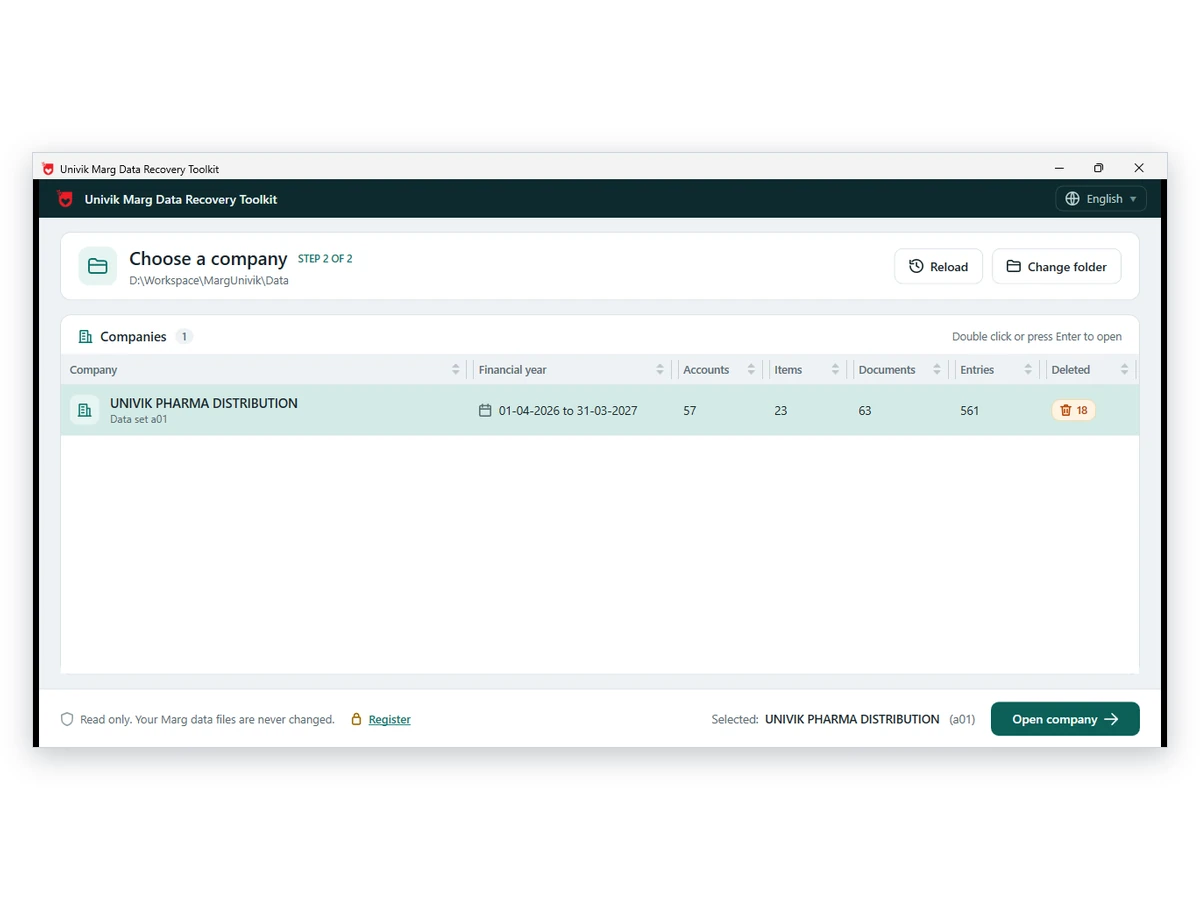
Note: everything is read-only and offline. The folder is never written to and a client's books never leave your machine. Reading is free. For a spreadsheet afterwards, see the Univik Marg Data Converter page for the formats it can write and the licence that lifts the trial cap.
Univik Marg Data Viewer displays a Data folder exactly as stored, from accounts to bills. Reading costs nothing.
Download Free Trial Buy a Licence - From $99Built for Windows 11 and 10 PCs. Reading is free and a licence lifts the ten-item save cap. Viewer page
Why Spreadsheet and BI Tools Cannot Load Marg Tables
A table file is no workbook and its extension is only a code, so Excel cannot read order.a01 as a sheet and Power BI offers no connector for it. Marg itself can send a single report to Excel at a time, which is the limit users on Techjockey keep running into.
To move a whole company into a workbook, follow our export walkthrough. How the file names are built is covered in the Marg data file guide.
What the Viewer Shows and What It Cannot Do
Accounts show opening, debit, credit and balance. Items, batches with expiry, bills with item lines, ledger entries and outstanding bills follow. One search spans every tab. Deleted records appear on request, each marked Deleted in Marg, so you can see them without mistaking them for live entries.
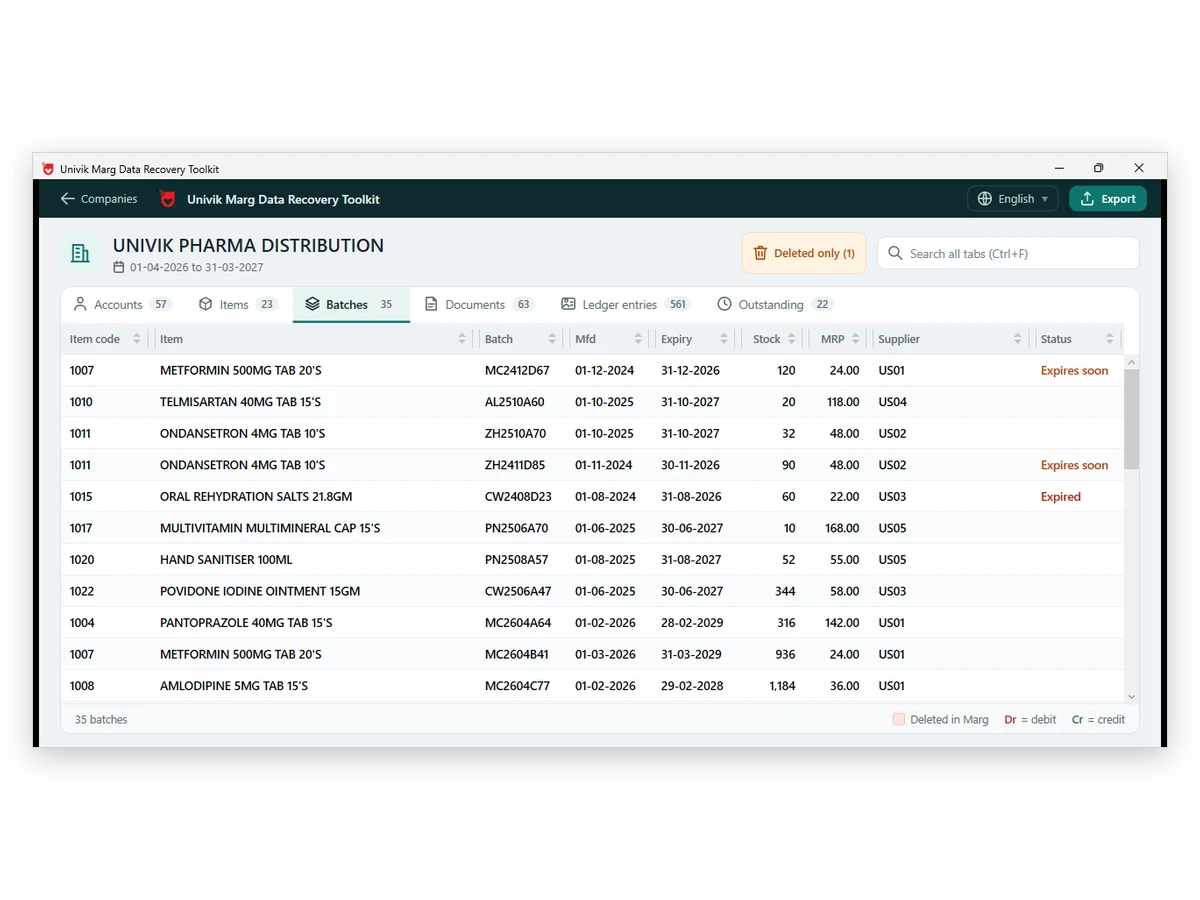
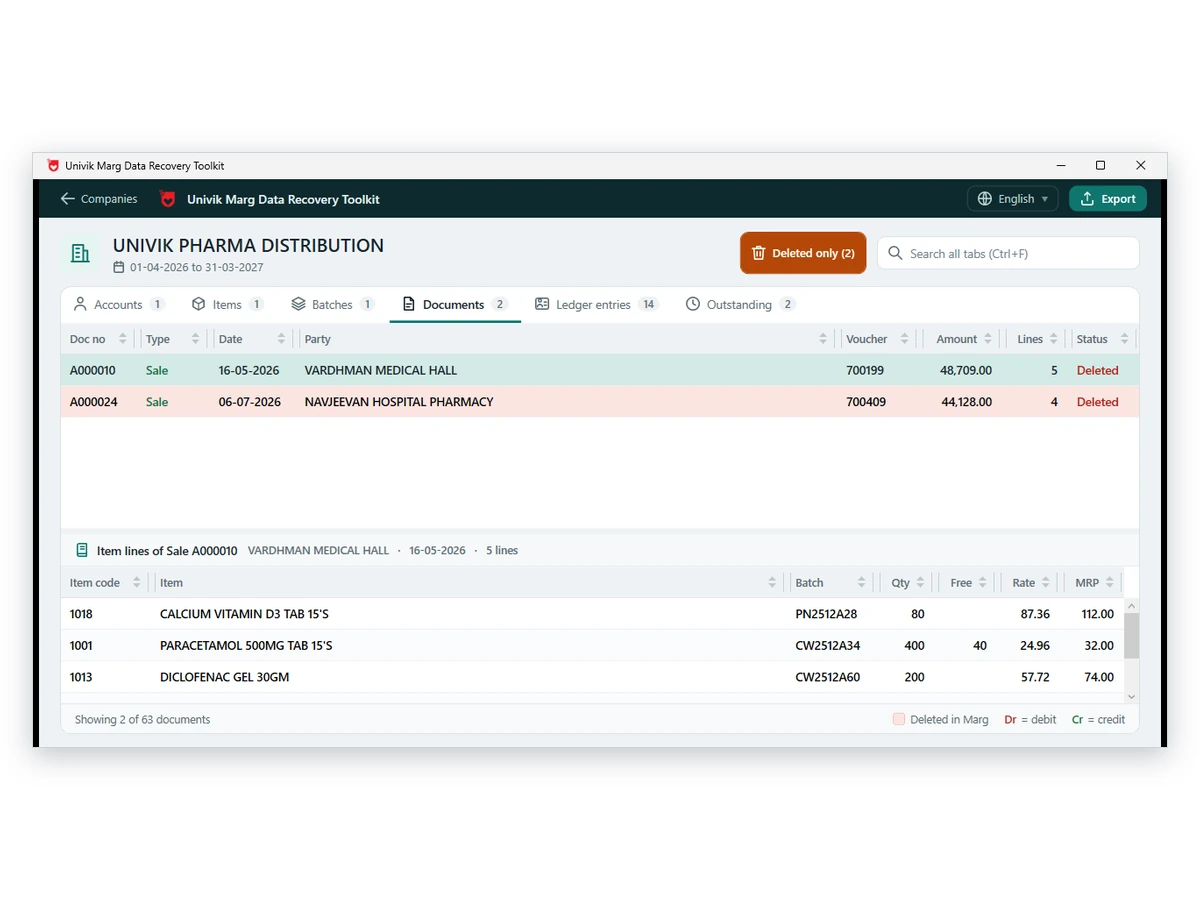
Limitations: it cannot post bills, repair a broken file or stand in for Marg. Use it to read the books when the program is absent and keep Marg for daily billing.
- You worked on a copy and the delivered original is intact
- The company name and period on screen are the ones you were promised
- A few balances and one month of entries agree with a report printed from Marg
- Deleted in Marg flags are treated as leads and not as proof
- Your notes carry the date and the folder name

Fixes for Trouble Opening a Copied Marg Folder
Do this: Make sure you selected the Data folder itself and not its parent. Bring the two ini lists along, since they name the companies and periods. If the list stays empty, email the file names to Univik support.
Do this: Read the guide to a Marg company that does not show. It covers the data path, the period slot and the ini lists.
Do this: Move a copy to a local drive and open that. A slow link is the usual culprit.
Unsure which route to pick? Write to support and quote the folder name plus the edition if known.
FAQ: Reading Marg Books With No Marg Install

Product notes here were supplied by Univik staff. The folder layout and viewer facts come from the product page and the Marg data file guide. The Excel point follows a question thread on Techjockey that we read on October 12, 2026.
Pages we read: Marg ERP 9 questions on Techjockey