 Univik Marg Data Recovery Toolkit, Recovery Module for Windows
 At a Glance
 Key Features
Reads Damaged Table Files
A table is read as far as it holds together. Zeroed runs are skipped and every surviving row is kept, though rows inside a zeroed sector are gone.
Univik Marg Data Recovery Toolkit, Recovery Module for Windows
Univik Marg Data Recovery Toolkit includes recovery for Marg ERP data folders that will not open or do not add up. It reads damaged table files, keeps the rows that survive, repairs what the other tables can prove and labels every row so you know how far to trust it.
Read-OnlyTrust Label per RowNo Marg NeededRuns Offline
*The free copy recovers and shows the rows. Saved output is held to 10 items per section until a licence lifts the cap and opens a 30-day refund window.

At a Glance
10
Damage Types
From flipped values to wiped headers, each with its own action.
6
Trust Labels
Healthy, suspect, partial, realigned, repaired and inferred.
96.9%
Rows Recovered
Mean over 178 damage scenarios on real Marg company tables. Wrong rows shown as healthy: 2.
1.0
Current Version
Needs Windows 11 or 10 and the .NET Framework 4.8 runtime.
$0
To Try It
Recovery opens free and a licence starts at $99 for 2 PCs.
Key Features
A table is read as far as it holds together. Zeroed runs are skipped and every surviving row is kept, though rows inside a zeroed sector are gone.
A file with the wrong name, a swapped extension or a copy under another table's name is recognised from what is inside it.
A balance must equal opening plus debit minus credit. A voucher must balance. A bill total must equal its lines. A figure is rebuilt only when these checks agree.
When a header is wiped, the layout comes from another period of the same company or from a catalogue of known layouts.
Healthy, suspect, partial, realigned, repaired or inferred, each with a confidence. A doubtful value is flagged and never mixed in silently.
When two candidate values are equally likely the software marks the row and leaves the choice to you. Your data files stay unchanged.
The Core Problem
Because the vendor's own remedy is a backup, and a backup is only as new as its last run. Two gaps open up whenever a table is damaged.
Trap 1: The Fix Is a Restore
For a damaged Order file, Marg Care says to set the file aside and restore a backup. Every entry made after that backup goes with it.
Trap 2: The Restore Can Fail Too
A restore may stop with No Data Found or Transaction file not found. Marg Care blames a damaged file or built-up temporary files, and the next step is another backup.
The Fix: Read the Damaged Copy Itself
Univik Marg Data Recovery Software reads the damaged table files and keeps what survives. Our advice: never repair in place. Put a copy on a local drive and open that copy, so the original stays sealed. The tool writes to neither.
Our verdict: restore the backup first, then read the damaged copy for the gap. Bill totals must equal the sum of their lines, so a lost total can be rebuilt from the rest. Where no rule decides, the row is flagged.
What It Repairs
order.a01
Account Master
Balances are checked against opening, debit and credit and the month totals.
gledger.a01
Voucher Entries
Each voucher must balance, and its legs must match the bill it belongs to.
mdis / dis
Bills and Item Lines
A bill total is checked against its lines, tax, discount and round-off.
pro / probat
Items and Batches
Item names and batch details are matched across tables.
Which Damage Can the Marg Data Recovery Software Handle?
| Damage | What you see | What the software does |
|---|---|---|
| Bytes added or lost in the middle | Rows read well, then noise to the end of the file | Finds the row boundaries again and reads on |
| Single flipped values | One value in one row is off | Checks it against accounting rules and flags it when in doubt |
| A zeroed sector | A run of empty rows | Skips the run. Rows that sat inside it are lost |
| A wiped header | The layout of the table is gone | Takes the layout from a sibling period, a header match or the built-in catalogue |
| Wrong name or extension | The content belongs to another table | Identifies the table by its content |
| Two tables swapped | Name and content disagree | Identifies each table by its content |
| A block pasted from another table | Foreign rows sit inside the table | Notes the block and flags its rows |
| A duplicated block | Three or more identical rows in a row | Drops the copies and notes it |
| A truncated file | The last row is cut short | Keeps the partial row and flags it |
| Damaged company or period lists | snmanrc1.ini or snmanri1.ini will not read | Reads them the same way and lists the problems first |
Three Steps
Work from a duplicate of the Data folder on a PC that lacks Marg.
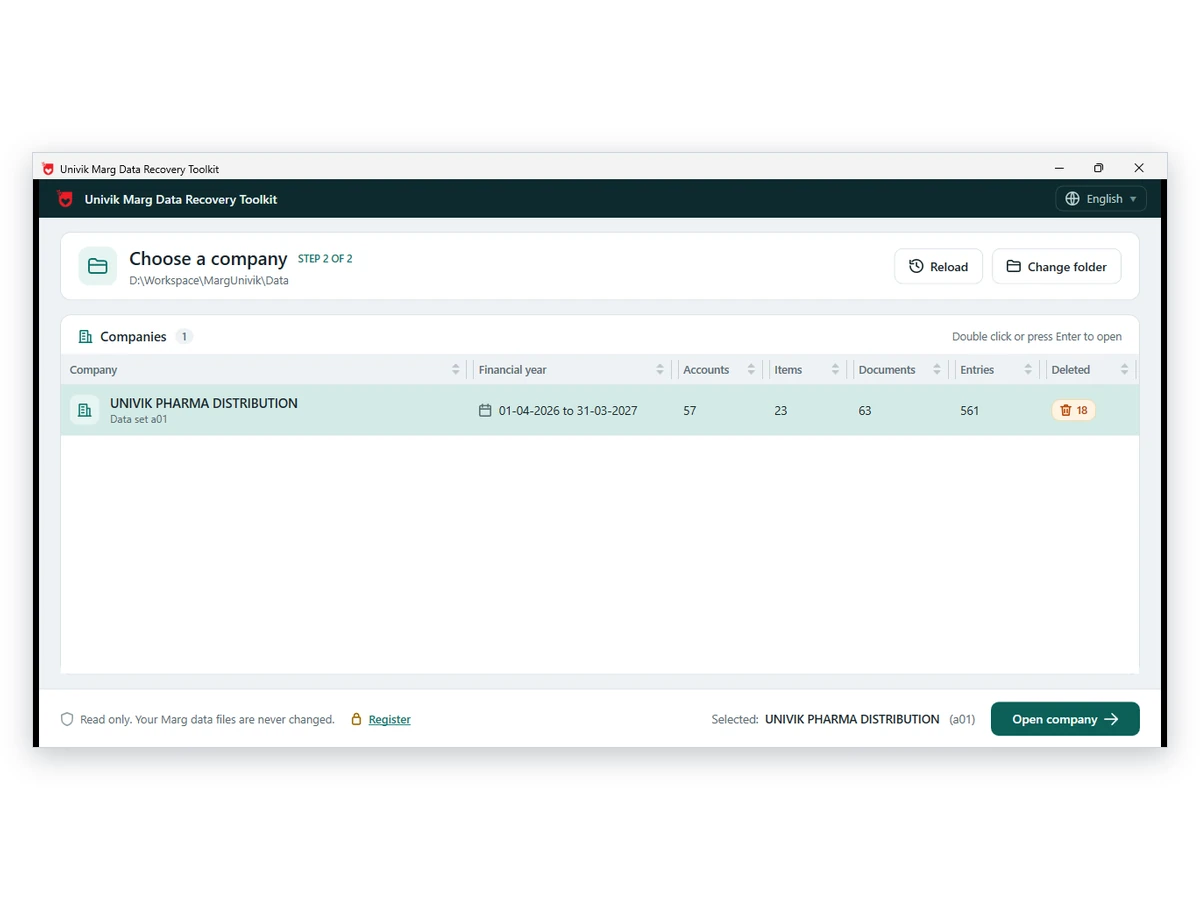
Copy the Whole Data Folder
Duplicate the Data folder, with every period of the company and both ini lists, onto a local disk. Keep the original aside.
Load the Copy
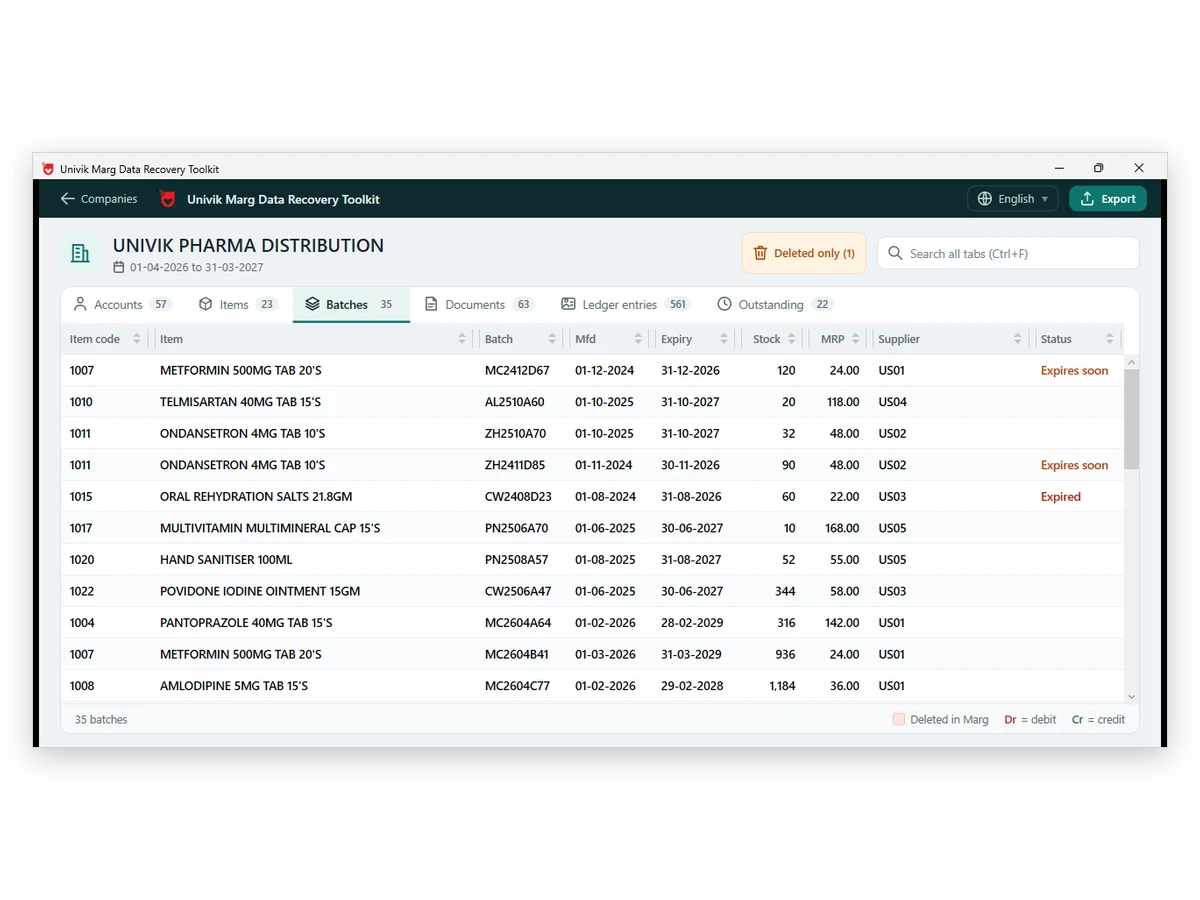
Open the duplicate in the software. It locates the damage, repairs what the evidence proves and loads the rest as stored. The folder itself stays unwritten.
Review the Labels and Save
Go through each row with its label, then save PDF, Excel, CSV or JSON files with a licence. Compare repaired and inferred rows with your paper records first.
Windows 11 or 10 · originals stay unwritten · ask Univik support if a step is unclear
Our Test
Our test engine took table files from 3 real Marg ERP 9+ companies (44 files in all) and broke copies of them in 178 scenarios. Ledger counts were 75, 195 and 113, with month balance tables that run from 1,241 rows to 33,261, so the set covers both a small shop and a busy one. The software then had to read each broken copy without Marg installed.
It brought back 96.9 percent of the records on average. Before the recovery layer went in, the raw read showed 3,004 rows as healthy that were not. After it, that number was 2. No scenario crashed the software or left it hanging.
Two limits. Bytes that are physically gone do not come back: a table file cut to 60 percent holds about 60 percent of what it had, and the labels say so. The bill sample in these companies was tiny, 0, 6 and 3 bills, so the bill rules held in every row that exists and not at scale. The scenarios are our own and the data set is one of three companies. Read the figures as a guide for your own file, not a promise.
| What we checked | Result |
|---|---|
| Companies and table files | 3 Marg ERP 9+ companies and their 44 table files, Marg not installed |
| Ledger balance = opening + debit - credit | Held in 100% of ledgers |
| Group totals vs month postings | Matched in 100% of groups |
| Bill total vs bill lines | 100% of the 9 bills that exist |
| Batch name = item name | 214 of 214 |
| Outstanding bill date and party | 6 of 6 |
| Damage scenarios | 178, mean recall 96.9 percent |
| Wrong rows shown as healthy | 2, down from 3,004 before the recovery layer |
| Crashes or hangs | 0 |
Bill figures rest on 9 bills across two companies, so they show the arithmetic holds and nothing more.
Real Situations
Marg Says a File Is Corrupt
The software refuses to open a company after a power cut. Read the damaged copy and see which tables still hold their rows.
Balances Do Not Match
Party balances disagree with the entries behind them. The labels show which accounts the rules could and could not confirm.
The Restore Failed
A backup restore stopped with No Data Found. Read the damaged folder for the entries that the backup lacks.
Before You Start
Copy the whole Data folder, not a single table. Keep every period of the company, such as order.a01 and order.a02, and the two lists snmanrc1.ini and snmanri1.ini. Sibling periods supply a lost layout.
Marg Care also asks for a copy of the Marg folder before any repair. The Marg data file guide explains each file, and the backup guide covers MBK files that sit beside the data.
Compare Your Options
Restore a backup when one exists. Add Univik Marg Data Recovery Software for the gap since the backup or when none exists.
| What you need | Restore in Marg | Retype the Entries | Univik Marg Data Recovery SoftwareTRIAL |
|---|---|---|---|
| Needs a recent backup | Yes | No | No |
| Entries made after the backup | Lost | Typed again by hand | Read from the damaged copy when they survive |
| Works when the company will not open | Only after the restore | Only after the restore | Yes, on a copy of the folder |
| Shows how far to trust each item | No | No | Yes, a label per row |
| Writes to the live folder | Yes, it overwrites files | Yes | No, read-only |
| Cost | Part of Marg | Staff time | Free to try, licences from $99 |
Restore steps for each backup type are on the MBK file guide. The causes of a failed restore are in the blog on No Data Found.
What You Need
Windows and Memory
Windows 11 or 10 plus .NET Framework 4.8 or later, with spare memory for a large damaged table.
A Full Copy
Copy every period of the company and both ini lists. A complete set gives the best chance of rebuilding a layout.
Local Disk
Open the copy from the PC's own disk. A pen drive or network share can drop out in the middle of a read.
Licence Tiers
Recovery opens free. Personal ($99) is meant for CAs and accountants. Technician ($199) is meant for commercial recovery services and business houses. Each tier runs on 2 PCs.
| Title | Univik Marg Data Recovery Toolkit, recovery module |
| Build number | 1.0 |
| Works on | Windows 11 and Windows 10 |
| Prerequisite | .NET Framework 4.8 or above |
| Source | Marg ERP Data folders, damaged table files and the snmanrc1.ini and snmanri1.ini lists included |
| Results (licence needed) | PDF, Excel, CSV and JSON |
Questions
More Tools
Authored by Univik Product team
This page was compiled on 12 October 2026 from the product and the Marg Care articles it cites. The figures in Our Test come from the team's own runs on 3 real Marg ERP 9+ companies, with every run on a read-only copy; they were added on 15 October 2026. The software never changes the Data folder. Recovered rows carry labels, and nothing is claimed beyond them. Licences carry a 30-day refund policy.
Reviewed on 15 October 2026
Univik Team Since 2013Your Folder Is Only ReadOffline Processing30-Day Money-Back Cover
Marg is a trademark of its owner. Univik works independently of Marg Compusoft.


 The Core Problem
 What It Repairs
 Three Steps
 Our Test
 Real Situations
 Compare Your Options
 Questions
 More Tools