JSON is text, but an .mdf is not. The file is a binary SQL Server database, so you cannot rename it to .json or drop it into a parser. To turn its tables into JSON without a SQL Server instance, a Windows tool reads the .mdf directly and writes the JSON for you. Univik MDF Converter works on Windows and produces either a JSON array or JSON Lines, with strings, numbers, booleans and null typed the way JSON expects. Nothing is uploaded and no instance runs.
One check before the how. This page is about the SQL Server .mdf, the Master Database File that stores a database’s tables and rows. Two unrelated files share the extension, a disc image written by Alcohol 120% that rides alongside an .mds file and an automotive measurement file in the ASAM MDF4 standard saved as .mf4. Neither of those turns into JSON the way a database does. If you are unsure which one you hold, our MDF to CSV guide pulls the three apart.
Why JSON and Not CSV or a Spreadsheet
JSON earns its place when the data is headed for a program rather than a person. A CSV is flat text with no types, so every field is a string until something guesses otherwise. A spreadsheet is built for people to read. JSON sits apart from both. It carries real types, it nests and almost every language parses it without a library.
Take a single row. In CSV it reads 007891,false, and the receiver has to guess that the first field is an identifier, the second a boolean and the third empty. In JSON the same row leaves nothing to guess. The id stays a string so its leading zeros hold, active is a real boolean and the missing note is null rather than a blank cell.
For the flat text case our MDF to CSV guide is the better fit, and for a workbook people will open by hand the MDF to Excel guide covers that. JSON is the one you reach for when code, an API or a NoSQL store is on the receiving end. It also carries no tie to SQL Server, so the data drops into a stack built on something else entirely.

“JSON export gets the same treatment as the rest of our SQL testing: databases from 100 MB up to 5 GB, every version and edition, rows read back and compared. The big databases are where a structural slip shows.”
Nick Rogers
|Founder, Univik, building file conversion tools since 2013
JSON Array or JSON Lines
JSON comes in two shapes, and the .mdf can export to either. Knowing which you need saves a second conversion later.
A JSON array is one file wrapped in square brackets, with each row an object inside it. It is the shape most APIs and JavaScript expect, and a single JSON.parse call reads it. The cost is memory, since a parser loads the whole array at once, so a very large table can strain it.
JSON Lines, saved as .jsonl, drops the wrapping brackets and writes one object per line. Nothing encloses the whole file, so a program can read it a line at a time, append to it and stream millions of rows without holding them all in memory. Big data tools, log pipelines and MongoDB all prefer it. The JSON Lines convention is a light agreement on top of ordinary JSON rather than a separate standard.
Three Ways to Convert MDF to JSON
Three routes take an .mdf to JSON, and they part ways on what has to be in place first.
The native route runs inside SQL Server. You attach the database, then add FOR JSON to a query, as in SELECT OrderID, Total FROM Orders FOR JSON PATH. SQL Server 2016 and later build the array for you, write dates as ISO 8601 strings and drop nulls unless you add INCLUDE_NULL_VALUES. It needs a running instance with the database attached, and it works a query at a time rather than a whole database at once.
The online route uploads the file to a web service, which returns JSON. No SQL Server is needed, though the whole database travels off your network to reach it.
The direct read route stays on your own machine, reading the .mdf and writing the JSON there, with no instance to attach and nothing uploaded.
Reading the MDF Straight to JSON
The same file read that produces a CSV or a workbook can emit JSON instead. The tool parses the .mdf, reconstructs each table, then serialises the rows as JSON objects rather than grid cells. No instance is mounted, so it works even where SQL Server was never installed and on an .mdf that lost its server long ago.
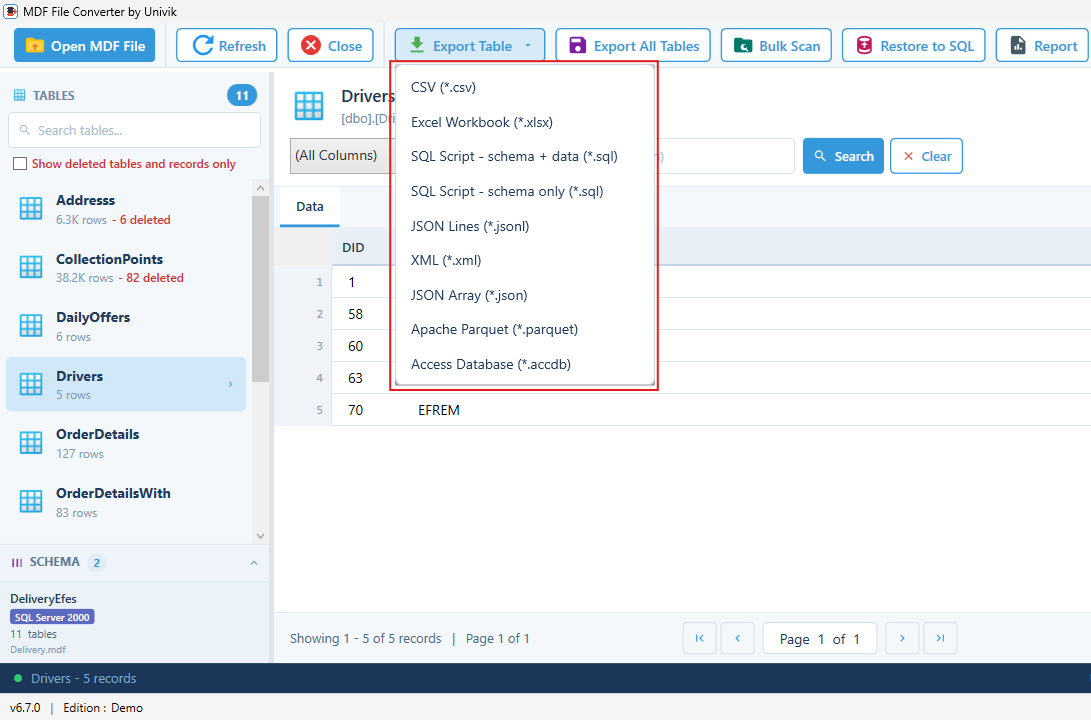
Univik MDF Converter runs this on Windows. You choose JSON array or JSON Lines at export time, and the tool writes the file with every value already typed. Deleted rows the file still holds appear in red before you commit them. What the tool supports and how it is licensed are documented on the MDF Converter product page. For a quick look without exporting, the MDF viewer opens the tables without writing anything.
How Multiple Tables Map to JSON
A database is many tables, and an export has to decide how they sit together. The .mdf export keeps it plain. Export Table writes the one table you are on as a single JSON file. Export All Data Tables covers every user table, one JSON file per table, each named for its table with the system tables left out.
One file per table keeps each list of objects clean and loadable on its own. If you want the tables folded into one nested document, that is a shaping step for your own code after the export, not something the converter decides for you.
How Types, Dates and Big Numbers Land in JSON
JSON has six value types, and the export maps each column to the right one so a parser never has to guess.
Text. An nvarchar or varchar column becomes a JSON string. JSON is UTF-8, so accented and non Latin characters carry across with no encoding step.
Numbers and booleans. An int or decimal becomes a JSON number. A bit column becomes true or false rather than 1 or 0.
Big identifiers. This is the trap. JSON numbers are read as floating point doubles, so any value past 9,007,199,254,740,991, the largest safe integer, loses precision in most parsers. A bigint key written as a number can come back changed. Written as a JSON string it stays exact. RFC 8259 marks that safe integer range as the limit of what parsers agree on.
Dates and null. A datetime becomes an ISO 8601 string such as 2025-07-09T13:45:00. A NULL becomes JSON null, which is not the same as an empty string. A varbinary blob has no native JSON form, so it is base64 encoded into a string or left out of the export.
Loading the JSON Into Code, NoSQL or a Pipeline
The value of JSON is what happens after the export. A JSON array drops straight into JavaScript or any language with a JSON parser, so a Node script or a browser reads it in one line. REST APIs take it as a request body with no translation. A JSON Lines file loads into MongoDB with mongoimport, one document per line. Other document stores read it the same way. For quick work at the command line, jq filters and reshapes either shape without a database anywhere in the picture.
Handling a Corrupt or Detached MDF
The export only works on a file it can read. When the .mdf is corrupt, how far the corruption reaches decides what happens next. Light damage can leave enough intact pages for a direct read to serialise the surviving tables. Heavier damage stops the export until the file is repaired.
A database that no longer comes online is a recovery job first. Our guide on recovering a SQL database without a backup starts there, and the SQL database recovery tool repairs the .mdf itself when that is what stands in the way. The MDF file extension guide explains how the MDF, NDF and LDF pieces relate if you need the background.
Turn your MDF into JSON, no SQL Server needed
Univik MDF Converter reads the .mdf on Windows and writes a JSON array or JSON Lines, plus seven other formats. Deleted rows show in red. The file never leaves your machine.
Frequently Asked Questions
Can I Convert an MDF to JSON Without SQL Server?
Yes. Reading the .mdf as a file means no SQL Server engine has to be present, so there is nothing to install. Univik MDF Converter parses the file on Windows and serialises the rows to a JSON array or JSON Lines. FOR JSON cannot, since it is a query that only runs inside a database already attached and running.
What is the Difference Between JSON and JSON Lines?
A JSON array holds every row in one bracketed list, which a parser loads in a single pass. JSON Lines drops the brackets and puts one object on each line, so a program can stream it a line at a time and append to it. Use the array for APIs and small sets. Reach for JSON Lines with very large tables or a pipeline.
Will Large ID Numbers Survive in the JSON?
They survive when the export writes them as strings. JSON numbers are read as floating point doubles, so any integer past 9,007,199,254,740,991 loses precision in most parsers. A bigint key held as a JSON string stays exact, which is why a careful export writes large identifiers as strings rather than numbers.
How are Dates and NULL Values Written in the JSON?
A datetime column becomes an ISO 8601 string such as 2025-07-09T13:45:00, since JSON has no date type of its own. A NULL becomes JSON null, which a parser reads as a real null rather than an empty string. That keeps a missing value distinct from a blank one.
Can I Import the JSON Into MongoDB or a NoSQL Database?
Yes. Export JSON Lines and load it with mongoimport, which reads one document per line. Most document stores accept the same shape. A plain JSON array works too for smaller sets, though JSON Lines is the safer choice once the file grows large.
Does the JSON Include the Database Schema or Just the Data?
Just the data, as row objects. JSON holds the values, not the primary keys, foreign keys, indexes or stored procedures that surround them. To rebuild the structure instead of reading the rows, generate a SQL script, which our guide on converting MDF to a SQL script walks through.