Parquet is the format analytics engines want, and an .mdf cannot become one by renaming. Even a running SQL Server has no plain export for it. CETAS arrived in SQL Server 2022 and only writes Parquet to cloud or S3 compatible object storage after PolyBase setup. The simpler path is a Windows tool that parses the .mdf itself and writes .parquet files locally. Univik MDF Converter reads the tables from the file and saves compact, typed Parquet ready for pandas, DuckDB, Spark or Power BI, with no instance and no upload.
A quick scope check before the details. Everything here concerns the database kind of .mdf, the Master Database File in which SQL Server keeps a database’s tables. An .mdf from Alcohol 120% is a disc image, and an automotive ASAM MDF recording (.mf4) is measurement data that converts to Parquet through the open source asammdf tools instead. Our MDF to CSV guide explains how to identify each one.
Why Parquet and Not CSV or JSON
Apache Parquet is a columnar file format built for analytics. A CSV stores text row by row. JSON stores structures for code to parse. Parquet stores each column together, compressed and with its type recorded in the file, so an engine can grab two columns out of fifty without touching the rest.
That design pays off the moment tables get large. Values within one column repeat and compress well, so the file shrinks. Queries that scan a handful of columns skip the others entirely. And because the file carries a schema, a reader knows an amount column holds decimals without guessing from text.
When a person needs to open the data, a spreadsheet through our MDF to Excel guide makes more sense, and when an app or API consumes it, converting MDF to JSON fits better. Parquet is the pick when the destination is a data lake, a notebook or an analytics engine.

“Parquet output is tested like every other export in the lab: convert databases from 100 MB to 5 GB, read the files back and compare rows with the source. Large tables are the point of Parquet, so the 5 GB databases matter here.”
Nick Rogers
|Founder, Univik, building file conversion tools since 2013
Three Ways to Convert MDF to Parquet
Parquet is different from every other export target here. SQL Server offers no quick clause for it the way FOR XML or FOR JSON serve those formats, so each route involves a real decision.
CETAS is the native option, short for CREATE EXTERNAL TABLE AS SELECT. It exists in SQL Server 2022 and later, and it writes Parquet only to Azure Data Lake Storage, Azure Storage or S3 compatible object storage. Before the first file appears you need PolyBase export enabled, an external data source, a file format object and credentials, plus the database attached to a live instance.
The script route is what most engineers use on older versions. Python reads the attached database with pandas and writes .parquet through pyarrow. It works well, and it still requires a running SQL Server to query, plus a Python environment to maintain.
The direct read route removes both requirements. A desktop tool parses the .mdf as a file and saves Parquet to a local folder, so a detached or orphaned database converts on any Windows PC.
Reading the MDF Straight to Parquet
A direct read treats the .mdf as a document to parse rather than a database to mount. The tool reads through the file’s pages, rebuilds every table with its column types, then encodes each one as a columnar .parquet file. No engine starts, so the .mdf can come from a decommissioned server, an old backup folder or a machine that never had SQL Server at all.
Four short steps cover it.
- Load the .mdf into the converter on any Windows PC.
- Preview the tables and confirm the data looks right.
- Pick Parquet as the output format.
- Save the .parquet files wherever you want them, local disk included.
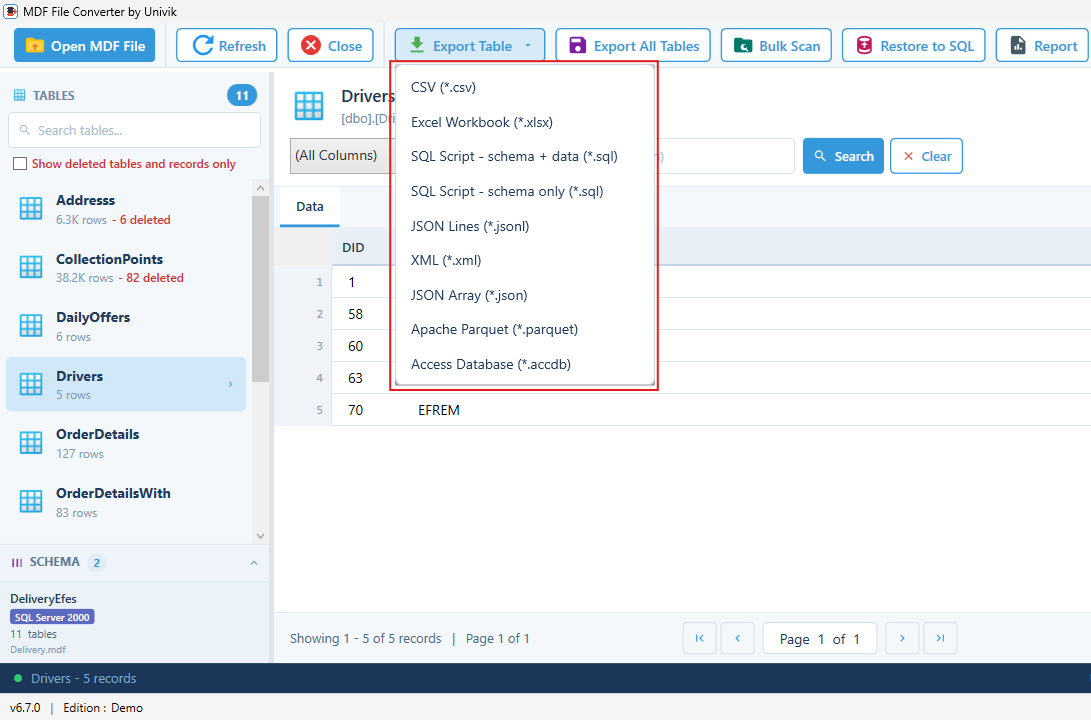
Univik MDF Converter is built for this. It shows every table before export, flags rows still marked as deleted in red and writes Parquet alongside CSV, JSON, XML and more. Supported SQL Server versions and licensing are covered on the MDF Converter product page, and the free MDF viewer is enough when you only need to look inside the file.
What Parquet Columnar Storage Changes
The columnar layout is not a cosmetic difference. It changes what a query costs. An analytics engine asked for the total of one amount column across ten million rows reads that single column’s compressed block and ignores the other forty nine. The same query against a CSV reads the whole file, because every line mixes all the columns together.
Compression also works better on columns. A status column holding a few repeated values packs down to almost nothing, and a numeric column compresses far better as binary than as text digits. The practical result is a file several times smaller than its CSV twin that answers column queries faster.
The trade off is that Parquet is not human readable. Opening a .parquet in Notepad shows binary. If someone needs to read the data by eye, export a CSV or spreadsheet next to it. The two formats work well side by side, and the converter writes either from the same read.
How Multiple Tables Map to Parquet Files
Parquet has no notion of a multi table database. One file holds one table’s columns, which matches how lakes and engines expect data anyway. Export Table saves the table you are viewing as one .parquet. Export All Data Tables turns every user table into its own file named after the table, leaving system tables out.
There is no row ceiling to plan around either. Excel stops at 1,048,576 rows per sheet, while a Parquet file simply grows, and engines stream it in chunks rather than loading everything at once.
How Types, Dates and NULL are Stored in Parquet
Parquet stores values in binary with the schema inside the file, which removes a whole class of problems text formats carry.
Numbers stay numbers. An int lands as a 32 bit integer and a bigint as a 64 bit integer, exact to the last digit. JSON readers can silently round huge integers, a trap our MDF to JSON guide covers, and Parquet sidesteps it because the value never becomes text.
Dates stay dates. A datetime column is written as a real timestamp value the reader loads as a native date type, with no string parsing step. A decimal keeps its declared precision and scale.
NULL is native. The format tracks missing values itself, so a NULL survives the trip without a placeholder string. And a varbinary column is stored as raw bytes, no base64 detour, because the file is binary to begin with.
Opening the Parquet File After Export
The exported file plugs into the analytics stack directly. In Python, pandas read_parquet loads it into a DataFrame in one line. DuckDB queries a .parquet with plain SQL and no import step. Spark reads folders of them in parallel, and Power BI pulls them in through Get Data. Cloud warehouses such as Athena and Synapse query them where they sit in object storage.
The format is an open standard run by the Apache Software Foundation, documented at the Apache Parquet project, so the file written today stays readable across tools and years.
Converting a Corrupt or Detached MDF
Detached is the easy case. A direct read never asks the file to attach, so an .mdf sitting alone without its LDF converts to Parquet as it is. How the MDF, NDF and LDF pieces relate is explained in the MDF file extension guide.
Damage is a different matter. When pages are torn or headers are broken, read what survives first. Intact tables can still come out as Parquet. For the rest, follow our guide on recovering a SQL database without a backup before converting anything, and point the SQL database recovery tool at the .mdf itself if repair is needed.
Turn your MDF into Parquet files, no instance and no cloud setup
Univik MDF Converter parses the .mdf on Windows and saves compact columnar .parquet files for pandas, DuckDB, Spark and Power BI, among nine export formats. Deleted rows show in red, and everything stays on your PC.
Frequently Asked Questions
Can I Convert an MDF to Parquet Without SQL Server?
Yes. The direct read approach treats the .mdf as a document to parse rather than a database to mount, so nothing needs to be installed or running. Univik MDF Converter takes that path on Windows and saves .parquet files to a local folder. The native CETAS route cannot work that way, since it runs inside a 2022 or later instance and writes only to object storage.
Is There a Native Parquet Export in SQL Server?
Not in the simple sense. There is no FOR PARQUET clause. SQL Server 2022 added CETAS, which can write Parquet after PolyBase export is enabled and an external data source, file format and credentials are configured, and the target must be Azure storage or S3 compatible object storage. Earlier versions have no native writer, which is why Python scripts with pandas and pyarrow are so common.
Is Parquet Better Than CSV for Analytics?
For analytics workloads, yes. Parquet stores columns together, compressed and typed, so engines read only the columns a query touches and files come out several times smaller than the same data as CSV. The trade off is readability, since a CSV opens in any editor and a .parquet needs a tool. Plenty of teams write both from a single source.
Is There a Row Limit Like Excel Has?
No. Excel caps a sheet at 1,048,576 rows, and a Parquet file has no comparable ceiling. Large tables export whole, and readers such as Spark and DuckDB stream the file in chunks instead of loading it all into memory, so size is limited by disk space rather than by the format.
Which Tools Open a Parquet File?
Any modern analytics tool. pandas loads it with read_parquet, DuckDB queries it with plain SQL, Spark reads it natively and Power BI imports it through Get Data. Cloud services including Athena, BigQuery and Synapse query Parquet in place. A plain text editor cannot open it, because the format is binary.
How are NULL Values and Big Numbers Handled in Parquet?
Both are stored exactly. NULL is part of the format, so missing values need no placeholder text. A bigint is written as a 64 bit integer and read back digit for digit, avoiding the rounding that can hit very large integers in JSON. Decimals keep their declared precision and scale through the conversion.