An EXE keeps its icon in the same resource section any Windows program uses, and a reader lifts that icon out by loading the file as data, never as a program. So you can see what an unknown or suspicious file is wearing without running its code. The Univik ICO Converter reads an .exe, .dll or .NET assembly from its metadata and shows every icon inside.
A stranger sends you a file, or you find one on a drive with no memory of where it came from. It is an .exe, and it wears a familiar icon, a document, a folder, a well known app. You want to study that icon up close without the risk of double clicking a program you do not trust.
Good news. Looking at an EXE's icon is one of the safest things you can do with it. A reader opens the file as data and reads the picture out, and the code stays put. This guide shows how, why it is safe and how the icon itself can be part of a trick.
Why a Suspicious EXE's Icon Matters
The icon on an EXE is the first thing you judge it by. A program with a clean, familiar picture feels trustworthy, which is exactly why the icon deserves a close look when the file is a stranger.
An attacker counts on that reflex. Dressing a harmful program in the icon of a PDF, a Word document or a trusted app is one of the oldest tricks going, and it works because people click the picture, not the file name. Reading the icon out and studying it shows you what the file wants you to believe about it, which is the first step in deciding whether to believe it.
Why Reading the Icon Never Runs the File
Here is the mechanism that makes this safe. A Windows program keeps its code in one part of the file and its resources, the icons and images, in another. A reader does not have to touch the code to reach the resources. It opens the file as data instead.
Windows has a built in way to do exactly that. The loader can open a module only to read its resources, and when it does, it skips the program's entry code and treats the file as if it were a plain data file. Microsoft's security team notes that nothing loaded this way is marked to execute. The icon comes out. The program stays asleep.
The Univik ICO Converter takes the reading path. It opens an EXE from its structure and metadata, lists the icons and executes nothing. So a file you do not trust can still show you what it carries.
How to Inspect the Icon Without Running the EXE
Point a resource reader at the file and study what comes back.
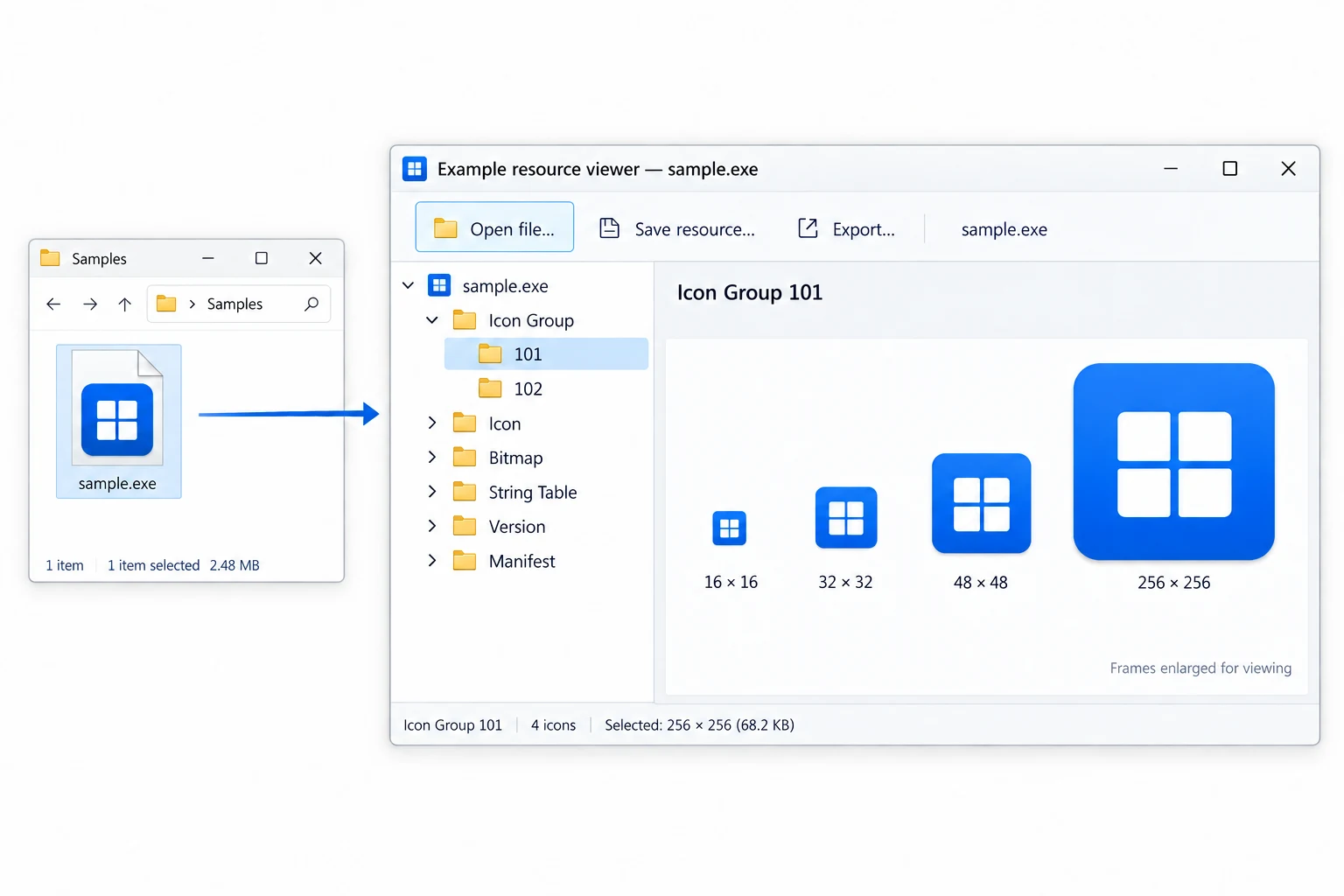
- Open the EXE as dataDrag the .exe onto the converter. It loads the file to read, not to launch, so no code fires.
- See every iconThe app lists each icon the file holds, at every size and colour depth.
- Match it to the fileAsk whether the icon fits what the file claims to be. A setup wearing a document icon is a warning.
- Save what you needExport any icon as a PNG that keeps its transparency or as an ICO.
For a fast look with nothing installed, the free ICO viewer lists the icons in an .exe or .dll and writes nothing to your disk.
Load an .exe, .dll or .NET assembly, read every icon out of it with no code running and keep any you like as a PNG or an ICO. A calm way to check a file you are not sure about.
Free Download See All FeaturesInspecting a .NET EXE
A .NET program raises a fair question. If the code is managed, where does the icon sit?
In the same place a native program keeps it. A .NET assembly is still a Windows program file, and its application icon is embedded as an ordinary resource next to the managed code. The Univik ICO Converter reads a single file .NET or .NET 5 assembly straight from its metadata, so the icon comes out with no runtime started and no method called.
If a program is wrapped so its real contents stay hidden until it runs, a reader sees only the wrapper's icon, which may be all the author wanted you to see. An icon too plain for the file is worth noting. So is a file that resists every reader.
When the Icon Is the Disguise
The icon does its worst work next to a second trick, the hidden extension. Windows hides the extension of known file types by default, so a file named invoice.pdf.exe shows in Explorer as invoice.pdf. Pair that with a PDF icon and the mask is complete.
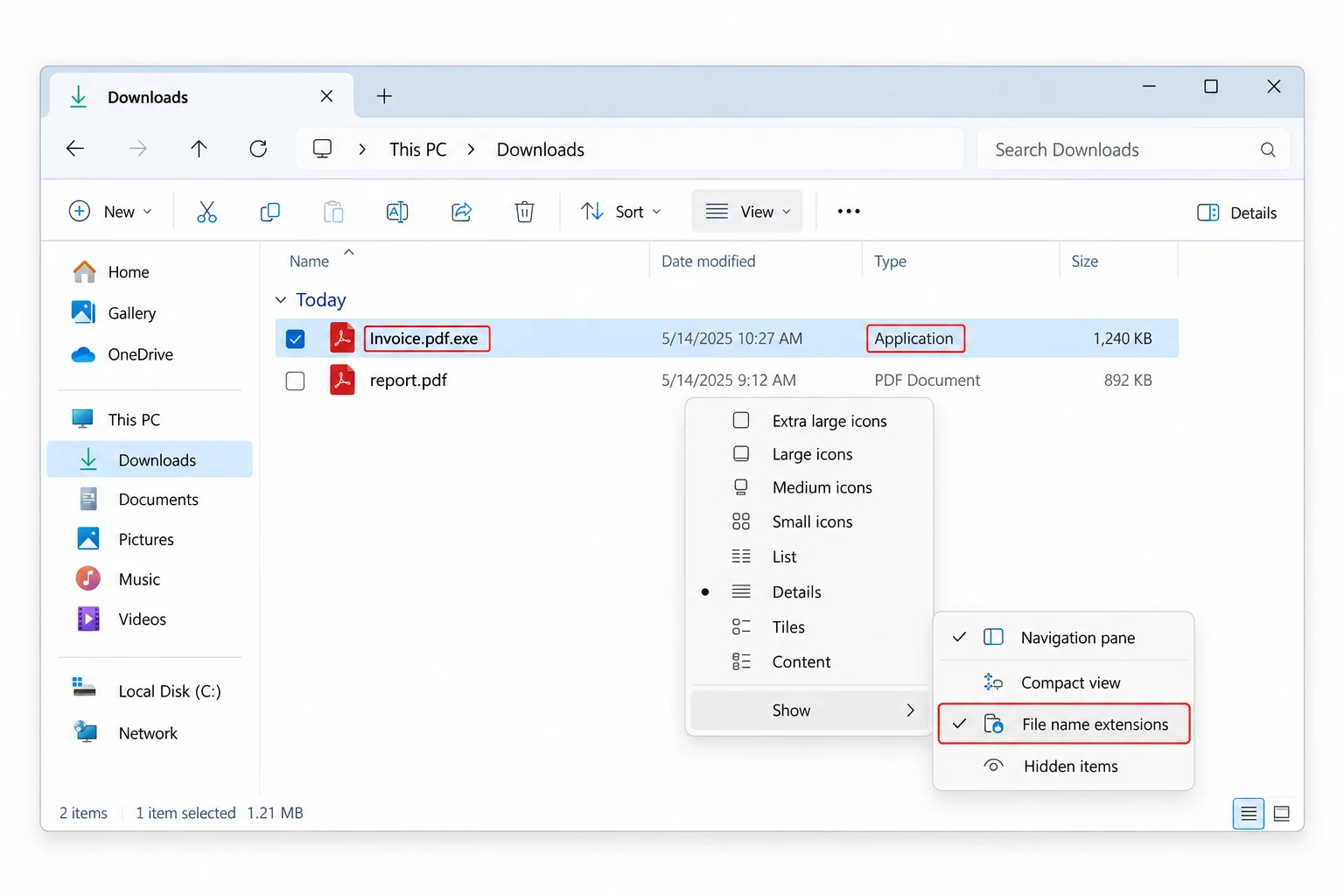
invoice.pdf
What you see, because Windows hides the last part
.exe
The real type, hidden by default, a program not a document
a PDF icon
Borrowed art that finishes the disguise
Reading the real file tells the truth. An icon that does not fit the type, a Word picture on something your reader opens as a program, is the tell. Switch file name extensions back on in Explorer's View settings, the same toggle on Windows 11 and 10, so an .exe can never hide behind a friendlier ending.
Free Tools That Read Without Running
No purchase is needed to read an EXE's resources. Two free tools do it and leave the code alone.
The wider method these tools follow, across any program file, is what extracting icons from EXE and DLL files maps out. It reads a suspicious file exactly as it reads a trusted one, since pulling a resource is safe either way. The same approach carries over to OCX, CPL and SCR files, which are programs of the same kind under different extensions.
Turning the Icon You Pulled into an ICO
Once the icon is out, the format is your call. The converter saves it to a PNG or a full multi size ICO in one go.
For a desktop shortcut, a folder icon or an app of your own, an ICO file holding several sizes is what Windows expects, and building one from a PNG is a short step laid out in converting PNG to ICO. If the icon belongs to a real product and you plan to reuse it, where that stands is spelled out in whether extracted icons are legal to use.
The Icon Alone Is Not a Safety Verdict
Reading the icon is safe, and it tells you what a file pretends to be. It does not tell you the file is clean. For that, a few quick checks go further, and none of them require running the thing.
| Check | How | What it tells you |
|---|---|---|
| The signature | Get-AuthenticodeSignature in PowerShell | Who signed it and whether that signature is valid |
| A scan | Your antivirus, or upload to VirusTotal | What known engines already make of the file |
| Isolated run | A virtual machine or sandbox | What it actually does, with no harm to your PC |
One honest caveat sits on top of all this. A valid signature proves who signed a file, not that the file is harmless. Microsoft says as much, trust rests on the publisher and where you got the file, not the checkmark by itself. Treat the icon as a clue, treat the signature as a second clue and treat the whole picture as your answer.
Frequently Asked Questions

Written and maintained by Leena Taylor Paul and the Univik team, developers of Windows data conversion and recovery software since 2013. We hardened the ICO Converter to read a program from its structure alone, so someone staring at a file they did not ask for can see its icon without ever giving it a chance to run. Last verified August 2026. Looking at a file you do not trust? Contact our support team.