 Tally Data Recovery Toolkit by Univik for Windows
 Quick Facts
 Key Features
Misplaced Pages Returned to Their Slots
Every page of a .900 or .1800 file stores a checksum tied to its position. A page found in the wrong place is moved back to the slot its checksum names.
Tally Data Recovery Toolkit by Univik for Windows
Univik Tally Data Recovery Toolkit is Windows software for a Tally company folder that holds .900 or .1800 files and no longer opens cleanly. It puts pages back in order and rebuilds torn vouchers from Tally's own spare copies. Each voucher it returns carries a note of its source. TallyPrime does not have to be installed.
Damaged DataSource LabelsRuns OfflineTally Not Needed
*Opening a damaged folder costs nothing. The trial build saves 10 items in each section and a licence lifts that limit. Purchases come with a 30-day refund. Personal covers 2 PCs.

Quick Facts
43,326
Vouchers Tested
Seven real TallyPrime company data sets, FY 2018-19 to 2025-26, plus two Tally.ERP 9 companies in .900 format.
100%
.900 Month Totals Matched
In the Tally.ERP 9 data, 4,100 of 4,100 account months and all 236 opening balances matched.
0
Import Errors
A full export of 8,836 vouchers went back into TallyPrime with 0 import errors and 0 field differences.
7
Source Labels
Each recovered voucher says whether it came from live data, a backup copy or a change log.
$99
Personal Licence
Suits CAs and accountants. Technician costs $199. Both cover 2 PCs.
Key Features
Every page of a .900 or .1800 file stores a checksum tied to its position. A page found in the wrong place is moved back to the slot its checksum names.
A single flipped bit is corrected only when the checksum points to exactly one fix. When damage is heavy the correction switches itself off and nothing is guessed.
Where a voucher page is zeroed or overwritten, the software looks for the backup copy of the last save, an earlier saved version or Tally's own change log files.
A voucher that lost some pages is rebuilt from the small parts left. It is marked as put together from small parts, with a note on whether debit equals credit.
A name lost with its Manager page can come back from the change log or as an older name. The recovery report counts names repaired and names not found.
The dashboard shows a recovery report and the Day Book gains a Recovered vouchers filter. Each recovered voucher opens with a banner that names its source.
The Core Problem
Tally's own Repair is the first thing most people try, and it runs inside Tally on the original folder. Two things are worth knowing before you press it.
Trap 1: Repair Removes What It Cannot Mend
Tally's repair help page says data it cannot recover is removed and that the repair clears the company's Edit Log information. You see the loss only after it has happened.
Trap 2: A Forced Repair Can Cost Entries
The same page warns that the zero command repair may lose data and Edit Log entries, which you then type in again by hand. Tally also asks for a backup before any repair starts.
The Way Out: Read the Damaged Copy Before Anything Is Removed
Univik Tally Data Recovery Software reads what the damaged .900 or .1800 files still hold. It works on a copy and shows each voucher with its source. Our view: copy first, read the copy, then decide about Tally Repair. If a good backup exists, restore it and use this software for the entries made since.
Tally does not list your company at all? The data path may be the cause and not damage. The company not showing guide walks through that case.
Damage Types
| Symptom | Likely cause | Software response |
|---|---|---|
| Tally shows Repair Required or will not open the company | A power cut or crash left pages half written | Switches to recovery mode, finds each bad page and rebuilds vouchers from what survives |
| Vouchers are missing or show no lines | The pages that held them were zeroed or overwritten | Looks for the backup copy of the last save, an earlier saved version or the change log files |
| An error names a Manager or TranMgr file | A bad sector or an antivirus lock flipped bytes in the file | Corrects a single flipped bit only when the page checksum proves the fix |
| The folder is smaller than it should be | The copy was cut short or a transfer stopped | Reads every voucher before the cut and reports the rest as not found |
| Ledger names look blank or old | The Manager page that held them was lost | Takes the name from the change log or an older name and counts it in the report |
| Tally lists the company but the totals look wrong | Pages were partly overwritten | Marks partly recovered vouchers and says if debit equals credit |
These causes are typical ones. We cannot name the cause of your damage without seeing the files. For the error messages themselves, see the damaged file guide and the memory access violation guide.
How It Works
Work on a copy and read the report before trusting any voucher.
Copy the Whole Company Folder
Close Tally and copy the company folder, a numbered folder such as 10000 or 100000, to the PC's own disk. Keep every .900 or .1800 file in it and the .TSF files beside them. The original stays untouched.
Open the Copy in Recovery Mode
Start the software and tick Use recovery mode on the company chooser, or pick Recover company data that will not open on the Welcome screen. Your folder is never written to.
Read the Report and Save
Read the recovery report on the dashboard and open the Recovered vouchers filter. Then save the result as Excel, CSV, Tally XML, JSON or a printable page. Past the trial limit a licence is needed.
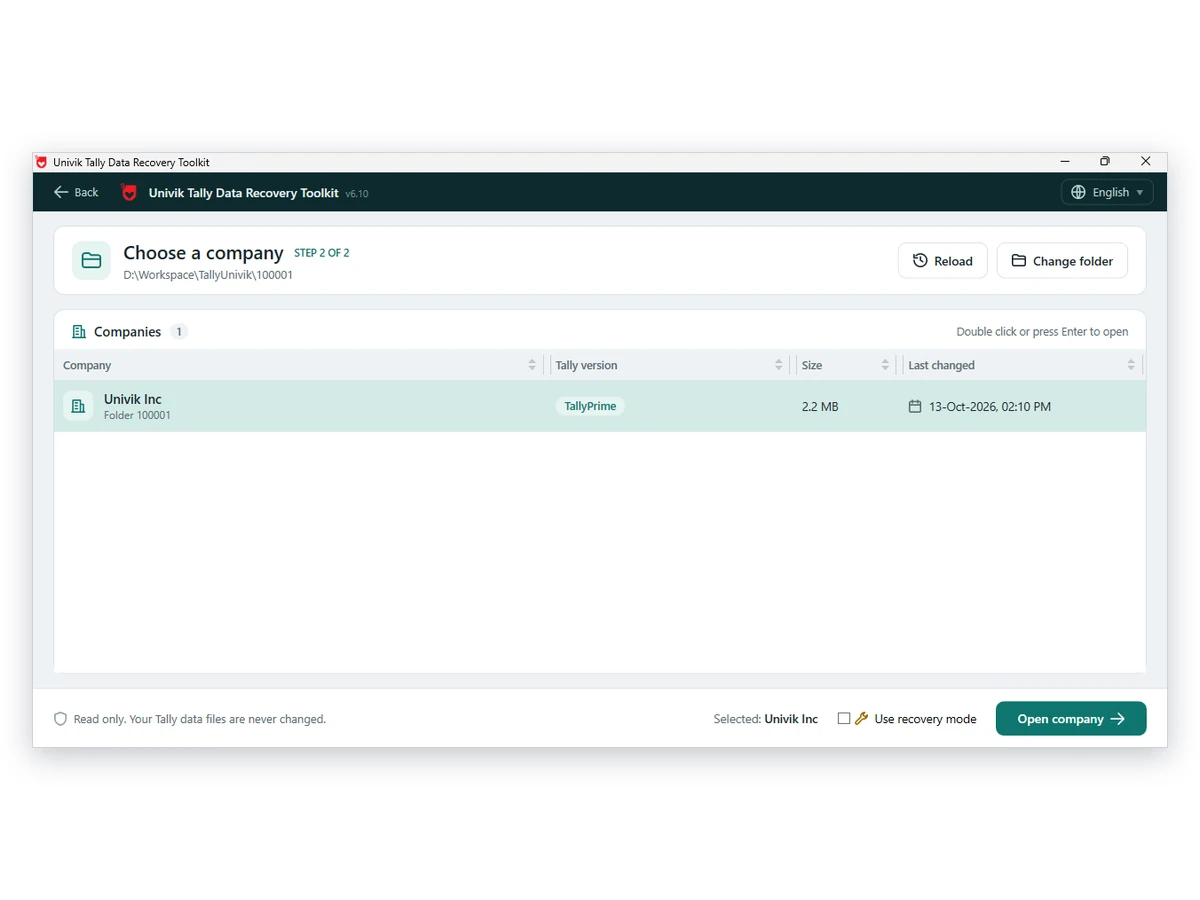
Windows 11 or 10 · read-only on your data · TallyPrime not required
Our Test
The reader behind this recovery software was run over real company data: seven TallyPrime sets from a single business (FY 2018-19 through 2025-26) with 43,326 vouchers between them, and two Tally.ERP 9 companies stored as .900 files. Each run used a read-only copy. The source folders were never written to.
In the two .900 companies the stored month totals agreed with totals rebuilt from the vouchers in every one of 4,100 account months, and the 236 opening balances all matched. One whole company, 8,836 vouchers, was exported, then imported into a fresh TallyPrime company with 0 import errors and 1,591 masters created, then TallyPrime itself exported it a second time. Those two files showed 0 field differences and every original voucher number survived across 9 voucher types.
What these numbers do not cover is damage. Our 178-scenario damage test ran on BUSY and Marg files, not on Tally folders, so this page carries no Tally recovery rate yet. Until it does, treat recovery mode as a careful read with extra checks. Judge each rebuilt voucher by its source label.
| What we checked | Result |
|---|---|
| TallyPrime company sets read | 7 sets from one business, 43,326 vouchers, FY 2018-19 to 2025-26 |
| Tally.ERP 9 (.900) month totals | Matched in 4,100 of 4,100 account months |
| Tally.ERP 9 (.900) opening balances | 236 of 236 matched |
| Full export re-imported into TallyPrime | 8,836 vouchers, 0 import errors, 0 field differences |
| Voucher numbers after import | Kept in 100% of vouchers across 9 voucher types |
| Stock vouchers | Balanced, 45 of 45 |
| Bank transaction types | 20 of 20 read by name, Cheque to UPI and IMPS |
| Same company saved twice | Decoded content identical, export identical byte for byte |
| Original data | Read-only copies only; nothing written to the source folders |
No Tally damage rate appears here because none has been measured yet.
Limits
Lost
Lost Bytes Cannot Be Read Back
A page that was zeroed or cut off holds nothing. The software reports those vouchers as not found and does not guess them.
XML
Recovered Data Gives a Basic Tally XML
The Tally XML for recovered data is a basic file. Extra detail such as stock items and bill-wise lines may not carry over.
Numbers
Test Figures Come From .1800 Data
Recovery mode also opens .900 folders. Our bench companies were TallyPrime .1800 data, so the percentages describe those.
Files
Deleted or Locked Files Need Another Tool
The software repairs damage inside files. It cannot undelete a folder or decrypt files that ransomware locked.
Treat each recovered voucher as a lead until you have matched it to your own books. Anything not marked Complete and checked deserves that check first.
Who It Is For
CAs With a Client's Damaged Copy
A client's pen drive holds a folder Tally rejects and no newer backup exists. Recover whatever it holds and give the client sheets with doubtful vouchers flagged.
Owners After a Power Cut
Restore the latest backup first. Then run recovery on the damaged folder to find the entries made after that backup, so a week of vouchers is not typed again.
Recovery Services With Client Data
A client hands over a company folder that Tally refuses. Read it on a copy first and report what came back before anyone runs a repair.
Side by Side
A recent backup restored inside Tally is the first choice. This software is for the days when no backup exists or the backup is older than the data you need.
| What you need | Tally Repair | Restore a backup | Paid recovery service | Univik Tally Data Recovery ToolkitTRIAL |
|---|---|---|---|---|
| Needs no backup at all | No, a backup is the prerequisite | No | Varies | Yes, from the damaged copy |
| Needs Tally on the PC | Yes | Yes | Varies | No |
| Leaves the original folder unchanged | No, it changes the company | Not applicable | Varies | Yes, read only |
| Keeps what it cannot mend | No, removes it | Not applicable | Varies | Yes, shown with a label |
| Marks how sure each voucher is | No | Not applicable | Varies | Yes, seven labels |
| Result loads into Tally | Yes | Yes | Varies | Partly, as a basic Tally XML |
| Shows how success was measured | Not applicable | Not applicable | Varies | Yes, on this page |
| Price visible before contact | Part of Tally | Part of Tally | Varies | $99 or $199 |
Tally Repair column read from Tally's help page on 13 October 2026. Service terms differ by provider, so that column says Varies where one answer cannot fit all. If your company opens fine and you only want to read it, the Tally Data Viewer is enough.
Setup Needs
Windows and .NET
The PC needs .NET Framework 4.8 or newer on Windows 11 or 10.
No Tally Needed
Neither TallyPrime nor a Tally licence has to be on this PC.
A Full Local Copy
Copy the full company folder, with every .900 or .1800 file and the .TSF files, to a local drive.
A Numbered Company Folder
A 5-digit folder such as 10000 holds .900 files and a 6-digit folder such as 100000 holds .1800 files.
| Platform | Windows 11 or 10 |
| Runtime | .NET Framework 4.8 or newer |
| Product | Univik Tally Data Recovery Toolkit, recovery mode, release 6.10 |
| Opens | A Tally company folder with .900 or .1800 files, including one Tally marks as damaged |
| Saves as | Excel, CSV, Tally XML, JSON or a printable page; full saves need a licence |
| Test bench | 7 TallyPrime companies with 43,326 vouchers and 2 Tally.ERP 9 companies, all real business data |
| Licences | Personal for CAs and accountants and Technician for recovery service providers and for business houses. Both cover 2 PCs. |
Questions
Related Software
Reviewed by Nick Rogers Founder of Univik
Page Checked 13 Oct 2026
Univik founder Nick Rogers approved the wording of this page on 13 October 2026. The recovery figures above come from our own test runs on sample TallyPrime companies, and the page says so. Where we describe Tally's own Repair, the help page behind the statement is linked. No tool can promise that a particular folder is recoverable. Every licence comes with Univik's 30-day refund policy.
Last updated: 15 October 2026
Univik Since 2013Folder Left UnchangedWorks Offline30-Day Refund
Univik works independently of Tally Solutions and the Tally name stays with its owner.


 The Core Problem
 Damage Types
 How It Works
 Limits
 Who It Is For


 Side by Side
 Questions
 Related Software


