Old Publisher will not open a file made in Publisher 2002 or newer, because the format changed. To open a new file in Publisher 98 or Publisher 2000, you save the file down to that older version first. If you still have a copy of Publisher 2002 to 2010, File then Save As does it for free. If you have a newer Publisher that still works, such as a perpetual Publisher 2021, 2019 or 2016, the Univik PUB Converter drives it to save the files down to Publisher 98 or Publisher 2000 format in one batch. Both routes need a working Publisher. Publisher left Microsoft 365 on 1 October 2026, so a Microsoft 365 copy only helps if it still opens today.
Update, 1 October 2026: Publisher has left Microsoft 365
Saving down needs a working copy of Publisher to write the old-format file. Today that means Publisher 2002 to 2010, a perpetual Publisher 2021, 2019 or 2016, or a Microsoft 365 copy that still opens with the “Publisher is retiring” banner, which may not last. If you have none of these, you can still read the file with the free Univik PUB File Viewer on Windows.
Publisher left Microsoft 365 on 1 October 2026, so a lot of people are going back to an old copy of Publisher they already own, Publisher 98 or Publisher 2000 that still runs happily on an old machine. Then they hit a wall. The newsletter or flyer they made last year will not open in it. The file is fine. It was saved in a newer format that the old program cannot read. The fix is to hand the old program a version of the file it understands.
Why Publisher 2000 and 98 Will Not Open Your New Files
For background, our guide on what a PUB file is explains the .pub format and how to open it without Publisher.
Publisher has used a few different file formats across its life, and the big split falls at Publisher 2002. Everything from Publisher 2002 through Publisher 2021 shares one modern format. Publisher 98 and Publisher 2000 came before that split and speak an older one. An old program can read its own format and formats older than itself, but it cannot read a format that did not exist yet when it was built.
So Publisher 2000 opens a Publisher 98 file without a fuss, and it opens its own files. Point it at a file made in Publisher 2013, 2016 or 2021 and it stops, because that format arrived years after Publisher 2000 shipped. This is the same wall seen from the other side in Publisher cannot open this file, where a new Publisher refuses an old file. Here the direction is reversed (an old Publisher refusing a new file), and the cure is the opposite too. Instead of bringing the file forward, you take it back.

“We keep Publisher files from every version in the lab for one reason: the old ones behave differently. Before you save down, open the result on the machine that has to read it and check the text formatting, because that is where a version change shows.”
Nick Rogers
|Founder, Univik, building file conversion tools since 2013
The Free Way: Save As in Publisher 2002 to 2010
If you happen to have a copy of Publisher from 2002 to 2010 installed, you do not need any extra software. If you no longer have any copy installed, an Online Publisher Viewer lets you open and inspect the file in your browser first. Those versions can open the modern format and save a copy back down to the old one. The option lives right in the Save As box, where the file type list includes Publisher 2000 Files and Publisher 98 Files as targets. These are the backward-compatible save formats Microsoft built for sharing with people on an older Publisher. Microsoft’s own developer notes name these save formats directly.
- Open the new file in a copy of Publisher 2002, 2003, 2007 or 2010.
- Click File then Save As and choose where the copy should go.
- In the Save As type list, pick Publisher 2000 Files or Publisher 98 Files.
- Save the copy, then open that copy in your old Publisher.
Two things are worth knowing before you count on this. There is no Save As target for Publisher 97 or anything older, so Publisher 98 is as far back as the format goes. And a mid-era version like Publisher 2007 already reads the newer family, so if you have one you can edit the file there and skip the old program entirely. Microsoft’s community threads have walked users through this Save As downgrade for years.
When That Save As Is Not an Option
The manual Save As to 98 or 2000 only appears in Publisher 2002 through 2010. On a newer Publisher, and on the reasons people get stuck, the picture changes.
If your working copy is Publisher 2013, 2016, 2019, 2021 or the Microsoft 365 version, its Save As box can leave Publisher 98 and 2000 off entirely, so the manual downgrade is not there to click. A folder of forty files is slow going one Save As at a time. And time is the real pressure. Publisher left Microsoft 365 on 1 October 2026, so a Microsoft 365 copy that still opens is on borrowed time, and support for Publisher 2021 ends on 13 October 2026. In each case you still need a working Publisher to read the files, but you want something that drives it for you and clears the batch while that copy still works.
Convert New Publisher Files to Publisher 98 or 2000
The Univik PUB Converter works with the Publisher already on your machine to save modern files down to Publisher 98 or Publisher 2000 format. It opens each new file through your installed Publisher and writes a backward-compatible copy your old Publisher can then open. Aim it at a folder, choose the older format as the output and it converts the whole batch in one run rather than one file at a time.
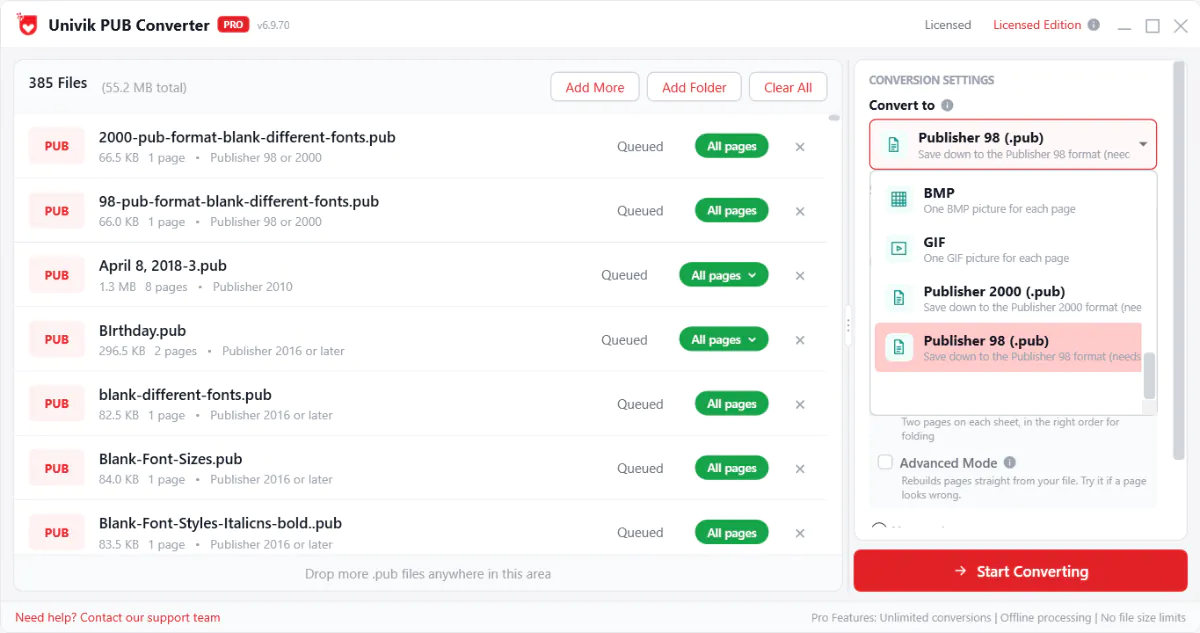
The reason to reach for it over the manual Save As comes down to scale and reach. It takes a whole folder at once, which matters when a small business is moving years of flyers and price lists back to a program the front desk still knows. It also saves down from newer Publisher versions, not only the 2002 to 2010 ones that still show 98 and 2000 in their own Save As box. The one thing it cannot do is work without Publisher, since it drives the copy you already have, so run it while that copy still works. If Publisher has already gone from your Microsoft 365 plan, this route needs a perpetual Publisher 2021, 2019 or 2016 instead. To check what a file holds before you convert it, the free PUB viewer opens it for a quick look.
Need your new files to open in Publisher 98 or 2000?
Univik works with your installed Publisher to save modern files down to Publisher 98 or Publisher 2000 format, a whole folder at a time. Run it while your Publisher still works.
Which Old Publisher Needs Which Format
Which format you save down to comes down to compatibility with the version of Publisher you plan to open the file in. The table below matches each one to the target that works.
| Publisher You Want to Open It In | Format to Save Down To | Result |
|---|---|---|
| Publisher 98 | Publisher 98 format | Opens |
| Publisher 2000 | Publisher 2000 format, or Publisher 98 | Opens |
| Publisher 2002, 2003, 2007, 2010 | No downgrade needed | Reads the 2002 to 2021 family |
If your old copy is Publisher 2000, the Publisher 2000 format is the natural pick, though the Publisher 98 format opens there too and travels a little further to friends on Publisher 98. If your copy is Publisher 98, save straight to the Publisher 98 format. And if you turn out to have a Publisher 2002 to 2010 disc after all, you do not need to downgrade anything, since those versions read the newer family on their own.
What Changes When You Save Down
An honest word before you commit a whole archive to this. Saving a file into an older format is not lossless, and it cannot be. The old format was built years before some of the design features you added, so anything the old format has no slot for gets simplified or dropped on the way down. Microsoft lists the features that drop for each old format, and the Publisher 98 format loses more than the Publisher 2000 format does. So when your old copy is Publisher 2000, save to the Publisher 2000 format rather than 98 to hold on to as much as you can.
Keep the original new file rather than saving over it. Downgrade a copy, so the full version stays intact for the day you have a modern tool again. Think of the old-format copy as a working version for the old program, not a replacement for the real thing.
Check the File Opens in Old Publisher
Do not assume the downgrade worked. Test it before you rely on it, especially across a batch.
- Copy the downgraded file to the machine that runs your old Publisher.
- Open your old Publisher first, then browse to the file from inside its Open box instead of double clicking it.
- Look over the pages for text that reflowed or images that moved.
- Fix anything the downgrade shifted while you still have the original open for reference.
If the file still refuses to open, the old program is older than you realise, or the copy went to the wrong target. Confirm the version of your Publisher, then save down again to that exact format. A file that opens but looks off is normal for a downgrade and something you tidy by hand, not a failure of the conversion.
A Longer-Term Plan Worth Weighing
Leaning on old Publisher works, and for people who like the program and know it well there is nothing wrong with it. If you already own Office Professional 2021 or a standalone Publisher 2021, 2019 or 2016, it keeps running now that the Microsoft 365 version is gone. It gets no more fixes, though. Publisher 2016 and 2019 left support in October 2025, support for Publisher 2021 ends on 13 October 2026, new Publisher licences are no longer sold and Office 2024 does not include it. It is worth saying plainly that it is a bridge rather than a destination. Old Publisher runs on old machines, and both wear out.
For the files you truly need to keep, a copy in PDF outlives every version question, since a PDF opens anywhere for years to come. For a large archive, Microsoft ships a PowerShell script that turns a whole folder of publications into PDF in one pass, though it needs a working copy of Publisher. The walkthrough for converting PUB to PDF sets it out, and moving a publication into Word gives you something you can still edit. If you would rather keep designing, a current layout tool is the honest long-term home, and Publisher alternatives lays out where to go, with moving PUB files to Affinity Publisher as one popular path. The wider story of what happens to PUB files after 2026 and the details of Microsoft Publisher end of life fill in the timeline. Downgrading to Publisher 98 or 2000 buys you the room to make that move on your own schedule instead of in a panic.
Frequently Asked Questions
How do I Save a Publisher File in an Older Version?
If you have Publisher 2002 to 2010, open the file, click File then Save As and pick Publisher 2000 Files or Publisher 98 Files in the file type list. That writes a copy the older program can open. If you do not have one of those versions, the Univik PUB Converter drives your installed Publisher to save them down to Publisher 98 or Publisher 2000 format in a batch. Either way you need a working Publisher. Since Publisher left Microsoft 365 on 1 October 2026, that means Publisher 2002 to 2010, a perpetual Publisher 2021, 2019 or 2016, or a Microsoft 365 copy that still opens.
Can Publisher 2000 Open a File Made in Publisher 2016 or 2021?
No, not as it stands. Publisher 2016 and 2021 use the modern format that arrived long after Publisher 2000, so the old program cannot read it. You have to save the file down to Publisher 2000 or Publisher 98 format first, either from a copy of Publisher 2002 to 2010 or with a converter. Once it is in the old format, Publisher 2000 opens it normally.
How do I Open a New Publisher File in Publisher 98?
Publisher 98 reads only the Publisher 98 format and older, so a new file has to be saved down to the Publisher 98 format before it will open. That is the oldest target available, since there is no save option for Publisher 97 or earlier. Save the copy to the Publisher 98 format with Publisher 2002 to 2010 or with the Univik converter, then open that copy in Publisher 98.
Does Saving Down to Publisher 2000 Lose Any of My Layout?
Text, page layout and standard pictures carry across. Newer picture effects, fonts the old version does not have and features added after the old format get simplified or dropped, because the old format has no place for them. Old Publisher could never display those touches anyway. Keep the original new file and downgrade a copy, so nothing is lost for good.
Can I Still Save to Publisher 98 Now That Publisher Has Left Microsoft 365?
Not on a Microsoft 365 install that has lost Publisher. Microsoft 365 dropped Publisher on 1 October 2026 and its Save As went with it. The Univik converter also relies on a working Publisher, so neither works on that machine. If your Microsoft 365 copy still opens with the retiring banner, save your files down now while it lasts. A perpetual Publisher 2016, 2019 or 2021 keeps running and can still do the job, even though support for Publisher 2021 ends on 13 October 2026.
Can I Convert New Publisher Files to Old Format for Free?
Yes. If you own a copy of Publisher 2002 to 2010, its built-in Save As writes to Publisher 2000 or Publisher 98 format at no cost. That is the free path. Without one of those versions there is no free Microsoft route, since old Publisher cannot open the new file to convert it and Microsoft ships no separate downgrade tool. A converter fills that gap.