Univik PUB File Converter

Microsoft Publisher retires October 2026. Convert your PUB files before the deadline.
Excellent  4.8 TrustRating (149 Verified Reviews)

Convert Microsoft Publisher PUB Files to PDF, Word, JPG and More

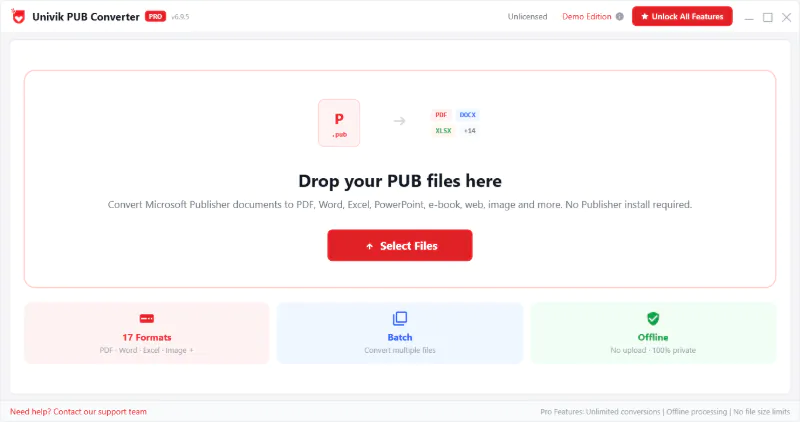
Univik PUB Converter opens and converts PUB files without Microsoft Publisher installed. Every page, text frame, image, shape and embedded font is read directly from the binary PUB file and exported to formats that work everywhere. Batch convert your entire Publisher archive before the October 2026 deadline.

*Free trial converts the first 10 pages of each document. No registration required.

  • No Publisher Required: Reads PUB files directly using a proprietary parser. Works even when Publisher is uninstalled, expired or too old for your Windows version.
  • Layout Preserved: Text frames, images, shapes, columns and embedded fonts all extracted with precise positioning. PDF output is pixel-accurate.
  • All Publisher Versions: PUB files from Publisher 1.0 (1991) through Microsoft 365 Publisher detected and converted automatically.

Univik PUB File Converter

PUBLISHER RESCUE ★ 2025 ★

Trusted for Publisher Migration

IT teams and document managers use Univik PUB Converter to rescue decades of Publisher files before the October 2026 retirement deadline.

 Publisher Document Elements Extracted

 Output Formats

Convert PUB to 7 Formats

Each output format is designed for a specific use case. Archive your Publisher documents, share them universally or prepare them for print.

📄
PDF
Pixel-accurate layout reproduction. Embedded fonts, all images and vector shapes preserved. The best format for printing, archiving and sharing.
📝
Word (DOCX)
Editable Word document. Text content, tables, images and headings extracted. Use when you need to edit the Publisher content in Microsoft Word.
🖼️
JPG / JPEG
Each page rendered as a high-resolution JPEG image. Quality and DPI configurable. Ideal for email, social media and web use.
🖼️
PNG
Lossless page rendering with transparent background support. Higher quality than JPEG for text-heavy layouts. Use for presentations and web graphics.
🌐
HTML
Web-ready output with text, images and layout approximated in HTML. Useful for publishing newsletter content to a website or intranet.
📐
SVG
Scalable vector output. Text and shapes preserved as vector paths at any resolution. Use for logos, brochure artwork and design handoff to Illustrator or Inkscape.
📋
RTF
Rich Text Format compatible with Word, LibreOffice, Google Docs and virtually every word processor. A universal fallback when DOCX compatibility is uncertain.

 Key Features

Why Choose Univik PUB Converter

Built for document managers, IT departments and businesses with Publisher archives that need converting before the October 2026 deadline.

No Publisher required

No Publisher Installation Required

The converter parses PUB files directly using an internal engine built for Publisher's binary format. No Microsoft Publisher installation, no Office 365 subscription and no internet connection are needed. This is the essential capability for anyone whose Publisher licence has expired or whose version will not install on Windows 10 or 11.

Layout preserved

Layout and Fonts Fully Preserved

Publisher files store page layout as absolute pixel coordinates for every text frame, image and shape. The converter reads those coordinates directly and reproduces the exact layout in the output. Embedded fonts are extracted and applied so headings, body text and decorative typography render correctly. PDF output is indistinguishable from printing from Publisher itself.

Batch conversion

Batch Convert Entire Archives

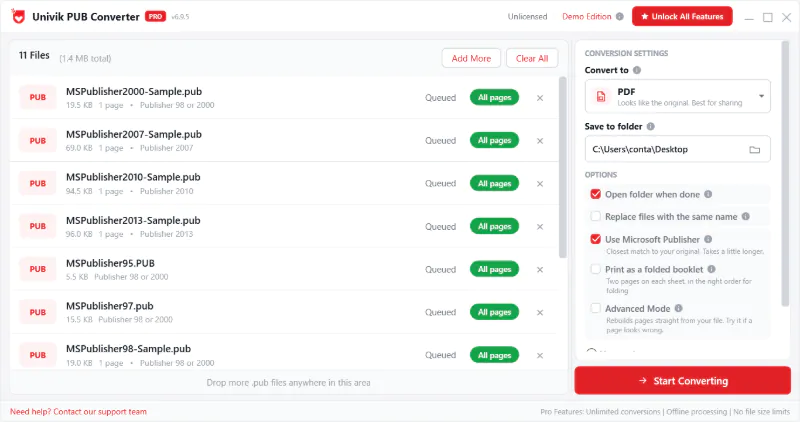
Select a folder of PUB files, choose the output format and run. The converter processes each file sequentially, naming the output after the source file. A progress log shows each conversion result. This is how organisations with hundreds of templates, brochures and newsletters convert everything before the Publisher retirement date without manual effort.

All Publisher versions

All Publisher Versions Supported

From Publisher 1.0 (1991) through Publisher 2021 LTSC and Microsoft 365 Publisher. The converter detects the PUB file version from the binary header and applies the correct parsing rules. PUB files from each ownership era (Microsoft Consumer, Office, 365) that differ in internal structure. The converter handles all variants without manual configuration.

100% offline

100% Offline and Confidential

Publisher documents often contain confidential business materials: marketing collateral, internal newsletters, company directories, price lists. Univik PUB Converter processes every file locally on your Windows machine. No files are transmitted to any server, no cloud processing occurs and no internet connection is required. Your documents stay on your machine.

DPI and quality control

DPI and Quality Controls

When converting to JPG, PNG or SVG, configure the output resolution from 72 DPI (screen) to 600 DPI (commercial print). Set JPEG quality from 1 to 100. Choose whether to export all pages or a specific page range. These controls let you produce output tuned for the exact destination: web thumbnail, print-ready artwork or archive copy.

 How It Works

PUB to PDF in 3 Steps

No technical knowledge required. Convert a single file or a folder of hundreds in the same operation.

1

Add Your PUB Files

Drag and drop a PUB file, browse for a single file or point the converter at a folder for batch processing. A document preview shows page count, dimensions and detected Publisher version before you convert anything.

2

Choose Output Format

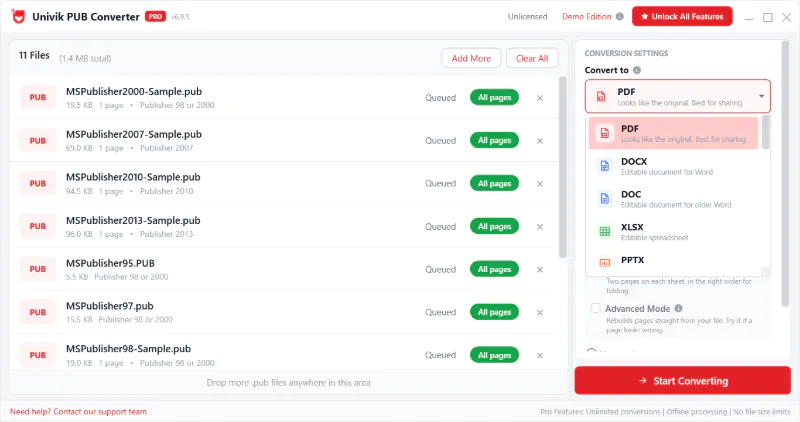
Select PDF for print and archiving, DOCX for editing in Word, JPG or PNG for images, HTML for web publishing or SVG for design handoff. Set DPI and quality for image outputs. Select a page range if you only need specific pages.

3

Convert and Save

Click Convert. Single files finish in seconds. Batch jobs show a live progress log with the status of each file. Output files are saved to the folder you specify, named after the source PUB file, ready to use immediately.

Action Required Before October 2026

Microsoft Publisher is Retiring. Your PUB Files Are Not.

Microsoft has confirmed Publisher will be retired from Microsoft 365 in October 2026. The application will stop working. Standalone Publisher licences sold out through 2025. Every organisation with PUB files needs a conversion plan. Not after the deadline, but now.

The official Microsoft method (export to PDF via Publisher, then open in Word) has been tested and found to produce poor results for complex layouts. Univik PUB Converter reads the PUB binary directly and produces accurate output without going through a failing intermediate step.

Brochures Newsletters Flyers Catalogues Posters Certificates Business cards Templates

Why the Official Method Fails

Step 1
Export PUB to PDF via Publisher. Requires Publisher to still be working..
Step 2
Open PDF in Word. Layout collapses. Text boxes become floating objects. Tables break apart.
Result
Office Watch tested this method in December 2025 and found the output "nearly unusable for typical editing tasks."
Univik
Reads PUB binary directly. No Publisher needed at any point. Layout preserved in output.

 Version Coverage

Every Publisher Version Supported

35 years of PUB files from every Publisher release. One converter that reads them all.

Early Publisher

1991 to 1999

1991
Publisher 1.0 for Windows 3.1
1993
Publisher 2.0 and Publisher for Windows 95
1997
Publisher 97 and Publisher 98

Office Integration

2000 to 2010

2000
Publisher 2000: joined Microsoft Office family
2003
Publisher 2003: commercial print support
2007
Publisher 2007: PDF export added

Modern Publisher

2010 to 2021

2010
Publisher 2010: improved typography
2016
Publisher 2016 and Publisher 2019
2021
Publisher 2021 LTSC: last perpetual licence

Microsoft 365 Era

2013 to October 2026

2013
Publisher added to Office 365 subscription
2025
Standalone licences sold out. Sale discontinued.
Oct 2026
Publisher 365 retires. App stops working.

 PUB File Reference

Understanding the PUB Format

What the PUB file contains, why it cannot be opened by standard tools and why layout-accurate conversion is technically difficult.

What is a PUB File?

PUB is the proprietary binary format used by Microsoft Publisher since 1991. It stores page layout documents including brochures, newsletters, flyers, posters, catalogues and business cards. The format is optimised for precise visual positioning of elements on a page rather than flowing text like Word.

PUB files are binary and undocumented. Microsoft has never published the format specification. Standard tools cannot read them. You need Publisher or a purpose-built parser like Univik to extract content accurately.

PUB File Quick Reference

Extension.pubMicrosoft Publisher Document
Format typeBinary proprietaryUndocumented by Microsoft
CreatorMicrosoftPublished since 1991
Primary useDesktop publishingBrochures, newsletters, flyers
ContainsText, images, shapesWith fonts, colours and layout
Opens inPublisher onlyOr Univik converter
RetiresOctober 2026Publisher 365 stops working
Format docsfileformat.com/publisher/pubFormat reference

Why Standard Tools Fail

  • Microsoft Word
    No import filter for PUB. Word cannot open PUB files at all.
  • LibreOffice Draw
    Partial PUB support only. Complex layouts, tables and custom fonts frequently fail.
  • PDF via Publisher then Word
    Microsoft's official method. Tested by Office Watch and found "nearly unusable" for complex layouts.
  • Univik PUB Converter
    Reads PUB binary directly. No Publisher needed. Layout preserved in PDF output.
Univik PUB File Converter Features

 Why Univik

A PUB Converter That Actually Works

Most tools that claim to open PUB files either require Publisher to be installed, produce badly broken layouts or fail entirely on files from older Publisher versions. Univik handles all three problems directly.

  • No Publisher licence or installation required at any point.
  • All Publisher versions from 1.0 (1991) through Microsoft 365 Publisher.
  • PDF output is pixel-accurate to the original Publisher layout.
  • Embedded fonts extracted and applied in all output formats.
  • Batch convert hundreds of PUB files in one operation.
  • DPI and quality settings for print-ready image output.
  • 100% offline. No files uploaded. No cloud dependency.
  • Free trial. No registration. 30-day money-back guarantee.

 FAQs

Common PUB Converter Questions

Answers to what document managers and IT administrators ask most about converting PUB files.

Yes. Univik PUB Converter reads PUB files directly without requiring Publisher to be installed. This works whether your Publisher licence has expired, you are on a machine without Publisher, or you have files from an older Publisher version that no longer runs on Windows 10 or 11. No Office 365 subscription is required.

When Publisher is retired in October 2026, the Publisher 365 application will stop working. Your PUB files will still exist on disk but you will not be able to open them in Publisher. Univik PUB Converter lets you convert your entire PUB archive to PDF, Word or other formats before the deadline so your documents remain permanently accessible without needing Publisher at all.

Yes, for PDF output. The converter reads Publisher's internal page coordinates for every text frame, image and shape and reproduces them at exactly those positions in the PDF. Embedded fonts are extracted and applied so typography renders correctly. PDF output is indistinguishable from printing directly from Publisher. Word output preserves text and images with best-effort layout approximation, since Word's document model is fundamentally different from Publisher's page layout model.

Yes. Add a folder of PUB files or select multiple files, choose the output format and click Convert. The converter processes each file and saves the output alongside or in a separate folder, naming each output after the source PUB file. A progress log shows the status of each conversion. There is no file count limit in the paid version, making this practical for organisations with hundreds of Publisher templates or archived newsletters.

All Publisher versions are supported: Publisher 1.0 through Publisher 98, Publisher 2000, Publisher 2002, Publisher 2003, Publisher 2007, Publisher 2010, Publisher 2013, Publisher 2016, Publisher 2019, Publisher 2021 LTSC and Publisher 365. The converter detects the PUB file version automatically from the binary header and applies the correct parsing rules without any manual configuration.

Completely. Univik PUB Converter processes all files locally on your Windows machine. No document content is transmitted to any server and no internet connection is required during conversion. Your Publisher documents, which frequently contain confidential business materials, stay on your machine throughout. The original PUB files are never modified.

PDF is the best output format for printing. It preserves the exact page layout, embedded fonts, image resolution and colour profile of the original Publisher document. The PDF can be sent directly to a commercial printer or printed from any PDF reader on any operating system. For archiving, set the output to PDF and keep the original PUB files alongside. The PDF serves as the immediately accessible version while the PUB is the archival record.

Convert Your PUB Files Before October 2026

Free trial. No Publisher required. No registration. Your files stay on your machine.

Windows 7, 8, 10, 11  |  100% offline  |  30-day money-back guarantee

Written by Univik Research Team

The Univik Research Team has been building data conversion software since 2013. Our engineers work with proprietary Microsoft file formats including the PUB binary format across all Publisher versions from 1991 through Microsoft 365. This page is reviewed and updated as new information about the Publisher retirement deadline becomes available. Read more on the Univik blog or contact our support team.

Related converters: VCF Converter  |  ADF Converter  |  PST Converter