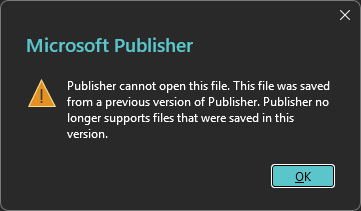
When Publisher cannot open this file, the wording of the error tells you why. The long error saying the file was saved from a previous version means your publication came from an old release, Publisher 1.0 or 2.0 in the worst case, and today’s Publisher will not open those old formats at all. Microsoft ships no converter for them. The Univik PUB Converter opens these legacy files where Publisher fails and turns them into formats you can use. The short error saying Publisher cannot open the file points to damage instead, and the repair steps further down cover that case.
Update, 1 October 2026: Publisher has left Microsoft 365
If you use Publisher through Microsoft 365, the problem may not be your file at all. Microsoft 365 subscribers can no longer open or edit .pub files in Publisher, and the app now shows a “Publisher is retiring” banner. Your files are still on your PC or OneDrive, and the free Univik PUB File Viewer opens them on Windows with no Publisher needed.
Maybe it is a folder of old newsletters, or the flyers from a business you ran back in the 90s. The files are right there on the disk. Publisher is installed. Every double click ends in the same dialog. Nothing is wrong with your computer. You have hit a wall Microsoft built on purpose, and the fastest way through it starts with reading which of the two errors you actually have.
Publisher Cannot Open This File: Three Causes
First, check whether Publisher itself is the problem. Since 1 October 2026 this is the most common reason a .pub file will not open. Microsoft removed Publisher from Microsoft 365 that day. You may see a banner titled “Publisher is retiring”, the app may refuse to start or it may be gone from your Start menu. Your file is fine and has not been deleted. Some Microsoft 365 copies still open for a short time, so if yours does, save your files to PDF or Word now. If yours does not, open the file without Publisher: the free Online PUB Viewer displays files made in Publisher 2003 or later right in the browser, and the Univik PUB Converter turns any version into PDF or Word. Publisher 2021, 2019 or 2016 bought on a one-time licence also still opens .pub files. Repairing Office, reinstalling it or renewing your subscription will not bring Publisher back. If Publisher does open but shows an error, read on.
Publisher shows two dialogs that people lump together, and they point at opposite problems. Fixing the wrong one wastes an afternoon, so match your message first.
The long message is honest about its cause. Every version of Publisher saves files in the format of its day, and the current app only reads the recent ones. The short message carries no explanation because Publisher genuinely cannot read enough of the file to say more. A download that stopped early, a disk fault or years on failing media all end here.
The short error has been worded a few different ways over the years, but it is the same problem. Publisher 2000 said the file is not a Publisher file, Publisher 2002 and 2003 said Publisher cannot open the file, and Publisher 2007 onward said it detected a problem in the file. If your problem is the opposite, a file that must open in an older Publisher, you can save it in an older Publisher format. Press Ctrl+Shift+I on any of these dialogs and Publisher shows a numeric alert ID in the corner, which is the detail a support agent asks for first.

“Files that will not open are often older than the copy of Publisher trying to read them, and we test with files from every Publisher version for that reason. The text and graphics are still in the file. The application is the problem.”
Nick Rogers
|Founder, Univik, building file conversion tools since 2013
Which Publisher Files Still Open: a Version Table
Publisher was sold for more than thirty years, and the file format changed several times along the way. The table matches each period to what happens today. The current application column reflects Publisher 2016 through 2021 and the Microsoft 365 app up to its removal on 1 October 2026, and the pattern is the same one users have reported on Microsoft’s own forums for years.
| Publisher Version | Released | Opens in Current Publisher | Opens in Univik PUB Converter |
|---|---|---|---|
| Publisher 1.0 | 1991 | No, refused | Yes |
| Publisher 2.0 | 1993 | No, refused | Yes |
| Publisher for Windows 95 | 1995 | No, refused | Yes |
| Publisher 97 | 1996 | No, refused | Yes |
| Publisher 98 | 1998 | Unreliable, reports vary | Yes |
| Publisher 2000 | 1999 | Opened by 2010-era versions, varies now | Yes |
| Publisher 2002 to 2019 | 2001 to 2018 | Yes, one format family | Yes |
| Publisher 2021 and Microsoft 365 | 2021 on | Yes | Yes |
The cut-off point is the late 90s. Files from Publisher 2002 onward share one format family and open across every release since. Publisher 1.0 and 2.0 sit on the far side of the wall, and they are the versions this error names most, because the files people dig out of decades-old backups came from exactly those releases.
Quick Checks Before You Reach for Tools
Two minutes of checking saves you from fixing the wrong problem. If you only need to confirm the file itself is intact, load it in an Online PUB File Viewer first to see whether it opens at all.
- Copy the file to your desktop and work on the copy, never the only original.
- Read the error again. The long previous version message means an old format, the short one means damage.
- Check the file size in its properties. A file of 0 KB or a few hundred bytes is basically empty, and no tool brings content back from nothing.
- Try one more file from the same batch. A whole folder failing with the long message confirms old versions. A single failure among working files suggests damage.
One route worth knowing exists inside Publisher itself. If an old machine or an installation disc for Publisher 2003 is within reach, that release opened files from the 90s that later versions refuse, and resaving from there modernises the format. It is a real fix, but a slow one, since it means old hardware, old licences and one file at a time.
Convert the Old File and Get the Publication Back
The direct route skips Publisher and reads the old formats itself. Point the Univik PUB Converter at the file and it reads publication formats across the tool’s whole history, the Publisher 1.0 and 2.0 files that trigger this error most included, then writes the content into a form today’s software reads. No old install, no version juggling and a whole folder handled in one go rather than one old file at a time.
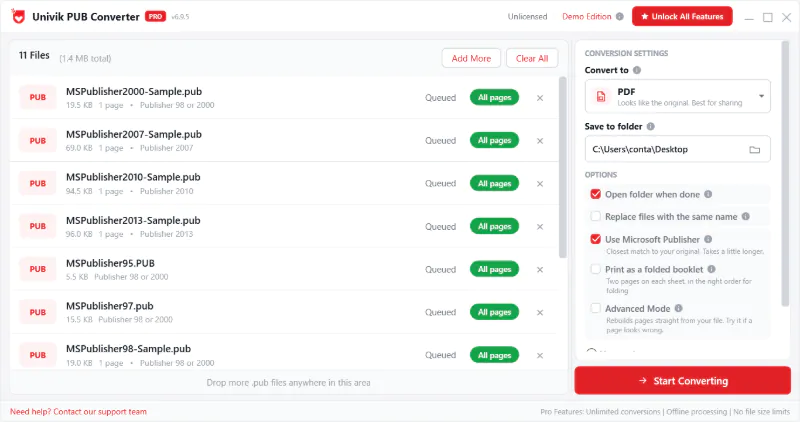
Where the output goes depends on what the publication is for now. A finished newsletter that only needs to stay readable belongs in PDF, which the guide on converting PUB to PDF covers. A document you want to edit again does better in Word, covered in converting a PUB document to Word, or as plain content via extracting editable text. And if you still want to edit the design itself, it can move into a modern layout tool, a route the guide on moving PUB files to Affinity Publisher walks through. Open source layout tools like LibreOffice and Scribus read some newer PUB files but choke on the old formats and complex layouts, so they are worth a try only for recent publications. When you only need to see what a mystery file contains before deciding, the free PUB viewer answers that question without a conversion, and it can print the pages if you need a paper copy.
Publisher refuses your old publication?
Univik opens Publisher 1.0, 2.0 and other legacy PUB files that modern Publisher rejects, then converts each one into PDF, Word or HTML.
Why Modern Publisher Dropped Its Own Old Files
The refusal comes straight from the way the file format changed over the years. Publisher 1.0 saved its publication in a layout all its own. From 2.0 onward it packed everything into one container file, the same way old Word and Excel files worked, and the data inside carried a version tag that changed again with the 2002 release. Files from 2002 through 2019 share that later tag, which is why they open in every recent version while the older ones do not.
Reading each old tag means keeping each old bit of code alive, and Microsoft dropped them one by one instead. Users on Microsoft’s own forums have documented the wall for years. Files from the late 90s opened in Publisher 2003, then were refused by 2007 and everything after, with no converter offered and no way for a newer release to save back past the 2000 format. Microsoft never changed its mind as the versions went up, and Publisher leaving Microsoft 365 on 1 October 2026, covered in Microsoft Publisher end of life, settles it for good.
Repair the File When Damage Is the Cause
The short error changes the job from conversion to repair. Publisher is telling you it cannot make sense of the file at all, and the classic causes are an interrupted copy, failing storage or a file renamed to .pub that never was one.
You can only try these repairs with Publisher installed and running. In practice you need a perpetual licence for Publisher 2021, 2019 or 2016, or a subscription copy Microsoft has not removed yet. Without one, skip to the converter route in the next section. Work through the simple fixes first. Open Publisher and use its own Open dialog rather than double clicking the file, since a broken file link can throw the same error. Try the copy you made on another computer, which rules your installation in or out. If the file sits on a USB stick or an old disc, copy it to your hard drive before opening, because failing media misreads under the steady reading that opening needs. And check for earlier versions of the file, whether from File History, a backup or the mail you originally sent it in, since a clean older copy beats a repaired newer one.
Two native tricks are worth trying before anything else. Launching Publisher in safe mode, by holding Ctrl as it starts, rules out an add-in or a broken setting as the real culprit. And for a file that half opens or crashes the application, create a new blank publication and bring the old one in through Insert File, once called Insert Text File, which rebuilds the document around whatever content survives. It works when the damage is in the file’s outer structure rather than in the pages themselves, and Microsoft has pointed users at this Insert File approach for damaged publications for decades.
Recover the Content When the File Stays Shut
Some files fail every simple fix, and the real question is how much can still be saved. If you still have a working Publisher, its own Recover Text from Any File filter, offered in the Open dialog, extracts the plain text from a broken publication but loses the layout, which is sometimes enough. Beyond that, a converter that parses the publication directly, rather than asking Publisher to open it, reads whatever structure survives. Because .pub is a closed format Microsoft never documented publicly, a reader built to understand it does work that a generic recovery tool cannot. That reaches text and layout in files Publisher itself gives up on, which makes running the file through the PUB Converter worth the attempt before declaring anything lost. What survives depends on where the damage landed, and a file whose start is badly broken gives back part of the content or none.
Set expectations by what the file has been through. A publication refused since the day it was copied off a dying drive carries real damage, while one that opened last month and fails today more likely has a local cause you can still walk back. For files that hold years of work, the recovery attempt costs minutes, and anything it returns is content you did not have an hour before. If the publication is password protected on top of everything else, the Publisher VBA password remover deals with that separate obstacle.
Publisher Has Left Microsoft 365: What It Means for Old Files
There is a reason to deal with old PUB files now rather than someday. Microsoft removed Publisher from Microsoft 365 on 1 October 2026, and no other Microsoft 365 app, not Word, not PowerPoint, opens a .pub file at all. If your Microsoft 365 copy still opens with the retiring banner, treat it as borrowed time and save your files now. Perpetual copies of Publisher 2016, 2019 and 2021 keep opening files but get no updates. Publisher 2016 and 2019 left support in October 2025, and support for Publisher 2021 ends on 13 October 2026. Either way, every publication still sitting in .pub is heading for the same wall your 1.0 and 2.0 files already hit, but on a later schedule. The longer view of PUB files beyond 2026 is its own story, and the roundup of Publisher alternatives covers where the editing work goes next.
The simplest move is one pass over everything. Gather the old publications, convert the keepers into PDF for the finished pieces and an editable format for the live ones, and the version wall stops being a problem you rediscover every few years. Whether a file dates from 1993 or last spring, it ends up somewhere you can actually open it.
Frequently Asked Questions
Why Does Publisher Say This File Was Saved from a Previous Version?
Because the publication was created in an old release, Publisher 1.0, 2.0, 95 or 97 in most cases, and current Publisher no longer reads those formats. The file is not damaged. Microsoft removed support for the early formats and ships no converter, so the fix is opening the file with a tool that still reads the legacy format and saving it into something modern.
How do I Open Publisher 1.0 and 2.0 Files Today?
Modern Publisher refuses them, so you need a path around it. The Univik PUB Converter reads Publisher 1.0 and 2.0 files directly and converts them to usable formats. The alternative is finding a working installation of Publisher 2003 or earlier, opening each file there and resaving it, which works but needs old software and handles one file at a time.
Can Publisher 365 Open Publisher 98 or 2000 Files?
Results vary, which is the polite version of what years of user reports show. Publisher 2010 and the versions around it opened files from 2000 onward, while files from 98 and earlier were refused. On the last Microsoft 365 releases, users reported old files from the late 90s failing with the previous version error. Since 1 October 2026 Microsoft 365 subscribers can no longer open Publisher at all, so no update will fix this. Treat anything older than Publisher 2002 as at risk and convert it.
How do I Repair a Damaged PUB File That Will Not Open?
Start with a copy of the file, then try Publisher’s own Open dialog, a different computer and the local drive rather than USB or disc media. If Publisher partially opens the file or crashes, create a new blank publication and insert the broken file’s pages into it, which rebuilds the document around the surviving content. When every attempt fails, a direct converter can still read what remains of the structure.
Can I Recover a Publisher File Without Opening Publisher at All?
Yes. A converter that parses the publication file itself needs no working Publisher installation at all, which is exactly what helps when the application refuses the file. It reads the surviving text and layout straight from the file and writes them out in a modern format. For a quick look inside a file before converting anything, a free PUB viewer does the same read without producing output.
Will My PUB Files Stop Working Now That Publisher Is Retired?
The files stay on your disk, OneDrive or SharePoint. What changed is that since 1 October 2026 Microsoft 365 no longer includes Publisher, and no other Microsoft 365 app opens .pub files. Perpetual copies of Publisher 2016, 2019 and 2021 keep opening them without updates or help, and support for Publisher 2021 ends on 13 October 2026. To open a file without Publisher, use a free PUB viewer. For publications you care about, convert them into PDF or an editable format.