 Email Settings Guide
Quick answer: incoming is mail.talktalk.net, IMAP port 993 or POP 995, SSL on. Outgoing is a different host, smtp.talktalk.net, port 587 with STARTTLS. The username is your full email address with the email password. The same settings cover talktalk.net, tiscali.co.uk, lineone.net, tinyworld.co.uk and pipex.com. One thing to know: if you have left TalkTalk broadband, keeping the email now needs a paid Everymail plan.
What Changed Recently#
Related email providers: BT Mail email settings, Sky IMAP settings, Virgin Media email settings, Zen IMAP settings, Eir email settings
Email providers change login rules more often than server addresses. TalkTalk Mail has moved to a new provider called Everymail, which now decides whether your email stays free. Here is where TalkTalk email stands in 2026.
Latest update
Left TalkTalk broadband? Your email may now cost money. TalkTalk Mail is moving to Everymail. Former broadband customers must subscribe to keep the address, at £5 a month or £50 a year. Current broadband customers keep it free. See who pays.
Earlier change
Everymail is the new platform, powered by Open-Xchange. The servers on this page still work the same way, so you do not need to change your mail app. Webmail moved to the new TalkTalk Mail portal. More on Everymail.
Earlier change
Receiving but not sending is the top complaint. Incoming is mail.talktalk.net, outgoing is smtp.talktalk.net on port 587. Getting these mixed up or leaving the old port 25 is the usual cause. See the fix.
mail.talktalk.net for incoming and smtp.talktalk.net for outgoing, SSL on, full address as the username. Free with TalkTalk broadband, paid via Everymail if you have left.
Before You Begin#
Two TalkTalk quirks sink most setups. Sort both before you touch server values.
1. Check the account is still active
If you have left TalkTalk broadband and not subscribed to Everymail, sending is switched off first, then login, so no server setting will fix it. Confirm the account is still active or paid before troubleshooting.
Where: Free or paid check below →
2. Use the right server for each direction
Incoming and outgoing are different hosts: mail.talktalk.net to receive, smtp.talktalk.net to send on port 587. Getting this wrong is why mail arrives but will not send.
Where: The send fix below →
About TalkTalk Mail#
TalkTalk is a UK broadband provider. Its TalkTalk Mail covers talktalk.net along with legacy addresses like tiscali.co.uk, lineone.net, tinyworld.co.uk and pipex.com that TalkTalk absorbed over the years.
TalkTalk grew by taking over Tiscali, Pipex, LineOne and Tinyworld, which is why so many old UK addresses still land on the same servers. In 2025 TalkTalk moved its mail to a new provider, Everymail, run on Open-Xchange. The change that matters for setup: email is free while you have TalkTalk broadband. A paid plan applies once you leave.
| Service Name | TalkTalk Mail |
| Run By | Everymail, powered by Open-Xchange |
| Legacy Domains | Tiscali, LineOne, Pipex, Tinyworld |
| Email Domains | talktalk.net, tiscali.co.uk, lineone.net |
| Webmail URL | TalkTalk Mail portal |
| Servers | mail.talktalk.net in, smtp.talktalk.net out |
| App Password Needed | No, your full address and email password |
| Cost | Free with broadband, £50 a year after |
@talktalk.net, @tiscali.co.uk, @lineone.net, @tinyworld.co.uk and @pipex.com all use the servers on this page. A tiscali.co.uk address behaves exactly like a talktalk.net one now.
TalkTalk Mail Login#
Webmail moved to the new TalkTalk Mail portal when Everymail took over. The official pages are:
Webmail
mail.talktalk.co.uk (webmail)
Account Security
My Account (broadband and billing)
Forced Password Reset
TalkTalk sometimes forces a reset when you sign in from a new device or after leaving broadband. Reset it in the webmail portal, then update every device.
Do You Still Get TalkTalk Email Free?#
One question decides it: do you still have TalkTalk broadband? TalkTalk Mail moved to a new provider, Everymail. That move split customers into two groups.
If you left TalkTalk and do nothing
TalkTalk emails affected customers directly with dates. If you ignore it, access is removed in stages, ending in permanent deletion.
Not sure it is worth paying? Back up the mailbox first, then the mail is yours to keep whether or not you subscribe.
TalkTalk IMAP Settings#
IMAP is the right incoming choice for most people, since it keeps mail on TalkTalk's server so every device shows the same inbox. Incoming uses the mail host:
| IMAP Server | mail.talktalk.net | |
| Port | 993 | |
| Encryption | SSL/TLS (required) | |
| Username | Your full email address, for example you@talktalk.net | |
| Password | Your TalkTalk Mail password | |
| Authentication | Required |
TalkTalk POP3 Settings#
POP3 downloads mail to one device, useful for a local copy on a single computer. Same incoming host, mail.talktalk.net. Not sure which to pick? See the comparison below.
| POP3 Server | mail.talktalk.net | |
| Port | 995 | |
| Encryption | SSL/TLS (required) | |
| Username | Your full TalkTalk address | |
| Password | Your TalkTalk Mail password |
TalkTalk SMTP Settings#
587 with STARTTLS or 465 with SSL. Many home routers and security tools block port 25, which is why mail suddenly stops sending. A few old guides list smtp.o2.co.uk as the outgoing server. That is wrong now, use smtp.talktalk.net.
SMTP handles outgoing mail. This is where the top TalkTalk complaint lives. Outgoing uses a different host from incoming. Old port 25 is often blocked by routers. Use these values:
| SMTP Server | smtp.talktalk.net (not mail) | |
| Port (SSL) | 465 | |
| Port (STARTTLS) | 587 | |
| Encryption | SSL or STARTTLS (required) | |
| Username | Your full TalkTalk address | |
| Password | Same as incoming mail | |
| Authentication | Required. Tick "My outgoing server requires authentication" and reuse the incoming login. |
Check TalkTalk IMAP Settings Online#
You don't need to download anything to check TalkTalk IMAP settings online. This page is the lookup, with every value verified and copyable. Remember incoming and outgoing use different hosts. Type your address for a quick check:
Does my email address use these settings?
Runs in your browser only. Your address is never sent anywhere or stored.
Want to verify the account itself first? Sign in at TalkTalk webmail. If webmail works but an app does not, the cause is almost always the wrong outgoing host or a blocked port, not your password. If webmail is blocked too, check whether the account needs an Everymail subscription.
Look Up IMAP Settings for Any Email Domain#
This page covers TalkTalk. For any other address, including a business domain on a different host, our free lookup database imapsettings.com returns the incoming and outgoing servers for any domain in one step.
imapsettings.com
Complete email settings database, by Univik
Enter any email address and get the incoming and outgoing server settings for that domain in 1 step:
Your address is used only to find the settings for that domain. Nothing is stored or shared.
Receiving But Not Sending?#
This is the number one TalkTalk complaint. Mail arrives fine but nothing sends. Almost always the outgoing server is set to the wrong host or port. Use these:
| Direction | Server | Port and security |
|---|---|---|
| Incoming (IMAP) | mail.talktalk.net | 993, SSL |
| Incoming (POP3) | mail.talktalk.net | 995, SSL |
| Outgoing (SMTP) | smtp.talktalk.net | 587, STARTTLS |
| Avoid | Port 25, smtp.o2.co.uk | Both fail now |
Fix Sending in Four Checks
- Set the outgoing server to
smtp.talktalk.net, not mail.talktalk.net and not any o2 address. - Set the outgoing port to 587 with STARTTLS or 465 with SSL. Never leave it on 25.
- Turn on outgoing authentication and reuse your full address and email password.
- If it still fails, confirm you have not left broadband without paying, since that removes sending first.
Set Up TalkTalk Mail in Email Clients#
The servers are always the same: mail.talktalk.net in, smtp.talktalk.net out. Only the menus differ. Jump to your app:
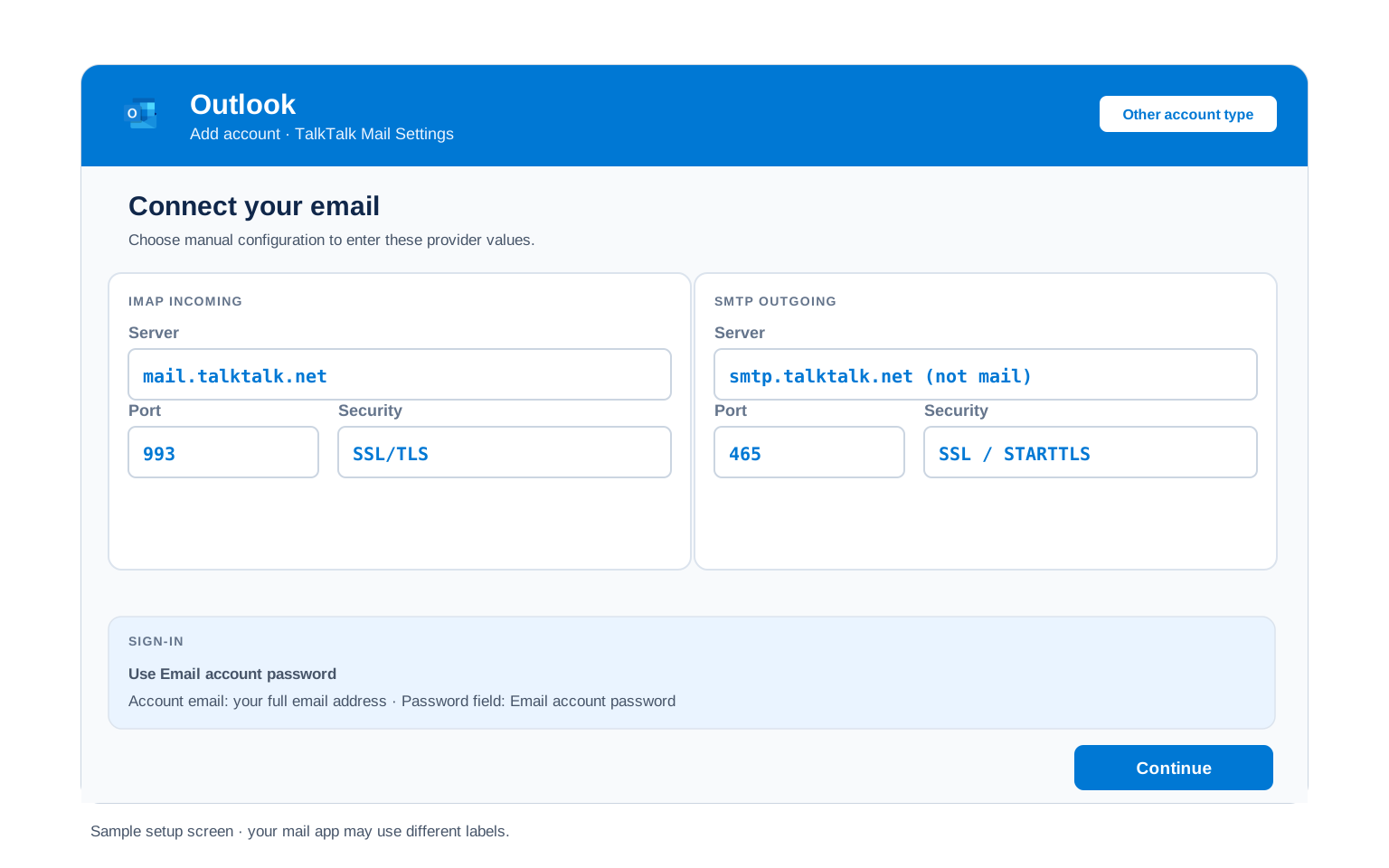
Outlook (Windows and Mac)
- Open Outlook → File → Add Account [new Outlook: Settings → Accounts → Add account].
- Enter your TalkTalk address, open Advanced options and check "Let me set up my account manually".
- Choose IMAP and enter
mail.talktalk.netport993(SSL) for incoming andsmtp.talktalk.netport587(STARTTLS) for outgoing. - Use your full address and email password in both the incoming and outgoing boxes.
- Finish and send yourself a test to confirm sending works, since that is the step that usually fails.
Apple Mail (macOS)
- Open Mail → Settings → Accounts → Add Account.
- Choose Other Mail Account, since TalkTalk is not in the built in list.
- Enter your name, full address and email password, then continue.
- Set incoming to
mail.talktalk.netand outgoing tosmtp.talktalk.net, both with the full address as the username. - Enable Mail in the checkbox list and finish.
iPhone and iPad
- Open Settings → Apps → Mail → Mail Accounts → Add Account.
- Tap Other → Add Mail Account, since TalkTalk is not a built in choice.
- Enter your details with your email password, then tap Next.
- Keep IMAP selected, set incoming
mail.talktalk.netand outgoingsmtp.talktalk.net. Put the full address as the username in both. - Tap Save and wait for iOS to verify the account.
Android
- Open your mail app (Gmail app, Samsung Email or another) → Add account.
- Choose Other (IMAP) when your provider is not in the list.
- Enter your address and email password. If auto setup fails, pick Manual setup.
- Enter the servers:
mail.talktalk.net993 SSL incoming,smtp.talktalk.net587 STARTTLS outgoing. - Finish setup and pull down to sync your inbox.
Thunderbird
- Open Thunderbird → Account Settings → Account Actions → Add Mail Account.
- Enter your name, address and email password, then select Continue.
- Thunderbird may detect the wrong outgoing server. Confirm IMAP is selected, then check the outgoing host.
- Set outgoing manually to
smtp.talktalk.netport 587 if the test fails, the usual TalkTalk fix. - Select Done. Folders sync on first open.
TalkTalk Webmail Settings#
Server settings connect your apps. These control how TalkTalk Mail itself behaves. Find them in webmail under the gear icon, then Settings, in the new Open-Xchange based portal.
Signature
Settings, then Mail, then Signatures. A signature set here shows in webmail only. Outlook and phone apps keep their own separate signature.
Vacation Auto Reply
Settings, then Mail, then Vacation Notice. Set start and end dates so it turns off by itself. It runs on the server, so it replies even when your computer is off.
Filters and Folders
Settings, then Mail, then Filter Rules. Rules here run on the server, so mail is sorted before your phone or Outlook sees it. Client side rules only run while that app is open.
Spam and Blocked Senders
Settings, then Mail, then Blacklist. Add addresses or whole domains. Blocked senders go to the Spam folder rather than the inbox.
POP3 vs IMAP#
| Feature | IMAP | POP3 |
|---|---|---|
| Where mail lives | On the TalkTalk server | Downloaded to 1 device |
| Multiple devices | ✅ Everything stays in sync | ❌ Each device sees different mail |
| Sent and deleted mail | ✅ Synced everywhere | ⚠️ Stays only on that device |
| Offline reading | ⚠️ Cached mail only | ✅ Full local copy |
| Server storage used | Yes, counts against your quota | Can be freed after download |
| Best for | Phone + computer, everyday use | Single PC, local archives |
TalkTalk Sending and Storage Limits#
Hit a limit and TalkTalk blocks sending for a while without a clear error. Know the numbers before you bulk forward or migrate a mailbox:
| Outgoing port | 587 STARTTLS or 465 SSL. Port 25 is blocked |
| Recipients per message | Keep bulk sends small to avoid a temporary block |
| Attachment size limit | Around 20 MB, use a link for larger files |
| Free mailboxes with broadband | Up to 5 addresses on one account |
| Cost after leaving broadband | Everymail, £5 a month or £50 a year |
| What happens at a send limit | Sending pauses for a period, then clears on its own |
Troubleshooting TalkTalk Connections#
Find the exact error your email app shows, then apply the fix:
| Error you see | What it means | Fix |
|---|---|---|
| Receives mail but will not send | Wrong outgoing server or port | Set outgoing to smtp.talktalk.net port 587 STARTTLS. Move off port 25 and drop any smtp.o2.co.uk value. |
| Cannot connect to server | Wrong incoming host or SSL off | Incoming is mail.talktalk.net, 993 with SSL. Antivirus and VPN apps can also block the port. |
| Account login rejected in webmail too | You left broadband and have not paid | Check whether the address now needs an Everymail subscription. If so, no server setting will connect it. |
| Password suddenly rejected | A forced reset changed it | TalkTalk resets passwords after some new device logins. Reset in webmail, then update every device. |
| Old guide settings no longer work | Mail moved to Everymail | Use the hosts on this page. Ignore any guide listing pop3.talktalk.net or an o2 outgoing server. |
Reader Reported Fixes
Two fixes that come up again and again in TalkTalk Mail setups, beyond the error table above.
Fix the outgoing server before anything else. When mail arrives but will not send, do not touch the incoming settings. Nine times out of ten the outgoing host is still mail.talktalk.net or the port is 25. Change outgoing to smtp.talktalk.net on 587 and the problem clears.
Back up before the Everymail deadline. If you have left TalkTalk broadband, download a full copy of the mailbox now, while login still works. Once the account closes, the data is gone for good, so a backup is the safe move whether or not you decide to pay.
Coming from Tiscali or Pipex?#
Tiscali, Pipex, LineOne and Tinyworld were all absorbed by TalkTalk. A @tiscali.co.uk, @lineone.net, @tinyworld.co.uk or @pipex.com address still works, but it now uses the TalkTalk servers on this page, not any old Tiscali or Pipex hostname.
Setting up one of these old addresses? Use every value above with the full address as the username, then sign in at TalkTalk webmail. The free-or-paid rule is the same: free with TalkTalk broadband, an Everymail plan once you leave.
Not going to pay for Everymail? Back up the mailbox first. Once the account closes, TalkTalk deletes the data and there is no recovery, so save it while login still works.
Moving to Gmail or Microsoft 365? The Univik Email Migration Tool copies every folder from TalkTalk to the new account. Enter the IMAP settings from this page for the TalkTalk side and your new provider's details for the other.
Rather not do it yourself? Our Email Migration Services team plans and runs the whole transfer for you and verifies every folder arrived.
Use These Settings in Univik Email Backup#
The same IMAP settings above let you download your complete TalkTalk mailbox to your computer. Univik Email Backup saves everything as PST, MBOX, EML or PDF files you keep forever, even if the account closes. That last point matters if you have left broadband and might not pay for Everymail.
- Download Univik Email Backup and install it on Windows.
- Choose IMAP from the source list and enter
mail.talktalk.net. - Sign in with your full email address and your TalkTalk Mail password.
- Confirm the server details:
mail.talktalk.netwith port993and SSL, from the IMAP table above. - Pick a saving format and folder, then start the backup. Large mailboxes download in the background.
Univik Tools That Use These Settings#
Many people land here while migrating or archiving a mailbox. All 3 tools use the same IMAP settings from this page:

Email Backup
Download your complete TalkTalk mailbox to PST, MBOX, EML or PDF before any Everymail deadline.
Email Backup Tool →
Email Migration Tool
Copy every folder from TalkTalk straight into Gmail, Microsoft 365 or any other account. No manual export needed.
Email Migration Tool →
Email Converter Tool
Already have MBOX, EML or OST files from an old export? Convert them to PST, PDF or any format your new app opens.
Email Converter Tool →Prefer to hand the whole migration to experts?
If server settings feel like too much, you don't have to learn them. Univik's migration team handles the whole project: planning, transfer, verification and a report showing every folder made it. Since 2013, for single mailboxes up to full company moves.
Email Settings Glossary#
IMAP
Internet Message Access Protocol. Reads mail from mail.talktalk.net so all your devices see the same inbox, folders and read status.
POP3
Post Office Protocol version 3. Downloads mail to 1 device and can remove it from the server. Older method, still useful for local archives.
SMTP
Simple Mail Transfer Protocol. Sends your outgoing mail, on smtp.talktalk.net for TalkTalk. Every account needs it next to IMAP or POP3, which only receive.
SSL / TLS / STARTTLS
Encryption for the connection. SSL/TLS encrypts from the start (ports 993, 995, 465). STARTTLS upgrades a plain connection (port 587).
Everymail
The provider now running TalkTalk Mail, built on Open-Xchange. Current broadband customers use it free. Former customers pay to keep an address.
TalkTalk Mail Plus
The paid Everymail plan, £5 a month or £50 a year, that keeps a TalkTalk address working after you leave TalkTalk broadband.
How We Verify These Settings#
Univik builds email backup, migration and converter software since 2013. Our tools sign in to TalkTalk over IMAP and SMTP every day for thousands of users, so a changed server, port or login rule shows up in our connection logs before most guides notice it.
Every value here is confirmed with 3 checks: a live IMAP and SMTP connection from Univik Email Backup, a comparison against TalkTalk's own help pages and a real login test through the current TalkTalk Mail portal. We re verify after any TalkTalk announcement and at least once a quarter.
Found something that no longer matches what TalkTalk shows you? Tell us and we will retest and update the page, with the change logged in what changed recently.
 Help & Support
Frequently Asked Questions
Incoming is mail.talktalk.net on port 993 with SSL. Sign in with your full email address and your TalkTalk Mail password. Outgoing is a different host, covered in the send fix. The full table is in the IMAP settings section.
This is the top TalkTalk complaint. It is nearly always the outgoing server. Set outgoing to smtp.talktalk.net on port 587 with STARTTLS, turn on outgoing authentication, then move off port 25. Full steps are in the send fix.
IMAP suits nearly everyone because it mirrors your inbox across phone, computer and webmail. POP3 fits only a single computer where you want a local download. It also pulls mail off before an Everymail deadline. Full comparison here.
The outgoing server is smtp.talktalk.net, port 587 with STARTTLS. Port 465 with SSL works as an alternate. Turn on outgoing authentication and reuse your email login. Do not use port 25, which most routers block. Ignore any old smtp.o2.co.uk value.
Only if you have left TalkTalk broadband. Current broadband customers keep email free, up to 5 mailboxes. If you left, you must subscribe to Everymail, £5 a month or £50 a year. Without it the address is closed. See who pays.
No. TalkTalk absorbed Tiscali, Pipex, LineOne and Tinyworld, so @tiscali.co.uk, @pipex.com, @lineone.net and @tinyworld.co.uk all use the same mail.talktalk.net and smtp.talktalk.net servers as talktalk.net. Just use the full address as the username.
An IMAP client downloads mail as it syncs, but a dedicated backup tool is faster and saves standard files you can open anywhere. This matters if you have left broadband, since a backup keeps the mail even after the account closes. See how to back up your TalkTalk mailbox.
Two common TalkTalk causes. First, the mail moved to Everymail, so old guides listing pop3.talktalk.net or an o2 outgoing server no longer work. Second, you left broadband and the account now needs a paid plan. Check what changed recently, then confirm the hosts on this page.
An email migration tool copies mail directly between the 2 accounts over IMAP. You need the TalkTalk IMAP settings and your email password for this side, plus the destination details for the other. Every folder and date stays intact. Doing this before an Everymail deadline saves the mail for good.
If setting this up feels risky or you have many accounts to move, our managed email migration service does the entire job for you.
Other Email Provider Settings
Summary: TalkTalk Settings at a Glance
- IMAP: mail.talktalk.net, port 993, SSL
- POP3: mail.talktalk.net, port 995, SSL
- SMTP: smtp.talktalk.net, port 587 STARTTLS
- Username is your full email address
- Incoming and outgoing are different hosts
- Avoid port 25 and any smtp.o2.co.uk
- Free with broadband, £50 a year after via Everymail
- Same servers for tiscali, pipex, lineone