 Email Settings Guide
Quick answer: the Virgin Media IMAP server is imap.virginmedia.com on port 993 with SSL. The outgoing server is smtp.virginmedia.com on port 465 with SSL. The POP3 server is pop3.virginmedia.com on port 995 with SSL. Note the pop3 prefix rather than pop, which catches people out. Your username is the full address. The password is a Virgin Media email app password. These same values serve ntlworld, Blueyonder and virgin.net addresses. Before you set anything up though, it is worth checking whether your mailbox is due to be closed.
What Changed Recently#
Related email providers: BT Mail email settings, Sky IMAP settings, TalkTalk email settings, Zen IMAP settings, Eir email settings
More has changed here than at any other provider in this series. Some of it affects whether you keep your address at all.
Latest update
Leaving Virgin Media deletes the mailbox 90 days later. Virgin Media states that an email account is deactivated and deleted 90 days after services are disconnected. That term sits in its contract. When the account closes, the contents are permanently deleted. It also admits that some accounts slipped through, which is why people who left years ago are being contacted now. Virgin Media advises forwarding your mail elsewhere or saving messages and attachments to a hard drive first.
Earlier change
A second 90 day rule covers inactivity. This is the recoverable one. A mailbox left unopened for 90 days may have access suspended with no prior notice. Suspension runs 60 days. Virgin Media can reactivate it inside that window. Do not confuse this with the disconnection rule above, which ends in deletion. Leaving a mail client connected satisfies the inactivity rule without you thinking about it, which is one practical reason to finish the setup on this page.
Earlier change
No new Virgin Media addresses are being created. Virgin Media puts it plainly. New customers cannot get one, though existing addresses are unaffected. Taken with the closure programme, that means a Virgin Media address is not replaceable once lost.
Before You Begin#
Two things to settle before you type a single server name. One of them is unusually urgent on Virgin Media.
1. Check the mailbox is not being closed
Virgin Media closes email accounts belonging to people who have left, deleting the contents permanently. There is also a 90 day activity rule. Setting up a client on a mailbox already on that path wastes your time.
2. Drop any legacy server names
Old configurations pointing at smtp.ntlworld.com or similar no longer authenticate. Virgin Media answers with error VM401. Every domain now uses the virginmedia.com hosts.
Where: Server tables below →
About Virgin Media Mail#
Virgin Media is a UK cable broadband, TV and phone provider, now part of Virgin Media O2. Its mail service carries four different domains because of the companies it absorbed on the way here.
Virgin Media Limited took its name in February 2007, when NTL and Telewest merged then rebranded. virgin.net had launched back in 1996 as a separate ISP before folding into the parent in 2015. Each of those names left an email domain behind. The mail platform itself moved off Google in 2015, which is why setup guides written before then send you to hosts that no longer answer.
| Service Name | Virgin Media Mail |
| Owned By | Virgin Media O2, the Liberty Global and Telefónica joint venture |
| Launched | February 2007, from the NTL and Telewest merger |
| Email Domains | @virginmedia.com, @ntlworld.com, @blueyonder.co.uk, @virgin.net |
| Webmail URL | my.virginmedia.com |
| Protocols Supported | IMAP, POP3, SMTP. Virgin Media recommends IMAP |
| App Password Needed | Yes. Virgin Media issues email app passwords for clients |
| Free Storage | Tied to the broadband account. No figure published we can verify |
@virginmedia.com, @ntlworld.com, @blueyonder.co.uk and @virgin.net all connect through the virginmedia.com hosts on this page. Your address does not change. An ntlworld address stays an ntlworld address, it stops using ntlworld servers. Anything still pointing at pop3.ntlworld.com or smtp.blueyonder.co.uk is a configuration left over from before the 2015 platform move.
Virgin Media Webmail Login#
Webmail sits behind the My Virgin Media portal rather than on its own address. Go to My Virgin Media, scroll to Quick links at the foot of the page, then choose Virgin Media Mail:
Webmail
Account Security
Password Recovery
Is Your Mailbox Being Closed?#
No other provider in this series needs a section like this. Virgin Media has two different 90 day rules that can take your mailbox away. Almost every guide online muddles them together. One is recoverable. One is not. Work out which one you are facing before touching a single server setting.
- There are two separate 90 day rules. People conflate them constantly, including guides that should know better. One is about leaving Virgin Media. The other is about not opening your mailbox. They have different consequences.
- Rule one, disconnection. Virgin Media states that an email account is deactivated and deleted 90 days after your services are disconnected. That sits in its terms and conditions. This one is permanent. There is no recovery window afterwards.
- Rule two, inactivity. If a mailbox goes unopened for 90 days, Virgin Media may suspend access without prior notice. Suspension then runs 60 days. The mailbox can be reactivated by contacting Virgin Media inside that window. This one is recoverable.
- Which applies to you? Still a Virgin Media customer means only rule two matters. Having left means rule one is already running, whatever your mailbox currently does.
- Still working years after leaving? That is common and not a reprieve. Virgin Media says accounts are usually closed within 90 days of disconnection but that it missed some. It is now contacting those people. Yours being alive means it was overlooked rather than exempted.
- No replacement exists. Virgin Media no longer creates new email addresses, so an address lost either way cannot be reopened under another name.
Virgin Media IMAP Settings#
IMAP is the incoming protocol to use here. Virgin Media says so too. Mail stays on the server, which is how every device ends up showing one inbox.
| IMAP Server | imap.virginmedia.com | |
| Port | 993 with SSL. Virgin Media recommends IMAP over POP3 | |
| Encryption | SSL/TLS (required) | |
| Username | Your full email address, including @virginmedia.com | |
| Password | A Virgin Media email app password | |
| Authentication | Required. Set the method to Password rather than anything else |
Virgin Media POP3 Settings#
POP3 brings mail down to one machine. Worth it only for a single computer keeping a local copy. Undecided? The comparison is below.
| POP3 Server | pop3.virginmedia.com, with the 3. Not pop.virginmedia.com | |
| Port | 995 | |
| Encryption | SSL/TLS (required) | |
| Username | Your full email address | |
| Password | The same email app password |
pop3.virginmedia.com. Almost every other provider in this cluster uses a pop. prefix, so guessing by pattern gives you a host that does not exist. POP3 also pulls mail off the server as it goes, which sits badly with a 90 day activity rule and a closure programme. Tick "leave a copy on the server" if you use POP at all.
Virgin Media SMTP Settings#
smtp.ntlworld.com on port 25 without SSL fail with 530 5.1.0 Authentication Required (VM401). That VM401 code is Virgin Media's own. Seeing it means your client is running settings from before the 2015 platform move. Replace the host with smtp.virginmedia.com, set port 465 with SSL, then turn outgoing authentication on.
SMTP carries outgoing mail. Reading fine while sending fails points here. On Virgin Media the cause is usually an old host name rather than a wrong password.
| SMTP Server | smtp.virginmedia.com | |
| Port | 465 with SSL, which is what Virgin Media publishes | |
| Authentication method | Password. Not port 25, which is where VM401 comes from | |
| Encryption | SSL or STARTTLS (required) | |
| Username | Your full email address | |
| Password | The same email app password as incoming | |
| Authentication | Required. Check "My outgoing server requires authentication" in Outlook. |
Check Virgin Media IMAP Settings Online#
You don't need to download anything to check Virgin Media IMAP settings online. This page is the lookup: every value is verified, current and copyable straight from your browser. Not sure your address uses Virgin Media servers? Type it below and find out instantly.
Does my email address use these settings?
Runs in your browser only. Your address is never sent anywhere or stored.
Want to verify the account itself before configuring an app? Sign in at Virgin Media webmail, which confirms your address and password work, then confirm an app password exists. If both pass, any email app connects with the tables above.
Look Up IMAP Settings for Any Email Domain#
This page covers Virgin Media. For every other address, work email on a company domain included, we run a free online lookup database: imapsettings.com.
imapsettings.com
Complete email settings database, by Univik
Enter any email address and get the incoming and outgoing server settings for that domain in 1 step:
Your address is read in the browser to identify the domain. It is not sent or saved anywhere.
Virgin Media Email App Password#
Virgin Media calls this an email app password. It is what your mail client uses in place of the password you sign in to My Virgin Media with.
| Where you sign in | My Virgin Media password | Email app password |
|---|---|---|
| My Virgin Media portal | ✓ Works | Not used here |
| Virgin Media Mail webmail | ✓ Works | Not used here |
| Outlook, Apple Mail, Thunderbird | ✗ Rejected | ✓ Required |
| Phone mail apps set up by hand | ✗ Rejected | ✓ Required |
How to Get a Virgin Media Email App Password
- Open the My Virgin Media app on your phone. Virgin Media puts this in the app rather than on the website.
- Go to Account settings and find the app password option there.
- Create the app password. Virgin Media keeps it separate from your portal password on purpose, so a mail client never holds the credential for your whole account.
- Copy it while it is on screen and paste it into your mail client as the password.
- Use the same one for incoming and outgoing. Virgin Media does not issue a separate credential for SMTP.
smtp.ntlworld.com, which returns VM401 whatever password you supply. Check the host names before generating anything new.
Set Up Virgin Media in Email Clients#
All four Virgin Media domains take the same hosts and the same app password. Only the menus change. Pick your app:
Outlook (Windows and Mac)
- In Outlook choose File, then Add Account. New Outlook puts it under Settings, then Accounts.
- Enter your Virgin Media address, open Advanced options and check "Let me set up my account manually".
- Choose IMAP and enter
imap.virginmedia.comon port993with SSL, thensmtp.virginmedia.comon port465with SSL. - Enter your email app password when Outlook asks, then tick outgoing server authentication under More Settings.
- Email yourself once it is running. A single round trip proves both halves of the setup.
Apple Mail (macOS)
- In Apple Mail the route is Settings, Accounts, Add Account.
- Choose Other Mail Account. Apple carries no Virgin Media entry among its providers.
- Enter your name, full address and email app password, then continue.
- Prompted for hosts? Take them from the IMAP and SMTP tables higher up.
- Leave Mail ticked in the service list, then finish.
iPhone and iPad
- On iOS the path runs Settings, Apps, Mail, Mail Accounts, Add Account.
- Tap Other, then Add Mail Account. iOS has no Virgin Media option built in.
- Enter your details using the email app password, then tap Next.
- Leave IMAP chosen, filling in both hosts should iOS ask for them.
- Tap Save, then give iOS a moment to confirm it.
Android
- In your Android mail app, whichever it is, choose Add account.
- Take Other, then IMAP, since Virgin Media will not be listed.
- Enter your full address and email app password. Where automatic setup fails, switch to Manual setup.
- Enter the servers:
imap.virginmedia.com993 SSL incoming,smtp.virginmedia.com465 SSL outgoing. - Finish, then swipe down on the inbox to start the first fetch.
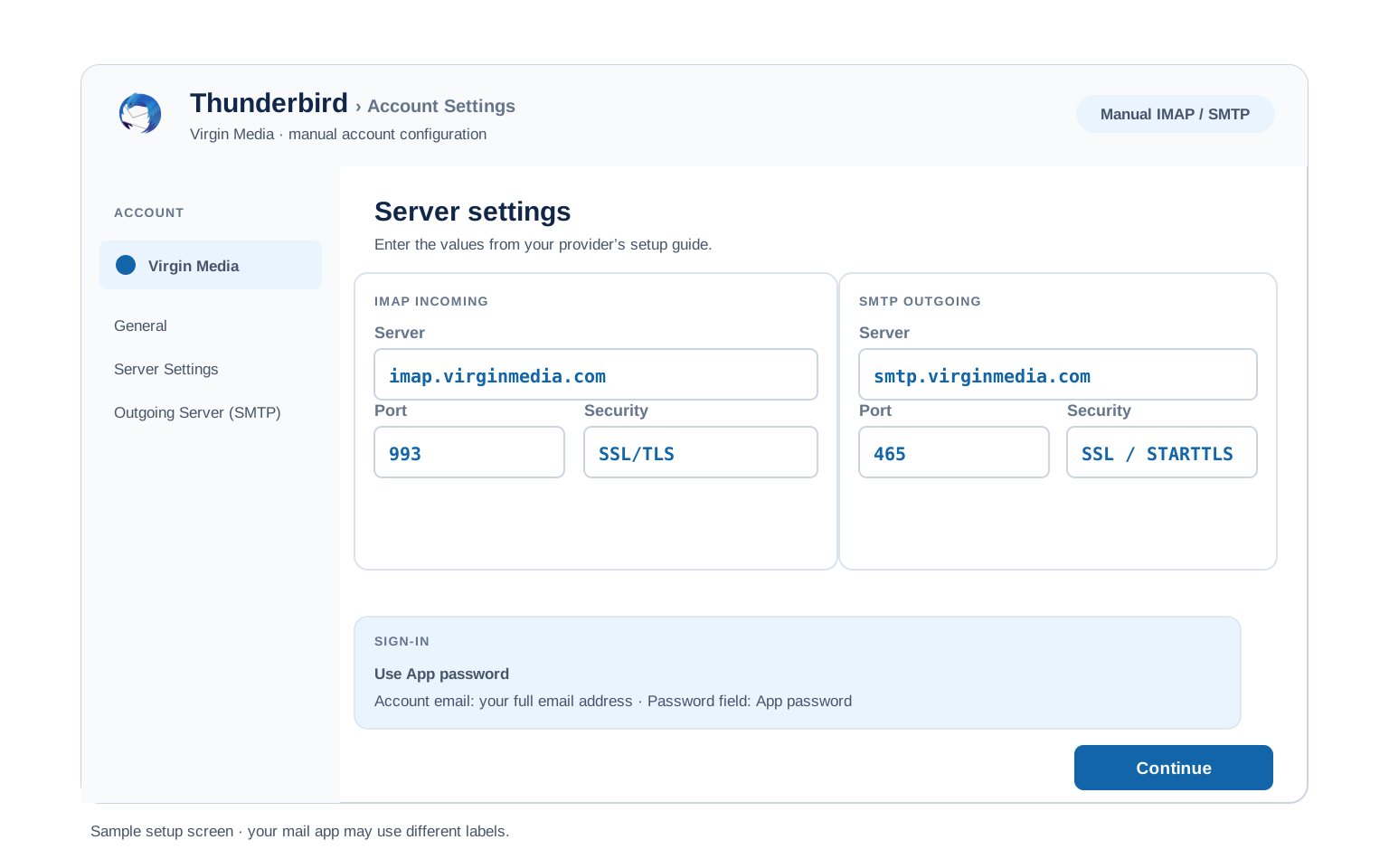
Thunderbird
- In Thunderbird the route is Account Settings, Account Actions, Add Mail Account.
- Enter your name, full address and email app password, then select Continue.
- Let Thunderbird try automatic detection, then confirm it chose IMAP with the virginmedia.com hosts rather than anything ntlworld branded.
- Detection come up short? Choose Configure manually and type in the table values.
- Select Done. Folders appear on the first sync.
Virgin Media Webmail Settings#
The values above connect your apps. This next group changes the mailbox itself. It lives in Virgin Media Mail webmail rather than in your client.
Signature
Set one in webmail and it applies to mail sent from the browser. Outlook, Apple Mail and Thunderbird each keep their own, so people routinely end up writing two versions without noticing.
Vacation Auto Reply
Give the away message a start and an end date so it switches off unattended. It runs on the server, meaning replies go out with all your devices shut down.
Filters and Folders
Rules built in webmail run server side, filing mail before a device collects it. A rule inside Outlook fires only while Outlook is open, which is why two devices can disagree about where something went. Webmail also has an archive tool that sweeps anything 90 days or older into year by year subfolders, reached from the folder actions menu.
Spam and Blocked Senders
Virgin Media filters spam server side before delivery. Check the spam folder in webmail first when mail goes missing, because a rule in your client cannot retrieve something the server already filed away. Worth knowing too: closure notices from Virgin Media land in spam often enough that the company warns about it directly.
Virgin Media POP3 vs IMAP#
| Feature | IMAP | POP3 |
|---|---|---|
| Where mail lives | On the Virgin Media server | Downloaded to 1 device |
| Multiple devices | ✅ Everything stays in sync | ❌ Each device sees different mail |
| Sent and deleted mail | ✅ Synced everywhere | ⚠️ Stays only on that device |
| Offline reading | ⚠️ Cached mail only | ✅ Full local copy |
| Server storage used | Yes, counts against your quota | Can be freed after download |
| Best for | Phone + computer, everyday use | Single PC, local archives |
Virgin Media Deadlines and Mailbox Limits#
The numbers that matter here are deadlines rather than quotas. These are the ones Virgin Media publishes:
| After disconnecting your services | The account is deactivated and deleted 90 days later, per Virgin Media's terms. Permanent, with no recovery window |
| After 90 days without opening the mailbox | Access may be suspended with no prior notice. A different rule from the one above |
| Suspension lasts | 60 days. Virgin Media can reactivate the mailbox during that time |
| New addresses | Not issued. Virgin Media states it cannot create new email addresses for new customers |
| Mailbox storage | Not published in a form we can verify, so we are not guessing at a figure |
| Sending limits | Not published. Treat it as a personal mailbox rather than a sending platform |
Troubleshooting Virgin Media Connections#
Virgin Media faults cluster around three things. Legacy host names. The app password. The mailbox itself being suspended. Find your symptom.
| Error you see | What it means | Fix |
|---|---|---|
| 530 5.1.0 Authentication Required (VM401) | Your client is using a legacy host, usually on port 25 with no SSL | VM401 is Virgin Media's own code. Change the outgoing host to smtp.virginmedia.com, port 465 with SSL, then enable outgoing authentication. No password change is needed. |
| Nothing arriving after a long gap | The mailbox may be suspended under the 90 day rule | Server settings will not help. See whether your mailbox is at risk. Suspension can be reversed within 60 days. |
| Cannot connect to server | Wrong port or encryption | Check IMAP 993 SSL and SMTP 465 SSL. Virgin Media has had repeated outages through 2026, so try webmail before rebuilding the account. Antivirus software and VPN apps block these ports too. |
| Password keeps being asked | The client holds your portal password rather than an app password | Replace it with an email app password. Check the host names at the same time, since a legacy host produces the same prompt. |
| Messages stuck in Outbox | SMTP authentication is off | Switch on outgoing authentication, giving it the same details as the incoming server. |
Reader Reported Fixes
Years of correct settings that suddenly are not. A mail client set up before 2015 keeps working until something forces it to reauthenticate, at which point the old ntlworld or Blueyonder host fails and VM401 appears. Nothing was changed at your end. The platform moved underneath you years earlier and the client has only now noticed. Updating the two host names resolves it.
Assuming a closure notice was a scam. Virgin Media genuinely does email people about closing mailboxes, so the real notice looks exactly like the phishing everyone has been trained to ignore. Sign in to My Virgin Media directly rather than following any link, then check the account state there. Treating a real notice as spam is how people lose mail permanently.
Legacy Domains and Getting Your Mail Out#
NTL, Telewest, Blueyonder or virgin.net customer? Those addresses moved onto Virgin Media infrastructure as the companies combined, then moved again in the 2015 platform migration. Your address is unchanged. The servers are not. Use the virginmedia.com hosts above and drop anything ntlworld or blueyonder branded.
Getting your mail out? This is the part to take seriously here. Virgin Media states that a closed account has its contents permanently deleted, so back the mailbox up before any closure date rather than after. Forwarding messages one at a time works for a handful. It does not work for twenty years of mail.
Moving to a new provider? The Univik Email Migration Tool copies every folder straight into the new account over IMAP. Use the values above with your email app password for the Virgin Media side.
Taking your mail to a new account? The Univik Email Migration Tool copies every folder from the old account to the new one. Enter the IMAP settings from this page for the Virgin Media side and your new provider's settings for the other.
Rather not do it yourself? The Email Migration Services team plans it, runs it, then verifies each folder landed.
Use These Settings in Univik Email Backup#
The same IMAP settings above let you download your complete Virgin Media mailbox to your computer. Univik Email Backup writes the whole mailbox to PST, MBOX, EML or PDF. Those files survive the account closing, which on this provider is the entire point.
- Put Univik Email Backup on a Windows machine.
- Set Virgin Media as the source. Where the name is missing, generic IMAP does the same job.
- Sign in with your full email address and your email app password. A backup tool is another client, so the portal password is refused here too.
- If the tool asks for server details, use
imap.virginmedia.comwith port993and SSL from the IMAP table above. - Set the output format and destination, then begin. Twenty years of mail keeps downloading unattended.
Univik Tools That Use These Settings#
Most people reading this are part way through moving or saving a mailbox. All 3 tools use the IMAP values above:

Email Backup
Download your complete Virgin Media mailbox to PST, MBOX, EML or PDF before switching or closing the account.
Email Backup Tool →
Email Migration Tool
Copy every folder from Virgin Media straight into Gmail, Microsoft 365 or any other account. No manual export needed.
Email Migration Tool →
Email Converter Tool
Got MBOX, EML or OST from an earlier export? Reshape it into PST, PDF or whatever your next app reads.
Email Converter Tool →Prefer to hand the whole migration to experts?
Nobody needs to learn ports and host names under time pressure. Univik's migration team takes the job end to end, planning through transfer through verification, closing with a report that shows where each folder landed. Running since 2013, for one mailbox or a whole company.
Email Settings Glossary#
IMAP
Internet Message Access Protocol. Reads mail that remains on the server, which is why every device shows matching folders and read marks.
POP3
Post Office Protocol version 3. Downloads mail to 1 device and can remove it from the server. Older method, still useful for local archives.
SMTP
Simple Mail Transfer Protocol. Sends your outgoing mail. Every account needs it next to IMAP or POP3, which only receive.
SSL / TLS / STARTTLS
Encryption for the connection. SSL/TLS encrypts from the start (ports 993, 995, 465). STARTTLS upgrades a plain connection (port 587).
App Password
A separate code standing in for your real password inside an app. Virgin Media calls its version an email app password, keeping it distinct from the one that opens your whole account.
OAuth
Signing in through a browser window rather than typing a password into the app. Several large providers have gone this way. Virgin Media has not, so you enter an app password directly.
How We Verify These Settings#
Univik has built email backup, migration and converter software since 2013. Our tools sign in to Virgin Media over IMAP and SMTP every day for thousands of users, so a changed server, port or login rule shows up in our connection logs before most guides notice it.
Every value on this page is confirmed with 3 checks: a live IMAP and SMTP connection from Univik Email Backup, a comparison against Virgin Media's own published help pages and a sign in run through the current webmail. Any announcement triggers a recheck. We revisit the page quarterly regardless.
Does your screen disagree with this page? Report it. We retest, correct, then note the change in what changed recently.
 Help & Support
Frequently Asked Questions
Use imap.virginmedia.com on port 993 with SSL. Your username is the full address, whether it ends in virginmedia.com, ntlworld.com, blueyonder.co.uk or virgin.net. The password is an email app password. The complete table sits in the IMAP settings section.
Two possibilities on Virgin Media. The second is more common than people expect. Either the client holds your My Virgin Media password rather than an email app password. Or it is still pointing at a legacy host such as smtp.ntlworld.com. The second returns VM401 no matter which password you supply, which is why changing the password repeatedly gets you nowhere.
IMAP for almost everyone. It keeps your phone, computer and webmail in sync. POP3 fits only a single computer setup where you want a local download. Full comparison here.
Yes. They hold across all four Virgin Media domains too. An ntlworld or Blueyonder address takes exactly the same hosts as a virginmedia.com one. Only the menu names differ by device, which the client setup guides cover.
Create a replacement from the email settings area of My Virgin Media. Before you do, check the host names in your client, because a legacy host produces an authentication failure that no new password will fix.
Yes, on the encrypted ports listed here. The email app password helps, since a mail client never holds the credential that opens your whole Virgin Media account. What matters more on this provider is keeping a copy of the mail itself, given that a closed mailbox has its contents deleted.
An IMAP client pulls mail down as it syncs, though a dedicated backup tool moves quicker and writes standard files that open anywhere. On Virgin Media this matters more than usual, because a closed mailbox is deleted rather than archived. See how to back up your Virgin Media mailbox. Holding an export in some other format? An email converter reshapes it into PST, PDF or whatever comes next.
On Virgin Media there are three real candidates. A legacy host name finally being rejected. The mailbox suspended under the 90 day rule. Or one of the outages the service has had repeatedly through 2026. Check webmail first, since that separates an account problem from a client one in seconds.
An email migration tool copies mail directly between the 2 accounts over IMAP. You need the Virgin Media IMAP settings and your email app password for this side, plus the same details for the destination account. Every folder, label and date stays intact.
Where a deadline is involved or several mailboxes are, our managed email migration service handles all of it.
Other Email Provider Settings
Summary: Virgin Media Settings at a Glance
- IMAP: imap.virginmedia.com, port 993, SSL/TLS
- POP3: pop3.virginmedia.com, port 995, SSL/TLS
- SMTP: smtp.virginmedia.com, port 465 with SSL
- Username is always your full email address
- POP host is pop3., with the 3
- Email app password, not your portal one
- Legacy ntlworld hosts return VM401
- Open the mailbox every 90 days