 Email Settings Guide
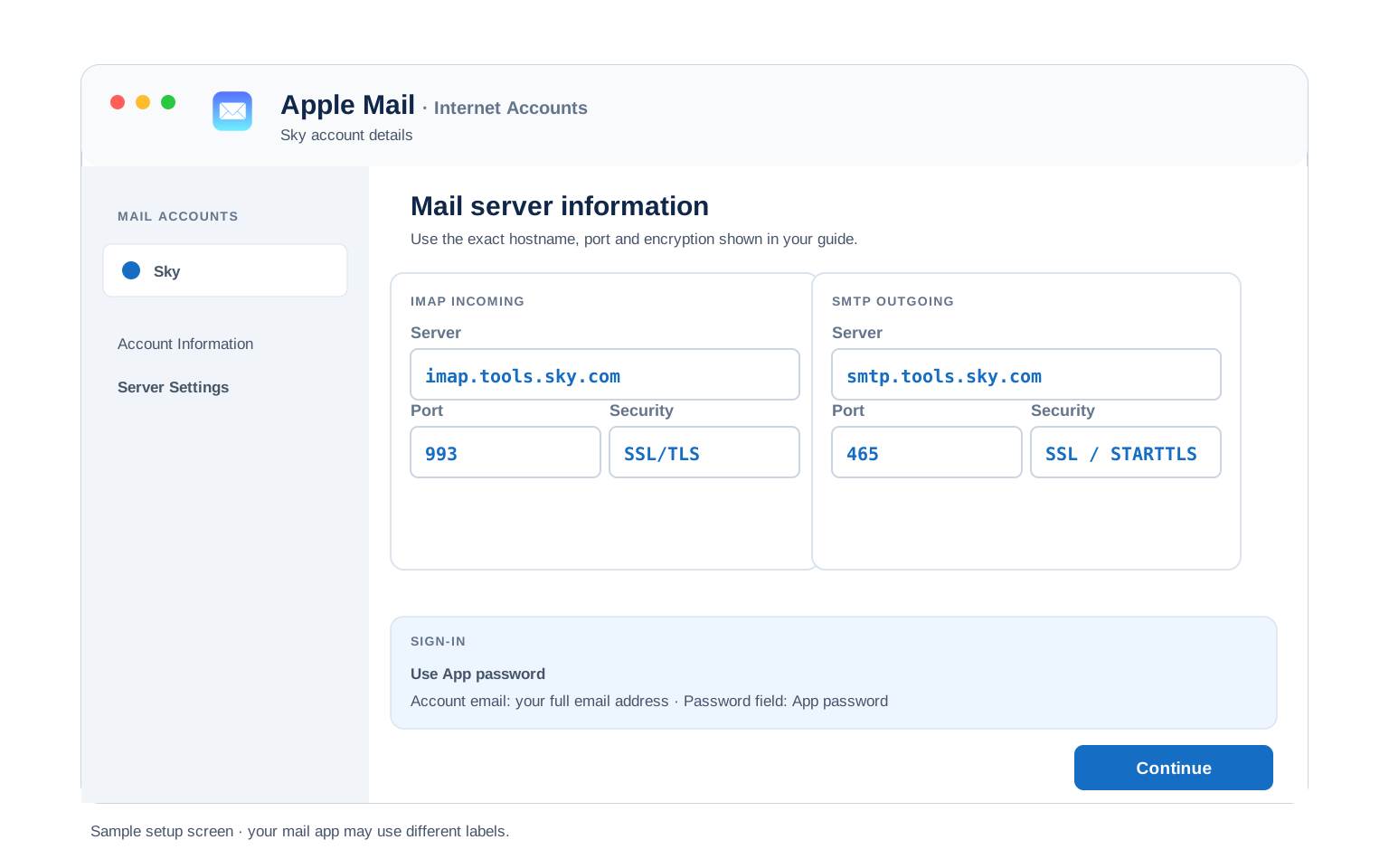
Quick answer: the Sky IMAP server is imap.tools.sky.com on port 993 with SSL/TLS. The outgoing server is smtp.tools.sky.com on port 465 with SSL. The POP3 server is pop.tools.sky.com on port 995. Your username is the full address. The password has to be an app password, generated on Sky's own page rather than Yahoo's, which is where most people come unstuck. Because Sky email runs on Yahoo, the equivalent mail.yahoo.com hosts also work if the Sky ones give you trouble.
What Changed Recently#
Related email providers: BT Mail email settings, Virgin Media IMAP settings, TalkTalk email settings, Zen IMAP settings, Eir email settings
Sky email has changed hands and changed platforms more than once, which is why so much advice about it contradicts itself. Here is where things actually stand.
Latest update
Sky email is Sky Yahoo Mail, with Yahoo running the help pages. Yahoo operates the service on Sky's behalf, to the point where the official support documentation sits on a Yahoo domain rather than a Sky one. That single fact explains the app password requirement, the OAuth behaviour in mail apps and why two different sets of server names both work.
Earlier change
Two hostname sets are in circulation. The Sky branded tools.sky.com servers are what Sky's own community recommends. The Yahoo mail.yahoo.com servers reach the same mailboxes. Some newer guides now lead with those instead. Reports say both work, so if one set refuses to connect it costs nothing to try the other.
Earlier change
Your address can outlive your Sky subscription. Guidance from Sky and Yahoo says a Sky email address keeps working after you leave Sky, on one condition: you have to keep checking it. Leave it unread long enough and access goes. It is also reported that Sky no longer hands out new @sky.com addresses, though we have only seen that from a single source rather than from Sky directly.
Before You Begin#
Two things decide whether this works. Get either wrong and the connection fails no matter how carefully you typed the servers.
1. Generate the app password on Sky, not Yahoo
Sky email is run by Yahoo, so people follow Yahoo's app password link and reach a blank screen or a 404. That page only serves yahoo.com addresses. Sky has its own.
Where: The right link, below →
2. Choose "Other", never "Yahoo"
Picking Yahoo as the provider sends your client down a browser sign in route that refuses generated passwords outright. Choosing Other keeps you on manual setup, where the app password works.
Where: Client setup guides below →
About Sky Mail#
Sky is a British broadcaster and broadband provider, owned by Comcast since 2018. Its email service is branded Sky Yahoo Mail, because Yahoo runs the mail platform behind it.
Sky email has sat on other companies' infrastructure for most of its life, which is why guidance written a few years apart can disagree so completely. The Yahoo arrangement is the current one. It goes deep too. Yahoo publishes the official Sky email support pages on its own domain. Everything awkward about setting up a client here traces back to that. You need a generated app password. Your mail app must not be told this is a Yahoo account. Two separate sets of server names both reach your mailbox.
| Service Name | Sky Mail |
| Owned By | Sky Group, part of Comcast since 2018. Mail platform operated by Yahoo |
| Launched | Sky Broadband from 2006. Mail has moved platform more than once since |
| Email Domains | @sky.com is the one we can confirm. Other Sky endings are reported but we have not verified them |
| Webmail URL | sky.com/mysky/email |
| Protocols Supported | IMAP, POP3, SMTP. OAuth too, in clients that support it |
| App Password Needed | Yes, unless your client signs in with OAuth. One per Sky address |
| Free Storage | Comes with the Sky account. No figure published we can stand behind |
@comcast.net address is a US cable mailbox on entirely different servers and needs our Comcast settings instead. Ownership on paper does not put two mail systems on the same hardware.
Sky Webmail Login#
Webmail keeps working whatever your mail app decides to do. Note where these actually live, because two of the three are Yahoo pages:
Webmail
Account Security
Password Recovery
Who Actually Runs Sky Email?#
There is no IMAP switch to find on Sky. The thing worth understanding instead is who operates the mailbox, because every awkward part of setup follows from it.
- Yahoo runs the mail platform. The service is branded Sky Yahoo Mail. Yahoo publishes the official support pages for it on a Yahoo domain rather than a Sky one.
- So a generated app password is required. Your ordinary Sky password is refused by mail apps, exactly as a Yahoo password would be.
- But you generate it on Sky's page, not Yahoo's. This is the trap. Yahoo's app password screen only serves yahoo.com addresses, so Sky customers who follow it reach a blank page.
- And you must not tell your client this is Yahoo. Choosing Yahoo triggers a browser sign in that rejects generated passwords. Choose Other.
- Two server name sets exist because of the same arrangement. The Sky branded hosts and the Yahoo hosts both reach your mailbox.
tools.sky.com set throughout this page, because that is what Sky's own community consistently recommends. The Yahoo equivalents, imap.mail.yahoo.com and smtp.mail.yahoo.com, reach the same mailbox and some recent guides now prefer them. Sources genuinely disagree on which is current, so rather than pick one and hide the other we list both. If your first attempt refuses to connect, swapping the host name costs nothing to try.
Sky IMAP Settings#
IMAP is the incoming protocol to pick. Your mail stays put on the server, which is what lets every device agree on the same inbox.
| IMAP Server | imap.tools.sky.com | |
| Alternate host | imap.mail.yahoo.com reaches the same mailbox | |
| Port | 993 | |
| Encryption | SSL/TLS (required) | |
| Username | Your full email address, including @sky.com | |
| Password | A generated app password. Your Sky account password is refused | |
| Authentication | Required. Set the provider to Other, never Yahoo |
Sky POP3 Settings#
POP3 hauls mail down to one machine and leaves the others out of it. Only worth it for a single computer holding a local copy. Torn? Compare them below.
| POP3 Server | pop.tools.sky.com | |
| Alternate host | pop.mail.yahoo.com, worth reaching for on POP more than anywhere else | |
| Port | 995 | |
| Encryption | SSL/TLS (required) | |
| Username | Your full email address | |
| Password | The same generated app password |
pop.tools.sky.com failing to resolve at all while imap.tools.sky.com answered normally from the same machine. Other people had POP running on the Sky host at the same time, so this looks patchy rather than withdrawn. Where POP is what you need, the Yahoo host is the one to reach for when the Sky name goes quiet. It is another reason to prefer IMAP here.
Sky SMTP Settings#
SMTP carries outgoing mail. Reading fine while sending fails points here. On Sky there are two usual culprits. Outgoing authentication gets left switched off. Failing that, an unverified extra address on the account produces a 553 error.
| SMTP Server | smtp.tools.sky.com | |
| Alternate host | smtp.mail.yahoo.com reaches the same mailbox | |
| Port (SSL) | 465 | |
| Port (STARTTLS) | 587 | |
| Encryption | SSL or STARTTLS (required) | |
| Username | Your full email address | |
| Password | The same app password as incoming | |
| Authentication | Required. Outlook exposes this as the outgoing server authentication tickbox. |
Check Sky IMAP Settings Online#
You don't need to download anything to check Sky IMAP settings online. This page is the lookup: every value is verified, current and copyable straight from your browser. Not sure your address uses Sky servers? Type it below and find out instantly.
Does my email address use these settings?
Runs in your browser only. Your address is never sent anywhere or stored.
Want to verify the account itself before configuring an app? Sign in at Sky webmail, which confirms your address and password work, then confirm an app password exists. If both pass, any email app connects with the tables above.
Look Up IMAP Settings for Any Email Domain#
This page covers Sky. For every other address, work email on a company domain included, we run a free online lookup database: imapsettings.com.
imapsettings.com
Complete email settings database, by Univik
Enter any email address and get the incoming and outgoing server settings for that domain in 1 step:
The address is checked here in your browser to work out the domain. Nothing leaves the page.
Sky App Password: The Right Link#
Sky needs a generated app password for any client that cannot sign in through a browser. The catch is where you generate it, because the obvious route sends you to a page that cannot help you.
| Where you sign in | Sky account password | Generated app password |
|---|---|---|
| Sky webmail in a browser | ✓ Works | Not needed |
| Outlook, Apple Mail, manual setup | ✗ Rejected | ✓ Required |
| Phone mail apps set up by hand | ✗ Rejected | ✓ Required |
| Thunderbird or another OAuth client | Via a browser window | Not needed at all |
How to Generate a Sky App Password
- Go to Sky's own app password page: sky.com/sky-yahoo-mail/manage-apps. This is the step everything hinges on.
- Do not use Yahoo's version of this page. It looks like the right place, since Yahoo runs Sky mail, but it only serves yahoo.com addresses. Sky customers get a blank screen or a 404 and reasonably conclude the service is broken.
- Sign in with your Sky credentials when prompted.
- Create a password and name it after the device, for example "Outlook on the desktop". Copy it while it is on screen.
- Generate one per Sky address. App passwords are tied to a single account, so a second Sky mailbox needs its own. Reusing one across accounts fails.
Set Up Sky in Email Clients#
One rule runs through all of these. When the client asks which provider this is, answer Other rather than Yahoo. Pick your app:
Outlook (Windows and Mac)
- In Outlook choose File, then Add Account. New Outlook keeps it under Settings, then Accounts.
- Enter your Sky address, open Advanced options and check "Let me set up my account manually".
- Choose IMAP and enter
imap.tools.sky.comon port993with SSL, thensmtp.tools.sky.comon port465with SSL. - Paste the generated app password when Outlook asks. If Outlook has cached an old one, clear the Sky entry from Windows Credential Manager first, since a stale cached password survives everything else you try.
- Write yourself a test message once it is set up. One message exercises sending and receiving together.
Apple Mail (macOS)
- From Apple Mail go to Settings, then Accounts, then Add Account.
- Choose Other Mail Account. Do not pick anything Yahoo branded, even if offered.
- Enter your name, address and generated app password, then continue.
- If it asks for hosts, lift them from the IMAP and SMTP tables further up this page.
- Check Mail among the services offered, then finish up.
iPhone and iPad
- From iOS Settings work through Apps, Mail, Mail Accounts, then Add Account.
- Tap Other, then Add Mail Account. Avoid the Yahoo entry, which sends you down a browser sign in that will not take an app password.
- Enter your details using the generated app password, then tap Next.
- Stay on IMAP, supplying the incoming and outgoing hosts if iOS wants them.
- Tap Save and let iOS run its check on the account.
Android
- Launch your Android mail app of choice, then Add account.
- Choose Other, then IMAP. Some Android apps spot a Sky address and treat it as Yahoo, forcing a browser sign in that rejects app passwords. Manual setup avoids that.
- Enter your address and generated app password. Where automatic setup fails, switch to Manual setup.
- Enter the servers:
imap.tools.sky.com993 SSL incoming,smtp.tools.sky.com465 SSL outgoing. - Wrap up setup, then swipe down on the inbox to fetch mail.
Thunderbird
- From Thunderbird go to Account Settings, then Account Actions, then Add Mail Account.
- Enter your name and address, then select Continue.
- Thunderbird can sign in through a browser window, which means no app password is needed at all. This is the easiest route into Sky mail, particularly with more than one address.
- If it cannot work them out, hit Configure manually and supply the table values.
- Hit Done. The folder list populates on first run.
Sky Webmail Settings#
The values above connect your apps. This next group governs the mailbox itself. Because Yahoo runs the platform you will find them under Settings, then More Settings, in the Yahoo style interface.
Signature
Set one under More Settings and it applies to webmail. Outlook, Apple Mail and Thunderbird each hold their own, so most people write it out more than once without understanding why.
Vacation Auto Reply
Give the away message a start and an end date so it stops on its own. It runs on the server, so replies go out with every device of yours turned off.
Filters and Folders
Filters built in webmail run server side, sorting mail before any device collects it. A rule inside Outlook fires only while Outlook is open, which is why devices sometimes disagree about where a message went.
Spam and Blocked Senders
Block senders from the same settings area. Sky Yahoo Mail can also collect other mailboxes, Gmail and Outlook included, under More Settings then Mailboxes, which is handy if you are consolidating before a move.
Sky POP3 vs IMAP#
| Feature | IMAP | POP3 |
|---|---|---|
| Where mail lives | On the Sky server | Downloaded to 1 device |
| Multiple devices | ✅ Everything stays in sync | ❌ Each device sees different mail |
| Sent and deleted mail | ✅ Synced everywhere | ⚠️ Stays only on that device |
| Offline reading | ⚠️ Cached mail only | ✅ Full local copy |
| Server storage used | Yes, counts against your quota | Can be freed after download |
| Best for | Phone + computer, everyday use | Single PC, local archives |
Sky Account and Mailbox Limits#
Sky publishes very little here. Yahoo does not publish Sky specific figures either. Rather than invent numbers, here is what can actually be established:
| App passwords | One per Sky address. They cannot be shared between accounts |
| Keeping the address after leaving Sky | Possible, provided you keep checking the mailbox. Go quiet for long enough and access ends |
| New @sky.com addresses | Reported to be closed to new registrations. We have seen this from one source only, not from Sky |
| Ports that matter | 993 for IMAP, 995 for POP3, 465 or 587 for SMTP. Yahoo names these as the ones firewalls block |
| Mailbox storage | Not published in a form we can stand behind, so we are not guessing at a figure |
| Sending limits | Not published. Treat the mailbox as personal scale rather than bulk |
Troubleshooting Sky Connections#
Nearly every Sky failure traces to one of three causes. The wrong app password page. The wrong provider choice in your client. A blocked port. Find your symptom.
| Error you see | What it means | Fix |
|---|---|---|
| The app password page is blank or gives a 404 | You are on Yahoo's version of the page | That screen only serves yahoo.com addresses. Use Sky's own app password page instead. This is the most common Sky dead end by a wide margin. |
| A browser sign in appears and rejects the app password | The client was told this is a Yahoo account | Remove the account and add it again choosing Other. Some Android apps do this by themselves on spotting a Sky address. |
| POP stops working while IMAP carries on | The Sky POP host is not resolving for you | Switch the incoming host to pop.mail.yahoo.com, keeping port 995 and SSL. Reported on Sky's community with the Sky IMAP host still answering fine. |
| 553 error when sending | An extra address on the account is unverified | Verify the additional address in Sky Yahoo Mail settings, then retry. Sending stays blocked while one sits unverified. |
| Cannot connect to server | Wrong port or encryption | Check IMAP 993 SSL and SMTP 465 or 587. Yahoo names 995, 465 and 587 as the ports commonly blocked by firewalls, security software or the network you are on. Worth trying the alternate mail.yahoo.com host as well. |
| Password keeps being asked | Your Sky account password was entered instead of a generated one | Replace it with an app password from Sky's page. On Outlook, clear the cached Sky credential from Windows Credential Manager too, since the old one lingers there. |
| Messages stuck in Outbox | SMTP authentication is off | Turn on the outgoing authentication option, feeding it the same credentials the incoming server uses. |
Reader Reported Fixes
Chasing the app password round in circles. Someone follows a Yahoo help article, lands on an empty Account Security screen, tries a second computer, gets the same nothing, then concludes their account is broken. It is not. Yahoo's app password tool does not recognise Sky addresses. Sky publishes its own version. Most people are set up within a minute of finding it.
Switching client rather than fighting the password. Where a mail app keeps forcing a browser sign in that refuses generated passwords, moving to a client that signs in through OAuth properly sidesteps the problem. Thunderbird is the usual choice. It handles several Sky mailboxes at once without a single app password.
Leaving Sky or Moving Your Mail#
Cancelling Sky but keeping the address? Guidance from Sky and Yahoo says that is possible, on one condition. You have to keep checking the mailbox. An address left unread long enough stops being accessible, so if you plan to hold onto it, connect a client using the settings above and let it poll.
Leaving properly? Back up the mailbox first. That condition above is the whole reason. An address kept alive by habit is not a safe place for the only copy of anything. Reports also suggest new @sky.com addresses are no longer issued, so a lost one may not be replaceable.
Moving mail to another account? The Univik Email Migration Tool copies every folder across. Use the IMAP values above with your generated app password for the Sky side.
Taking your mail to a new account? The Univik Email Migration Tool copies every folder from the old account to the new one. Enter the IMAP settings from this page for the Sky side and your new provider's settings for the other.
Rather not do it yourself? Our Email Migration Services team maps the move out, performs it, then confirms nothing was left behind.
Use These Settings in Univik Email Backup#
The same IMAP settings above let you download your complete Sky mailbox to your computer. Univik Email Backup puts the lot into PST, MBOX, EML or PDF. Those files answer to you rather than to Sky.
- Get Univik Email Backup onto a Windows PC.
- Point it at Sky as the source. No Sky entry in the list? The plain IMAP option does the same thing.
- Sign in with your full email address and a generated app password. A backup tool is another third party client, so your Sky account password is refused here too.
- If the tool asks for server details, use
imap.tools.sky.comwith port993and SSL from the IMAP table above. - Choose your file format and where it lands, then let it run. Big mailboxes keep going while you do something else.
Univik Tools That Use These Settings#
A fair number of readers turn up mid move or mid archive. Each of these 3 tools runs on the IMAP values above:

Email Backup
Download your complete Sky mailbox to PST, MBOX, EML or PDF before switching or closing the account.
Email Backup Tool →
Email Migration Tool
Copy every folder from Sky straight into Gmail, Microsoft 365 or any other account. No manual export needed.
Email Migration Tool →
Email Converter Tool
Sitting on MBOX, EML or OST from a previous export? Convert to PST, PDF or whatever the next app expects.
Email Converter Tool →Prefer to hand the whole migration to experts?
There is no obligation to become fluent in ports and app passwords. Univik's migration team will scope the move, carry it out, check it, then hand you a report showing where every folder ended up. That service has run since 2013, covering everything from one mailbox to an entire firm.
Email Settings Glossary#
IMAP
Internet Message Access Protocol. Reads mail that stays on the server, so all your devices see the same inbox, folders and read status.
POP3
Post Office Protocol version 3. Downloads mail to 1 device and can remove it from the server. Older method, still useful for local archives.
SMTP
Simple Mail Transfer Protocol. Sends your outgoing mail. Every account needs it next to IMAP or POP3, which only receive.
SSL / TLS / STARTTLS
Encryption for the connection. SSL/TLS encrypts from the start (ports 993, 995, 465). STARTTLS upgrades a plain connection (port 587).
App Password
A generated code standing in for your real password inside an app, revocable on its own. On Sky each one belongs to a single mailbox, so a second Sky address needs a second password.
OAuth
Signing in through a browser window rather than typing a password into the app. On Sky this is worth seeking out, because an OAuth capable client needs no app password at all.
How We Verify These Settings#
Univik has built email backup, migration and converter software since 2013. Our tools sign in to Sky over IMAP and SMTP every day for thousands of users, so a changed server, port or login rule shows up in our connection logs before most guides notice it.
Every value on this page is confirmed with 3 checks: a live IMAP and SMTP connection from Univik Email Backup, a comparison against the Sky and Yahoo support pages, plus a fresh app password created through Sky's current flow. Any announcement triggers a recheck. We revisit the page quarterly regardless.
Screen in front of you disagreeing with this page? Say so. We go back and test it, amend the page, then log what moved in what changed recently.
 Help & Support
Frequently Asked Questions
Use imap.tools.sky.com on port 993 with SSL/TLS, with your full address as the username and a generated app password. Because Sky mail runs on Yahoo, imap.mail.yahoo.com reaches the same mailbox if the Sky host gives you trouble. The complete table sits in the IMAP settings section.
Your password is fine. Sky refuses account passwords in mail apps, so you need a generated app password instead. The part that traps people is where to get one. Yahoo runs Sky mail, so Yahoo's app password page looks like the right place, but it only serves yahoo.com addresses and shows Sky customers a blank screen. Sky has its own page. Check as well that your client is set to Other rather than Yahoo.
IMAP for almost everyone. It keeps your phone, computer and webmail in sync. POP3 fits only a single computer setup where you want a local download. Full comparison here.
The ports and encryption stay the same everywhere. The one thing that varies by device is how much trouble it takes to avoid the Yahoo provider option, since some Android mail apps insist on treating a Sky address as Yahoo. The client setup guides cover each case.
No. Generate a replacement on Sky's app password page and delete the old entry. Bear in mind each password belongs to one Sky mailbox, so replacing the password for one address leaves your other Sky accounts untouched.
Yes. An app password is safer than your real one, since it can be revoked on its own without changing how you sign in to Sky. Better still, use a client that signs in through a browser window, which needs no stored password of that kind at all. Either way, look through the connected apps list occasionally and remove anything you have stopped using.
An IMAP client pulls mail down as it syncs, though a dedicated backup tool works faster and writes standard files that open anywhere. See how to back up your Sky mailbox. Got an old export in the wrong format? An email converter turns it into PST, PDF or whatever the next app expects.
On Sky there are three likely causes. A revoked or expired app password. A client update that switched the account back to Yahoo style sign in. A cached old password in Outlook that survives everything else you try. Clearing the Sky entry from Windows Credential Manager fixes the last one. See what changed recently for the rest.
An email migration tool copies mail directly between the 2 accounts over IMAP. You need the Sky IMAP settings and a generated app password for this side, plus the same details for the destination account. Every folder, label and date stays intact.
Too much at stake? Too many mailboxes? Our managed email migration service will run the whole thing instead.
Other Email Provider Settings
Summary: Sky Settings at a Glance
- IMAP: imap.tools.sky.com, port 993, SSL/TLS
- POP3: pop.tools.sky.com, port 995, SSL/TLS
- SMTP: smtp.tools.sky.com, port 465 with SSL
- Username is always your full email address
- App password from Sky's page, not Yahoo's
- Set the provider to Other, never Yahoo
- mail.yahoo.com hosts work as a fallback
- An OAuth client skips the app password