To move OneNote to Notion, convert your notebooks to HTML, Word or Markdown, then import those files from Notion's Import screen. Notion reads no OneNote file directly, so the Univik ONE Converter makes the file it will take.
You are moving to Notion, and it has no button that reads OneNote.
What Notion does read is HTML, Word and Markdown. Convert your notebooks to one of those, then import the files. Here is the route and which format holds up best.
Which Format to Import into Notion
If you only need to read the notes rather than convert them, you can open OneNote in your browser first. That viewer opens .one and .onepkg files with nothing to install.
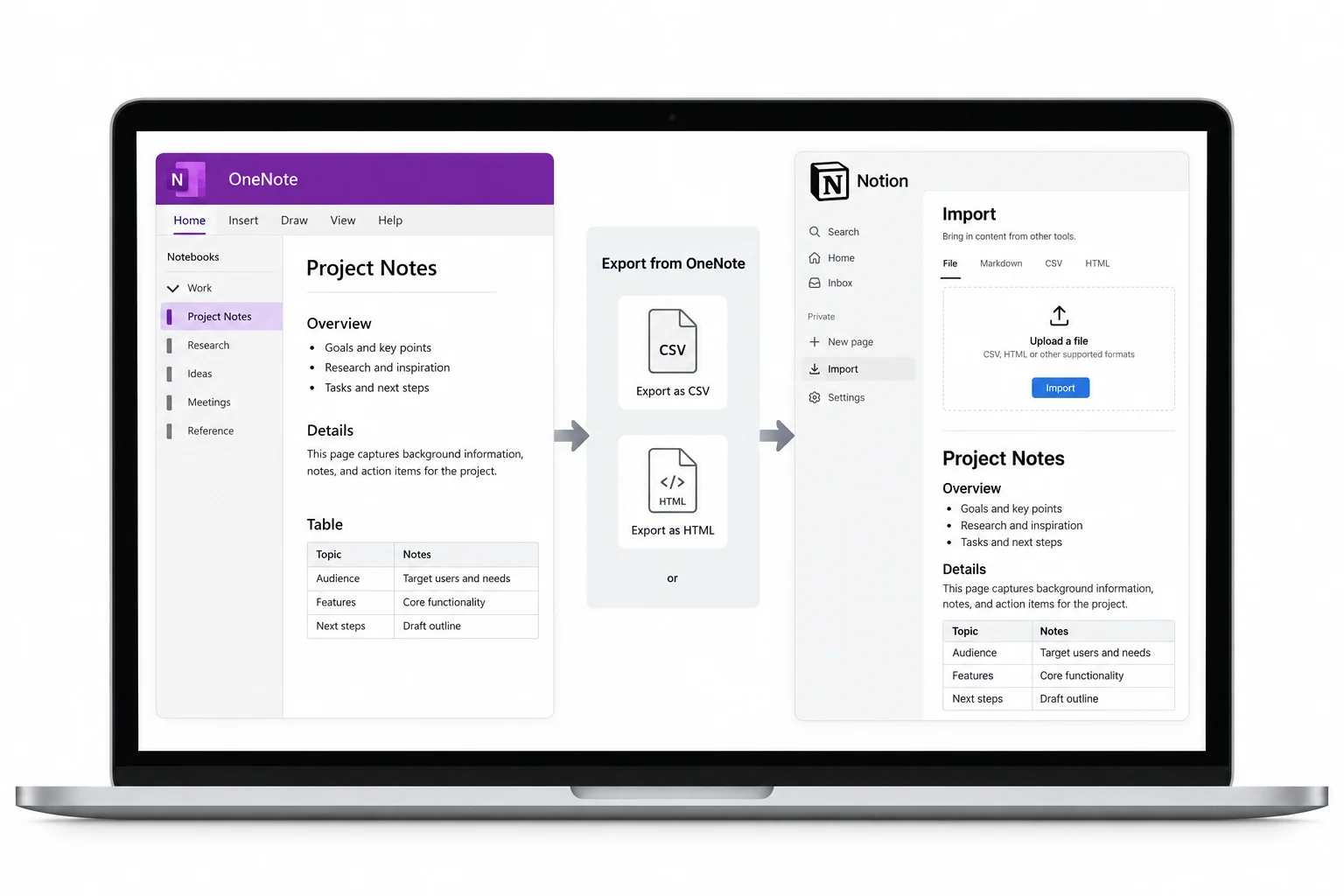
Notion pulls in several file types, and three of them suit OneNote notes. Each imports in a batch, so the pick is about how much of the note you want kept.
HTML is the one to reach for first. The Notion import list takes all three, so the other two are there when you have a reason to prefer them.
Convert OneNote Then Import
Notion has connectors for a handful of apps, Evernote and Google Docs among them, and OneNote is not on that list. So the move runs in two steps. Turn the notebooks into HTML, Word or Markdown with a converter, then import those files into Notion.
Making the files is a job of its own. The OneNote to HTML guide lays out the HTML steps, and the Word guide and Markdown guide take the other two. Each output choice is set on the OneNote converter page.
Import the Files into Notion
Everything goes in from one screen. Open Settings, choose Import, pick the file type and upload. Many HTML, Markdown or Word files go up together in a single run.
- Open Settings then Import Find Import in the Notion sidebar settings.
- Pick the file type Choose HTML, Markdown or Word.
- Upload the converted files Send the whole set at once.
- Check the new pages Open a few and confirm they read right.
The ONE Converter turns your notebooks into HTML, Word or Markdown, tables and pictures kept, so every file is ready to upload on Notion's Import screen.
Free Download See All FeaturesHow Sections and Pages Land in Notion
OneNote stacks notebooks, sections and pages. Notion works in pages, with pages nested inside other pages.
| In OneNote | In Notion |
|---|---|
| Notebook | A top level page |
| Section | A page under it |
| Page | A nested page |
When you import HTML, switch on include subpages so the nesting comes with it. Leaving that off is the usual reason an import lands flat, every note at the top level with the hierarchy gone.
Move an Entire Notebook Over
A converter writes a file per section, so a notebook shows up as a folder of files you upload together. For a very large library the caution is size. Notion caps a single archive import in the thousands of files, and a giant upload can fail with no clear error. Split a big library into a few smaller uploads and each one lands clean.
What Happens to Your OneNote Tables
OneNote tables come into Notion as simple tables, the plain grid kind, not the database tables Notion is built around. The rows and columns carry across, though sorting, filters and relations are not part of a plain table. A OneNote table is real structure in the file, detailed in Microsoft's OneNote file format spec, so a converter rebuilds the cells rather than flattening them to text.
Tidy the Pages After Import
A fresh import wants a pass. Rename pages that came in with section prefixes, move stray subpages under the right parent and promote any table that should be a database. Notion's search finds the notes fast once they are in, so a loose structure is quick to fix later rather than up front.
What a Notion Import Leaves Behind
Some parts of a OneNote page do not make the trip.
Password protected sections open only after you unlock them in OneNote. The written notes, their tables and their pictures are what reaches Notion, ready to arrange into a workspace.
OneNote to Notion Questions
How do I get my OneNote notes into Notion?
Convert your notebooks to HTML, Word or Markdown with a converter, then open Settings in Notion, choose Import, pick that file type and upload. Notion has no OneNote connector, so the converted file is what it reads.
Does Notion have a OneNote importer?
No. Notion connects to a few apps like Evernote and Google Docs, but OneNote is not one of them. You bring OneNote in by converting the notebooks to HTML, Word or Markdown first and importing those files.
Which format is best for moving OneNote to Notion?
HTML holds the most, with tables and images kept in place. Markdown suits plain notes you want light and portable, and Word suits notes you will keep editing as documents. All three import into Notion.
Will my OneNote tables become Notion databases?
No. They arrive as simple tables, the plain grid kind, not the database tables Notion is known for. The rows and columns carry over, and you can turn a table into a database in Notion after the import if it needs sorting or filters.
Can I import a whole OneNote notebook into Notion?
Yes. A converter writes a file per section, so a notebook lands as a folder you upload together. For a very large library, bring it over in a few uploads rather than one giant batch, which can stall or drop files.
Do OneNote images come across into Notion?
Yes. When you import HTML or Word, the pictures ride along with the text and land in the page. Keep the images that a converter saves beside the files together with them when you upload.

Written and maintained by Leena Taylor Paul and the Univik team, developers of Windows data conversion and recovery software since 2013. Notion takes almost every note format except the one OneNote hands out, so the questions we field are about which file to make and how much of a table survives, which is what this guide sets straight. Last verified August 2026. Planning a Notion move for a big notebook? Contact our support team.