 Email Settings Guide
Quick answer: the Naver IMAP server is imap.naver.com on port 993 with SSL. The outgoing server is smtp.naver.com on port 587 with STARTTLS. The POP3 server is pop.naver.com on port 995, though we found that value less thoroughly documented than the IMAP and SMTP ones. Your username is the full address. The important part is the password: since November 2025 your ordinary Naver password is refused. You need two-step verification switched on plus an application password. Most English language guides have not caught up with this.
What Changed Recently#
Related email providers: Daum email settings, Nate IMAP settings
The servers have not moved. The sign in rules have, recently enough that most guides still describe the old ones. The dates below come from three independent Korean sources, including notices sent by service providers whose own products broke.
Latest update
Your Naver password stopped working in mail clients in November 2025. From 24 June 2025 Naver began requiring two-step verification and an application password for POP3, IMAP and SMTP connections. The grace period ended on 18 November 2025, after which ordinary Naver passwords were refused outright. If a setup that had worked for years suddenly stopped around then, this is why. Nothing on your side broke.
Earlier change
The deadline moved once, which is why guides disagree. The notice Naver sent in June 2025 pointed at a shorter grace period, with users at the time reporting it as running to September and access blocked from October. The final notice put the end at 18 November 2025. If you have read an earlier date somewhere, that is where it came from rather than from anyone getting it wrong.
Earlier change
The symptom is a login window that will not stop reappearing. Korean guidance describes this as the signature of the change. You enter your Naver password, the prompt returns, you enter it again. Around it goes. The password is correct. It is no longer accepted by this route, so no amount of retyping will help.
Earlier change
What broke, specifically. The Korean notices list the affected setups: importing Naver mail into Gmail through its external mail feature, the iPhone Mail app over IMAP, Samsung Email on Android, Outlook on a PC, plus SMTP sending from business and accounting software. If any of those went quiet, the fix is an application password rather than a reinstall.
One of those is beyond fixing now. Gmail stopped supporting POP connections to third party accounts in January 2026. It also removed the option to check mail from other accounts on the Gmail website. So if you were pulling Naver mail into Gmail that way, an application password will not bring it back, because the route itself is gone. Connecting Naver directly in a mail client is the way round it. The Gmail mobile app over IMAP also works.
Before You Begin#
Three things now. The second is compulsory in a way it is not on most services. Skip any of them and the connection is refused however carefully you enter the server values.
1. Allow external programs
Naver Mail keeps client access off until you switch it on. The setting sits in the mail environment settings rather than in your account security pages.
Where: Naver Mail → environment settings → POP3/IMAP setting
2. Two-step verification, then an application password
Naver made both compulsory for mail clients in 2025. Two-step verification is not optional here, which catches out anyone used to providers where app passwords work without it.
Where: All three steps below →
About Naver Mail Mail#
Naver Mail is the email service attached to Naver, the dominant search and portal company in South Korea. It is one of the most widely held mailbox types in the country.
For years this was an unremarkable mailbox to connect: switch on external access, enter your password, done. That changed in 2025. Naver now requires two-step verification to be active on the account before it will issue the application password that mail clients need. The ordinary account password stopped being accepted in November of that year. The servers are unchanged, so a setup that broke needs a new credential rather than new settings.
| Service Name | Naver Mail Mail |
| Owned By | Naver Corporation |
| Launched | Long established as part of the Naver portal |
| Email Domains | @naver.com |
| Webmail URL | mail.naver.com |
| Protocols Supported | IMAP, POP3, SMTP and CalDAV, all under one rule change |
| App Password Needed | Yes. Two-step verification must be on before you can create one |
| Free Storage | Not published in a form we could verify, so no figure appears here |
Naver Mail Webmail Login#
Two different places matter here. Mail settings control external access, while the account pages hold two-step verification and application passwords:
Three Things Naver Now Requires#
This used to be one step. Since 2025 it is three, spread across two different parts of your Naver account.
- Allow external programs in Naver Mail. Sign in to the mail site in a browser, open the environment settings, find the POP3/IMAP setting and switch it to enabled. This lives in the mail settings, not in your account security pages.
- Turn on two-step verification. Go to your Naver ID account, then security settings, then two-step verification. On most services this is optional and app passwords work without it. Here it is a precondition. You cannot reach step three until it is on.
- Create an application password. Still in security settings, open the two-step verification management area, find application password management, then create one.
- Put that password into your client in place of your Naver password, with your full address as the username.
- Update your calendar too if you sync one. The same application password covers CalDAV, so a phone pulling both mail and calendar from Naver needs it in both places.
Naver Mail IMAP Settings#
IMAP is the protocol to pick for incoming mail. Messages stay on the server, which is what keeps every device showing one inbox.
| IMAP Server | imap.naver.com | |
| Port | 993 | |
| Encryption | SSL/TLS (required) | |
| Username | Your full email address, including @naver.com | |
| Password | An application password. Your Naver password is refused since November 2025 | |
| Requires | External access on, plus two-step verification |
Naver Mail POP3 Settings#
POP3 downloads onto a single machine. Reasonable where one computer holds a local copy, poor otherwise. Undecided? There is a comparison lower down.
| POP3 Server | pop.naver.com | |
| Port | 995 | |
| Encryption | SSL/TLS (required) | |
| Username | Your full email address | |
| Password | The same application password |
Naver Mail SMTP Settings#
587 with STARTTLS for smtp.naver.com. One states plainly that 587 is the outgoing port here. Port 465 does appear on one settings site, but inside a generic table that site prints for unrelated providers too, so we are not treating it as evidence. We are also not claiming 465 is unsupported. We could not verify it, which is a different thing.
SMTP carries outgoing mail. On Naver the same application password covers both directions, so the 2025 change tends to stop sending and receiving at the same moment rather than one before the other.
| SMTP Server | smtp.naver.com | |
| Port | 587 with STARTTLS, which is the value we could verify | |
| Outgoing authentication | Required, using the same details as incoming | |
| Encryption | SSL or STARTTLS (required) | |
| Username | Your full email address | |
| Password | The same application password. There is no separate outgoing credential | |
| Authentication | Required. Outlook shows this as the outgoing server authentication option. |
Check Naver Mail IMAP Settings Online#
You don't need to download anything to check Naver Mail IMAP settings online. This page is the lookup: every value is verified, current and copyable straight from your browser. Not sure your address uses Naver Mail servers? Type it below and find out instantly.
Does my email address use these settings?
Runs in your browser only. Your address is never sent anywhere or stored.
Want to verify the account itself before configuring an app? Sign in at Naver Mail webmail, which confirms your address and password work, then confirm an app password exists. If both pass, any email app connects with the tables above.
Look Up IMAP Settings for Any Email Domain#
This page covers Naver Mail. For every other address, work email on a company domain included, we run a free online lookup database: imapsettings.com.
imapsettings.com
Complete email settings database, by Univik
Enter any email address and get the incoming and outgoing server settings for that domain in 1 step:
The address is checked in your browser only to work out the domain. Nothing leaves the page.
Creating a Naver Application Password#
Since November 2025 there is only one answer for mail clients. Here is where each credential still applies:
| Where you sign in | Naver password | Application password |
|---|---|---|
| Naver Mail in a browser | ✓ Works | Not used here |
| Official Naver apps | ✓ Works | Not used here |
| Outlook, Apple Mail, Thunderbird | ✗ Refused since Nov 2025 | ✓ Required |
| Naver calendar over CalDAV | ✗ Refused | ✓ The same one |
How to Create the Application Password
- Sign in at Naver ID and open security settings.
- Turn on two-step verification if it is off. This is not optional on Naver. Application password management does not appear until it is enabled.
- Open the two-step verification management area, then application password management.
- Create a password and copy what Naver generates.
- Paste it into the password field of every client using this mailbox, replacing whatever is there. Your full address stays as the username.
Set Up Naver Mail in Email Clients#
Same hosts and the same application password everywhere. Only the menus change. All of this assumes the three requirements above are already met. Pick your app:
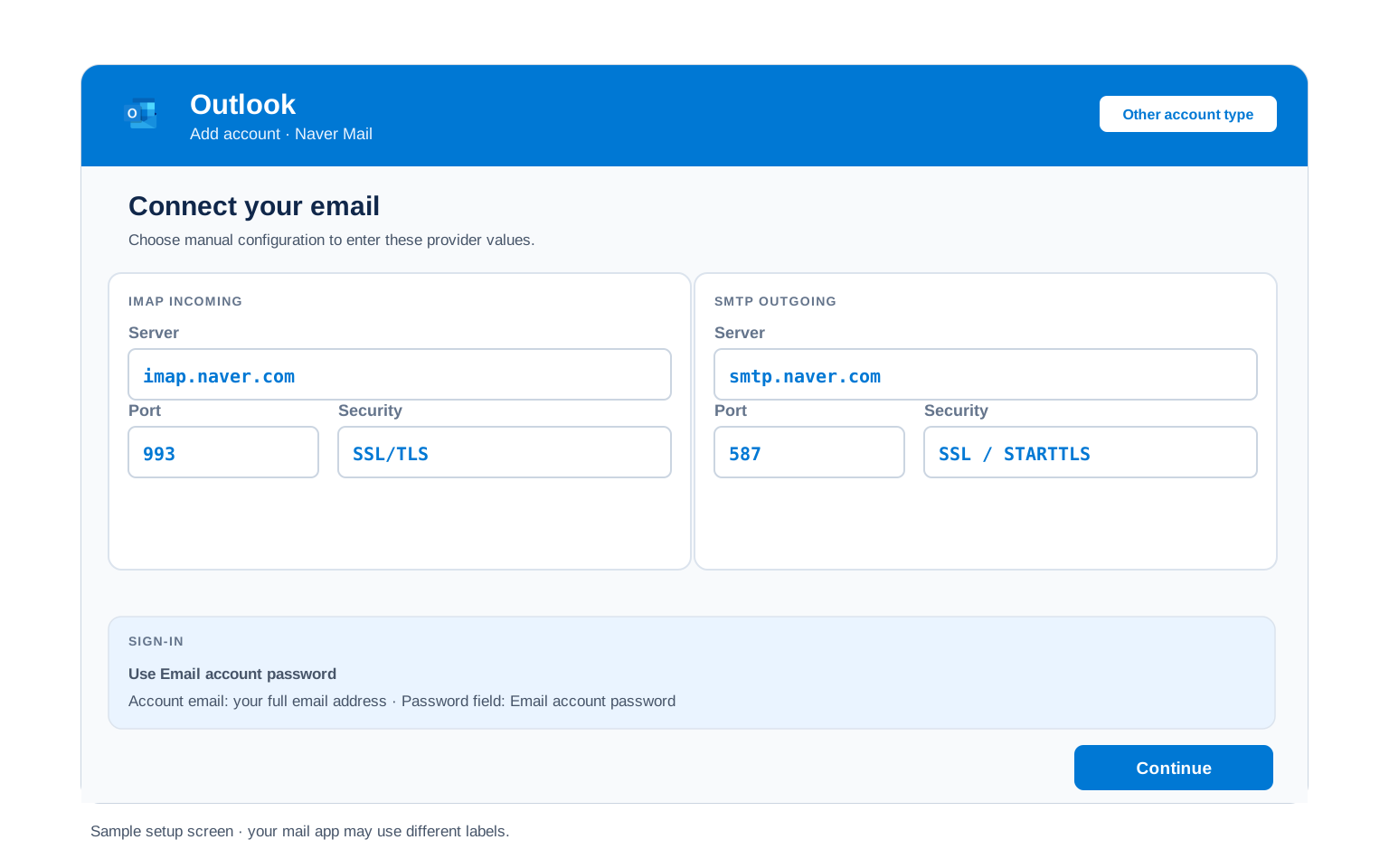
Outlook (Windows and Mac)
- Open Outlook, take File, then Add Account. Newer Outlook holds this under Settings, then Accounts.
- Enter your Naver Mail address, open Advanced options and check "Let me set up my account manually".
- Choose IMAP and enter
imap.naver.comon port993with SSL, thensmtp.naver.comon port587with STARTTLS. - Enter the application password rather than your Naver password, then tick outgoing server authentication under More Settings.
- Close by mailing your own address. That single message tests both directions.
Apple Mail (macOS)
- Open Apple Mail, then Settings, Accounts and Add Account.
- Choose Other Mail Account. Apple carries no Naver entry among its providers.
- Enter your name, full address and application password, then continue.
- When host names are asked for, take them from the IMAP and SMTP tables above.
- Check Mail is selected in the service list, then finish.
iPhone and iPad
- Open iOS Settings, then Apps, Mail, Mail Accounts and Add Account.
- Tap Other, then Add Mail Account. iOS has no Naver option built in.
- Enter your details using the application password, then tap Next.
- Leave IMAP chosen, entering both host names when iOS prompts.
- Press Save and let iOS finish verifying.
Android
- Open your Android mail app and select Add account.
- Take Other, then IMAP, as Naver does not appear in the provider list.
- Give it the full address and the application password. If automatic setup falls short, move to Manual setup.
- Enter the servers:
imap.naver.com993 SSL incoming,smtp.naver.com587 STARTTLS outgoing. - Complete setup, then swipe down on the inbox to sync.
Thunderbird
- Open Thunderbird, then Account Settings, Account Actions and Add Mail Account.
- Enter your name, full address and application password, then select Continue.
- Check what Thunderbird detected, confirming IMAP and that the outgoing port reads 587.
- Where detection fails, take Configure manually and enter the table values.
- Hit Done. Folders appear during the first sync.
Naver Mail Webmail Settings#
Those values connect your apps. What follows shapes the mailbox itself. It sits in Naver Mail environment settings in a browser.
Signature
Set from the mail environment settings. It applies to messages sent in the browser. Outlook, Apple Mail and Thunderbird each hold their own, which is how two versions quietly end up in circulation.
Vacation Auto Reply
Give the away message a start and an end date so it switches itself off. It runs on Naver servers, so replies go out with every device of yours shut down.
Filters and Folders
Rules built in the browser execute on the server, filing mail before any device fetches it. A rule inside Outlook runs only while Outlook is open, which is why two devices can disagree about where something went.
Spam and Blocked Senders
Block senders or whole domains from the same settings area. When mail goes missing, check the spam folder in the browser first, since a client side rule cannot retrieve what the server already filed.
Naver POP3 vs IMAP#
| Feature | IMAP | POP3 |
|---|---|---|
| Where mail lives | On the Naver Mail server | Downloaded to 1 device |
| Multiple devices | ✅ Everything stays in sync | ❌ Each device sees different mail |
| Sent and deleted mail | ✅ Synced everywhere | ⚠️ Stays only on that device |
| Offline reading | ⚠️ Cached mail only | ✅ Full local copy |
| Server storage used | Yes, counts against your quota | Can be freed after download |
| Best for | Phone + computer, everyday use | Single PC, local archives |
Naver Requirements and Limits#
Naver publishes requirements more readily than quotas. These are the constraints that shape a client setup:
| Before a client connects | External access on, two-step verification on, then an application password |
| Two-step verification | Compulsory. Application passwords are unavailable without it |
| Ordinary Naver password | Refused for POP3, IMAP and SMTP since 18 November 2025 |
| Also covered by the change | CalDAV calendar sync uses the same application password |
| Mailbox storage | Not published in a form we could verify, so no figure appears here |
| Sending limits | Not published. Treat it as a personal mailbox rather than a sending platform |
Troubleshooting Naver Mail Connections#
Since late 2025 one cause dominates. Check it before anything else.
| Error you see | What it means | Fix |
|---|---|---|
| Login window keeps reappearing | Your Naver password is in use. That route closed | This is the signature symptom of the 2025 change. Create an application password and put that in instead. Retyping the old one cannot work. |
| No application password option anywhere | Two-step verification is off | Naver hides application password management behind two-step verification. Turn that on first and the option appears. |
| A setup that worked for years stopped | The grace period ended | Existing connections kept working until 18 November 2025, then stopped. Nothing on your machine changed. See what changed recently. |
| Cannot connect to server | Wrong port or encryption | Check IMAP 993 SSL and SMTP 587 STARTTLS. Security software and VPN clients interfere with these ports often enough to rule out. |
| Password keeps being asked | Your Naver password is saved in the client | Replace it with an application password. On Naver this is now the answer rather than one possibility among several. |
| Messages stuck in Outbox | SMTP authentication is off | Turn on outgoing authentication using the same details incoming already has. |
Reader Reported Fixes
Rebuilding the account instead of changing the password. When a long standing setup stops and the login prompt keeps returning, the instinct is to delete the account and add it again. That produces the same loop, because the credential is the problem rather than the configuration. Create the application password first, then either edit the existing account or rebuild it, whichever you prefer.
Fixing the mail and forgetting the calendar. Naver applies the same rule to CalDAV, so a phone syncing a Naver calendar alongside the mailbox needs the new password in both places. People update the mail account, see it working, then find themselves puzzled a week later when calendar entries have quietly stopped arriving.
Backing Up Before Anything Else Changes#
The 2025 change is a useful reminder. A mailbox you have reached the same way for a decade can become unreachable overnight because of a policy decision somewhere else. Nothing was lost this time, since the mail stayed put and only the credential changed. It does not always go that way.
Backup tools need the same three things. A backup or migration tool connects over IMAP like any client, so it needs external access enabled, two-step verification on and an application password of its own. Worth setting up before you need it rather than during a rush.
Moving rather than archiving? The email migration tool carries mail between accounts directly, wanting the same credential. Archiving to files first costs a few minutes and removes the pressure.
Taking your mail to a new account? The Univik Email Migration Tool copies every folder from the old account to the new one. Enter the IMAP settings from this page for the Naver Mail side and your new provider's settings for the other.
Rather not do it yourself? Our Email Migration Services team designs the transfer, runs it, then verifies each folder arrived.
Use These Settings in Univik Email Backup#
The same IMAP settings above let you download your complete Naver Mail mailbox to your computer. Univik Email Backup writes the whole mailbox to PST, MBOX, EML or PDF. Those files are yours regardless of what any provider decides later.
- Get Univik Email Backup installed on a Windows machine.
- Choose Naver as the source. If the brand is not shown, the generic IMAP option does the same job.
- Sign in with your full email address and your application password. A backup tool is an IMAP client, so all three requirements apply here too.
- If the tool asks for server details, use
imap.naver.comwith port993and SSL from the IMAP table above. - Set a format and a destination, then run it. A large mailbox continues in the background.
Univik Tools That Use These Settings#
A good share of readers are mid move or mid archive. All 3 tools use the IMAP values above:

Email Backup
Download your complete Naver Mail mailbox to PST, MBOX, EML or PDF before switching or closing the account.
Email Backup Tool →
Email Migration Tool
Copy every folder from Naver Mail straight into Gmail, Microsoft 365 or any other account. No manual export needed.
Email Migration Tool →
Email Converter Tool
Holding MBOX, EML or OST from a past export? Turn it into PST, PDF or whatever your next app reads.
Email Converter Tool →Prefer to hand the whole migration to experts?
Policy changes and generated credentials need not become your problem. Univik's migration team handles the project instead, planning it, moving the mail, verifying the result, then reporting where every folder ended up. Since 2013, from a single mailbox to a whole company.
Email Settings Glossary#
IMAP
Internet Message Access Protocol. Reads mail that stays on the server, holding inbox, folders and read marks in step across everything you use.
POP3
Post Office Protocol version 3. Downloads mail to 1 device and can remove it from the server. Older method, still useful for local archives.
SMTP
Simple Mail Transfer Protocol. Sends your outgoing mail. Every account needs it next to IMAP or POP3, which only receive.
SSL / TLS / STARTTLS
Encryption for the connection. SSL/TLS encrypts from the start (ports 993, 995, 465). STARTTLS upgrades a plain connection (port 587).
App Password
A generated code standing in for your real password inside an app. Naver calls its version an application password. Since 2025 it is the only credential its mail servers accept from outside programs.
OAuth
Signing in through a browser window rather than typing a password into the app. Several large providers have gone this way. Naver took a different route, tying client access to two-step verification and an application password instead.
How We Verify These Settings#
Univik has built email backup, migration and converter software since 2013. Our tools sign in to Naver Mail over IMAP and SMTP every day for thousands of users, so a changed server, port or login rule shows up in our connection logs before most guides notice it.
Every value on this page is confirmed with 3 checks: a live IMAP and SMTP connection from Univik Email Backup, a comparison against Korean language provider notices and current guidance, since the 2025 rule change is documented there rather than in English. Where we cannot verify a value, we say so on the page instead of guessing. Any announcement triggers a recheck. We revisit quarterly regardless.
Screen not matching this page? Let us know. We check again, correct it, then log the change under what changed recently.
 Help & Support
Frequently Asked Questions
Use imap.naver.com on port 993 with SSL and your full address as the username. The password must be an application password, since ordinary Naver passwords stopped working for mail clients in November 2025. The full table appears under IMAP settings.
Because Naver stopped accepting them. From 24 June 2025 it began requiring two-step verification and an application password for POP3, IMAP and SMTP, with a grace period that ended on 18 November 2025. Your password is not wrong. It is no longer a valid way in through this route, so create an application password and use that.
IMAP for almost everyone. It keeps your phone, computer and webmail in sync. POP3 fits only a single computer setup where you want a local download. Full comparison here.
Yes. So does the application password requirement. Every device needs the new credential, including any that were working happily before November 2025. Menu names differ by device, which the client setup guides handle.
Go back to Naver ID, then security settings, then application password management, to create a replacement. If you cannot see that area at all, two-step verification has been switched off, which hides it.
Yes, arguably more so than before. Requiring two-step verification and an application password means your mail client never holds the credential that opens your whole Naver account. That was the point of the change, even though it broke a lot of working setups on the way through.
A mail client collects messages over IMAP as it syncs, while a dedicated backup tool runs faster and writes standard files that open anywhere. See how to back up your Naver mailbox. Stuck with an export in the wrong format? An email converter turns it into PST, PDF or whatever your next app reads.
On Naver there is a specific answer with a date attached. Ordinary passwords stopped working for mail clients on 18 November 2025, when the grace period for the June 2025 policy change ran out. Setups that had run untouched for years stopped that week. See what changed recently.
An email migration tool copies mail directly between the 2 accounts over IMAP. You need the Naver IMAP settings and an application password for this side, plus the same details for the destination. External access and two-step verification have to be sorted first. Every folder, label and date stays intact.
Concerned about the risk? Facing a stack of accounts? Our managed email migration service handles all of it.
Other Email Provider Settings
Summary: Naver Mail Settings at a Glance
- IMAP: imap.naver.com, port 993, SSL/TLS
- POP3: pop.naver.com, port 995, SSL/TLS
- SMTP: smtp.naver.com, port 587, STARTTLS
- Username is always your full email address
- Your Naver password stopped working Nov 2025
- Two-step verification is compulsory
- Then an application password
- The same one covers CalDAV calendar