 File Extension Guide
📖 What is a FOX File?
FOX files are most often the archives that Foxmail's Mail Archive tool writes. Mail Archive creates one .fox file for each configured account in a folder you choose. The mail inside covers the date range you set in the dialog, so a .fox file is a slice of an account and not always the whole mailbox.
Live mail stays in the Storage folder and Mail Archive writes the .fox files to the folder you pick instead. Import of .fox files arrived in Foxmail 7.2 on 23 January 2014, according to the changelog on Foxmail for Windows. Other mail programs do not know the format, so a double click on a .fox file gets you nowhere.
One rule to remember
Check which program made a .fox file before you open it. File type directories such as FileInfo and FILExt list four programs under .fox and only one of them holds email.
🔎 Which FOX File do I Have?
Folder context settles most cases. The four owners are Foxmail Mail Archive, InfoZoom, Furcadia and FoxPro.
Mail Archive file
Archive written by the Mail Archive tool, one file for each account.
Opens in Foxmail or Univik Foxmail ConverterInfoZoom data file
Table data and queries from InfoZoom.
Opens in InfoZoomFurcadia art file
Game graphics used by Furcadia.
Opens in FurcadiaFoxPro code file
Source code from an old FoxPro database project.
Opens in FoxProFileInfo and FILExt list these four owners. Files in the folder you picked in Mail Archive are mail archives, while .fox files inside game or database folders are not mail. The FOX file viewer page sorts the same four owners with a short checklist.
🗂️ How Does Mail Archive Make a FOX File?
Mail Archive sits under the menu icon at the top right of Foxmail 7.2. Click that icon, point to Tools and choose Mail Archive, as the arrow in the first screenshot shows. The Mail Archiver dialog opens next.
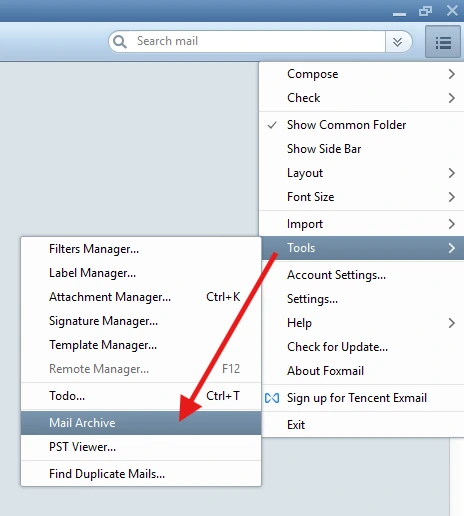
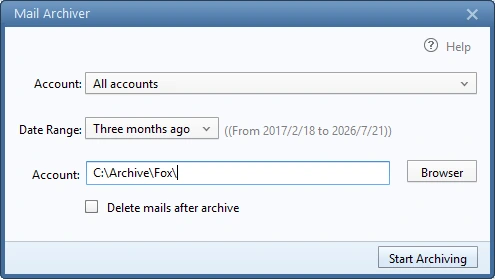
- Open Mail Archive. Click the menu icon, then Tools, then Mail Archive.
- Pick the account. The Account list offers All accounts or one account. Mail Archive still writes one .fox file for each account.
- Set the Date Range. The list starts at Three months ago and Foxmail prints the exact from and to dates beside it.
- Choose the folder. Type a path or press Browser. The screenshot uses C:\Archive\Fox\.
- Start the run. Leave Delete mails after archive unticked on a first run and press Start Archiving.
Open the folder afterwards and count the .fox files. Two accounts should give two files. Copy the whole folder to a second drive before you change anything else. Archive Foxmail Emails explains every field of the dialog.
🔓 How do You Open a FOX File?
Two routes work. The Import menu reads archives inside the program that made them. Univik Foxmail Converter reads them on a PC with no Foxmail.
Route 1: Foxmail Import menu
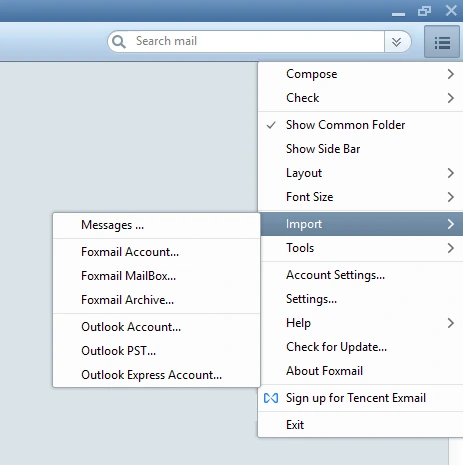
- Click the menu icon, then Import.
- Choose Foxmail Archive... and select the .fox file.
- Follow the dialog until the import ends.
Import writes into Foxmail, so try it on a spare copy first. The full restore plan covers the steps and all seven Import entries are explained in a second guide.
Route 2: Univik Foxmail Converter
- Start the converter on any Windows PC.
- Click Open and select the .fox file.
- Read the mail in the preview, then pick a target on the Export menu.
Foxmail is not needed for these steps. The FOX file converter exports EML, MBOX, PST and PDF. Trial mode exports 10 items per folder.
Work from a copy
Copy the archives to a working folder on a local drive and keep the first archive untouched. A wrong click then costs nothing.
🧪 How do You Check a FOX File Before You Delete Anything?
An archive is only a backup once you have read it back. Four checks take a few minutes and catch the usual mistakes.
- Count the files. The folder should hold one archive for each account you ran.
- Copy the folder. Put a second copy on another drive and open files from the copy.
- Open one archive. Read a few messages in a preview and check that attachments are listed.
- Compare the counts. Match the message totals per folder with the source account for the same date range.
Delete nothing from the source until all four checks pass. An archive that covers only three months leaves older mail in the Storage folder, so the date range decides what the archive protects.
📧 Can Outlook or Thunderbird Open a FOX File?
No, not directly. Outlook opens PST and OST files and Thunderbird imports MBOX files, so the archive needs conversion first. The converter exports PST for Outlook and MBOX or a Thunderbird target for Thunderbird.
- How to Move Foxmail to Outlook with the import steps for PST files
- How to Move Foxmail to Thunderbird through MBOX or EML
- PST file and MBOX file explain the two target formats
⚔️ How does a FOX File Compare With Other Mail Data?
| Item | Created by | Covers | Opens in |
|---|---|---|---|
| .fox archive | Mail Archive tool | Account and date range you chose | Import menu or Univik Foxmail Converter |
| Storage folder | The running program | The live mailbox | Foxmail or the converter |
| EML files | Export Mail command | Messages you select | Mail programs that read EML |
| PST file | The converter | Folders you convert | Outlook |
Storage folder paths for each Foxmail version sit in Where Does Foxmail Store Emails? and the EML route is covered in How to Export Foxmail Emails.
📝 Summary
- .fox is the archive Foxmail's Mail Archive writes
- Mail Archive makes one file per account
- A file covers the Date Range you chose
- Menu, Tools, Mail Archive creates it in Foxmail 7.2
- Menu, Import, Foxmail Archive... reopens it
- Univik Foxmail Converter opens it on a PC without the program
- Outlook and Thunderbird need PST or MBOX instead
- InfoZoom, Furcadia and FoxPro files are not mail
Last updated 22 October 2026. Menu paths and the Mail Archiver dialog were checked in Foxmail 7.2.25.563. The 7.2 import date comes from the changelog on Foxmail for Windows.
❓ Frequently Asked Questions
A .fox file is most often the archive that Foxmail's Mail Archive tool writes, one file for each configured account. Other programs use the extension too, so FileInfo and FILExt list InfoZoom data files, Furcadia art files and FoxPro code under .fox as well. The folder the file came from shows which kind you have.
Use Menu, Import, Foxmail Archive... in Foxmail or press Open in Univik Foxmail Converter. The converter shows a mail preview and needs no mail client on the PC.
Yes, Univik Foxmail Converter opens them on a PC that has no Foxmail. Only creating the archive needs the program.
No, Mail Archive writes one .fox file for each configured account, so two accounts give two files. Foxmail 7.2.25.563 offers All accounts in the Account list and still writes separate files.
Only the date range you choose in the Mail Archiver dialog ends up in the file. The Date Range list starts at Three months ago. Foxmail keeps the full account in the Storage folder, so copy that folder as well.
Version 7.2 added import of .fox archive files on 23 January 2014, according to the changelog on Foxmail for Windows. The Import menu in build 7.2.25.563 lists a Foxmail Archive entry.
No, neither program lists .fox as an import type. Convert the archive to PST for Outlook or to MBOX for Thunderbird first.
FileInfo lists InfoZoom data files and Furcadia art files under .fox and FILExt adds FoxPro code. None of the three holds email, so neither Foxmail nor Univik Foxmail Converter opens them.
Open the archive in Univik Foxmail Converter and choose PST, EML or MBOX on the Export menu. Convert one small archive first and compare the message counts with the source account before you run the rest.
Leave the box unticked on a first run. The box is named Delete mails after archive in the Mail Archiver dialog. Open the .fox file and compare message counts with the source account before you remove any mail.