Quick Answer
To archive Foxmail emails, open Menu, then Tools, then Mail Archive. Pick an account and a date range, choose a folder and press Start Archiving. Foxmail writes one .fox file for each account. Foxmail reopens the .fox files through its Import menu, so keep a second copy in an open format such as PST or MBOX.
Leave the Delete box unticked until you have reopened one archive.
Foxmail ships its own archive tool, so you can archive Foxmail emails without installing anything. I found it under Menu, then Tools in Foxmail 7.2. That tool writes .fox files you can park on another drive. This guide walks you through the tool box by box, follows my tests in Foxmail 7.2 and shows you how to keep a copy that doesn't depend on Foxmail.
I opened Menu and then Tools in Foxmail 7.2 and captured the dialog on screen, so the box names here come from my own copy of Foxmail. On October 21, 2026 I also read pages from the Library of Congress and Microsoft. I confirmed one claim myself: Mail Archive writes one .fox file for each configured account.
Three things vary by store: the size of a .fox file, the time a run takes and what the Delete box does. Each of those three things carries a source or a warning, so you can run the same check yourself. My sample store holds two IMAP accounts (2,876 and 2,548 messages), so a run on that store should end with two .fox files. Note your own message totals before you run an archive, because you compare those totals afterwards.
How Do You Start Mail Archive in Foxmail?
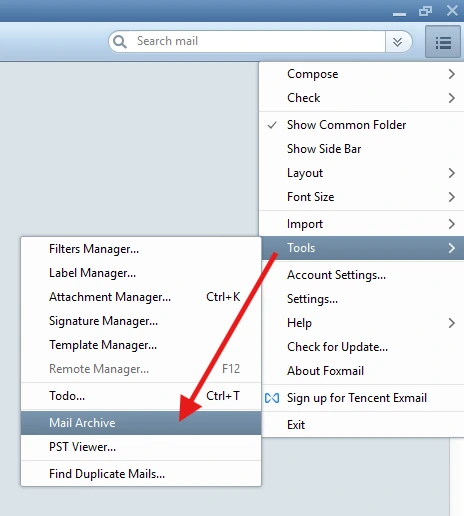
Mail Archive sits inside the main Menu button. Click the three-line Menu button at the top right of the Foxmail window, point to Tools and look for Mail Archive between Todo and PST Viewer. The red arrow in my screenshot marks Mail Archive. The same Tools list holds Filters Manager, Attachment Manager and Find Duplicate Mails, so you won't mix those up with the archive tool once you know the name.
Seven steps take you from the Menu button to the finished files. Step 1 matters most, so let every IMAP account finish its sync first. I let each account sync before my own run. The sync costs you one minute and it is an easy habit.
- Let Foxmail download all mailOpen each IMAP account and let Foxmail fetch every message first. I let each account sync before my own run, so the archive holds the full mailbox.
- Open Mail ArchiveClick the Menu button at the top right of the Foxmail window, point to Tools and choose Mail Archive. The Mail Archiver dialog opens.
- Pick the accountPick one account in the first list or keep All accounts to archive every account in one run. Foxmail writes one .fox file for each account.
- Set the date rangeOpen the Date Range list. It starts at Three months ago and the grey hint beside it shows the dates that choice covers. Pick the custom entry for any other range.
- Choose the folderType a path into the folder field or press Browser. Pick a folder on a second drive, so the archive doesn't sit beside the live data.
- Leave the Delete box untickedKeep Delete mails after archive unticked on the first run. Tick it only after you have opened the result and know it holds what you expect.
- Start the run and count the filesPress Start Archiving, then open the folder and count the .fox files. A store with two accounts should give you two.
The date range deserves a second look. In my dialog the date range hint ran from 2017/2/18 to 2026/7/21, which fits a range that ends three months back. So I read Three months ago as older mail, not the newest three months. Pick the custom entry when you want recent mail inside the archive. I checked that reading with a test run in Foxmail 7.2.
What Does Each Box in the Dialog Do?
The dialog has five controls, so the table lists each control with what I saw in my copy and my own run.
| Control | What I saw | Source |
|---|---|---|
| Account list | All accounts selected | My copy and my own run |
| Date Range | Three months ago with a date hint | My copy and my own run |
| Folder field | C:\Archive\Fox\ plus a Browser button | My copy |
| Delete mails after archive | A box that was unticked | My copy and my own run |
| Start Archiving | A button at the bottom right | My copy |
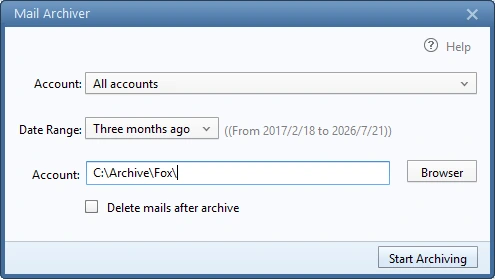
The folder field carries the same Account label as the first list in my copy, so I call it the folder field here. The path inside the folder field decides where the .fox files land. The Browser button lets you pick another path.
Most English pages on Foxmail backup that I read skip the archive tool, so the box names above matter.
Write down your server details before you retire a PC, so you can add the accounts again on the next machine.
Can You Open a .fox Archive Outside Foxmail?
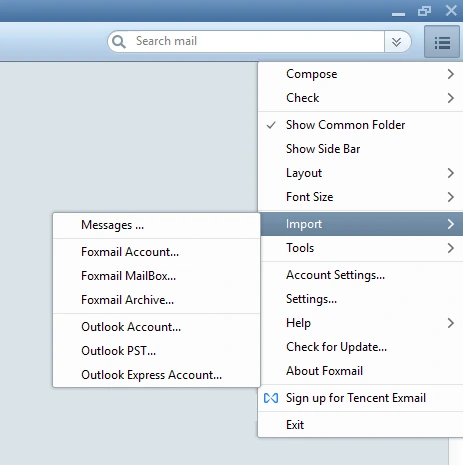
Foxmail reopens its own archives. The Import list in my copy of Foxmail 7.2 holds a Foxmail Archive entry. I tested the Import route in Foxmail 7.2: you open the .fox file, choose an account and start the import. An archive folder then appears under that account. The full restore steps sit in the guide to import a Foxmail archive. Keep the authorization code of an IMAP account at hand before you start.
Beyond Foxmail the choice is narrower. I treat the .fox file as a Foxmail format, so the two readers I tested are Foxmail itself and the converter described after the format table.
A second copy in an open format covers that gap. A .fox file does its job as a copy while Foxmail stays installed and updated. The day you move to another mail program, an EML, MBOX or PST copy is often easier to open elsewhere.
Which Format Should You Use to Archive Foxmail Emails?
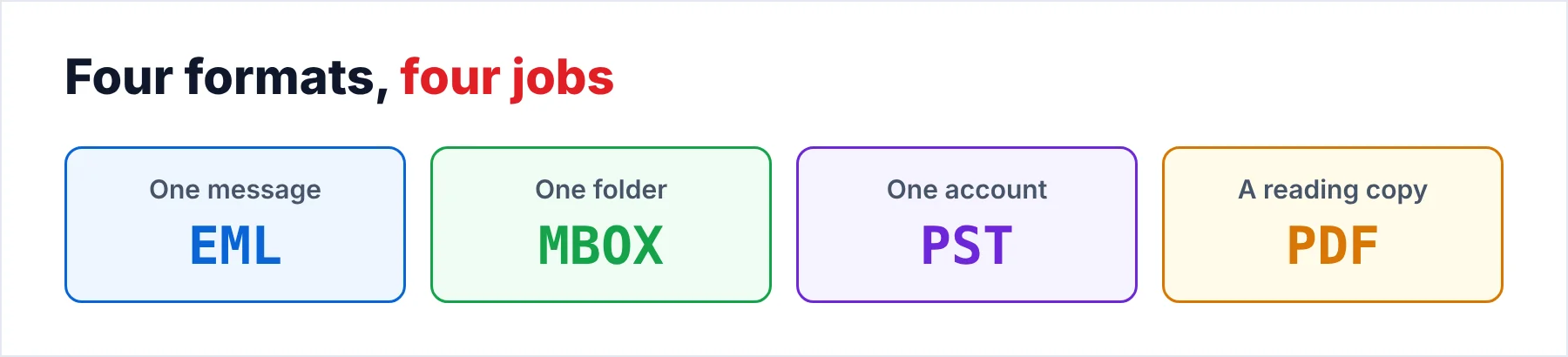
No single format wins, so the table pairs each format with a job. The Library of Congress says the same about email format: it names no preferred format and lists EML, MSG and PDF for single messages and PST, MBOX and PDF for folders.
| Format | Best for | Watch for |
|---|---|---|
| EML | One file for each message | Thousands of small files in one folder |
| MBOX | One file for each folder, Thunderbird users | RFC 4155 is only an informational memo, so tools differ |
| PST | Outlook users, one file for each account | The Outlook default caps a Unicode file at 50 GB |
| A readable copy with no mail program | A copy for reading, not a certified archive format |
My largest test store holds 86,000 emails in 5.8 GB, well under the 50 GB limit, so one PST for each account is a safe plan for a store like mine. A decade of mail from several accounts may bring you closer to that limit. That is one more reason to keep each account in its own file.
PDF needs a second look. I treat PDF as a readable copy and I do not claim PDF/A. The Foxmail to PDF guide covers that PDF route and the page on how to export Foxmail emails covers EML.
I'd keep the .fox files untouched and add one open copy for each account. For Outlook users the open copy is a PST file and for Thunderbird users the open copy is an MBOX file. The Foxmail to Outlook and Foxmail to Thunderbird guides cover both.
Can You Turn a .fox File Into Readable Mail?
Univik Foxmail Converter supports .fox files made by Mail Archive, so an archive isn't stuck inside Foxmail. The converter also reads a live Foxmail store read-only and works from a copy of Storage plus FMStorage.list when the old PC is gone.
Two short pages deal with the file type alone. The FOX file converter page is for turning an archive into another format and the FOX file viewer page is for working out what a .fox file is before you open it.
The Export menu lists TEXT, HTML, CSV, PDF, EML, MBOX and PST, plus Gmail, Office 365, IMAP and Thunderbird. Those choices apply to a .fox file too. Press Open and pick the .fox file. The converter then shows a preview of the mail before anything converts. Foxmail does not have to be installed on that PC. A free trial run on one small archive is still a sensible first check.
A live store is the other input. When a PC is going away, copy the Storage folder as well as the .fox files, because the archive holds only the range you picked. Our walkthrough, Move Foxmail to a New Computer, names the files to copy and the reference page on where Foxmail stores emails maps the folders.
How Should You Name and Store the Folders?
Start with the account, because Foxmail already writes one .fox file for each account. A tree such as Archive, then Foxmail, then the account address, then the date range keeps the files apart. Put the date range into the folder name and rename no file.
Then count your copies. The 3-2-1 rule says to keep at least three copies of the data on two kinds of storage media, with one copy offsite. For an archive that means the .fox files on one drive, a second copy on a different kind of media and one more copy in a place you trust, such as a cloud folder. Never leave your only copy on the same drive as the live Storage folder.
Do You Have to Keep Old Mail for a Set Time?
Retention rules depend on your country and your work. I'm not a lawyer and none of this is legal advice. I read three public sources to show how different the rules can be. Nothing in this guide claims that an archive made with these tools meets any of those rules.
The UK Companies Act 2006, section 388 sets three years for the accounting records of a private company and six for a public one, counted from the date they were made. The Act prescribes no file format.
GDPR Article 5(1)(e) runs the other way, because it asks you not to keep personal data longer than necessary. Keeping every old mail forever may conflict with that rule.
Section 7 of the Indian IT Act 2000 says an electronic record meets a retention rule when it stays accessible for later reference and keeps its original format or one that shows the original accurately. That is a good reason to prefer a format you can still open in ten years, which is a test you can apply today.
Univik Foxmail Converter supports .fox files made by Mail Archive and reads Foxmail 6.x to 7.2 stores, including a copy of the data. The Export menu lists EML, MBOX, PST and PDF along with further formats, so you can test one small archive on the free trial first.
Download Free Trial Select a Licence - From $39Foxmail Converter works on 64-bit Windows 10 and 11 after you install .NET Framework 4.8. A trial run covers 10 items from every folder.
What Goes Wrong When You Archive Foxmail Mail?
Do this: Leave Delete mails after archive unticked until you have opened the result. Copy Storage and FMStorage.list first, because a copy protects the originals whatever the tick does. The steps to move Foxmail to a new computer name both items. A copy is the easy way to protect them.
Do this: Pick a folder on a second drive in the dialog. A failing disk usually takes the live mail and the archive together, so a second drive is the safe choice.
Do this: Let Foxmail download every message before you start, so the archive holds the full mailbox. Afterwards open one .fox file through Import on a spare copy of Foxmail and look at the folders, which is a quick check.
Do this: Keep a second copy as PST or MBOX, so a change in Foxmail can't lock the old mail away. The Foxmail emails missing guide shows how fast a single copy can turn into a problem.
- Mail Archive sits under Menu and Tools and writes one .fox file for each account.
- You leave Delete mails after archive unticked until you have opened the result.
- You let IMAP accounts finish syncing first, so the archive holds the full mailbox.
- A .fox file reopens through Foxmail's Import menu and the converter supports it.
- You keep one open copy for each account and a second drive for the files.
FAQ: Archive Foxmail Emails

Read on October 21, 2026: public pages on email formats, the Outlook file limit, backup copies and retention law. The box names and the one .fox file for each account come from my own copy of Foxmail 7.2. The Delete box, the restore route and the output formats for .fox input come from my tests in Foxmail 7.2.
Pages we read: