Quick Answer
To fix Foxmail not opening, first copy the Storage folder and its FMStorage.list file to another drive. Then match your symptom. If nothing happens after the click, end the Foxmail process in Task Manager and start again. If Foxmail closes right after you add an account, give Users full control of the install folder under Program Files.
When every fix fails, a converter reads the copy while Foxmail stays closed.
When you hit Foxmail not opening, your mail is usually still on the disk, so you can run the quick checks and protect the data before you try anything risky. I tested these checks in Foxmail 7.2 and read two Microsoft pages on October 21, 2026: the Windows Security exclusion page and a Task Manager page.
I also met two start-up problems myself. One was a damaged Storage folder or FMStorage.list file that stopped Foxmail from starting. The other was a crash or hang at start-up. That is why this guide protects your mail first and tries the fixes second.
My sample store runs on Foxmail 7.2.25.563 with two IMAP accounts that hold 5,424 messages (2,876 and 2,548). I check that total after every copy of the store, so you should check your own total the same way. A bigger store of mine filled 5.8 GB with 86,000 emails, which means the drive that receives your copy needs at least that much room.
Which Fix Works for Foxmail Not Opening?
Five fixes cover the start-up problems that I could verify, so the table lists them in the order I'd try them. You start with the copy, because the copy only reads your files while the later rows change folder rights or security settings. Each row names what you need for the fix and what you should watch for.
| Fix | Try it when | Needs | Watch out for |
|---|---|---|---|
| Copy the data | You need a copy before any fix that changes files | A second drive | Both items must be copied together |
| End the stuck process | You see nothing after you click the icon | Task Manager | Unsent draft text is lost |
| Give the folder write rights | You see Foxmail close right after you add an account | An administrator account | Fits an install inside Program Files only |
| Check Windows Security | You think security software blocks Foxmail | The Windows Security app | An excluded folder is not scanned in real time |
| Convert the copy | You see Foxmail fail to start after every fix | The copied folder plus the list | Trial runs cover 10 items per folder |
I'd run the first row before any other, since a copy takes a few minutes while a lost mailbox stays lost. After the copy you can try the middle rows in any order, but you should stop as soon as Foxmail starts, because every extra change makes the cause harder to find. Change one thing, test one thing and note one result, so that every change has one clear result.
Four symptoms show up most often, so match yours before you change anything. Each symptom sends you to one section of this guide.
- Nothing happens after the clickA leftover process can hold Foxmail, so you end it in Task Manager.
- Closing right after you add an accountThe install folder can block writes, which you check in the Security tab of the folder.
- Hang or crash at start-upI met this myself, so I copy the data first and you convert the copy when a restart does not help.
- Damaged Storage or FMStorage.listI met this too. You should never delete either item before the copy exists.
How Do You Run These Fixes in a Safe Order?
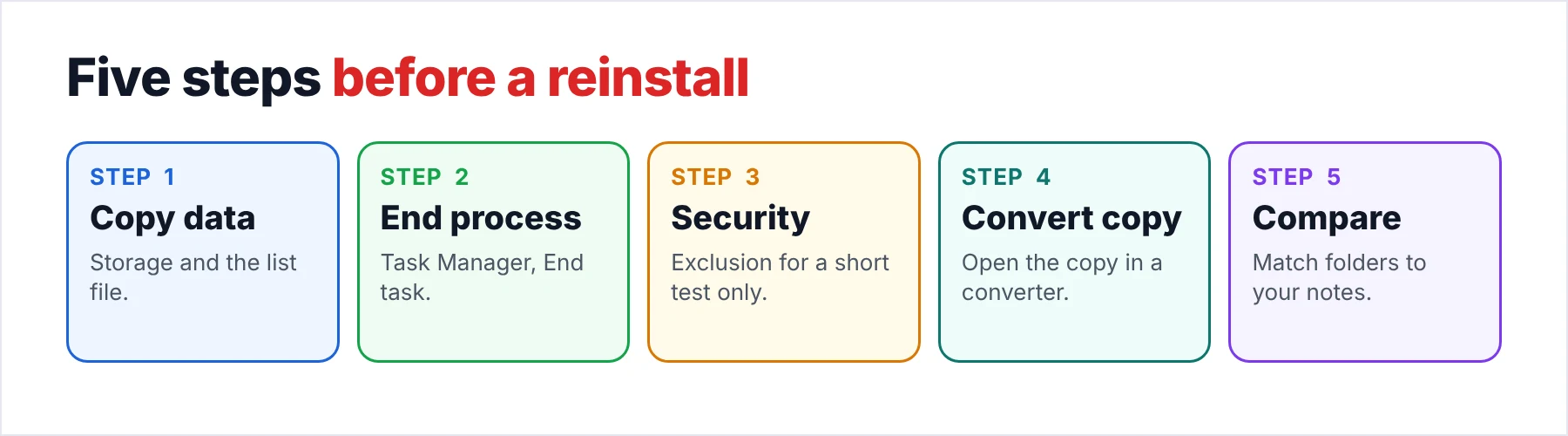
Five steps take you from the copy to the conversion. The order protects your mail at each stage. The first step only reads files, so you can do it before you know the cause. The last step is your safety net for the case where every fix fails.
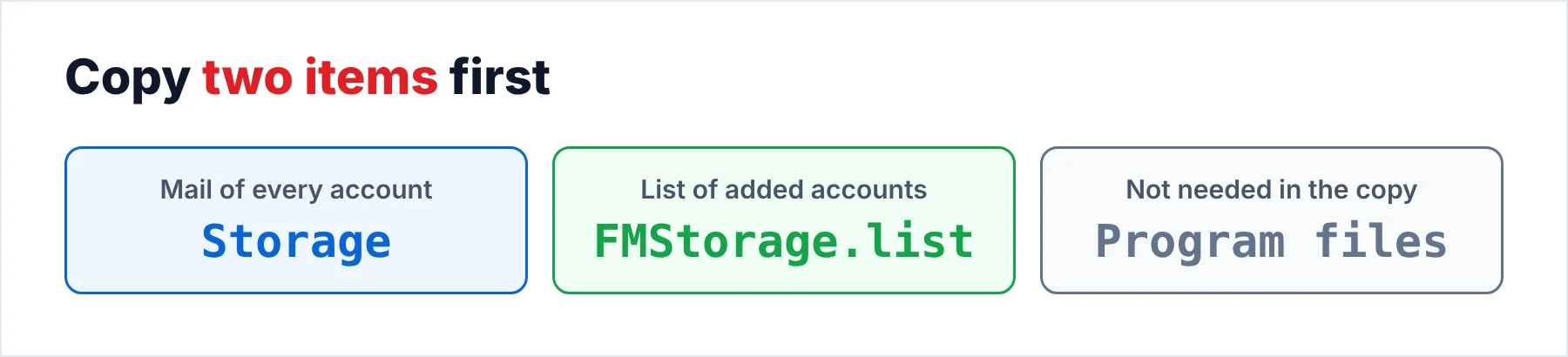
- Copy the data before any fixClose Foxmail. Take the Storage folder plus its FMStorage.list file out of the install folder and put both on another drive. Open the copy in File Explorer to see that both items arrived.
- End the stuck processOpen Task Manager, select Foxmail on the Processes tab and click End task. Then start the program again from its icon.
- Check the folder rightsWhen the program closes right after you add an account and the install folder sits in Program Files, open the folder Properties, go to the Security tab and give Users full control.
- Look at Windows SecurityOpen Windows Security and check whether it blocked the program. Add the install folder as an exclusion only for a short test, because an excluded folder is not scanned in real time.
- Convert the copyWhen Foxmail still will not start, point the converter at the copy of Storage and FMStorage.list. Pick the output format you need and check the folder counts afterwards.
Stop at the first step that gets Foxmail started. Then compare the folder counts with the numbers you noted before the fix, since a program that starts is not proof that every folder came back.
How Do You End a Stuck Process?
A quick test costs you one minute, so start with the process list. Open Task Manager, click the Processes tab and look for Foxmail in the list. Select the entry and click End task. On the Details tab the same button asks you to confirm with End process.
Microsoft Learn describes the Processes and Details tabs of Task Manager, so you can use whichever tab shows the Foxmail entry. Then start Foxmail from its icon again. Note: copy any draft text you need first, since ending the process closes the window at once. When the window opens after the restart, the process was the problem. When the window stays shut, you move on to the next row of the table.
Why Does Foxmail Close Right After You Add an Account?
I tested Foxmail 7.2 installed in a Program Files folder on Windows 10 and 11. The program asked for an account setup on every start, then it closed. The cause is the folder: Windows keeps the Program Files folders read-and-execute only for normal programs while Foxmail writes FMStorage.list and a Storage folder into its install root, so the program closes when the write fails.
The fix changes the rights on the Foxmail 7.2 folder. Open File Explorer, right-click the folder and choose Properties. Open the Security tab, click Edit and select Users. Tick Allow next to Full control, click OK twice, start Foxmail again, add the account again and check the folder again for the two items. On my test PC the two items then appeared in the folder and the account setup stopped coming back.
You can also test your security software, although I found no Foxmail page that names it as a cause. Open Windows Security, go to Virus & threat protection and click Manage settings. Under Exclusions choose Add or remove exclusions and then Folder. Microsoft warns that an exclusion may leave your device and data vulnerable and that it covers real-time scanning only, so you should remove the exclusion again when the test ends.
Is Your Mail Safe When Foxmail Stops Working?
Your mail lives in files, not in Foxmail, so a program that fails to start leaves those files where they were. Foxmail 7.1 and later keep the mail of every account in the Storage folder inside the install folder, with FMStorage.list beside it. Foxmail 7.0 and earlier stored mail in a Data folder, so check which one you have. On my sample PC the path is C:\Foxmail 7.2\Storage. The companion guide on where Foxmail stores emails lists the subfolders and what each one holds.
Close every Foxmail process and copy both items to another drive. In File Explorer select Storage and FMStorage.list, press Ctrl+C and paste them into a new folder on the other drive. A large store is slow to copy, so give it time. For a store as big as my 5.8 GB one I'd use robocopy, whose switches my Move Foxmail to a New Computer guide explains with Microsoft's page.
Check the copy before you go on. Right-click the copied Storage folder, open Properties and compare the size and the number of files with the original. When the numbers differ, copy again and read the robocopy log, because robocopy reports an exit code from 8 upward when any file failed to copy. A good copy matches the original in size, in file count and in folder count, so you compare all three numbers before you go on.
How Do You Read the Mail When Foxmail Will Not Start?
Univik Foxmail Converter reads a copy of Storage and FMStorage.list, so Foxmail itself does not need to start. The Foxmail email viewer guide shows what you can open from that copy. The converter needs FMStorage.list as well as Storage, which is why you put both items into the copy. It opens your copy for reading only and sends its output to another folder, so the original files stay untouched. The copy is the input, the converter is the tool and the output folder is the result, so you always know which files are original and which files are converted.
In the Export menu you find Outlook PST files, Office 365, Gmail, Thunderbird and PDF. Each target has its own guide: Foxmail to Outlook, Foxmail to Office 365, move Foxmail emails to Gmail, Foxmail to Thunderbird and Foxmail to PDF. EML and MBOX files come out as well, which the article on how to export Foxmail emails explains. An IMAP server works as a target too, as the guide on how to migrate Foxmail to IMAP shows. Contacts leave as VCF or CSV files and calendar entries as ICS files, as the guides on how to export Foxmail contacts and export Foxmail calendar show.
I'd convert the copy as soon as a second try at starting Foxmail fails, since no later fix can improve a copy that is already safe. You can still repair Foxmail afterwards and compare the two results.
Univik Foxmail Converter opens a copy of your Storage folder and its list file, so Foxmail 6.x to 7.2 data stays readable while the program is down. It saves the mail as PST, MBOX, EML or PDF files and can also upload it to Gmail, Office 365 or an IMAP server.
Download Free Trial Select a Licence - From $39Foxmail Converter needs .NET Framework 4.8 and a 64-bit copy of Windows 11 or 10. The free trial handles 10 items per folder.
What Goes Wrong While You Test These Fixes?
Do this: Leave both items alone and copy them to another drive. I met this problem myself, so I copy both items before I try any other fix. Then convert the copy, because a damaged list file may stop the program from starting on any restart.
Do this: End the process in Task Manager and start Foxmail once more. When the same hang returns, copy the two items and convert the copy instead of trying more fixes. I met this crash myself too.
Do this: Check where Foxmail is installed. An install inside Program Files can lack write rights, so give the Users group full control of the Foxmail folder. Add the account again afterwards.
Do this: Compare the size and the file counts in Properties. Run the copy again and open the log to find the failed files. Keep the original drive untouched until both folders match.
When Foxmail still will not start after these checks, write to Univik support with the Foxmail release you run and the text on the start-up screen.
- Your mail sits in the Storage folder with FMStorage.list beside it.
- You copy the Storage folder and FMStorage.list before any fix.
- You check the copy before you try a fix on Foxmail.
- You test the process and the folder rights before you test Windows Security.
- You convert the copy when Foxmail still will not start.
FAQ: Foxmail Not Opening

Read on October 21, 2026: Microsoft's Windows Security exclusion page and a Microsoft Learn page on Task Manager. The message totals come from my own sample store. Neither the totals nor the two start-up problems come from a web page.
Pages we read: