Quick Answer
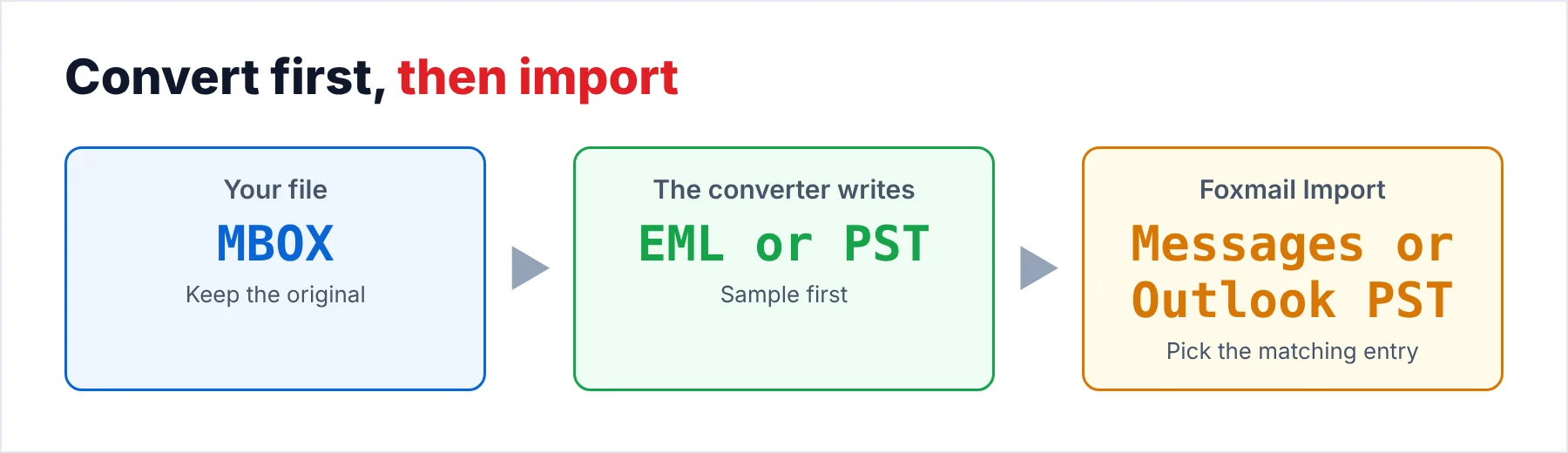
To import MBOX to Foxmail 7.2, convert the MBOX file to EML files or to a PST file first, because the Import menu has no MBOX entry. Then bring the EML files in through the Messages entry or the PST file through the Outlook PST entry.
Convert a small sample first and compare the message counts before you import the whole archive.
Foxmail 7.2 is Tencent's mail program for Windows. An MBOX file holds many messages in one file, each preceded by a separator line that starts with From, as RFC 4155 describes. Thunderbird, Apple Mail and Google Takeout all produce such files. The Import menu of Foxmail 7.2 has no entry that reads them as they are.
The way in is a conversion. Univik MBOX Converter turns an MBOX file into EML files or into a PST file. Foxmail has an Import entry for each of those two formats. The next sections show how to pick the format, run the conversion and import the result.
I took the Import entries from Foxmail 7.2 (build 7.2.25.563) on my own PC. The converter facts come from its product page on univik.com. Every other source is marked where it matters.
Does Foxmail Import MBOX Files Directly?
No. Foxmail 7.2 shows seven Import entries on my PC. None of the seven names says MBOX or Thunderbird. One entry is called Messages, three carry the word Foxmail and three carry the word Outlook.
Two of the seven entries match formats that a converter can write from an MBOX file. The Messages entry takes EML files and the Outlook PST entry takes PST files. The guide to the Foxmail Import menu describes all seven entries, including the five that do not apply to MBOX mail.
Should You Convert MBOX to EML or PST for Foxmail?
Both formats work, so the choice depends on how much mail you move. A PST file suits a whole mailbox because one file carries the folders. EML files suit a handful of messages because you pick them one by one.
| Convert to | Foxmail entry | What you get |
|---|---|---|
| EML | Messages | One .eml file per message. A large MBOX file can produce thousands of small files. |
| PST | Outlook PST | One file for the whole mailbox with its folders. The default cap of a Unicode PST in Outlook 2010 and later is 50 GB. |
| IMAP upload | None, the Import menu is skipped | A converter that lists IMAP among its outputs uploads the mail to an IMAP mailbox. Foxmail reads that mailbox as a normal account. |
The third route skips the Import menu, because Foxmail reads an IMAP account the usual way. My own sample store has two IMAP accounts, so Foxmail handles that kind of account. The rest of this guide follows the EML and PST routes.
How Do You Import MBOX to Foxmail Step by Step?
Six steps take an MBOX file from the old mail program to a checked result in Foxmail. Steps 1 and 2 protect the original file and step 6 proves the import.
- Copy the MBOX fileWork on a copy and keep the original untouched. Thunderbird stores MBOX files without an extension in the Mail folder of your profile. Mozilla places profiles under %APPDATA%\Thunderbird\Profiles. Apple Mail exports a .mbox folder. Google Takeout delivers an .mbox file inside a ZIP archive.
- Check the copy in a viewerOpen the copy in the free online MBOX viewer and read a few messages, one of them with an attachment. Write down how many messages the file holds, because you compare that total after the import.
- Add the file to the converterStart the converter, click Add Files or Add Folder and select the copy. Browse the preview to confirm the folders, the message count and the attachments.
- Choose EML or PST and convertSelect EML to get one file per message or PST to get one Outlook data file. Set a new destination folder and click Convert. The free trial exports the first 25 emails per MBOX file, which is enough for a first test.
- Import the result into FoxmailIn Foxmail open Menu, point to Import and click Messages for EML files or Outlook PST for a PST file. Pick the converted files and confirm the dialog.
- Count and compareOpen the folder that received the mail. Compare the count and three messages with what the viewer showed. The trial stops at 25 emails per MBOX file, so expect 25 until you license the converter. Import the rest only after the sample looks right.
How Do You Import EML Files Into Foxmail?
Open Menu, point to Import and click Messages, then select the converted EML files. An .eml file holds one message in the layout that RFC 5322 calls the Internet Message Format, with the header lines first and the body after them. The EML file page on our site explains the format in full.
A converted MBOX file can produce thousands of EML files, so run a quick import of ten first. The MBOX to EML converter page lists file naming patterns such as Date and Subject, which keep a folder of EML files easy to sort. Compare three things for the sample: the count, the date on each message and one attachment. When all three match, import the rest in batches. Finally, note the last batch so that you never repeat one.
Also, use a spare account for the first run. The Alibaba Cloud help page says Foxmail asks whether to sync the imported messages to the server after an import into an IMAP account, so a real mailbox can receive your test messages.
How Do You Import a PST File Into Foxmail?
Open Menu, point to Import and click Outlook PST, then pick the PST file from the converter. The guide on how to import PST to Foxmail covers the checks on the file and what to do when the entry refuses it.
Size matters for a large archive. Microsoft sets the default cap of a Unicode PST in Outlook 2010 and later at 50 GB. The MBOX to PST converter page says the converter splits PST output by size or by folder, so a large MBOX archive becomes several PST files that you import one at a time and count after each.
Should You Check the MBOX File Before You Convert It?
Yes. A damaged or wrong file is usually cheapest to find before the conversion. Univik runs a free browser-based MBOX viewer that opens a file without any installation. Open the copy, write down how many messages you expect and read a few that carry attachments. A free EML viewer shows a single converted message the same way.
A very large MBOX file converts more safely in pieces, so our page on splitting a big MBOX file gives you smaller files to try one at a time. Each small file makes a quicker trial.
Which Tool Converts MBOX Files for Foxmail?
Univik MBOX Converter is Windows software that reads MBOX files from Thunderbird, Apple Mail, Gmail Takeout, Eudora, Opera Mail and SeaMonkey. It exports EML, PST, MSG, PDF and other formats, 15 or more in total according to its product page. EML and PST are the two that Foxmail imports.
The preview panel shows each message with its headers and attachment list before you convert. Filters narrow the output by date, sender, recipient, subject or attachment. The folder tree carries over into the output. PST export does not need Outlook installed. The trial exports the first 25 emails per MBOX file with no limit on preview.
MBOX Converter writes files and doesn't write into Foxmail. The Import menu does that last step.
Univik MBOX Converter reads MBOX files from Thunderbird, Apple Mail and Gmail Takeout and exports EML or PST for the Foxmail Import menu. The free trial exports the first 25 emails per MBOX file, so you can test one file before you buy.
Download Free Trial Select a Licence - From $29MBOX Converter works on Windows 7 to 11 and on Windows Server 2012 to 2022. PST export does not need Outlook installed.
What Can Go Wrong When You Import Converted Mail?
Do this: Expect 25 emails per MBOX file in the free trial, because the count usually looks short when the trial has exported no more. Compare your sample against 25 and license the converter to convert the full file.
Do this: Cut the file into parts with the split guide or let the converter split a PST by size. Import one part at a time and count after each part.
Do this: Convert each MBOX file into its own EML folder and name that folder after the mailbox it came from. The Library of Congress lists MBOX for folders and EML for single messages, so one MBOX file usually stands for one folder in your old program.
Do this: Test in a spare account first, because the Alibaba Cloud page shows Foxmail asking you to confirm a sync to the server after an import into an IMAP folder. A real mailbox can receive every test message that you import into that folder.
Do this: Write down which files you imported and never repeat a batch. The Tools menu in my copy of Foxmail names a Find Duplicate Mails entry. Check the folder for repeated messages after each batch.
Do this: Back up the Storage folder and FMStorage.list before the first import, as the guide to move Foxmail to a new computer lists. Univik Foxmail Converter exports the mail already in Foxmail to EML, MBOX or PST, which gives you a copy outside the store. It does not import into Foxmail.
- The Foxmail Import menu has seven entries and none is named MBOX.
- Convert the MBOX file to EML for the Messages entry or to PST for the Outlook PST entry.
- Univik MBOX Converter writes both formats and does not write into Foxmail.
- The free trial exports 25 emails per MBOX file, which is enough for a first sample.
- Import into a spare account first, because an IMAP import can sync to the server.
FAQ: Import MBOX to Foxmail

Written for Foxmail 7.2 in October 2026. I took the seven Import entry names from Foxmail 7.2 on my own PC. The converter facts come from the product pages on univik.com. The sync prompt comes from an Alibaba Cloud help page, the file formats from two RFCs and the PST cap from Microsoft Learn.
Pages we read: