Quick Answer
To move Foxmail emails to Gmail, upload the mail straight into the Gmail account with a Google sign-in. The other route converts the mail to PST and imports it with Google's tools. Either route fills a Google Account, whose 15 GB is shared by Gmail, Drive and Photos, so check the free space first.
Google also caps IMAP uploads at 500 MB per day for each account, so a big mailbox may need days.
Gmail is an easy home for old Foxmail mail, because the account is free and opens in any browser. The catch is that the mail sits in a Storage folder on one PC, so you need something to carry it across. Before I wrote this guide I read Google's own help pages on October 21, 2026, since the limits on those pages decide which route can carry your mail across.
The mail in my sample store sits in two IMAP accounts that hold 2,876 messages and 2,548 messages, so the check at the end expects 5,424 messages. A larger store from a test run held 86,000 emails in about 5.8 GB (that size matters for both the storage limit and the daily upload cap).
Which Way Should You Move Foxmail Emails to Gmail?
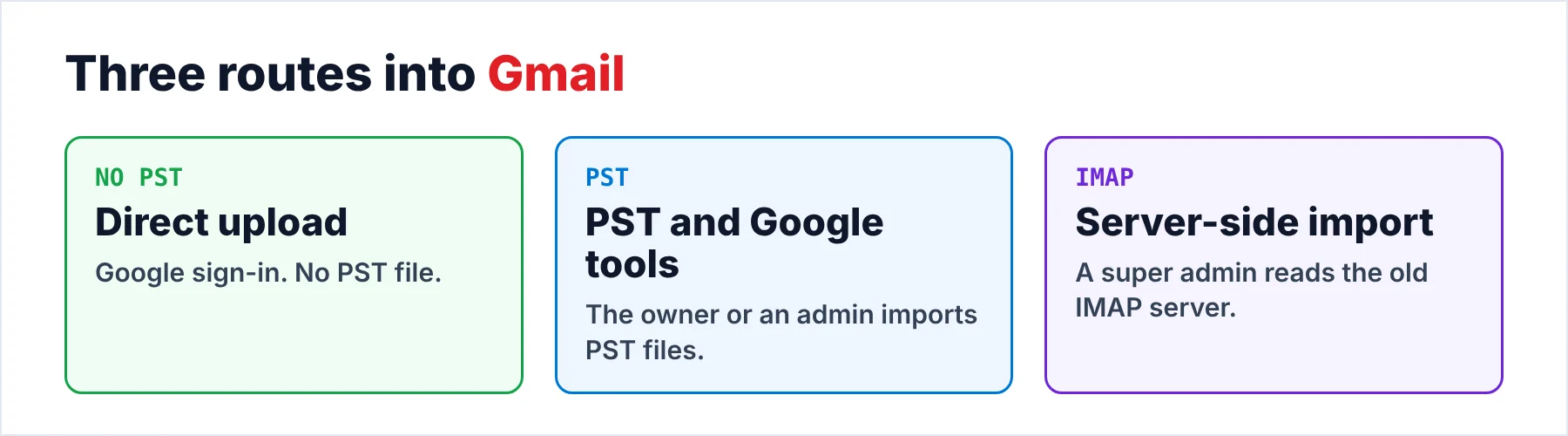
Each of the three routes meets the storage limit and the upload cap in a different way. The table names who runs the routes and what the routes need, so you can choose before any mail leaves Foxmail.
Foxmail's own Import submenu does not help with this job. In my copy of 7.2 the seven entries are Messages, Foxmail Account, Foxmail MailBox, Foxmail Archive, Outlook Account, Outlook PST and Outlook Express Account. None carries a Gmail name. All of them sit under Import.
| Route | Run by | Needs | Watch out for |
|---|---|---|---|
| Direct upload | The owner of the Gmail account | A Google sign-in or an App Password | 15 GB of shared storage |
| PST and Google tools | The owner or a Workspace admin | PST files and the import steps from the PST guide | Free space in the target account |
| Server-side IMAP import | A Google Workspace super admin | IMAP turned on at the old mail server | 100 IMAP users per import |
For a personal Gmail account I'd pick the direct upload from the table, because it skips the PST step, which makes it quicker. The server-side import skips that step too, yet it suits only a company whose old mail still sits on an IMAP server.
Google's own import cannot read a Foxmail Storage folder, so mail that lives only on a PC never reaches that route. The PST route fills the gap when a Workspace admin wants one import tool, yet every route ends in one Google Account. Pick one and test it first.
How Much Room Does Gmail Have for Foxmail Mail?
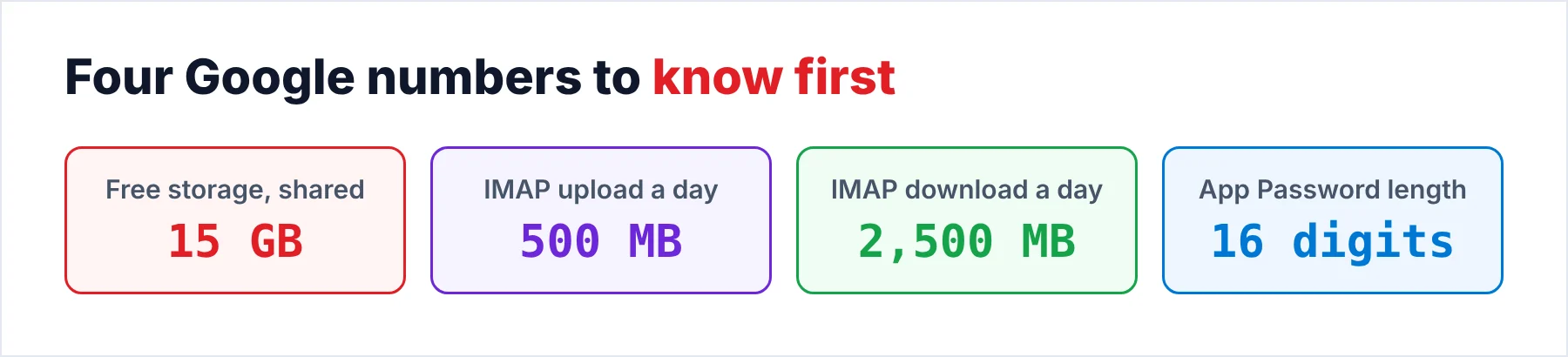
Every Google Account gives you up to 15 GB of storage, shared across Gmail, Google Drive and Google Photos. Also, Gmail messages and attachments count toward that figure (Spam and Trash included). A full account may struggle to send and receive messages, so check the storage meter in Google before you upload anything.
The test store of 5.8 GB takes about 39% of the 15 GB of storage, which leaves room only if Drive and Photos are not already crowded. However, a mailbox of 12 GB would not fit beside 5 GB of photos. You then need a paid plan for the mailbox. The other choice is for you to upload the older folders first and judge the mailbox later on the Google storage page.
- Free spaceYou open Google storage and compare the free gigabytes with the size of the Foxmail store.
- Sign-inYou decide between the Google sign-in and an App Password, as the next section explains.
- A copy of the storeYou make a copy of the Foxmail folder before the run (our walkthrough of where Foxmail stores emails shows where it sits).
- A quiet weekYou pick days when nobody else uploads into the same account.
Should You Use Google Sign-In or an App Password for the Upload?
You should use the Google sign-in whenever the converter offers it. Google says app passwords are not recommended and unnecessary in most cases. It advises Sign in with Google for connecting an app. An app password is a 16-digit code for an app that lacks that option.
An App Password works only on an account that has 2-Step Verification turned on. Google lists three situations where you may not see the option: 2-Step Verification that uses only security keys, a work or school account or an account with Advanced Protection. Also, Google revokes your app passwords when you change the account password, so don't change it in the middle of a run.
I'd treat the app password as the fallback. It still works when the sign-in page is blocked, but a separate password is one more secret for you to store and to revoke.
How Do You Move Foxmail Emails to Gmail in One Run?
Univik Foxmail Converter works with either sign-in and opens the Storage folder directly. Foxmail may stay closed or even be uninstalled, since the folder holds all the mail. Every account is listed with its folders and the message count of each folder. That count is your reference for the final check.
Gmail appears in the Export menu as a live target, next to Office 365 and IMAP. Five steps take you from that menu to the final count, then the upload runs as long as the mailbox needs.
- Let the converter open the Storage folderLaunch the converter and point it at the Storage folder of the PC. Use Browse when you work from a copy on another drive. Each account then shows its folders with a message count next to every folder name.
- Tick what should moveTick the accounts and folders that belong in the Gmail account. Mail you leave unticked stays in Foxmail, so start with the folders you open every day.
- Open the Gmail targetOpen the Export menu and choose Gmail. The target sits among the email services, next to Office 365 and IMAP.
- Sign in to GoogleChoose the Google OAuth sign-in or paste an App Password. Pick the OAuth sign-in when it is offered (Google calls app passwords unnecessary in most cases).
- Run the upload and compareStart the run. Finally, open Gmail in a browser and match each label against the number from step 1. A trial run of 10 items per folder lets you check the labels before the full upload.
In our test run of 86,000 emails the folder names came through unchanged, so I expect Gmail to list them as labels with the same names. Also, a trial on 10 items per folder shows you that before a day goes into the full upload. Mail goes online only during that upload, straight into your own mailbox.
Univik Foxmail Converter reads a Foxmail store from version 6.x up to 7.2 and sends the mail into Gmail after a Google OAuth sign-in or with an App Password. The converter writes PST files too, so the mail can take the import route instead.
Download Free Trial Select a Licence - From $39Foxmail Converter runs where Windows 10 or 11 has the 64-bit build and .NET Framework 4.8 is added. The trial stops at 10 items per folder.
How Fast Can Gmail Take the Mail Without Pausing the Upload?
Google publishes a bandwidth table for IMAP (our Gmail IMAP settings page lists the server details): 500 MB of upload per day and 2,500 MB of download per day for each account. Reaching the upload limit triggers a safeguard that stops IMAP uploads for that account for a while, so you may see the run stall. Google adds that the limit may change without notice, so treat 500 MB as a guide.
A store of 5.8 GB needs about 12 days at 500 MB per day, so a big mailbox cannot arrive in one upload if the upload runs over IMAP. Treat the cap as the worst case and watch the first day. That is the safe plan for you, because you lose nothing if the cap never applies.
Split the work by account so each day stays under the cap. You upload one account per day with the busiest folders of that account first. The quieter folders can follow on a later upload. Note: a paused upload is a safeguard of Google's, not a sign that the mail is damaged.
How Do You Check Labels and Counts in Gmail Afterwards?
Begin with the folder counts from step 1, since a number you can compare is the surest test of a finished upload. Open each label in Gmail and read the total you see in the top right corner of the list. Gmail groups messages into conversations by default, so that total can read lower than the message count until you switch conversation view off for the check. For the sample store the counts must add up to 5,424 messages.
Next you open a message from the Sent label and one that carries an attachment. Compare the sender, the date and the attachment name with what you see in Foxmail, since a wrong date or a missing attachment is the usual sign of a bad upload. Finally, look at the storage meter again, because you should find that a finished upload used about the size of the Foxmail store.
Contacts and calendars from the Foxmail store travel in separate files, as the FAQ explains. Open the contact file in the VCF viewer first if you want a quick look before you add it to Google Contacts.
What If Foxmail Mail Stops Halfway Into Gmail?
Do this: You check the three causes Google lists. 2-Step Verification must be on, it must not rely on security keys alone and the account must not be a work, school or Advanced Protection account. Use the Google sign-in when one of them applies.
Do this: You wait a day, since Google pauses IMAP uploads when the daily cap is reached. A likely cause is a store that is larger than the cap, so you split the next runs by account or by folder.
Do this: Open the Google storage page and see how your Drive, Photos and Gmail share the 15 GB. Empty Trash and Spam first, because both count toward that storage. You can then buy more storage or move fewer folders.
Do this: Create a new App Password, because Google revokes the old ones when you change the account password. Then you start the upload again and you paste the new password.
When a run keeps failing for you, send Univik support the Foxmail version and the exact error text that Google gave.
- The direct upload with a Google sign-in is the shortest route while PST files with Google's tools are the alternative.
- Gmail, Drive and Photos draw on one 15 GB allowance per Google Account.
- Google caps IMAP uploads at 500 MB per day, so you should plan days for a large mailbox.
- App passwords need 2-Step Verification and are unnecessary in most cases.
- You match every label total in Gmail against the numbers from step 1.
FAQ: Moving Foxmail Emails to Gmail

The Google limits and app password rules were read on help pages dated October 21, 2026. The sample store behind the message counts is a Foxmail 7.2.25.563 build. The converter details are from its 6.10 product page.
Google pages we read: