Quick Answer
To move Foxmail to Office 365, upload the mail straight into the Microsoft 365 mailbox after a Microsoft sign-in, which suits one person or a handful. For a whole company an admin imports PST files through the Microsoft Import service. The mailbox must exist with a licence first, because a plain password sign-in no longer works for mail tools.
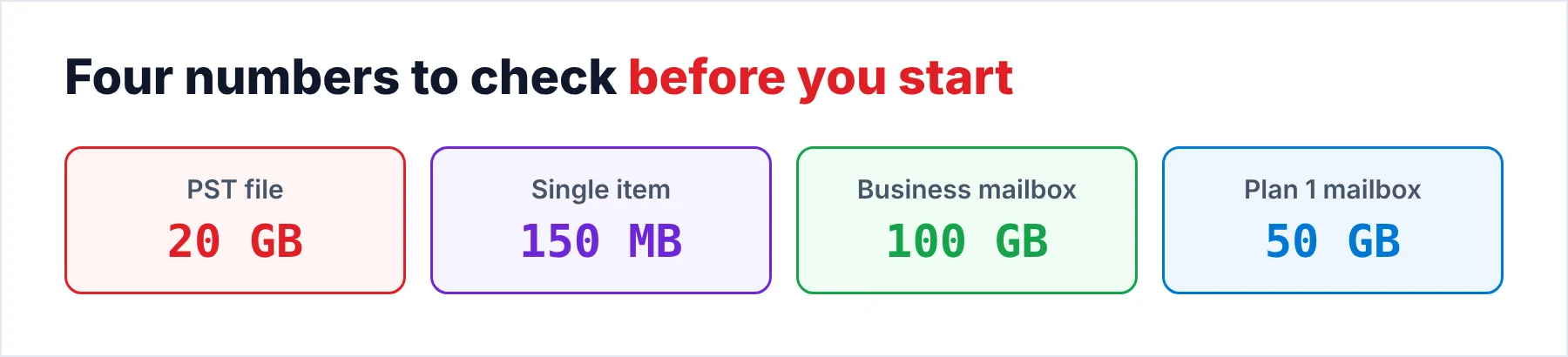
The Import service takes PST files up to 20 GB and skips items above 150 MB.
A PST import is only half of the job, because a company that moves to Microsoft 365 still has Foxmail mail on each PC where no admin console can see it. Each person can bring that mail over alone. The other way is for you to collect the Storage folders and move the mail for them. I looked at three ways to move that mail and checked every limit against Microsoft's own pages, which I opened on October 21, 2026.
My yardstick beside those pages is the Foxmail 7.2 sample store with two IMAP accounts that hold 2,876 and 2,548 messages. Those two counts add up to 5,424 messages, so I use that number as the check at the end of each route. A bigger test store of 86,000 emails weighed about 5.8 GB (a number that matters when you compare it with a mailbox limit).
Which Way Should You Move Foxmail to Office 365?
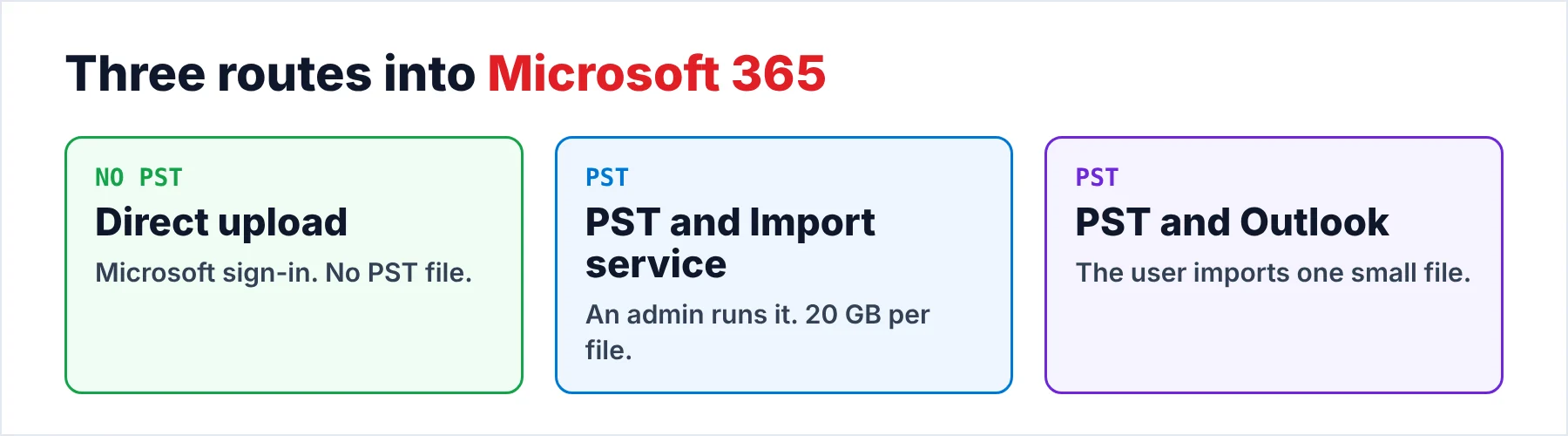
Each of the three routes works, yet a different limit bites first on each one. The table shows who runs the routes and which limit each route hits first, so you can match one to your situation before you export a single message.
The Import list inside Foxmail 7.2 is a different tool for a different job. It names seven entries and none of them is called Office 365. Import is the menu for mail coming into Foxmail, so the routes here start from the Export side instead.
| Route | Who runs it | What it needs | Limit that matters |
|---|---|---|---|
| Direct upload | The mailbox owner or whoever moves the mail | A Microsoft sign-in for the target mailbox | The size of the mailbox plan |
| PST and Import service | An admin in the Microsoft Purview portal | The Mailbox Import Export and Mail Recipients roles or a global administrator | 20 GB per PST file |
| PST and Outlook | The user on the user's own PC | Outlook signed in to the mailbox | One file at a time, so it suits a small mailbox |
For one person or a handful I'd choose the direct upload, because it is the quick route: it skips the PST step and the 20 GB limit with it. For a company that moves forty people, the admin route fits better, since one admin runs every job from one place. The admin route needs a PST for each mailbox, so you still convert the Foxmail mail first. Either choice is fair.
What Must Be Ready in the Mailbox Before Any Mail Goes In?
The target mailbox has to exist and carry a licence before you can send mail into it, so you add the mailbox owner in the Microsoft 365 admin center first. Then you compare the plan with the size of the Foxmail store, because a mailbox that is too small usually stops the move halfway. The plan values in the next table come from the Exchange Online limits page, in a snapshot dated October 19, 2026.
| Plan | User mailbox | Archive mailbox |
|---|---|---|
| Microsoft 365 Business Basic and Standard | 100 GB | 50 GB |
| Microsoft 365 Business Premium | 100 GB | 1.5 TB |
| Office 365 E1 and Exchange Online Plan 1 | 50 GB | 50 GB |
| Office 365 E3 and E5 and Exchange Online Plan 2 | 100 GB | 1.5 TB |
| Office 365 F3 and Exchange Online Kiosk | 2 GB | Not available |
However, an F3 or Kiosk mailbox holds only 2 GB, so the test store of 5.8 GB fits every plan row except the last one. The other number you need to know is the message size that a mailbox accepts. Outlook and mailbox migrations carry a message up to 150 MB. Note: an admin can set a lower message limit, down to 1 MB.
- Licensed userYou create the user and assign the licence, then wait until the mailbox shows up in the admin center.
- Plan sizeYou compare the Foxmail store with the user mailbox limit in the plan table.
- A copy of the storeYou copy the Foxmail folder first, as the page on where Foxmail stores emails explains.
- Account in handYou keep the sign-in details of the target mailbox ready, because the converter asks for them.
Why Does a Password Sign-In Fail for Foxmail Mail in Office 365?
Microsoft removed Basic authentication in Exchange Online for Exchange ActiveSync, POP, IMAP, Exchange Web Services, Autodiscover and Outlook for Windows. Its deprecation notice says Basic authentication is now disabled in all tenants, so nobody can switch it back on, not even Microsoft support. A tool that signs in with a stored password is therefore refused by Microsoft, which no longer accepts that sign-in. That sign-in is gone for good.
The replacement is Modern authentication (OAuth 2.0), a token sign-in. A mail tool has to ask Microsoft for a token instead of sending your password along with every request. The Office 365 target of the converter follows that rule, so the sign-in goes through Microsoft's own OAuth flow, returns a token and works with the licence you already hold.
I'd skip any tool that asks you to type the Office 365 password into its own window, because Microsoft no longer accepts that kind of sign-in for mail protocols. A sign-in page that belongs to Microsoft is the safe sign, since you hand the token to the tool while your password stays with Microsoft.
How Do You Upload Foxmail Emails to Office 365 in One Run?
Univik Foxmail Converter uses that token sign-in to send mail and reads the Storage folder directly, so Foxmail can stay closed or even be missing from the PC. The converter lists each account, its folders and a count for every folder, which gives you the numbers for each account at the final check.
The Export menu then offers Office 365 as a live target for each account, beside Gmail and IMAP. The five steps cover the whole setup, while the upload itself runs as long as the mailbox is large.
- Open the Storage folder in the converterStart the converter and let it read the Storage folder on the PC or use Browse to point it at a copy of that folder. You should see each account listed with its folders and a count beside every folder.
- Pick the accounts and foldersTick the accounts you want in the new mailbox (one run can carry several accounts). A folder you leave unticked stays behind, so Inbox and Sent make a sensible first pass.
- Pick Office 365 as the upload targetOpen the Export menu and choose Office 365. The entry sits in the same list as Gmail and IMAP, a few lines under the file formats.
- Sign in with MicrosoftYou sign in as the owner of the target mailbox. Office 365 takes a Microsoft OAuth sign-in only, because Modern authentication is the one kind it still accepts.
- Start the upload and compare the countsStart the run. Finally, open Outlook on the web and compare each folder with the count the converter showed you in step 1. Run the free trial first, because it moves 10 items per folder and shows you the folder names before you commit the full mailbox.
Folder names stayed the same in the output of our 86,000-email test run, so I expect the same tree in the mailbox. Also, the trial run confirms that on 10 items per folder before you spend an evening on the whole mailbox. Mail goes online only during the upload, into your own mailbox.
Univik Foxmail Converter reads the Storage folder of a Foxmail 7.2, 7.1, 7.0 or 6.x store and sends the mail straight into Office 365 with a Microsoft OAuth sign-in. The converter writes PST files from the same store when you prefer the import route.
Download Free Trial Select a Licence - From $39Windows 10 or 11 (64-bit) with .NET Framework 4.8 installed is all it needs. The trial of the converter moves 10 items per folder of mail.
How Do You Import Foxmail Mail Through PST Instead?
The trial writes PST files too, so choose PST in the same Export menu and you export one account at a time. A single account keeps each file well under the Import service limit of 20 GB. You can confirm the size in File Explorer with Properties. Microsoft also skips any item above 150 MB and refuses a file whose folders nest 300 levels deep or more.
Once you hand the files over, the admin uploads the file to a temporary Azure storage area and starts an import job. The guide on importing PST files to Office 365 walks through the six network upload steps with the mapping file, so you won't find them repeated here. Microsoft quotes about 24 GB per day for the upload and import steps but doesn't guarantee that rate, so a 60 GB set may take days.
For one small PST the easy way is a user import, since you need no admin role for it: open Outlook, sign in to the mailbox and import the file from the File menu. The Foxmail to Outlook guide covers that path and the new Outlook limits in detail. Also, after either import path Microsoft turns retention hold on without an end date, so retention policies skip the mailbox until an admin removes the hold.
How Do You Check the Mailbox After the Move?
Start with the counts the converter showed you for every folder in step 1, because a count is the most reliable test of a finished move. A count settles most doubts. Outlook on the web shows the same figure beside each folder name. For the sample store the two accounts have to add up to 5,424 messages, so I compare the Inbox folder first and the custom folders next.
Then you open one message from the Sent folder and one with an attachment. Check the date, the sender and the attachment name, because those three fields usually reveal a bad import fastest. If the import comes up short by a handful of messages, the most likely cause is an item above 150 MB, so look for the biggest messages in the Foxmail folder.
Finally, the Foxmail contacts become .vcf files and the calendars become .ics files in the same run as the mail. Open them in Outlook after the mail has arrived. For a quick look at the files before you import them into a mailbox, the VCF viewer opens a contact file without Outlook.
What If the Upload or Import Fails?
Do this: Sign in as the owner of a licensed mailbox, because an unlicensed user has no mailbox to receive mail. A tenant policy is a likely cause when the mailbox owner still sees a refusal, so ask your admin. Your admin can't switch Basic authentication back on either, so a password workaround doesn't exist.
Do this: Find the messages above 150 MB, since Microsoft 365 won't take them. Share those messages as OneDrive links instead, since the guide on skipped large emails in Microsoft 365 lists the other size limits.
Do this: Plan for about 24 GB per day, which is Microsoft's own figure for each job and not a promise you can count on, so a big mailbox often needs several days. You can split the mail by account and start the biggest job first, so the longest wait begins early.
Do this: Check the two limits that stop a file. The PST file must stay under the 20 GB limit and its folders must nest fewer than 300 levels. You export that account again in smaller parts if either limit is broken.
If a run still fails for you, write to Univik support with your Foxmail version and the exact message the sign-in page gave.
- Two routes work: a direct upload with a Microsoft sign-in or PST files through the Import service.
- A password sign-in fails because Basic authentication is off in every tenant.
- Each PST must stay under 20 GB while items above 150 MB are skipped.
- Business plans give 100 GB per user, while Plan 1 and E1 give 50 GB.
- You compare the folder counts in Outlook on the web with the converter after the move.
FAQ: Moving Foxmail Mail to Office 365

Limits and the sign-in rule come from Microsoft Learn pages opened on October 21, 2026. Message counts come from our Foxmail 7.2.25.563 sample store and converter facts from the 6.10 product page.
Pages we read: