Quick Answer
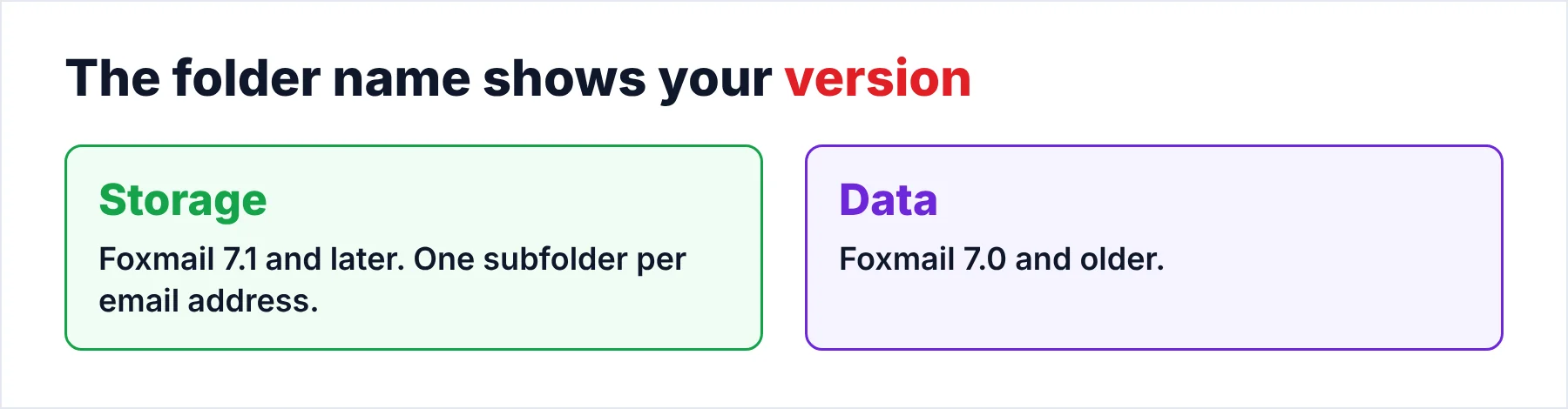
Foxmail 7.1 and later keep emails in a folder called Storage under the install folder, for example C:\Foxmail 7.2\Storage. Every email address has its own subfolder holding Mails, Boxes and Account.rec0. Foxmail 7.0 and older kept the mail in a Data folder. Searching the PC for FMStorage.list also leads to the right folder.
Message files are not plain .eml text, so copy the whole Storage folder.
Foxmail never asks where to save your mail, so most people don't see the folder until something goes wrong. A new PC or a full drive sends you on a search for that folder, while a client that won't start makes the same search urgent before the old PC is wiped. I ran that search in our own Foxmail 7.2 sample store (build 7.2.25.563), so every path in this guide comes from a real folder.
The sample store holds two IMAP accounts with 2,876 and 2,548 messages. Foxmail keeps all of those messages on the PC, which is why the Storage folder matters even when you also keep your mail on a server.
Where Does Foxmail Store Emails on Windows?
Foxmail 7.1 and later keep everything in a Storage folder inside the program folder. A default install usually puts that folder at C:\Foxmail 7.2\Storage, which is the path of our sample store, so I used that folder as the reference. An install that went to the Windows program directory may use C:\Program Files\Foxmail 7.2\Storage instead, depending on where you or your IT team pointed the installer.
Foxmail 7.0 and older named that folder Data. I checked the folder name in my Foxmail 7.2 store, where it is Storage, so the folder name is the quick, reliable check you can make for your version, because a Storage folder means 7.1 or later.
- Open file locationRight-click the Foxmail shortcut and choose Open file location. You'll normally see the Storage folder in the folder that opens.
- Paste the pathPaste one of the two paths above into the File Explorer address bar and press Enter.
- Search for FMStorage.listSearch the drive for that file name. It's a fast route when the other two fail, since the file sits beside Storage in the install folder.
What Does Foxmail Store Inside Each Account Folder?
Storage holds a subfolder for each account. The email address names that subfolder. Inside each account folder you'll find a few items that do all the work. I listed them from the sample store. However, a different build may add a few more.
| Item | What it holds | Why it matters |
|---|---|---|
| Mails | One file per message, in numbered subfolders | The mail itself |
| Boxes | The folder map that puts each message in Inbox, Sent or a custom folder | Without it, you lose the folders |
| Account.rec0 | The account settings you entered in the client | The server names you entered live here |
| Mime | Copies of messages you have opened | Only what you viewed, not the whole mailbox |
The Index file inside Mails records the sender, subject, size and read state of each message. Inside Boxes, a .map file links each message ID to a folder ID, while the .box files hold the folder views. In our sample store, folder ID 3 was the Inbox and folder ID 6 was Drafts.
Because every folder ID lives in Boxes, my advice is to treat Mails and Boxes as one unit, since Boxes without Mails is a map with no places and Mails without Boxes is a pile of messages with no folders.
Where Does Foxmail Store a Single Message File?
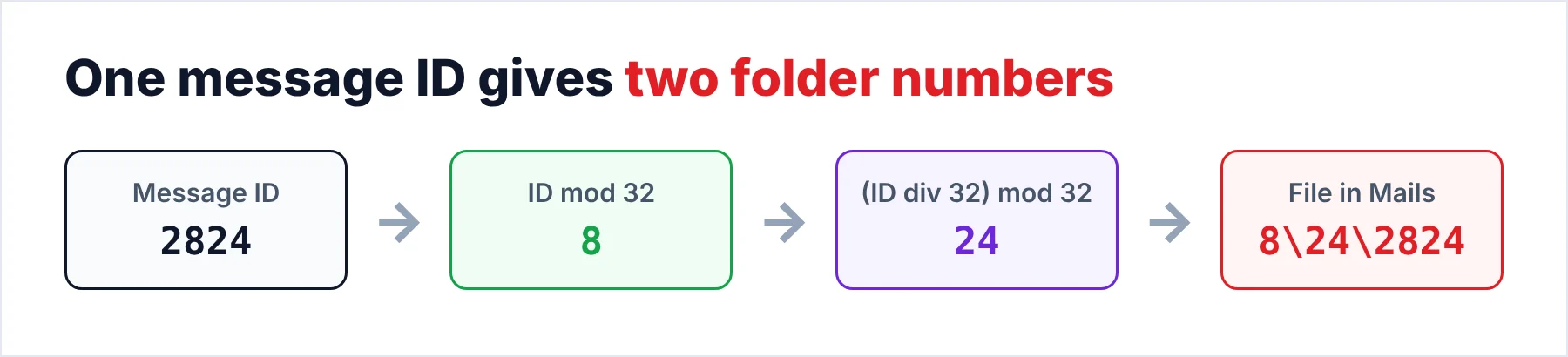
Message files sit in numbered subfolders of Mails because the numbers come from the message ID, with the first folder being the ID modulo 32 and the second being the ID divided by 32 (rounded down) and then taken modulo 32. The file itself carries the ID as its name.
I checked this rule on the ID 2824 in our sample store, where 2824 modulo 32 is 8 and 2824 divided by 32 rounds down to 88, which is 24 modulo 32. Those two modulo results give the path Mails\8\24\2824, the exact place where that file sits.
Note: the rule behind those results comes from one build and one sample store, so test it on a message of your own before you rely on it. A wrong guess about the rule costs nothing, since you only read the folder.
Why Can't You Open the Message Files in Notepad?
Each file in Mails starts with a 512-byte header that is followed by the message body, so neither part reads as text in Notepad. I confirmed this on message 2824, a file of 84,207 bytes that splits into the 512-byte header and an 83,695-byte body, the same size as the .eml that Export Mail wrote for that message.
Renaming the file to .eml therefore gives you nothing that a mail app can open. Foxmail's own Export Mail or a converter has to turn each file into a real .eml file first. The guide on how to export Foxmail emails covers Export Mail.
How Do You Copy the Foxmail Storage Folder Without Losing Anything?
A safe copy takes five short steps and about ten minutes for a mid-size mailbox. The steps work the same for Foxmail 7.2, 7.1 and 7.0, apart from the folder name.
- Quit Foxmail completelyClose the program window and check the taskbar tray for a second copy. A running client may hold files open or keep writing while you copy, so wait until the program has fully exited.
- Open the program folderUse one of the three ways from the box above. You should see the Storage folder and the FMStorage.list file side by side.
- Copy both items to another driveCopy the whole Storage folder and the FMStorage.list file to an external drive or a spare folder. Copy the folder as one piece, because Mails and Boxes don't work apart.
- Compare the sizesRight-click the original, choose Properties and note the Size. Do the same for the copy. You should see the same number twice, to the byte.
- Leave the original aloneFinally, keep the Foxmail folder untouched until you have opened the copy somewhere else. A second copy on a different drive costs little and covers a failed first copy.
Our test store held 86,000 emails and came to about 5.8 GB, so check the free space on the target drive before you copy that folder, because a copy that stops halfway is easy to miss when the drive fills up. Also, keep the copy private, because Account.rec0 carries your account settings and a saved password in scrambled form.
One copy on one drive is a weak backup, so you should not stop there. A common rule asks for three copies on two kinds of media with one kept off site, so a second drive is a good start for you.
Can You Read the Copied Folder Without Foxmail?
Univik Foxmail Converter reads the folder you copied without the Foxmail client, so the client can stay closed or missing. The converter shows every account with its folders and a count per folder. It writes EML, MBOX, PST or PDF files from the folder you copied. The files go to a separate output folder, so the copy isn't touched and nothing leaves your PC.
A copy of the store with 86,000 emails took about 42 minutes in that test run, which gives you a rough idea of the wait. The names of Inbox, Sent and each custom folder carried over unchanged. For the steps of an export run, the write-up on how to export Foxmail emails describes each format.
Univik Foxmail Converter turns the copy into EML, MBOX, PST or PDF files in a separate output folder. It reads Foxmail 7.2, 7.1, 7.0 and 6.x stores and leaves your copy untouched.
Download Free Trial Select a Licence - From $39Install .NET Framework 4.8 first, then run the converter on Windows 11 or 10 (64-bit). The trial covers 10 items per folder.
What If You Can't Find the Storage Folder?
Do this: Copy the Data folder, because you have version 7.0 or older. The converter treats a Data folder like a Storage folder, since it reads 7.0 and 6.x stores, so you can point it at either.
Do this: Search every drive for FMStorage.list, which records where a moved store lives. Someone most likely moved the store to another drive. The search shows you which drive.
Do this: Windows may ask for administrator permission before it shows you the files under Program Files. Confirm the permission prompt in File Explorer, then copy the Storage folder and its files from there.
Do this: Compare the size with the number of messages you have, not with a guess. Our test store held 86,000 messages at about 5.8 GB, so a small mailbox can sit far under that size.
Still stuck? Send Univik support your version number and a screenshot of the install folder.
- Storage is the folder name in Foxmail 7.1 and later, while 7.0 and older use Data.
- Each account folder holds Mails, Boxes and Account.rec0, so copy them together.
- The file of one message sits at Mails\(ID mod 32)\((ID div 32) mod 32)\ID.
- Message files are not plain .eml text, so renaming them achieves nothing.
- Copy Storage and FMStorage.list with Foxmail closed, then compare the sizes.
FAQ: Where Foxmail Keeps Your Emails

Paths, file sizes and the folder rule come from a Foxmail 7.2.25.563 sample store that we opened on October 21, 2026. Converter facts were read from the 6.10 product page.
Sources we read: