Quick Answer
When Foxmail emails go missing, stop using the PC, close Foxmail and copy the Storage folder plus the FMStorage.list file to another drive. Then check the Deleted folder in Foxmail and in your provider's webmail, because a message in either place can be moved back. A POP3 delete may have removed the only server copy.
If the message is in neither place, match your case: a removed account, damaged index data or a fresh install.
The cause decides whether any of your mail can come back, so you match the case before you click anything that writes to the drive. If you find Foxmail emails missing from the window, the first job is a copy of the data on a second drive. The second job is the cause, which the table of cases sorts out.
I read four pages on October 21, 2026 to build that table of cases: the QQ Mail and Tencent Exmail help pages and two Microsoft pages. I tested the Storage and FMStorage.list checks in Foxmail 7.2 myself. When Foxmail will not start at all, the Foxmail not opening guide fits better. When you moved to another PC, the page about moving Foxmail to a new computer holds the copy steps.
I tested this guide in Foxmail 7.2 and I name the page behind each cause, so you can run the same check. My restore test on another PC with Foxmail 7.2 gave three results. The mails showed empty at first, my accounts asked for a sign-in again and the restore failed without FMStorage.list. That restore failure is why this guide protects the files first.
My sample store holds the files of two IMAP accounts on Foxmail 7.2.25.563, with 5,424 messages in total (2,876 and 2,548). I compare that total after every copy, so you should note your own total before you test anything. A larger store of mine held 86,000 emails in 5.8 GB, so the destination drive for your copy needs at least that much free space.
Which Case Explains Your Missing Foxmail Emails?
Six cases cover what you may find on the drive, so the table lists each case with the first safe move. You can match your case in a minute. Each row names the case, what you see, the first move and the source of the claim. Every row starts with the same copy, because a copy only reads your files while later steps may change them.
| Case | What you see | First safe move | Source |
|---|---|---|---|
| Deleted by mistake | Mail gone from one folder | Look in Deleted, then in the webmail | Provider help pages |
| Deleted on a POP3 account | Mail gone with no server copy | Check Deleted before you empty it | My own check of the account settings |
| Account removed | One account has left the list | Check that its folder still sits in Storage | My restore test on a copy |
| Index or Boxes damaged | A folder looks short or empty | Copy the store and repair nothing | My own look at the layout |
| Fresh install | Empty window after the setup | Paste nothing until the copy exists | Sources and my restore test |
| Disk failed | The PC does not boot | Connect the drive to a second PC | Microsoft recovery page |
I'd copy the data before I read any further row, since every case starts with Storage and FMStorage.list. A copy of both takes a few minutes. After the copy you can work through the rows in order. Stop as soon as the mail reappears, because each extra change blurs the cause. Change one thing at a time and write down what happened after each change.
Four situations show up most often, so pick the one that matches yours before you go on. Each of those situations sends you to a section of this guide.
- One folder lost mailYou probably deleted it, so you check Deleted and the server first.
- One account is goneIts folder may still sit in Storage, which the account section explains.
- A folder looks shortThe index may hide mail that is still on disk, so check the Storage folder before you assume the mail is gone.
- The window is empty after an installA new install starts with empty folders, so you copy first.
What Should You Do First When Mail Disappears?
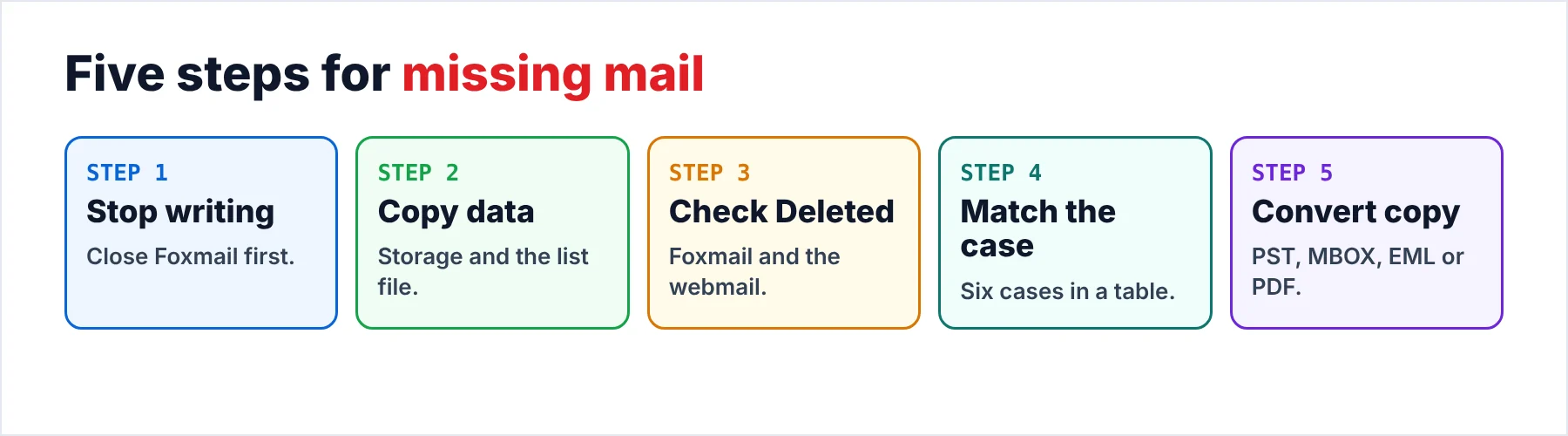
Five steps protect your files while you look for the cause of Foxmail emails missing from the window, so you can start with the first two steps before you know which case you have. Those two steps only stop writes and make a copy of the data. The final step is a safety net for the mail that still sits in your copy.
- Stop using the PC and close FoxmailClose Foxmail, check in Task Manager that no Foxmail process still runs and then avoid installing programs or saving files on that drive. New files can land on space that Windows has marked free, which is why Microsoft advises you to use the computer as little as you can.
- Copy the data to another drivePut the Storage folder and the FMStorage.list file on a second drive with File Explorer and open the copy to see that both arrived. Never write anything into the original while you search for the cause.
- Look in the Deleted folder and on the serverOpen the Deleted folder in Foxmail, then sign in to the webmail of your provider and check its Deleted folder too. A message that sits in either place can be moved back.
- Match your caseCompare what you see with the table of cases. A missing account, a short folder and an empty mailbox after an install each send you to a different section.
- Convert the copyAim the converter at your copy of Storage plus FMStorage.list. If the messages are still inside those files, you can write them out as EML, MBOX, PST or PDF and then compare the counts.
Microsoft says that deleted files sit in space marked as free, so new activity on the drive could overwrite them. Also, the page gives you one piece of advice: minimize the activity of the computer after a loss, until the files you need have been copied to a second drive. That advice explains why the first step is to stop, not to install a fix.
Can Deleted Foxmail Mail Still Be on the Server?
Deleted mail can still sit on the server, because a provider may keep a Deleted folder of its own. Open the webmail of your provider, such as QQ Mail or Exmail, find the Deleted folder and search that folder for the sender or the subject. A message you find there can be moved back to the Inbox. An IMAP account in Foxmail may then show the message again on the next sync.
A POP3 account is different, because the mail may leave the server once Foxmail has downloaded it. So a POP3 account may have no second copy at all. Look through your account settings before you empty Deleted, not after.
Two provider pages give numbers for the Deleted folder. The QQ Mail help page (in Chinese) says the Deleted folder is cleared after 30 days and that mail removed for good cannot be restored. The Tencent Exmail help page (also in Chinese) gives a default cleanup period of 30 days, counted from the day a message arrived and not from the day you deleted it. Both figures come from the pages as I read them on October 21, 2026, so open the page for your own account type. If your Foxmail account is a QQ mailbox, our QQ Mail settings page lists its IMAP and POP3 server details, so you can check which one your account uses.
Exmail adds one more rule for your account type. An account with Advanced Mail Features can restore part of the mail that was removed for good in the last 10 days, through the web self-service search. A Basic account cannot restore that mail. An administrator can also switch the restore option off. When your account runs on Exmail, ask the administrator before the clock runs out.

What If a Foxmail Account Is Missing?
An account that has left the window may still have its folder on disk. Foxmail keeps the mail of each account in its own subfolder of Storage, while the file FMStorage.list records the accounts you added. The guide to where Foxmail stores emails shows what a healthy subfolder holds.
If you made a .fox archive before the account vanished, Foxmail 7.2 lists a Foxmail Archive entry in its Import menu. A Foxmail MailBox entry sits right above it. I tested both entries in Foxmail 7.2. Still try them on a copy of the data and not on your only copy.
I tested a deleted mailbox in Foxmail 7.2 in three steps. First, check that the folder of that mailbox is still inside the Storage folder. Then open your copy of FMStorage.list in Notepad and look for the mailbox. Last, add a line for the mailbox at the end of FMStorage.list, in the form Storage\name of the mailbox\.
Note: I'd try it only on a copy of FMStorage.list, with Foxmail closed, so I'd never touch the original before the copy exists. In my own restore test a copy of the same file mattered a lot, since the restore failed without it.
Can a Damaged Index Hide Mail That Is Still on Disk?
A damaged Index may hide mail that is still on disk. In my sample store the file Index inside Mails lists the sender, subject, size and read state for each message, while the map files in Boxes place each message in a folder. A damaged Index or map could therefore make a folder look short while the message files still exist. That is my reading of the layout and the message files, not a statement from Foxmail.
I found no repair or rebuild option in Foxmail 7.2, so a copy is the only safe place to test a third-party index tool. I'd never run such a tool on the original.
A safe plan costs you nothing, because every test runs on a copy of the original. Copy Storage and FMStorage.list in File Explorer, then open the copy with the tool you want to test. The original stays as it was, so a failed experiment only costs you a new copy. I'd rather lose ten minutes on a second copy than lose a whole mailbox on a repair that didn't work and can't be undone without a copy.
How Do You Protect the Drive While You Look for Files?
Microsoft sets one rule that matters most for any recovery that writes to a drive. For Windows File Recovery, the page states that the source and destination drives must be different. The page suggests a USB or external drive when you have only one. The page covers Windows 11 and Windows 10 but notes that support for Windows 10 ended on October 14, 2025. I ran the tool against a Foxmail store myself, so keep the destination on a second drive and compare the recovered file count with your copy.
File History is a different route. Microsoft describes File History as a backup of your libraries and the Desktop. A Foxmail install folder outside your libraries isn't covered, so File History helps only when you added that folder yourself. When you did, right-click the folder in File Explorer, choose Restore previous versions and use Restore to so that the result lands in a new place. Plain Restore replaces the current files, which can't be undone.
Can You Read the Foxmail Mail That Is Still in the Copy?
Mail that is still inside the copy can be read again. Univik Foxmail Converter uses your saved Storage folder and FMStorage.list as input while Foxmail stays closed on the PC. It opens that copy for reading only and saves each result into a different folder.
The output holds only mail that was still in the copy, because the converter does not recover deleted mail and does not repair a damaged index. If a message is still in the copy and the converter lists it, you can read it in the preview, open its attachments with a double-click and then save the message as a file.
The Export menu offers Outlook PST files and PDF copies of each message, which the Foxmail to Outlook and Foxmail to PDF guides cover. EML and MBOX formats sit on the same menu. The post on how to export Foxmail emails walks through both formats. After a run, compare the file counts with the total you noted. For my sample store that total is 5,424 messages, so a count that falls short tells you to look at the copy again before you trust the output.
I'd run the converter on the copy as soon as the Deleted folder and the server have been checked, since a copy gets no safer with later steps. Mail that the copy no longer holds stays missing, because no export can change that. Still, a clean copy of what remains is worth a few minutes.
Univik Foxmail Converter accepts a copy of the Storage folder along with FMStorage.list. Foxmail 6.x to 7.2 data is supported, so a window that shows no mail doesn't stop you from reading what the files still hold. The output formats are PST, MBOX, EML and PDF.
Download Free Trial Select a Licence - From $39Foxmail Converter requires the .NET Framework 4.8 runtime and a 64-bit Windows installation. The free trial copies 10 messages from each folder.
What Goes Wrong While You Look for the Missing Mail?
Do this: Choose a second drive as the destination before you start any recovery tool. Microsoft states that source and destination must differ for Windows File Recovery. A USB drive is fine for the job.
Do this: Copy Storage and FMStorage.list first, before you reinstall. In my restore test the mails showed empty at first, so a new install is no proof that anything was lost.
Do this: Some guides I read tell you to rename or delete the live profile folder before you paste a backup, with no copy of the current files first. I'd copy the live folder before any paste, so you can always go back.
Do this: Run any repair idea on a copy only. A tool that overwrites the index inside the store can make a short folder worse, which only a copy can undo.
- You stop writing to the drive and copy Storage with FMStorage.list first.
- You check the Deleted folder and the server before any repair idea.
- A POP3 delete may have removed the only server copy.
- A removed account may still have its folder in Storage.
- Only the mail that the files still hold can be read, nothing more.
FAQ: Foxmail Emails Missing

Read on October 21, 2026: the QQ Mail and Tencent Exmail help pages and two Microsoft pages on file recovery. The message totals and the restore result come from my own tests. The Deleted folder figures come from the provider pages.
Pages we read: