Quick Answer
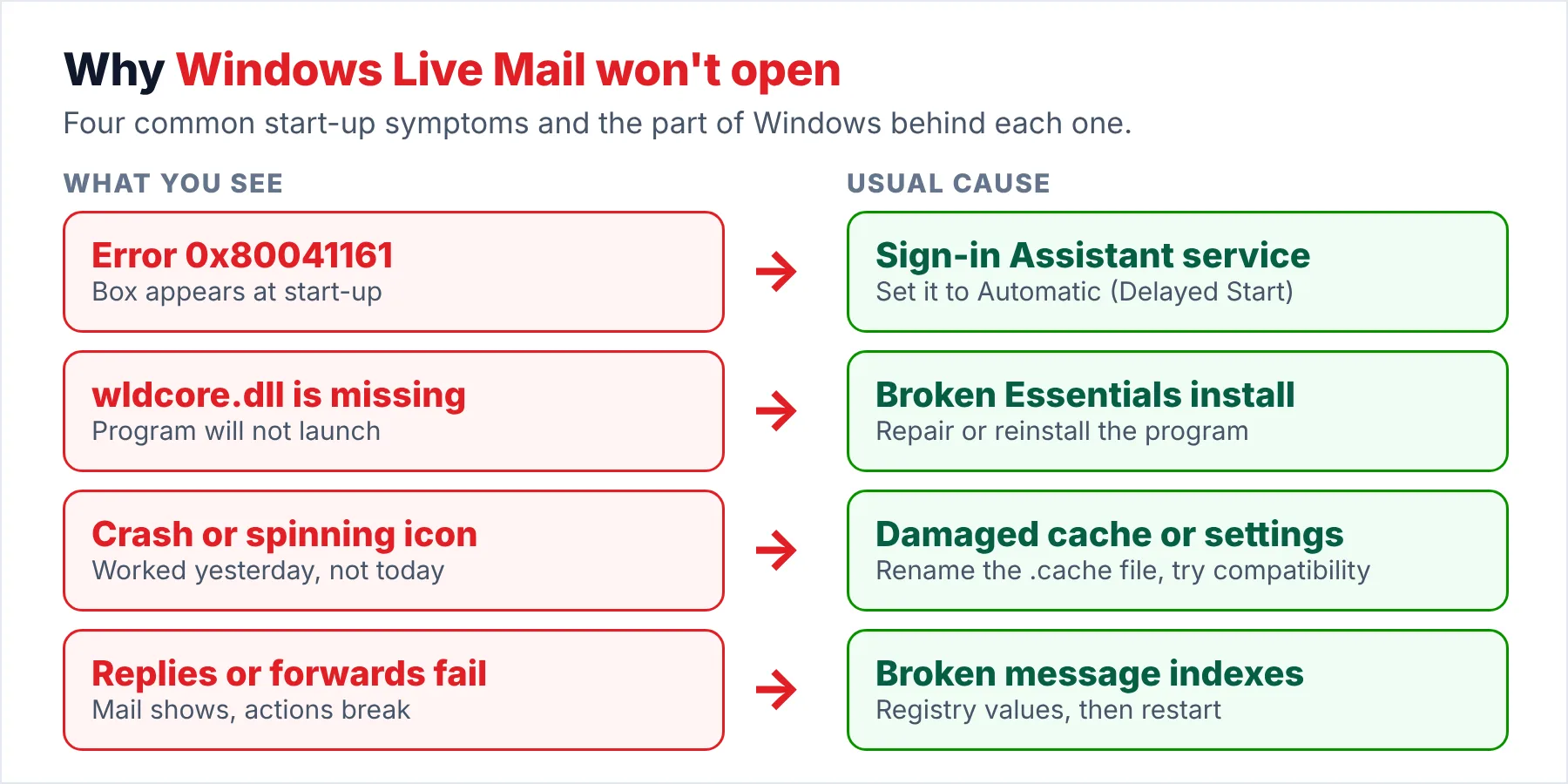
When Windows Live Mail won't open, the error box usually names the cause. Error 0x80041161 points to a stopped Sign-in Assistant service, a missing wldcore.dll points to a broken install and a crash at the splash screen points to a damaged cache or calendar.
Your email is not inside the program, because every message you ever received sits as an .eml file in the store folder, so copy that folder before you try any fix.
Windows Live Mail 2012 still runs on plenty of Windows 10 and 11 PCs, years after Microsoft dropped it. When Windows Live Mail stops opening, you usually see a spinning circle, a short error box with a hex code or no window at all.
In April 2026 a user on Microsoft Q&A wrote that Live Mail had worked "last Thursday" and asked Microsoft to reconnect it. The moderator's reply in that thread sums up the position: Live Mail is out of support and nobody at Microsoft will fix Live Mail for you.
That leaves you with two jobs: the first job is to get Live Mail running long enough for you to use it. The second job is to make sure your mail survives even if Live Mail never runs again on your PC, which matters more because the mail is what you can't replace.
Why Won't Windows Live Mail Open on Windows 11 or 10?
Most start-up failures leave a message or a code on your screen. Match the message you see to a row below, then jump to the matching row in the manual fixes table further down.
| What you see | Likely cause and source |
|---|---|
| "Windows Live Mail could not be started. It may not be installed correctly." (0x80041161) | The Microsoft Account Sign-in Assistant service is stopped or disabled. The accepted answer in a Q&A thread from 2016 set that service to Automatic (Delayed Start) and the program started again. Cadzow's knowledgebase gives the same cause under the service's older name. |
| "wldcore.dll is missing from your computer" | A broken Windows Essentials install, often after a Windows upgrade. The Infopackets write-up blames a registry entry that points to the wrong place for the file. |
| Spinning circle, then Live Mail closes | A damaged .cache file in the Windows Live folder or a compatibility setting lost in an upgrade. Appuals renames the file to .cache.old and sets Windows 7 compatibility on wlmail.exe. |
| "Your calendar contains corrupt data that is forcing Windows Live Mail to close" (0x80070002) | Damaged calendar data. A user on BleepingComputer got this error after a malware clean-up. The suggested fix of letting the calendar folder rebuild was never confirmed in that thread. |
| Opens, receives mail, but reply and forward do nothing | Live Mail's own indexes after a Windows 11 upgrade. A December 2021 thread marked "Same question (100+)" fixed it with three registry values. |
| Opens, but error 0x800C013E or no new Outlook.com mail | The mail service, not the program. Microsoft staff said in the April 2026 thread that Live Mail 2012 does not speak the protocols Outlook.com now uses. A December 2024 thread links the same error to providers that require modern sign-in. |
The first four rows are about the program on your PC. The last two rows are about Live Mail meeting a mail service that has moved on. That means no repair on your PC changes what the mail service accepts from you.
Who Still Hits a Live Mail That Won't Start?
Which of these describes your morning?
Live Mail worked for you yesterday. Today the Live Mail icon spins until an error box with a hex code appears, while on some days the Live Mail window never shows at all.
Protect the mail first →You installed Live Mail from an old installer to keep things familiar. It opens, but replies fail or Outlook.com refuses to sync.
Try the manual fixes →You moved to Outlook or webmail years ago. The archive in Live Mail is what matters to you now, so the program only has to give that archive back to you once.
Read the store directly →Why Save the Store Folder Before Any Fix?
A repair, a reinstall or a registry edit is fine for the program. However, a stalled repair or a slip in the registry can still leave you worse off, so copy the store folder first. Ten minutes you spend copying the store folder protects years of your mail.
- Open the store by pathPress Windows + R, type %LOCALAPPDATA%\Microsoft\Windows Live Mail and press Enter. The hidden AppData folder opens for you without changing any File Explorer setting, which is the quick route.
- Copy everythingSelect all folders and files inside, including Mail.MSMessageStore and the Backup folder. Copy the whole selection to a USB stick, which works for most people because a typical home store fits on an 8 GB stick, though you should check the folder size first.
- Export the registry keyRun regedit, go to HKEY_CURRENT_USER\Software\Microsoft\Windows Live Mail and choose File > Export. The .reg file keeps your account settings and rules safe in case a fix goes wrong.
I read the April 2026 Q&A thread on October 20, 2026. The moderator's reply confirms that Windows Essentials 2012 is unsupported and points users to Outlook.com in a browser or to Outlook for Windows. That makes the store folder copy the only part of this guide that keeps working whatever Microsoft changes next.
Which Fix Should You Try First?
Start at the top of the table, because each fix near the top of the table is quick for you to undo. However, the reinstall at the bottom of the table takes the longest and needs an installer you can trust.
| Fix | Where | Fixes | Source | Watch out |
|---|---|---|---|---|
| Set Microsoft Account Sign-in Assistant to Automatic (Delayed Start), then restart | Computer Management, Services | 0x80041161 | Accepted Q&A answer | Windows starts a little slower with delayed start |
| Rename .cache to .cache.old in the Windows Live folder under AppData | File Explorer | Spinning circle, then nothing | Appuals | Live Mail rebuilds the file at the next start |
| Set Windows 7 compatibility on wlmail.exe | Program Files (x86)\Windows Live\Mail, Properties, Compatibility | Crash after a Windows upgrade | Appuals | Apply it to the shortcut target, not a copy |
| Repair all Windows Essentials programs | Programs and Features, Windows Essentials 2012, Uninstall/Change | wldcore.dll missing, general crashes | Chron, Q&A answers | One user saw it stall at 12% |
| Turn on Live Mail's three index-rebuild registry values, then restart | Registry, under HKEY_CURRENT_USER | Reply and forward fail on Windows 11 | Q&A community answer | Exact values in our missing emails guide |
| Uninstall and reinstall Windows Essentials 2012 | Programs and Features, then an offline installer | Anything the repair could not fix | Q&A answers | Microsoft no longer offers the download |
The service fix comes from the 0x80041161 thread, where the poster confirmed Live Mail worked again the same night, which makes the service fix the reliable first try for you. Also, the registry fix comes from the Windows 11 thread, whose author warns that the values only take effect after a full restart. The repair option name you see in the table follows the Chron repair guide.
Limitations: these fixes can bring the program back for you, but none of them restore Outlook.com or Gmail sign-in. Also, a later Windows update can break Live Mail again, as a June 2023 thread shows after cumulative update KB5027215.
How Do You Read Your Mail When Windows Live Mail Won't Open at All?
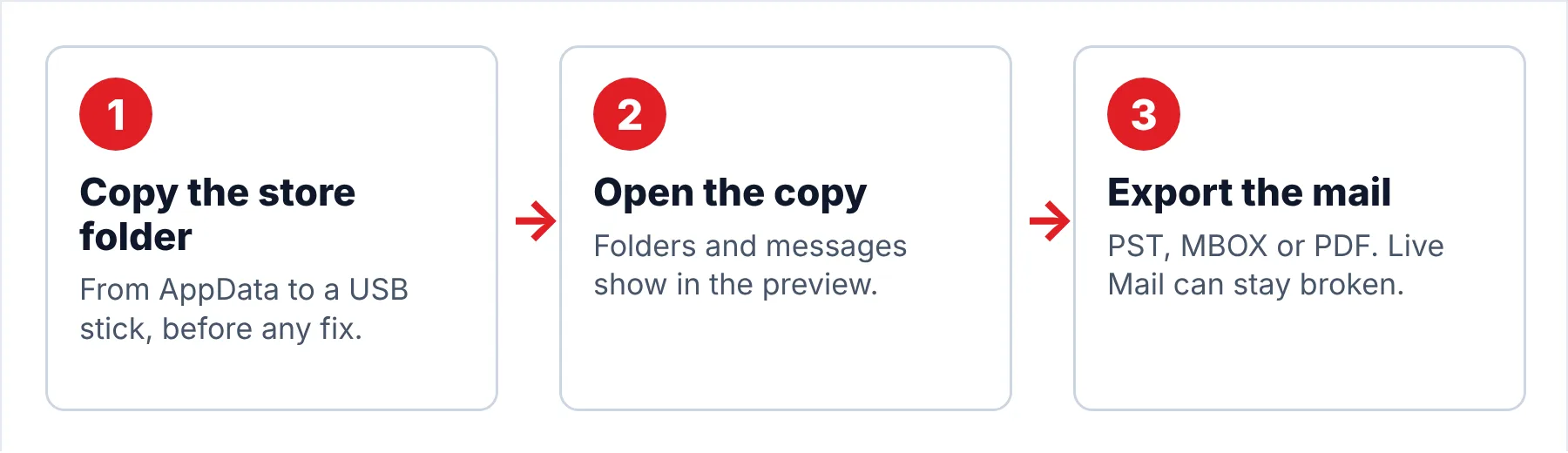
Univik Windows Live Mail Converter works from a copied store folder, taking the messages from the .eml files and the folder tree from Mail.MSMessageStore, so the program itself can stay broken. The converter shows the folder tree and the messages in a preview pane before you export anything. Also, the converter never writes to the copy you give it, so you can repeat the export from that copy later.
- Copy the store folderOpen File Explorer, paste %LOCALAPPDATA%\Microsoft\Windows Live Mail into the address bar and copy the whole folder to a USB stick. This step is easy and works whether or not Live Mail starts, because it never touches the program.
- Load the copyInstall the converter on a Windows 11 or 10 PC and click Open. Point the converter at the USB copy so that a tree of your accounts and Storage folders appears with a message count beside each one.
- Read before you convertClick through a few folders and open messages in the preview pane, which is a quick way to confirm your mail is all there. If you only need one old email, Advanced Search finds it by sender, subject or date without converting the rest.
- Export the foldersClick Export and pick PST for Outlook, MBOX for Thunderbird or PDF for a printable record. Pick a folder on your local drive for the output and start the run, since a local drive is faster and safer for you than writing back to the USB stick.
- Open the resultFinally, open the PST in classic Outlook or import it into the new Outlook. Check the newest and the oldest message you remember from your Live Mail days, because both messages should open with their original dates and attachments.
Note: trial output is capped at 10 items per folder. That cap is enough for you to open one old email you need today and to judge the output before you decide on the full store.
The converter opens the copied store on Windows 11 or 10, shows every folder and saves the mail as PST, MBOX or PDF.
Download Free Trial Select a Licence - From $29Requires .NET Framework 4.8 on a 64-bit Windows 11 or 10 PC. Trial output stops at 10 items per folder.
What Do You Have Once the Mail Is Out?
After the export your mail lives in a format that the programs you use today can open. The Live Mail program becomes optional at that point, so run the checks below before you uninstall Live Mail or wipe the old PC.
- Every account folder and Storage folder you had in the store shows up in the output.
- A folder you used often has roughly the message count you remember from Live Mail.
- The newest message in the output is from the day Live Mail last worked for you.
- An email you know had a photo or a PDF attached opens with that attachment.
- The USB copy of the store is still on the stick, untouched, for a second run.
Limitations: the converter reads mail, not Live Mail's account passwords or rules. Contacts live in a separate Windows Live Contacts store, so export those contacts from Live Mail if Live Mail ever opens again for you. Otherwise, you can rebuild your contacts from the addresses in your mail.
What Goes Wrong After Live Mail Comes Back?
Do this: The index no longer matches the .eml files. Close Live Mail and check that the store folder still holds your account folders, then follow our guide to Live Mail emails that disappeared once you see those folders. Also, your copy on the USB stick is the fallback if the folders stay empty.
Do this: Live Mail can only export to classic Outlook through MAPI. Our Windows Live Mail export troubleshooting guide pairs each MAPI error with the Windows or Office setting behind it.
Do this: The new Outlook imports PST files, not Live Mail folders. Our Windows Live Mail to new Outlook walkthrough covers the copy, convert and import route.
Still stuck at the splash screen? Write to Univik support with the error code and the size of your store folder.
- The error box usually names the reason the program won't start.
- Error 0x80041161 points to the Sign-in Assistant service, a missing wldcore.dll to a broken install and a splash-screen crash to a damaged cache or calendar.
- Your messages are .eml files in the store folder, not inside the program.
- Copy the store folder before any repair, reinstall or registry edit.
- Work down the fixes table from the top, since the first fixes are the quickest to undo.
FAQ: Windows Live Mail Won't Open

Error codes and fixes come from Microsoft Q&A threads, Microsoft's support page and four independent guides, all read on October 20, 2026. The converter steps describe version 6.9.
Sources we read:
- Windows Live Mail could not be started (0x80041161) after upgrade to Windows 10, Microsoft Q&A
- Windows Live Mail 2012 does not work properly after the Windows 11 upgrade, Microsoft Q&A
- Windows Live Mail did not work since last Thursday, Microsoft Q&A
- 24H2 Disabled Windows Live Mail, Microsoft Q&A
- Latest Windows update breaks Windows Live Mail, Microsoft Q&A
- Support for Windows Essentials apps, Microsoft Support
- WLDCore.dll missing; Windows Live Mail won't start, Infopackets
- Windows Live Mail 2012 will not open after upgrading to Windows 10, Appuals
- Repairing Windows Live Mail in Windows 7, Chron
- Windows Live Mail error 0x80041161, Cadzow Knowledgebase