Quick Answer
Foxmail exports contacts to CSV from the address book. Choose Tools, then Export and save the file, which covers one address book at a time. To cover every account in one run, point a converter at a copy of the Storage folder, which writes each address book as VCF or CSV files.
Open the first CSV in Notepad before you import it, because a file that isn't UTF-8 shows broken names in Outlook.
Foxmail's own export for the address book is a CSV file. The steps are short: open the address book, choose Tools then Export and save the list, which works on one address book at a time. If you want to export Foxmail contacts from several accounts in one run, you usually need a converter instead. Before I wrote any of this I went through the Alibaba Mail help pages on Foxmail, Microsoft's page on CSV contacts and Google's import page, all on October 21, 2026.
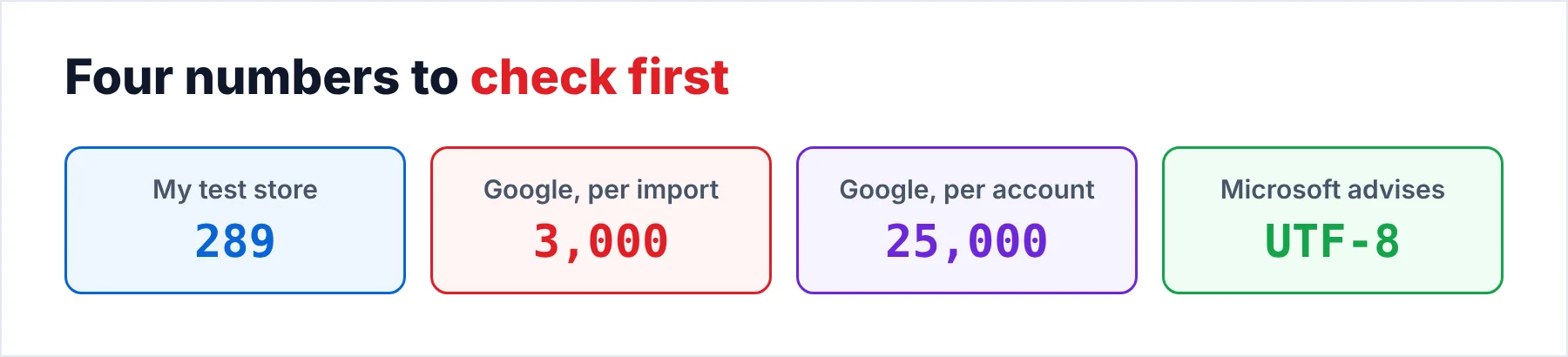
In my 86,000-email test store the two accounts held 289 contacts, which is a small list next to the mail but the part that most people miss first. Your new mail program needs that list on day one (so does a phone or a backup). A mail export does not carry it, so you have to export it on its own. This guide covers that step from start to finish for one account or for several accounts together.
Which Way Gets the Contacts Out of Foxmail?
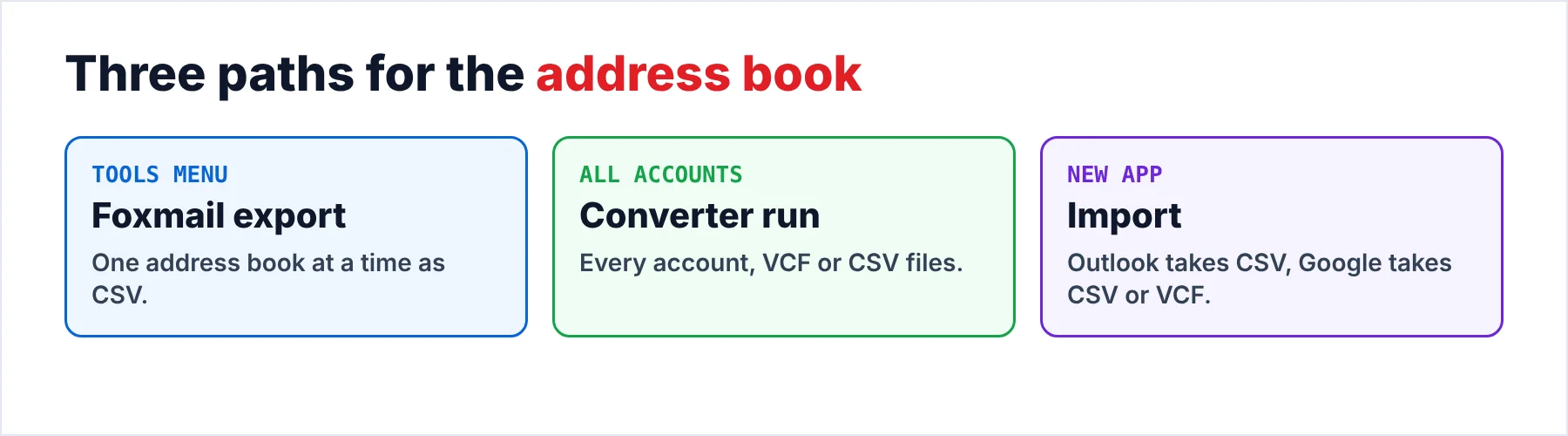
Three export routes cover the usual jobs. The table shows what these routes handle, the file each route gives you and where it can trip you up.
| Route | Handles | File you get | Watch out for |
|---|---|---|---|
| Address book export | One address book at a time | CSV | Foxmail has to be running |
| Converter run | Every account in one run | VCF or CSV | The trial caps the items in each folder |
| Import into the new app | The file you made | CSV for Outlook, CSV or VCF for Google | Check the encoding first |
Of the three routes, I'd use the address book export when you have a single account and Foxmail still opens on your PC. I'd use the converter when you have two or more accounts or when Foxmail no longer starts for you, because the converter doesn't need the client to run. That split is a simple rule to remember.
Who Needs an Address Book Outside the Old Mail Program?
Four situations make people look for the list outside the client. You may be setting up a new mail program that needs the list on day one. Your phone may need the list so that calls and messages show names. A mailbox of someone who left probably needs its address book kept with the mail. An old PC that you are about to wipe needs a copy of the list first. Each case wants the same list.
- A new mail programYou import one file into Outlook or Google Contacts.
- A phoneYou import a VCF file into Google Contacts, which your phone may then sync.
- A backupYou keep the CSV or the VCF files beside the mail export.
How Do You Export Foxmail Contacts From the Address Book?
Open Foxmail and click the Address Book icon, then open the Tools menu and choose Export. Export the list as a CSV file into a folder that you can find again (the desktop works). I tested these export steps in Foxmail 7.2, so a newer build may have moved the commands. Keep Foxmail open until the save ends.
The Alibaba Mail import steps for Foxmail mention an options button at the top right of the address book, so look there when you don't see a Tools menu. Note: in Foxmail 7.2 the export works on one account's address book at a time, so two accounts give you two exports and two files. However, you can paste the second file under the first in Excel (the columns match) when you want one list.
Why Do Names Break in a CSV File?
A CSV file is plain text, so the program that reads it has to guess the encoding. Microsoft recommends UTF-8 as the encoding because it supports all languages and alphabets. It also warns that a file in another encoding may show text incorrectly. I tested the contact export in Foxmail 7.2 and opened the file in Notepad to check the names. Do the same and look at a name with accents or Chinese characters before you import it. A quick look like that is a reliable test that costs you ten seconds. Do it before every import.
If the names look wrong to you, convert the file in Excel. Use Data, then From Text/CSV, pick the right file origin, load the file and save it with Save As as CSV UTF-8. Saving as CSV UTF-8 is Microsoft's own fix, so it is a safe one. It is also quick for a list of 289 people.
The column names also differ from one program to the next. Alibaba's Foxmail page has a Mapping step that matches the column names to Foxmail fields. Its general advice is to change the exported file so that it fits the format the next program needs, so a converter that writes the right file saves you that work. That is the case for a converter.
How Do You Export Foxmail Contacts From Every Account at Once?
Univik Foxmail Converter is one such converter, since it reads a Foxmail store without the client, so you need no Foxmail install and no running window. Copy the store folder first and run on the copy, which is the safe way because your original stays as Foxmail left it. The five steps that follow end with a count that you can check against Foxmail.
- Load a copy of the Foxmail storeStart the converter and open the copied Storage folder. Each account appears in the list, so you can take one account or all of them.
- Tick the accounts you needTick each account whose address book you want. The converter reads all of them in one run, so you never repeat these steps account by account.
- Choose VCF or CSV for the contactsPick VCF when the people go to a phone or to Google Contacts. Pick CSV when you plan to clean the list in Excel first.
- Choose the file layoutChoose one file for each contact when you want to share single people. Choose one combined file when you want to import a whole address book at once.
- Run it and check the countStart the run, then count the entries in each output file or folder. Open three records and compare the names and email addresses with Foxmail. My 86,000-email test store held 289 contacts, so a full run on that store should show 289.
Each account gets its own set of files, so the people from two accounts probably stay apart until you choose to merge them. The converter's Extract menu also saves photos of the people as standalone files. If you can't find the original store, the page on where Foxmail stores emails lists the usual locations.
Univik Foxmail Converter reads the address books of every account in a Foxmail 6.x to 7.2 store or in a copy of one. It writes VCF or CSV, as one file for each contact or as one combined file.
Download Free Trial Select a Licence - From $39Foxmail Converter writes each file on 64-bit Windows once .NET Framework 4.8 is installed. The free trial handles 10 items from each folder, which is enough to test an import.
How Do You Import the Contact File Into Outlook or Google?
To test that import in new Outlook, select People in the navigation bar and click Import contacts. If People is missing, open More apps and pin it. Choose Browse, pick the CSV file and click Import. Microsoft gives these steps for new Outlook and names CSV as the file type, so you should pick the CSV output for Outlook.
In Google Contacts click Import on the left, select the file and click Import. Google accepts CSV and VCF files. One import takes up to 3,000 contacts. Google also caps an account at 25,000 contacts, so a larger address book goes in as several CSV files.
I'd import three people first and open one record to check the name, the email address and the phone number before the full file goes in. Finally, use a fresh test list when the app offers one, since a wrong import is slow for you to clean up by hand. Start small.
What Goes Wrong When You Import the File?
Do this: The import file is often not UTF-8. Open it in Excel with Data, From Text/CSV, pick the right file origin and save it as CSV UTF-8. Then you import the CSV file again.
Do this: Compare the count in each output file with the count from step 5. The usual cause is an account that stayed unticked. Tick it and run again to get the full count of contacts.
Do this: Google takes up to 3,000 contacts in one import. Split the CSV into files of that size and import them one after another.
Do this: Use the mapping step when the app has one. Otherwise rename the CSV columns to match the mapping the app expects. Google's sample spreadsheet template shows the layout the app expects for the columns. To reshape a file between VCF and CSV, our VCF file converter writes CSV and our CSV file converter writes vCard.
If the columns still look wrong to you, write to Univik support and name your Foxmail version and the app you import into.
- Foxmail's own export gives a CSV file for one address book at a time.
- A converter run covers every account and writes VCF or CSV.
- You check the UTF-8 encoding before an import, since names break otherwise.
- Outlook takes the CSV while Google Contacts takes CSV or VCF.
- You compare the count of each output with the count you expect.
FAQ: Export Foxmail Contacts

Read on October 21, 2026: the Alibaba Mail help pages on the Foxmail address book, Microsoft's CSV contacts page and Google's import page. The 289-contact figure is from my 86,000-email test store, not from those pages. Converter details come from the version 6.10 product page, which is a different source from the test store.
Pages we read: