Quick Answer
To view Foxmail emails on a PC without Foxmail, copy the Storage folder with its FMStorage.list file to that PC and open the copy in a viewer that reads the Storage folder directly. The preview shows every configured account with emails, contacts, calendars and attachments. Export Mail with an .eml reader and a restore on a second PC both need Foxmail.
A Storage file renamed to .eml does not open, which I checked on a real message.
Foxmail is a Windows mail client from Tencent. It keeps your mail in files inside a Storage folder. No other mail app opens those files. Univik Foxmail Converter reads that folder itself, which lets you see the mail in a preview on a PC that has no Foxmail. That is the viewer route in this guide, while the later sections cover the routes that need Foxmail.
I measured the file sizes in this guide on my own sample store, which runs on Foxmail 7.2.25.563 and syncs 2,876 messages in one IMAP account and 2,548 in the other (5,424 in total). The earlier post on where Foxmail stores emails names the folders that hold them. The post on moving Foxmail to a new computer covers the restore. I read Microsoft's page on opening .eml files on October 21, 2026.
How Do You View Foxmail Emails on a PC With No Foxmail?
Copy the Storage folder with its FMStorage.list file to the PC where you want to read the mail, then open that copy in the converter. The software shows each configured account with its emails, contacts and calendars in a preview, so the PC does not need Foxmail.
Three facts decide whether this route fits your job. First, the converter reads Foxmail 7.2, 7.1, 7.0 and the 6.x releases. Second, it takes every account that is configured in that folder, so you do not open the accounts one by one, which saves time on a store with several accounts. Third, the copy can come from a PC that no longer starts, because the folder holds everything the software reads. The copy opens read-only and any file you save goes to a separate folder.
The preview is not limited to message text, since contacts, calendar entries and attachments show up in it as well. You double-click an attachment to open it, so you can check an invoice or a scan without leaving the software.
I'd pick this route first when the mail sits on a second PC or when the old PC is gone, because a viewer that works on the files saves you the install, the account set-up and the restore that Foxmail asks for. For one message it is not the quickest route, since Export Mail needs only a right-click when Foxmail is open.
Foxmail Converter reads a copied Storage folder together with FMStorage.list and shows every configured account in a preview, with emails, contacts, calendars and attachments. When you want to keep the mail, it saves EML, MBOX, PST or PDF files and it can also send the mail on to a Gmail, Office 365 or IMAP account.
Download Free Trial Select a Licence - From $39Foxmail Converter belongs on a 64-bit Windows PC, version 10 or 11, that already carries .NET Framework 4.8. The free trial shows 10 items per folder.
Which Foxmail Email Viewer Route Fits Your Job?
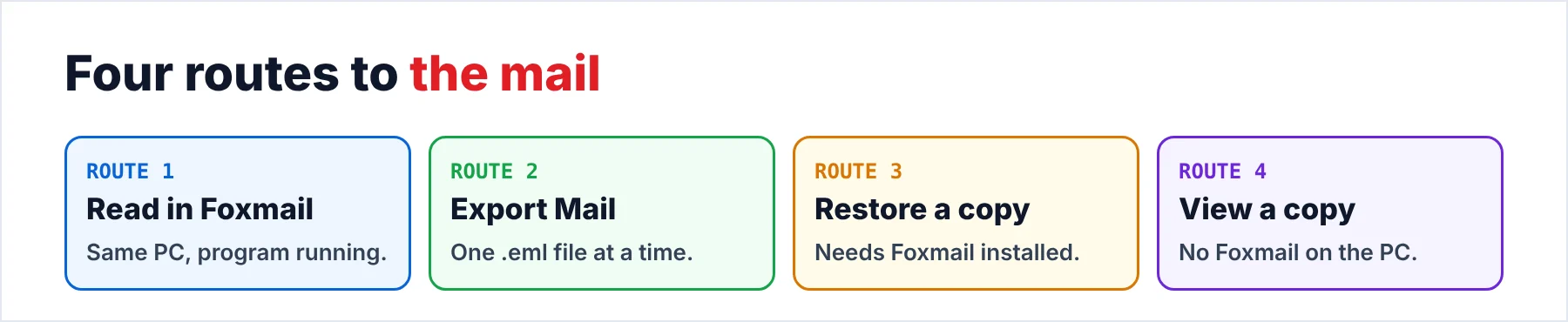
Four routes show Foxmail mail. Only one of them works on a PC with no Foxmail. The table sets the four side by side.
| Route | Foxmail needed | What you see | Good for | Limit |
|---|---|---|---|---|
| Read it in Foxmail | Yes, on the same PC | The mail inside the program | A look at mail that is still in the program | Foxmail has to start on that PC |
| Export Mail and an EML reader | Yes, running | One message at a time | One message or one folder | One folder per export |
| Restore the copy on another PC | Yes, installed | The mail inside the program | The same view on a second PC | My restore test showed problems |
| View the copy in the converter | No | Every configured account in a preview: emails, contacts, calendars and attachments | A whole store or a copy from a dead PC | Windows 10 or 11 with .NET 4.8. The trial caps each folder at 10 items |
For one old message I'd use Export Mail. Foxmail is already open, so the file reaches a reader in a few minutes. For a whole store the order flips. A viewer that reads the Storage files is the reliable pick, because it covers every account in one pass while an export covers one folder at a time. Only the last row of the table still works when your old PC is gone.
A .fox archive from Mail Archive is a separate case. The FOX file viewer page explains how to open one.
Is Your Mail Only on a Server?
Two groups of people type this search, but only one group needs the files that the program leaves on your disk. If you have a foxmail.com or QQ address, your mail sits on a server, so you open it through webmail or an IMAP client. The QQ Mail settings page lists the server details for that address, but this guide covers the files on your disk and not those server details.
An IMAP account may download its mail again when you add it to another client, so the server copy may be enough for you. A POP account differs, because the only copy of that mail can sit on your old PC. However, copy the data before you do anything else, since a copy is the safe first move for both account types.
What Should You Check Before You Open a Copy?
In Foxmail 7.1 and later the mail of each account lives in a Storage folder under the install path. The FMStorage.list file sits next to that folder, so you need to find both before you copy anything. Versions up to 7.0 used a Data folder instead. On my sample PC the path to the Storage folder is C:\Foxmail 7.2\Storage. Your path may differ, so search your PC for the list file to find the right folder.
Close Foxmail before you copy the folder. An open program may hold files, so you could get a copy that misses mail, while a closed program gives you a clean copy. Also, copy both items to a second drive and leave the original folder alone, because each account folder holds that account's settings as well as its mail.
A bigger store of mine held 86,000 emails, which made a copy of about 5.8 GB, so your second drive needs that much room.
How Do You Open One Foxmail Email as an EML File?
Export is the quick route for one message, because you need only a right-click and a save when Foxmail is already open on your PC. In Foxmail you right-click the message and choose Export Mail. On my sample store Export Mail wrote an .eml file of 83,695 bytes for message 2824. You need the program running while Export Mail works. The export also covers one folder at a time, a limit that a separate guide on how to export Foxmail emails explains.
Next you pick a reader for the .eml file. The table lists three reader options. Use whichever reader you already have.
| Reader | How to open the file | Note |
|---|---|---|
| New Outlook | Drag it onto the reading pane, use Open with from the right-click menu or double-click it | Double-click works only when new Outlook is the default app |
| Thunderbird | Choose File, then Open, then Saved Message | Menu names can differ between Thunderbird versions |
| A browser | Open a free online EML viewer and choose the file | One file opens at a time |
Microsoft lists the three Outlook ways on its support page, which makes new Outlook the easy choice when you already use it.
Why Can't You Open a Storage File Directly?
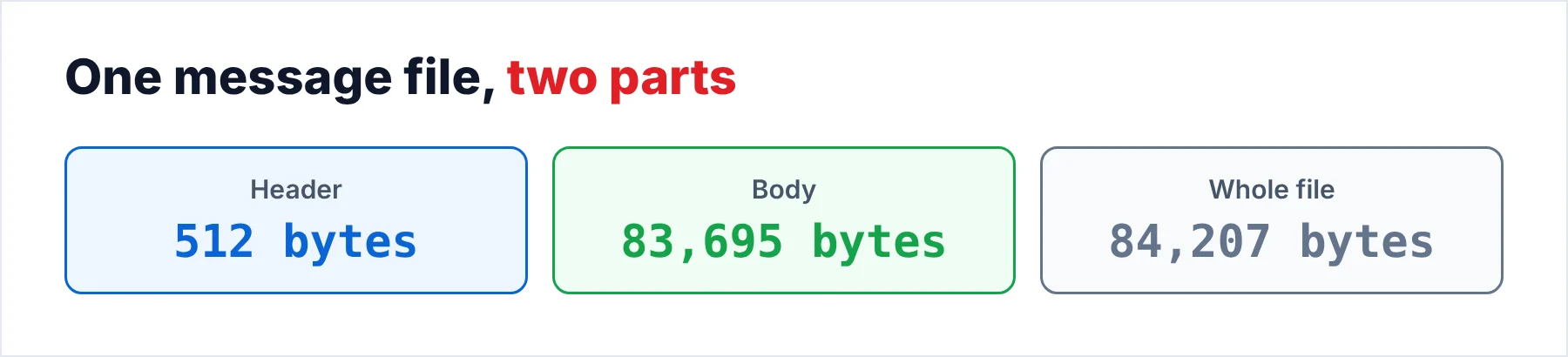
Each message sits in its own file inside the account folder. Every one of those files starts with a 512-byte header, so a renamed copy gives a mail app nothing to read. I checked this header on message 2824 of my sample store. The file is 84,207 bytes, which splits into a 512-byte header and an 83,695-byte body, which is the same size as the .eml file that Export Mail wrote. Notepad shows no readable text either.
A second guide, where Foxmail stores emails, shows where each file sits. The point here is shorter, because the files are real data that no mail app can use as they are, while the program turns them into readable mail for its own window. The converter does the same step for a copy, which is why a PC with no Foxmail can show that mail.
What If You Restore the Copy Into Foxmail on Another PC?
A restore of the copy gives you the same view on a second PC, but you need to install the program there first. I tested the manual restore on a second PC. The guide to moving Foxmail to a new computer lists the steps. You install Foxmail and add an account first, because the program will not start without one. Then you copy the mailbox folder into Storage, which leaves one more step: you add your entry to the FMStorage file in the same format as the existing entries.
My own test on a second PC with 7.2 showed problems. The restore guide, Move Foxmail to a New Computer, lists all four problems, so I'd treat this route as a restore that gives you a working Foxmail again, not as a way to look at a few messages.
Foxmail's Import menu is built for bringing mail in. My copy of 7.2 shows Foxmail Account, Foxmail MailBox and Foxmail Archive there. I tested those entries too. They are built for bringing mail in, so a viewer is the route for reading mail without importing it.
How Do You Keep the Mail After You View It?
Save the mail you viewed as files in an open format, so that a client you already have can open it later, which is the reliable way to keep a copy that does not depend on Foxmail. The converter writes EML, MBOX and PST files plus PDF, HTML and TEXT files, while contacts leave as VCF files and calendar entries leave as ICS files. The software can also send the mail on to a Gmail, Office 365 or IMAP account.
Each format opens in a different place. EML opens in a reader from the table above. MBOX opens in Thunderbird or in a free online MBOX viewer. PST opens in Outlook or in the PST viewer. PDF opens in any PDF reader. For the MBOX import read Foxmail to Thunderbird. For the PST import read Foxmail to Outlook.
My 86,000-email test store took about 42 minutes in a file export run, so plan a large store for your lunch break. After the run you open three messages as a check against the source. When Foxmail itself will not start, the guide to Foxmail not opening lists the fixes and puts the copy of your store first.
How Do You View Foxmail Mail on Another PC, Step by Step?
Five steps take you from a Storage folder to mail on the screen of a PC with no Foxmail. The first step protects your original files.
- Close Foxmail and copy the Storage folderClose Foxmail first so that no file is open. Copy the Storage folder together with FMStorage.list to a second drive or to the PC where you want to read the mail.
- Install the converter on a PC with no FoxmailRun the setup file on a Windows 11 or 10 PC (64-bit) that has .NET Framework 4.8. You do not need Foxmail on it.
- Open your copy of the Storage folder in the converterPoint the software at your copy. It lists the accounts that the folder holds, so you reach every configured account from one place.
- Read the mail in the previewPick an email, a contact or a calendar entry and read it in the on-screen preview. Double-click an attachment to open it. Nothing is written to your copy, because the folder opens read-only.
- Compare what you read with the sourceOpen three messages and compare the subjects, the dates and the attachments with what you see in Foxmail. Compare the message count of each folder as well.
Step five takes only a few minutes. It is the one proof that the copy matches the source, so don't skip it.
What Goes Wrong When You Try to View Foxmail Mail?
Do this: Copy the folder again with Foxmail closed, because a copy made while Foxmail runs may miss mail.
Do this: Close Foxmail and check that both Storage and FMStorage.list went into the new install folder. An empty Inbox may mean that the list entry is missing or that you did not add the account first. When the Inbox stays empty, open the copy in the converter instead.
Do this: Right-click the .eml file, choose Open with and pick Outlook (new). A double-click probably does not open the file in Outlook because another program is the default app. Microsoft says that a double-click works only when new Outlook holds that role.
Do this: Export the folders one by one. When the store holds many folders, open a copy in the converter instead. It reads every account in one run, so you do not repeat the export for each folder.
- A converter that reads the Storage folder shows every configured account on a PC with no Foxmail, with emails, contacts, calendars and attachments.
- The converter needs a copy of the Storage folder with FMStorage.list and reads Foxmail 7.2, 7.1, 7.0 and 6.x.
- Export Mail plus an EML reader suits one message or one folder, but Foxmail has to be running.
- A renamed Storage file does not open, because of its 512-byte header.
- A restore on another PC needs Foxmail and both Storage and FMStorage.list.
FAQ: Foxmail Email Viewer

Read on October 21, 2026: Microsoft's page on opening .eml files in new Outlook. Every file size and message count in this guide was measured on my own sample store, not taken from that page.
Pages we read: