Quick Answer
Foxmail forensics starts with preparing a mailbox for legal review, which differs from artifact analysis and is the job this guide covers. Copy the Storage folder and the FMStorage.list file, hash the original and the copy with your own tool and work only on the copy. Review platforms list PST, MBOX and EML, so convert the copy to one of those formats first.
Hash the copy with a tool you trust, because the converter isn't a hashing tool.
When a legal team asks you for Foxmail forensics, the first problem is the format, because review platforms don't open the Foxmail store. I read six pages on October 21, 2026 and built the order of this guide from them: the Foxmail help centre, the file-type lists of two review platforms, NIST SP 800-86, Microsoft's Get-FileHash page and the Bharatiya Sakshya Adhiniyam Schedule.
The store I tested runs Foxmail 7.2.25.563 with two IMAP accounts, which hold 2,876 plus 2,548 messages (5,424 in total). My larger test store came to 5.8 GB. It held 589 calendar entries, 289 contacts and 86,000 emails. That store needed about 42 minutes for one file export. This guide names the hash steps and leaves the measuring to your own tool, which you probably have on your Windows PC already, because PowerShell ships with Windows 11 and Windows 10.
Two earlier guides on the Foxmail store cover the groundwork. The first, where does Foxmail store emails, lists every subfolder of the store. The second, Move Foxmail to a New Computer, explains copying the Storage folder and its list file with robocopy, so you should read the second guide first when your store is big.
Which Route Gets a Foxmail Mailbox Into Review?
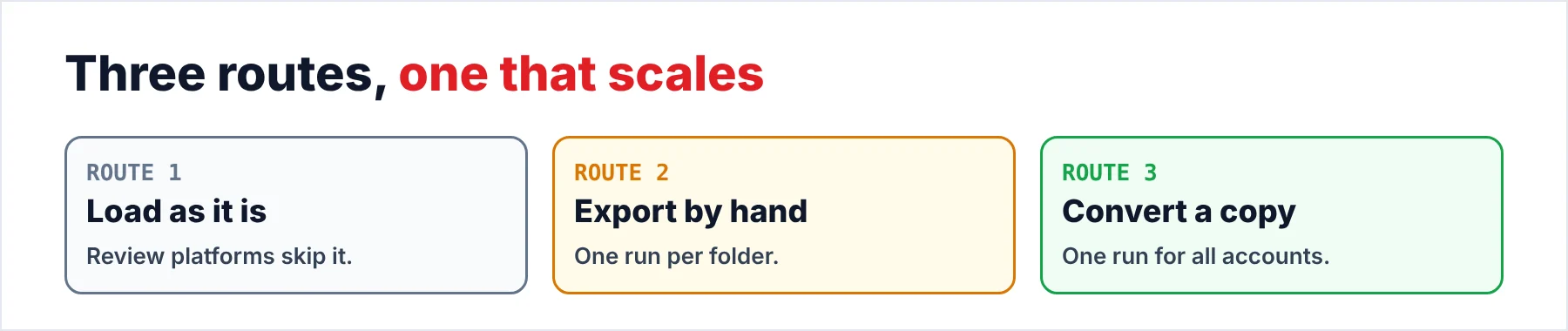
You can take three routes from a Foxmail mailbox to a review platform. Only the last one scales. Loading the native Foxmail store usually fails at the first step. A hand export of the Foxmail store works, but you repeat the same clicks for all accounts. A converted copy gives you one run for all accounts, with a separate output for each.
| Route | What it takes | Watch out for |
|---|---|---|
| Load the store as it is | Nothing, because you hand the folder over | Platforms list PST, MBOX and EML, not Foxmail |
| Export by hand | Foxmail running and one export per folder | Repeats for every account and every custodian |
| Convert a hashed copy | A copy, your hash tool and the converter | Hashing stays your job, not the converter's |
I'd pick the third row as soon as your case holds more than one mailbox, since every extra mailbox adds another round of manual export to the second row. However, for a single Foxmail mailbox of a few hundred messages the manual export may be enough for that Foxmail mailbox, so your case size decides.
- A legal team wants reviewable filesThis guide fits, because it ends with EML, MBOX or PST files and a count to check.
- An examiner wants artifactsDeleted items, logs and registry traces are outside this guide, which covers the copy and the conversion only.
- The old PC no longer startsTake the drive out of the old PC, copy the two items and follow the same steps on the copy that you made.
Where Does the Evidence Sit in a Foxmail Mailbox?
From Foxmail 7.1 onward the mail of each account sits in the Storage folder, which lives in the install folder. The Foxmail help page adds that the FMStorage.list file tells Foxmail which data folder to read. The same page says that index and index.key inside the Mails folder must stay intact for local mail to come back, so you never move single files out of a mailbox.
Each mailbox in that store holds extensionless message files, one for each message, plus the index files, so there is no .mbox or .eml file to hand over. That matches what I see in my sample store, where the mail files carry no extension.
Copy the folders of the store as a whole and keep them together. Note: Foxmail 7.0 and older use a Data folder in place of Storage, so you should check which folders your custodian has before you copy. The full table of subfolders sits in the Storage guide, where Foxmail stores emails, so I won't repeat it here. Open File Explorer on the custodian's drive and you will usually find both items in the Foxmail install folder.
Why Do Review Platforms Skip Foxmail Storage?
Their supported-type lists never name Foxmail. Relativity lists .pst, .ost, .nsf, .msg, .mbox, .eml and .emlx among others for processing. Everlaw lists PST, MBOX, EML and MSG as email formats. However, I read both lists on October 21, 2026, so you should check the current page of your platform before you plan a load.
A hand export of Foxmail mailboxes from many custodians is slow and likely to go wrong. A hand export leaves no record, whereas a copy that you hash once and convert in one run keeps every step on record.
How Do You Copy a Foxmail Store Without Changing the Original?
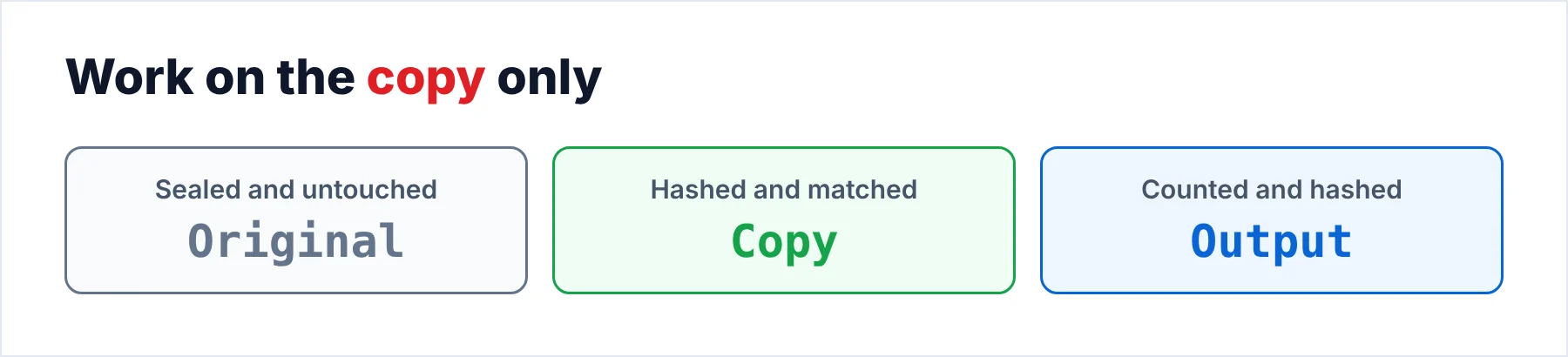
NIST says to make a copy of the evidence and to examine only the copy. Section 3.1.2 of SP 800-86 adds that you verify the copy by computing the message digest of the original and of the copy and comparing the two. Five steps put that rule into practice for the copy of a Foxmail store.
- Close Foxmail and take a copyClose Foxmail first, which releases every locked file. Then copy Storage and FMStorage.list out of the Foxmail install folder to a clean external drive. Leave the original drive untouched from this point on.
- Hash the original and the copyRun your own hash tool, such as Windows PowerShell, over every file of both folders and save each list. Use SHA-256 when your case rules allow it, then compare the two Hash columns.
- Work only on the copySeal the original and keep the copy as your working set. When a later step goes wrong, you take a fresh copy of the sealed original and hash it again.
- Convert the copyPoint the converter at the copy and choose EML, MBOX or PST, whichever format your review platform lists. Let the output go to a separate folder.
- Count the output and load itCompare the message count of each account with the count in the output folder, then hash the output files and load them into the platform. Record the counts and the hash lists in your case notes.
Windows can hash the copy for you with a built-in tool, because Windows PowerShell makes it a quick job. Microsoft documents the PowerShell cmdlet Get-FileHash with SHA256 as the default algorithm and SHA1, SHA384, SHA512 and MD5 as the other choices. Microsoft also warns that MD5 and SHA1 are no longer considered secure and suit simple change validation only.
I'd skip MD5 and SHA1 and choose SHA256 for the files of a case, because Get-FileHash uses SHA256 by default. Get-FileHash reads files, not folders, so you pipe every file of the Storage folder into Get-FileHash from a PowerShell window in Windows.
One PowerShell command writes one hash list for the original. It pipes every file of the Storage folder into one hash list, so change the path and the file name, run it again on the copy and compare the two hash lists. I wrote this command from Microsoft's documentation and I tested it on a Foxmail store.
Get-ChildItem -LiteralPath "C:\Foxmail 7.2\Storage" -Recurse -File | Get-FileHash -Algorithm SHA256 | Export-Csv C:\Case\original-hashes.csv -NoTypeInformation
Also hash the FMStorage.list file the same way. When the two hash lists match for every file, you have a clean copy that you can defend. When a single hash differs, you copy again before you convert anything. Finally, write down the algorithm you used for each hash, because a later certificate asks for it. Keep both hash lists with the copy.
How Do You Convert the Copy for Review?
Univik Foxmail Converter accepts the copied Storage folder along with the FMStorage.list file, so the copy is all it needs. That copy opens read-only in the converter while every output file goes into a separate folder. Before the run the converter lists every account and gives the message count of each of its folders. The preview shows each message with its attachments, so you can check a mail before any export. Each account gets its own output, so your review team can load the accounts one by one.
The output formats are EML, MBOX and PST, the three formats that the platforms above name. My guide on how to export Foxmail emails handles the EML and MBOX formats. In the Export menu, the Email Files group holds EML, MBOX and PST, while the Document Files group holds PDF, HTML, TEXT and CSV. I'd keep those formats for reading copies, because the platforms I read list the three mail formats.
Contacts and calendar entries have their own formats, VCF or CSV for contacts and ICS for calendar entries, which two guides explain: export Foxmail contacts for VCF and CSV, export Foxmail calendar for ICS. Hashing is not part of any of these formats. The Extract menu doesn't hash either. Also, hashing the output files with your own tool is a simple second pass before you load them into the platform.
When the run ends, compare the numbers. For my sample store, a Foxmail 7.2.25.563 install with two IMAP accounts, the two accounts should add up to 5,424 messages in the output. Count each output folder in File Explorer against the count that the converter showed before the run, then write both numbers into your case notes. A Microsoft Excel sheet is an easy way to keep that list of counts.
Univik Foxmail Converter reads a copied Foxmail store (versions 6.x to 7.2) and writes EML, MBOX or PST files while the Foxmail client stays closed. Every account gets its own output folder while the copy stays untouched.
Download Free Trial Select a Licence - From $39Foxmail Converter wants .NET Framework 4.8 on a 64-bit Windows 10 or 11 machine. The trial reads no more than 10 items from each folder.
What Does Section 63 Ask of a Hash in India?
General information about section 63 follows here and isn't legal advice. The Bharatiya Sakshya Adhiniyam 2023 asks for a certificate under section 63(4) when electronic records go into evidence. The Schedule text of the certificate has a Part A for the party and a Part B for the expert. Both parts want a hash value for the record. The text names SHA1, SHA256 or MD5 as examples of the algorithm, with room for another legally acceptable standard. The hash report goes with the certificate.
For your hash lists the practical point is small. The hash lists from the copy step are likely the numbers a certificate asks for, so you keep them with the output. The converter doesn't issue a certificate or a hash report.
What Goes Wrong After the Copy?
Do this: Close Foxmail and copy the Storage folder again, because Foxmail may write to its files while it runs. Hash the new copy and compare the lists once more, which takes you a few minutes, before you convert anything.
Do this: Add the FMStorage.list file to the copy of your Foxmail store and hash it. A Foxmail 7.x copy must carry FMStorage.list next to Storage when it goes into the converter, so a Storage folder alone stops the run.
Do this: Choose an empty output folder on another drive in Windows. A separate folder keeps the copy of the Foxmail store clean and lets you hash the output on its own.
Do this: Compare the count of every Foxmail account with the count the converter showed before the run. Note the difference, run the account again and keep both counts in your case notes.
When a count still differs after a second run, send Univik support the Foxmail release number and both counts.
- Review platforms list PST, MBOX and EML while Foxmail's store is none of those.
- You copy Storage and FMStorage.list together and never touch single files.
- You hash the original and the copy with your own tool and compare the lists.
- You convert only the copy and send the output to a separate folder.
- You count each account before you load the files.
FAQ: Foxmail Forensics and eDiscovery

Read on October 21, 2026: the Foxmail help page on Storage, the supported file types of two review platforms, NIST SP 800-86, Microsoft's Get-FileHash page and the Bharatiya Sakshya Adhiniyam Schedule. The numbers in this guide come from my own test stores. This page is general information and not legal advice.
Pages we read: