TallyPrime's Edit Log records each creation, alteration, renumbering, resave and deletion of a voucher or master with a user name and time, but only from Release 2.1 and only while it is switched on.
Tally will not print or export it, and a repair can remove it. Copy the data first and read the log from the copy.
A voucher is missing and nobody admits to touching it. In TallyPrime the answer may sit in the Edit Log. It may also not exist, because the log only runs from Release 2.1 and only while it is switched on, and knowing which case you are in comes before any accusation.
Who Asks What the Edit Log Kept?
Which question brought you here?
A sale has gone from the books and the owner wants to know who removed it, when they did it and whether the log can prove it.
See what is logged →The log is empty for an old period and you must explain that to an auditor.
Check the limits →The working papers need a record, and Tally will not print it.
Read it outside Tally →An audit trail answers who did what and when. In TallyPrime that job belongs to the Edit Log. Knowing what it keeps, and when it keeps nothing, saves you from treating a gap as proof of anything.
What the Edit Log Records
According to the vendor's tracking page, TallyPrime tracks creation, alteration and deletion of vouchers, ledgers, stock items and groups from Release 2.1. Anything before 2.1 has no history at all.
| Activity | Meaning |
|---|---|
| Created | First version of a voucher or master |
| Altered | A later version after an edit |
| Altered due to voucher renumbering | A number changed by renumbering |
| Resaved (No Changes) | Saved again with no edit |
| Deleted | The entry was removed but its history stays |
Each line carries a version, the user name and the date and time. The Edit Log FAQ covers deleted items directly.
When the Log Shows Nothing
A gap is not always suspicious. The vendor lists several reasons a company has no history, and you should rule out every one of them before you read anything into an empty log.
| Situation | Effect on the log |
|---|---|
| Data from before Release 2.1 | No log exists |
| Regular TallyPrime with Edit Log off | Nothing recorded while it was off |
| Migration from an earlier release | No activity before the migration |
| Release 2.1 with the log disabled, then repaired | The log is erased |
| Imported or synced entries | Marked Created due to Import/Sync |
Note: the same FAQ says the log is stored with the vouchers and masters, so backup and restore leave it intact. The log of the TallyPrime Edit Log product cannot be deleted. A repair, on the other hand, can remove it.
Reading It Inside Tally
Open a voucher in alteration mode and press Alt+Q. Tally shows the versions of that one voucher and lets you compare them, per its page on masters and transactions. For a wider view, the Edit Log Summary groups activity by voucher type and by master, and by user when security is on for the company.

Limitations: both are screen views. Printing and exporting the log is not allowed, user names appear only when security is on for the company and the history starts the day the log was switched on. That is why audit teams look for another way to keep a record.
List Deleted and Altered Vouchers With Univik Tally Data Forensic Analyzer
The analyzer reads the data files directly. It lists vouchers deleted in Tally and keeps the older versions of edited ones, so no Tally licence stands in the way and nothing in the copy is changed. Tally's own Edit Log screens remain the place to read user names.
- Copy the company folderClose Tally and duplicate the numbered folder (100000 is typical). Record hash values first if the work may turn into evidence.
- Open the copyLoad it in Univik Tally Data Forensic Analyzer. The folder opens read-only and Tally is not needed.
- Open the change viewsIn the Day Book pick the Deleted vouchers or the Edited vouchers filter. Each row opens to show the voucher as it was saved.
- Read the older versionsOpen each voucher to see its earlier versions and the date each was saved. Note vouchers deleted long after their own date.
- Save the extractExport the vouchers you need to Excel or CSV and keep the hash report next to them in the working papers.
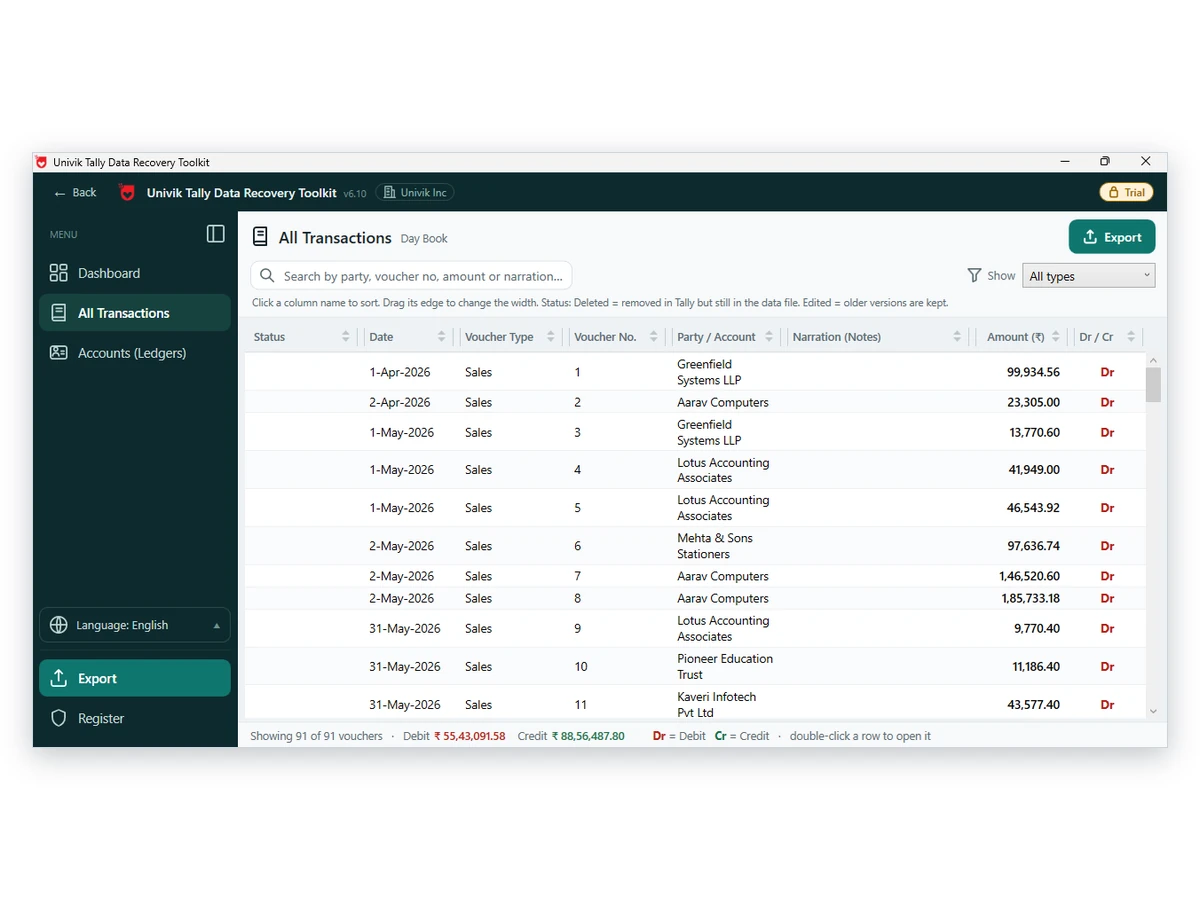
Univik Tally Data Forensic Analyzer lists vouchers deleted in Tally and the older versions of edited ones, with the date each was saved, from a copy that is never altered.
In our tests across 43,326 TallyPrime vouchers every exported voucher balanced, and a second snapshot of the same company taken one save earlier decoded to identical content. That's the level of agreement you want before you call any difference a change.
Download Free Trial Forensics Licence - $599Log extracts run on Windows 10 or 11 with .NET 4.8. The investigator licence is priced on the buy page. Analyzer page
What to Look For in the Results
Deleted entries show what left the books. Altered entries show who changed a figure. Vouchers created long after their own date, inside a closed period, can point to back-dating. Treat each one as a lead for a question you ask the accountant, not as proof you hand to anyone.
For the audit trail rule itself, the ICAI implementation guide quotes the audit trail proviso in the Companies (Accounts) Rules of 2014. For the evidence method, see the guide to examining Tally data as evidence.
- The company is on Release 2.1 or later
- Edit Log was on for the whole period you are testing
- The folder was copied before any repair or migration
- Your extract names the filter you used and the date it was made
- Findings are written as leads to question, not as conclusions
Fixes When the Log Looks Incomplete
Do this: The company may have migrated or the log may have been turned on late. Ask for the history of that setting.
Do this: Look for an earlier backup. Open it as described in the backup guide.
Do this: Read it outside Tally. See the File Damaged guide.
Questions on a case? Write to support and say which release the data came from.
FAQ: Tally Edit Log and Deleted Vouchers

The product input came from Univik. Edit Log behaviour comes from three Tally help pages that we read on October 12, 2026. The Rule 3(1) wording is taken from the ICAI guide. Reading the log from data files follows the analyzer page.
Pages we read: Tracking modifications · Edit Log in TallyPrime FAQ · Edit Log for masters and transactions · View Edit Log summary