BUSY's Tally2BUSY utility works with BUSY 21 and needs Tally running with the company loaded.
Zoho's Tally guide covers only its GCC editions. Both routes start from a working Tally. If the company will not open, read it from the files, export an Excel list of vouchers and import it through the new package's own Excel screen.
The decision to leave Tally is made. Now come the books, ten years of them. The vendors publish routes, and every one of those routes assumes Tally is up and running with the company open, which is exactly the thing you may no longer have.
Who Is Moving Tally Data to Another Package?
Which move are you planning?
The firm is switching and wants years of masters and vouchers in the new package.
See the BUSY routes →A GCC business is leaving Tally for a cloud ledger.
See what Zoho asks for →The licence has lapsed or the data is damaged, yet the books must move to the new package before the next filing.
Use the Excel route →Switching software is mostly a data problem. The vendors publish routes that start with the old software running. If it cannot run, there is still a way, but it needs a few more checks on your side.
The Routes at a Glance
| Route | Tally must run? | Limits the vendor states |
|---|---|---|
| Tally2BUSY utility | Yes, with the company loaded | BUSY 21 only. Demo imports 15 days or 100 vouchers |
| Masters and Daybook XML | Yes, to export both files | Vouchers land in the Main series. Large data goes in smaller ranges |
| Excel import in BUSY | No, if you already have the file | You map columns in a configured format |
| Zoho Books Tally guide | Yes, to run four reports | GCC editions only |
Moving the Books to BUSY
The Tally2BUSY page says the utility works only with BUSY 21 and wants the company loaded and open. TallyPrime is preferred over older releases. Masters cover ledgers, groups and items, while vouchers cover sale, purchase and journal entries. You can set a date range if you only want part of the history.

The page advises a backup first, a test on a small dataset and a new BUSY company. Map the account groups before the transfer and check the result afterwards. Note: do the small test even if you are in a hurry. A mapping mistake on 200 vouchers is a morning's work. On 20,000 it is a week.
The Tally to BUSY FAQ adds the XML route. Export Masters and Daybook into one folder, start the utility from the Add-on menu and point it at that folder, after which the vouchers land in the Main series. The inventory setting is named two ways on the page, Multi Godown Inventory and Multi Material Centre, so read your own screen.
The utility page calls Tally2BUSY free. The FAQ calls Tally to BUSY a chargeable service from the vendor's end and lists no price. They may be describing two different things, a self-service utility and a conversion done by the vendor, so ask BUSY support which one fits your case before you budget for it.
Moving Tally Data to Zoho Books
Zoho's Tally migration guide states that it is only for the GCC editions. It asks for the stock summary, master data, voucher data and trial balance reports. The import runs from the chart of accounts and contacts through items, opening balances and then transactions.
Its checks are plain. Once opening balances are in, credits must equal debits and the Opening Balance Adjustments account must read zero. We found no such guide for other Zoho editions, so look in Zoho's own help for yours.
Limitations of the vendor routes: both need Tally running on the company, Tally2BUSY is tied to BUSY 21 and Zoho's guide covers the GCC editions only.
Which route should you choose? If Tally opens the company and you are moving to BUSY 21, use Tally2BUSY. If you are a GCC business moving to Zoho Books, follow Zoho's guide. If Tally will not open, or the licence is gone, read the files and import through Excel.
Move the Books When Tally Cannot Open the Company
Univik Tally Data Converter, a module of Univik Tally Data Recovery Toolkit, reads the folder or a .001 backup itself and writes Excel, so you are no longer waiting for a licence that has lapsed. BUSY's import FAQ describes its Excel import, and the other software page says other software comes in as .xls, .xlsx or CSV.
The Excel this converter writes comes from the same reader that passed a full round trip: 8,836 vouchers out of the files and back into TallyPrime with 0 exceptions, voucher numbers kept in 100% of 9 voucher types. The sheet you import into BUSY starts from that.
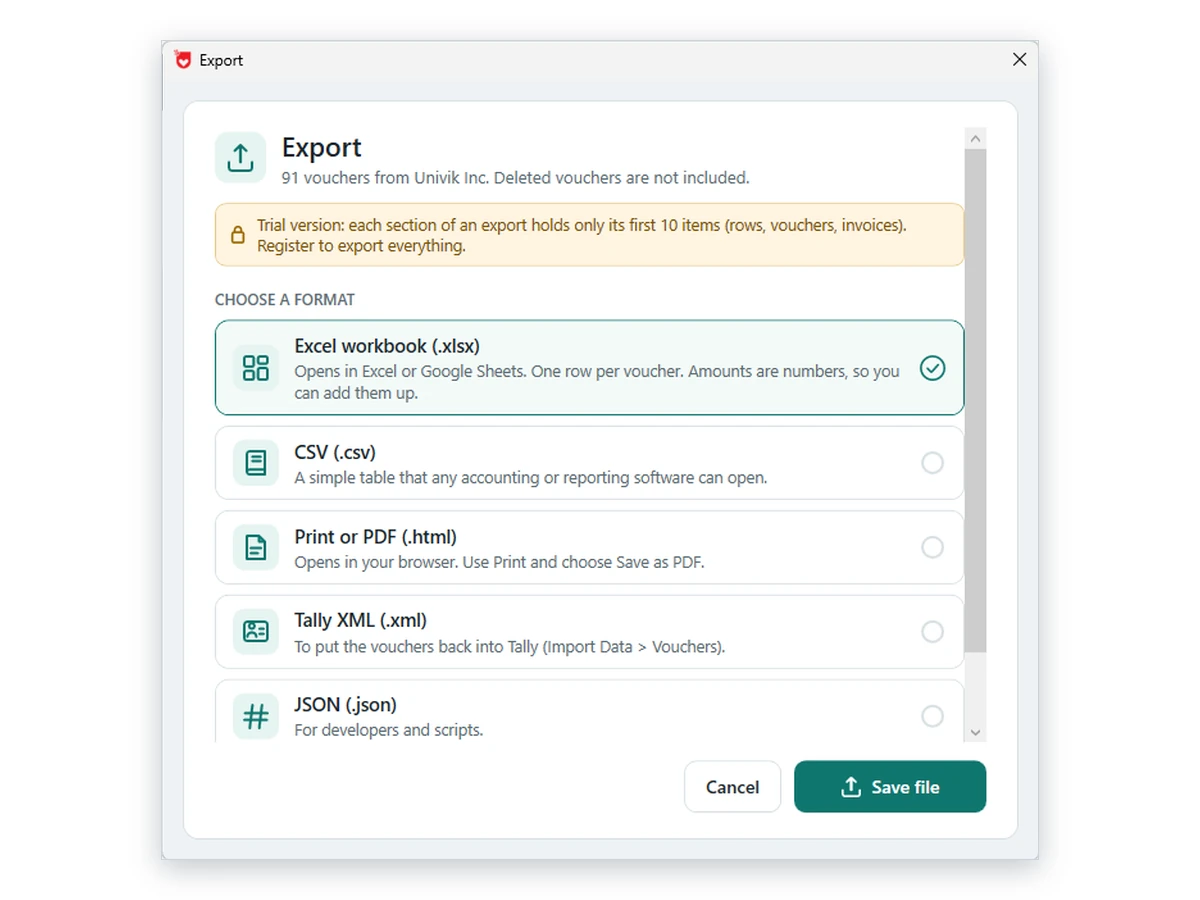
- Back up the source dataCopy the numbered company folder to another drive. A damaged or inaccessible company is read from this copy.
- Export the vouchers to ExcelIn Univik Tally Data Converter open the company, pick Excel and save. The workbook lists vouchers, one per row. The save screen has no date field, so cut the sheet by year in Excel when you load one financial year at a time.
- Check the workbookCompare a few closing balances with a report from the old books. Fix any gaps before the file goes near the new package.
- Create a new BUSY companyUse a fresh company for the financial year you are loading, as the vendor advises.
- Create the ledgers, then import vouchersThe workbook lists vouchers and the party names on them, not a masters list. Set up the ledgers in the new package first. Then use its Excel import for vouchers, configure the format and map the columns.
- Verify against the old booksMatch the trial balance and a few bills in BUSY with the figures for the same dates.
Univik Tally Data Converter reads the company folder or backup directly and writes an Excel list of vouchers.
Download Free Trial Full Licence - From $99Requires Windows 10 or 11 plus .NET 4.8. A licence lifts the trial limit. Converter page
- The trial balance at the cut-off date equals the old figure
- Receivables and payables lists agree party by party
- Stock quantities match for a sample of items
- A month of vouchers has the same count and total on both sides
- Nothing was loaded into a company that already holds entries
Fixes for Common Transfer Snags
Do this: Read it from the files instead, as described in the File Damaged guide.
Do this: Re-check the cut-off date and the opening balances before touching vouchers. Load masters again on a fresh company if needed.
Do this: Our guide on BUSY to Tally data transfer covers that direction.
Planning a large move? Write to support with the number of companies and years.
FAQ: Moving Tally Data to BUSY or Zoho Books

The product facts here were checked by Univik staff. The BUSY and Zoho facts come from the pages listed here, read on October 12, 2026. We flag the places where two BUSY pages disagree. The Excel route is our own idea.
Pages we read: Tally to BUSY data transfer tool · Tally to BUSY FAQ · BUSY Excel import FAQ · Zoho Books Tally migration