A reader built for Tally's file layouts can open a company with no Tally installed, because each company is a numbered folder of data files.
Every export route built into Tally needs a running copy with a company loaded. Copy the folder or the .001 backup to a Windows PC first, then open the copy in a read-only viewer.
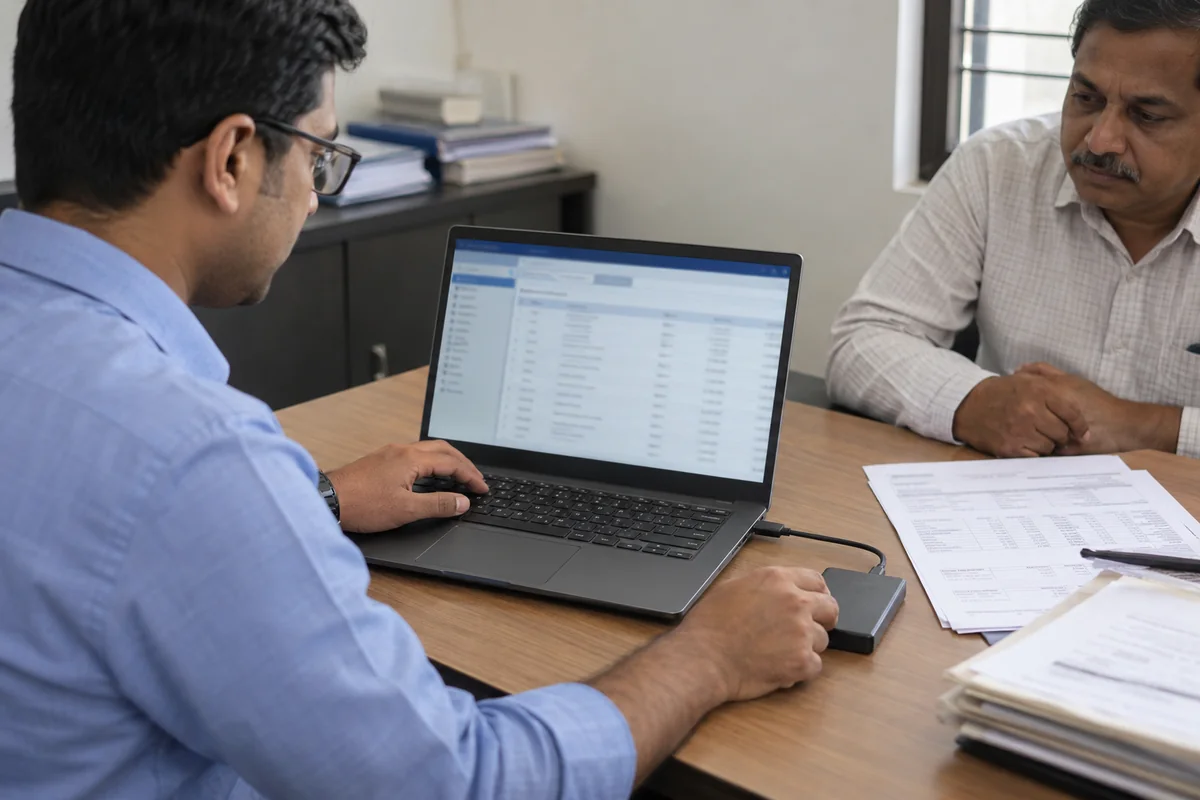
Maybe a client handed you a pen drive with last year's books on it, or your own licence dropped to Educational mode in the week a return is due. Maybe the business closed and all that is left is a disk. That gap is fixable. In every one of these cases the books are still there as files, and the only thing missing is a program that can show them to you.
Who Needs to Read Tally Data With No Tally?
Which of these is your week? Each card jumps to the part that helps.
Your client is on a newer TallyPrime release than your office copy, so their folder refuses to load on your side.
Compare the routes →The software opens in Educational mode or not at all, and the books are needed this week.
Open the folder →No Tally was ever installed on the PC that holds it. You have a folder of files and a question about last year.
Prepare the copy →Each company sits in a numbered folder of data files, and it is the accounting program that turns those files into ledgers and vouchers on screen. Take the program away and the records are still on the disk, but you cannot read them. Below, every route is marked by one thing: does it need another working copy of Tally or not.
Get the Folder Ready First
- Find the numbered folderA 5-digit name such as 10000 points to Tally 9 or TallyPrime up to 2.1. A 6-digit name such as 100000 appears after a move to TallyPrime 3.0.
- Look for both foldersAfter that move the old 5-digit company stays beside the new 6-digit one. Entries made later live in the newer folder, so the older one may be out of date.
- Copy firstWork on a duplicate. TallyPrime can rewrite data on opening, as it does during migration. A copy keeps the delivered files as they came.
- Confirm you may read the booksThe business that kept them owns them, so read only what you may.
Which Routes Read a Tally Company Without Tally?
Three of the four routes need a running copy of Tally with a company loaded. One does not. Compare the rows, then pick the route that matches what is installed on your PC right now.
| Route | Tally running? | Licence needed? | What it gives | Caution |
|---|---|---|---|---|
| TallyPrime on the same PC | Yes | Yes, or Educational mode | Every report | A higher-release company refuses to load in an earlier release |
| Export from the Alt+E menu | Yes, with a company loaded | Yes | Masters and vouchers in ASCII, Excel, HTML, PDF, XML or JSON | Masters and vouchers go out separately, which Tally calls slow |
| Tally's ODBC link | Yes, with the ODBC server on | Yes | Tables for Excel and BI tools | Tally's own page covers ledgers and stock items |
| Univik Tally Data Viewer | No | No | A read-only view of the folder or backup | Windows only. Saving beyond 10 items per section needs a licence |
The export formats come from the TallyPrime export page. The ODBC limits come from the ODBC page for Excel. Both assume a copy of the software that is already open on a company.
Which route should you choose? If a licensed TallyPrime of the same or a higher release is on your PC, load the company there and export from Alt+E. If your copy is older than the client's, or there is no Tally at all, the viewer route is the only one that opens. If you only need masters in Excel and Tally is running, ODBC will do.
Limitations of the built-in routes: all three need a licence or Educational mode and a company that loads first. The Alt+E export also sends masters and vouchers out as separate files.
Open a Tally Company Folder in Univik Tally Data Viewer
Univik Tally Data Viewer is one part of Univik Tally Data Recovery Toolkit. It reads the company files directly, so no Tally install and no Tally licence stand between you and the books. Here is how to point it at a copied folder:
We ran the viewer and converter over 7 TallyPrime company data sets from one real business, FY 2018-19 to 2025-26, 43,326 vouchers in all, plus 2 Tally.ERP 9 companies in .900 format. Every exported voucher balanced and not one bank code came out unknown. Every run used a read-only copy, so the original folders were never touched.
- Find the company folderIn TallyPrime the Data Path is set from Alt+Y (Data), in its configuration screen. With no Tally on hand, search the drive for Company.900, Company.1800 or Company.500. Whichever folder contains it is your company folder.
- Copy it to a local driveCopy the whole numbered folder, for example 10000 or 100000, plus any .001 backup. Leave the original where it is.
- Install the viewerRun setup-tally-data-recovery.exe on a Windows 10 or Windows 11 machine that has .NET Framework 4.8 or newer. Tally itself is not installed or needed.
- Open the copySelect the numbered company folder or the .001 file. The company and its sections appear in a list.
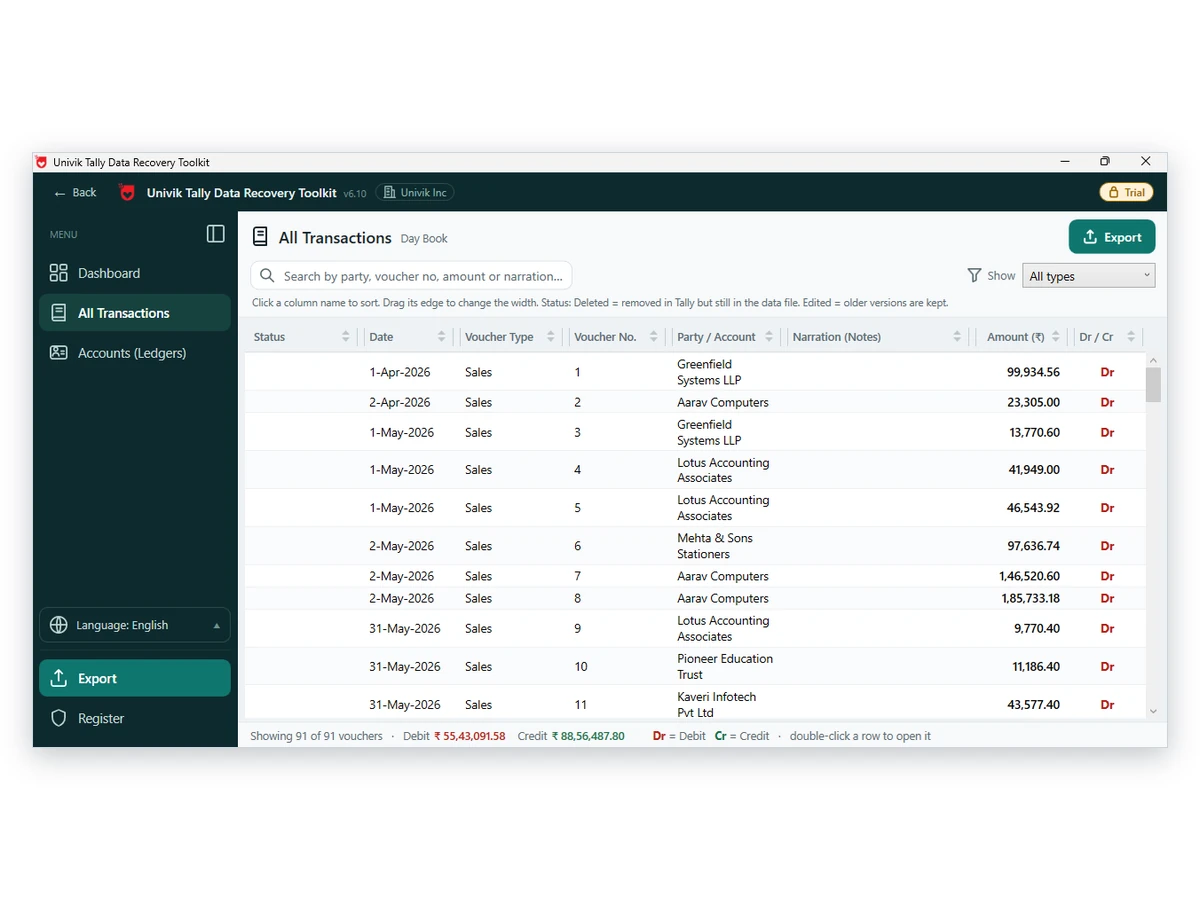
- Browse and checkOpen the Day Book, then one ledger at a time. Search by party, voucher number or amount. Match a closing balance and one month of entries against a report you trust before you rely on what you see.
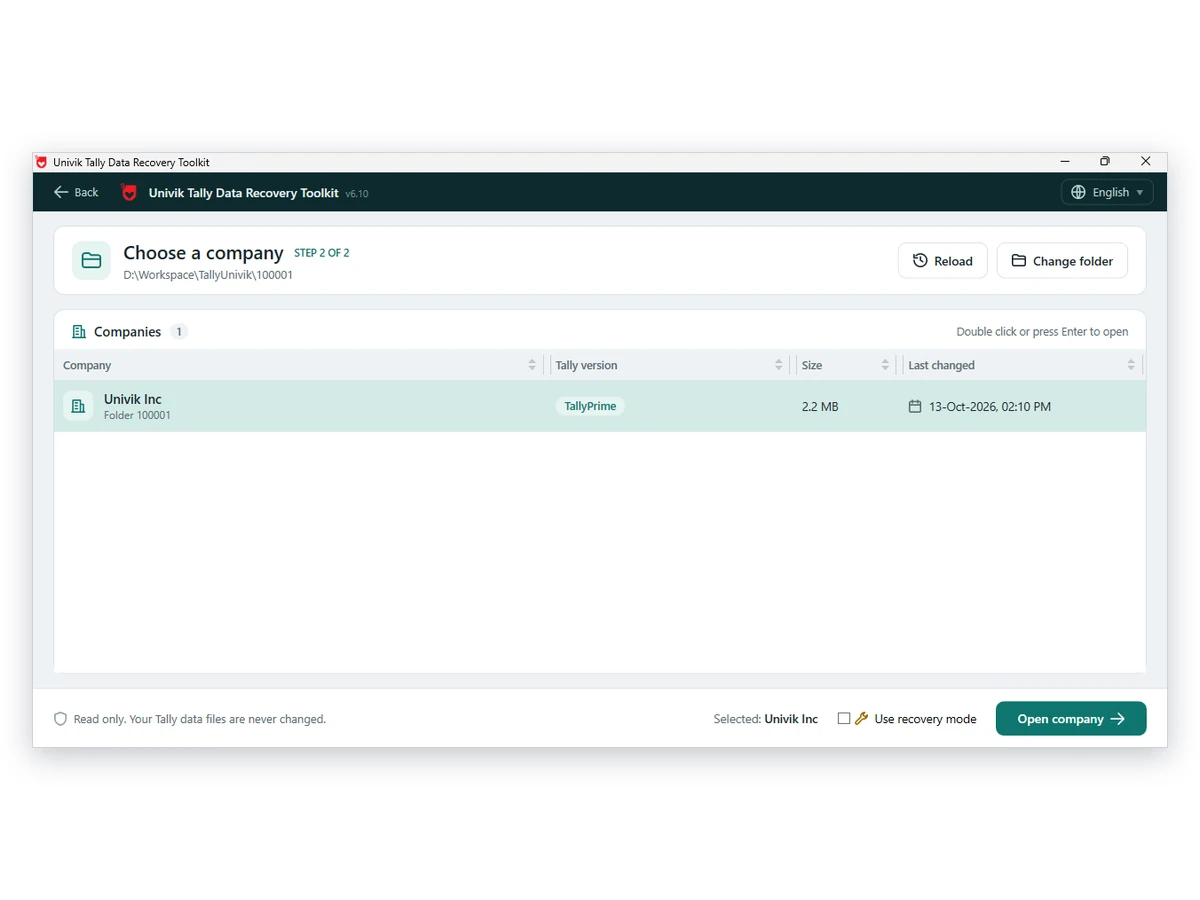
Note: nothing is written to the folder and nothing leaves your PC. Browsing is free. When you want the books in a workbook, the Univik Tally Data Converter page lists the saving options and the licence that removes the ten-item cap.
Univik Tally Data Viewer shows a company folder or backup the way it was saved, ledgers and vouchers included.
Download Free Trial Pick a Licence - From $99For Windows 10 and 11. Browsing is free, and a licence removes the cap of ten saved items. Viewer page
Why Does a Folder Fail to Load in Tally on Another PC?
The usual reason is a release mismatch. Tally says so in its data migration FAQ: a company saved by a higher release will refuse to load in an earlier one, and the fix it offers is to go back to the earlier release or install the latest one in a new folder and restore there. Neither fix helps when the newer copy belongs to your client and not to you.
A viewer written for the file layouts has no such check. It reads .500, .900 and .1800 side by side, so you can sit on an older release and still look at a client's newer data. If you want to know what each file inside a company folder is for, the Tally data file guide lists them.
Backups need the same care, because a .001 file normally has to go through a Restore before Tally will show it. The guide to opening a Tally backup without restoring shows you how to look inside one and skip that step.
What You Can Do Once the Books Are Open
Browse the Day Book, open one account at a time, search for a party or a voucher number and compare the totals with a report you hold on paper. Vouchers that were deleted or edited in Tally have their own filters. Saving needs a licence. For a workbook of every voucher, see exporting every Tally company to Excel.
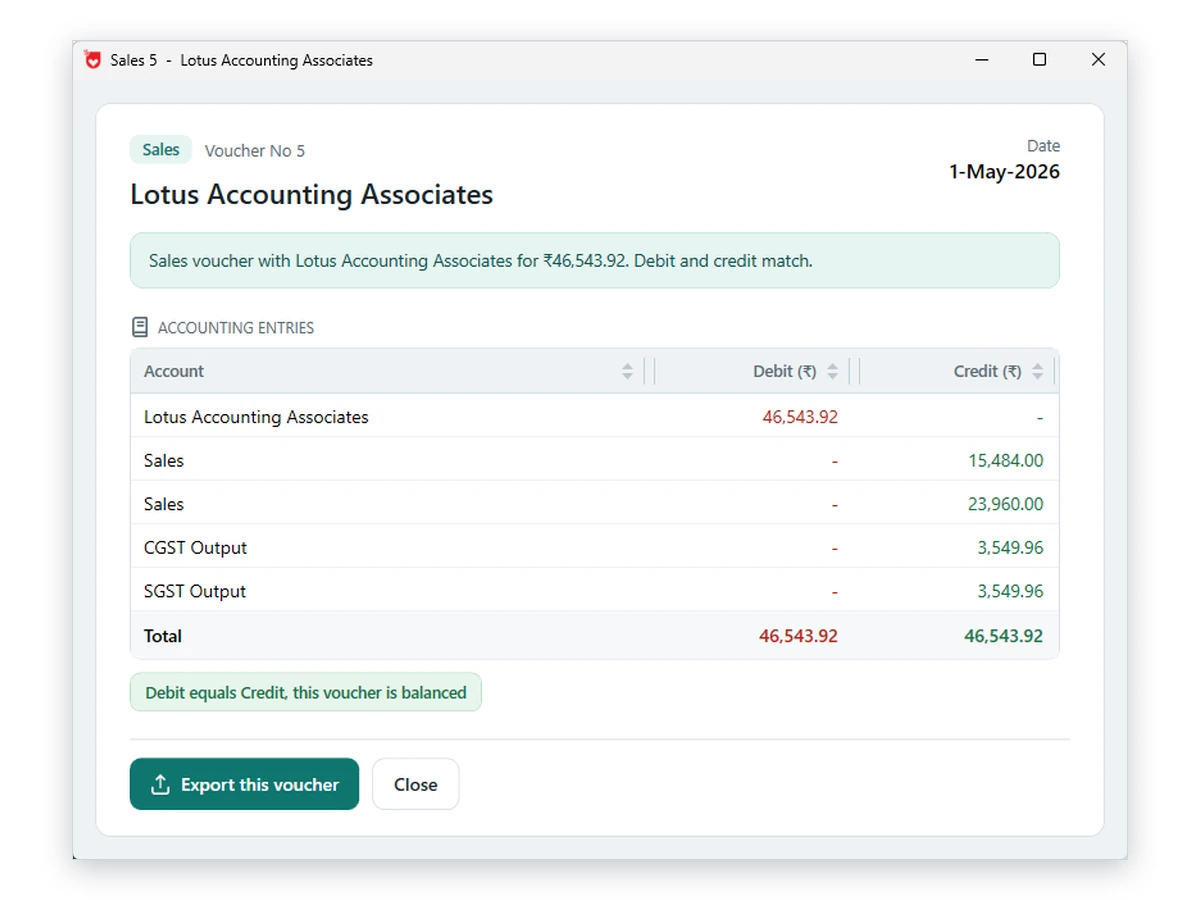
Limitations: the viewer is not a replacement for TallyPrime. It cannot post vouchers, run GST returns or change a single entry. It was never meant to. Use it to read the books while the program is absent and keep TallyPrime for daily work.
- You opened a duplicate and the original folder was left as received
- The company name and financial year shown match the engagement
- A closing balance and a month of vouchers match a printout from the client
- When both a 5-digit and a 6-digit folder exist, you know which one holds the latest entries
- Your notes carry the folder name and the date you opened it
Fixes When the Copied Folder Will Not Open Cleanly
Do this: Choose the numbered folder, for example 10000, rather than its parent. If you still see nothing, read the guide to a Tally company missing from the list.
Do this: Choose the backup file in the viewer. It opens without a restore and without a spare data path.
Do this: Copy the folder to a healthy drive first. If the company shows File Damaged or Repair Required in Tally, see the guide to that error.
Unsure which folder to open? Write to support with the folder names and the Tally release if you know it.
FAQ: Opening Tally Data With No Tally Install

Univik supplied the product details. The folder and release facts follow Tally's data migration FAQ and its export page, opened on October 12, 2026. The viewer notes come from the viewer page.
Pages we read: Tally data migration FAQ · Export data in TallyPrime · ODBC extraction page