 Email Settings Guide
Quick answer: the Fastmail IMAP server is imap.fastmail.com on port 993 with SSL/TLS. The outgoing server is smtp.fastmail.com on port 465 with SSL or 587 with STARTTLS. The POP3 server is pop.fastmail.com on port 995 with SSL. Your username is the full email address. The password has to be an app password. Your normal Fastmail password will not work in a mail client. Neither will your two step verification password. One thing to check before any of it: the Basic plan carries no IMAP access at all.
What Changed Recently#
Related email providers: Hushmail email settings, Countermail IMAP settings, Mailfence email settings, StartMail IMAP settings, Runbox email settings, Soverin IMAP settings
Fastmail keeps its server addresses steady and puts its restrictions in the account rules instead. These are the ones that decide whether a client connects.
Latest update
Your plan decides whether IMAP exists for you. Fastmail Basic carries no IMAP, SMTP, CalDAV or CardDAV. Anyone on that tier is limited to webmail and the official app. Moving down to Basic from a higher plan also switches off every app password you already made, which breaks working clients without warning.
Earlier change
App passwords are the only accepted credential. Fastmail refuses both your account password and your two step verification password in any external client. There is no setting that changes this.
Earlier change
JMAP sits alongside IMAP. Fastmail helped author JMAP as a modern replacement for IMAP and supports both. IMAP is not going anywhere, so the settings here stay valid, though a JMAP capable client will feel quicker.
Before You Begin#
Two checks come first. Miss either one and your mail app will refuse the connection even with every server value on this page entered correctly.
1. Check which plan you are on
Fastmail Basic includes no IMAP, no SMTP, no CalDAV and no CardDAV. On that plan there is nothing to configure, because outside clients cannot connect at all.
Where: Plan check below →
2. Create an app password
Fastmail rejects your account password in every external client. It rejects your two step verification password too. An app password is the only credential that works here.
Where: App password steps below →
About Fastmail Mail#
Fastmail is a paid, ad-free mail service run by Fastmail Pty Ltd from Melbourne, Australia. It has been running since 1999, which makes it one of the oldest independent mail hosts still operating.
Fastmail funds itself on subscriptions rather than advertising, so there is no free tier to fall back on, only a 30 day trial. Opera Software bought the company in 2010, then the staff bought it back in 2013 and it has been independent since. It went on to acquire Pobox and helped author JMAP, the modern protocol built as a successor to IMAP. Two things make connecting a client here different from most providers. Your account password is refused in every external app without exception. The cheapest plan removes client access altogether.
| Service Name | Fastmail Mail |
| Owned By | Fastmail Pty Ltd, an independent Australian company |
| Launched | 1999, in Melbourne |
| Email Domains | @fastmail.com, @fastmail.fm, your own custom domain, plus a long list of Fastmail owned domains |
| Webmail URL | app.fastmail.com |
| Protocols Supported | IMAP, POP3, SMTP, JMAP, CalDAV, CardDAV. Not on Basic |
| App Password Needed | Yes, always, for every client on every plan that allows one |
| Free Storage | None. Paid only, with a 30 day trial and no card required |
@fastmail.com, @fastmail.fm, one of Fastmail's other owned domains or your own custom domain all connect to the same three hosts on this page. Hosting your own domain at Fastmail changes your username and nothing else. That is worth knowing, because plenty of providers hand custom domain customers a different server name.
Fastmail Webmail Login#
Webmail keeps working no matter what your mail app is doing. These are the pages Fastmail actually runs:
Which Fastmail Plan Are You On?#
Fastmail is the rare provider where the plan decides whether any of this works. There is no toggle to find and nothing to enable. Client access is either included with your plan or absent from it.
- Basic plan. No IMAP, no POP, no SMTP, no CalDAV and no CardDAV. Fastmail states this plainly in its own documentation. Webmail in a browser and the official Fastmail app are your only options, so no value on this page applies to you.
- Individual, Duo and Family plans. Client access is included. Everything below works.
- Business Standard and Professional. Client access included, along with custom domains.
- Not sure which you have? Open Settings in webmail and look at your subscription. If the app password screen refuses to let you create one, you are on Basic.
Fastmail IMAP Settings#
IMAP is the incoming protocol to reach for. Mail stays on the Fastmail server, so every device you own looks at one identical inbox.
| IMAP Server | imap.fastmail.com | |
| Port | 993 | |
| Encryption | SSL/TLS (required) | |
| Username | Your full email address, including @fastmail.com | |
| Password | An app password. Your account password is rejected here | |
| Authentication | Required |
Fastmail POP3 Settings#
POP3 pulls mail down to one machine. It suits a single computer holding a local copy and little else. Undecided? The comparison sits below.
| POP3 Server | pop.fastmail.com | |
| Port | 995 | |
| Encryption | SSL/TLS (required) | |
| Username | Your full email address | |
| Password | The same app password works for POP as for IMAP |
Fastmail SMTP Settings#
SMTP carries outgoing mail. If messages arrive but nothing sends, look here first. Fastmail recommends port 465 with SSL, which is the reverse of what many providers suggest, though 587 with STARTTLS works too.
| SMTP Server | smtp.fastmail.com | |
| Port (SSL) | 465 | |
| Port (STARTTLS) | 587 | |
| Encryption | SSL or STARTTLS (required) | |
| Username | Your full email address | |
| Password | The same app password as incoming, provided its access scope covers Mail | |
| Authentication | Required. In Outlook this is the outgoing server authentication checkbox. |
Check Fastmail IMAP Settings Online#
You don't need to download anything to check Fastmail IMAP settings online. This page is the lookup: every value is verified, current and copyable straight from your browser. Not sure your address uses Fastmail servers? Type it below and find out instantly.
Does my email address use these settings?
Runs in your browser only. Your address is never sent anywhere or stored.
Want to verify the account itself before configuring an app? Sign in at Fastmail webmail, which confirms your address and password work, then confirm an app password exists. If both pass, any email app connects with the tables above.
Look Up IMAP Settings for Any Email Domain#
This page covers Fastmail. For every other address, work email on a company domain included, we run a free online lookup database: imapsettings.com.
imapsettings.com
Complete email settings database, by Univik
Enter any email address and get the incoming and outgoing server settings for that domain in 1 step:
The address is read locally to identify the domain. It goes nowhere and is kept nowhere.
Fastmail App Passwords and Access Scopes#
Fastmail takes a harder line than most providers here. Only an app password authenticates an outside client. Here is what each credential actually opens.
| Where you sign in | Account password | 2FA password | App password |
|---|---|---|---|
| Fastmail webmail and official apps | ✓ Works | ✓ Works | Not needed |
| Outlook, Apple Mail, Thunderbird | ✗ Rejected | ✗ Rejected | ✓ Required |
| Phone mail apps set up by hand | ✗ Rejected | ✗ Rejected | ✓ Required |
| Calendar and contacts apps (CalDAV, CardDAV) | ✗ Rejected | ✗ Rejected | ✓ Required |
How to Create a Fastmail App Password
- Sign in to Fastmail webmail on a computer, then open Settings → Privacy & Security.
- Find the connected apps section and choose to manage app passwords. Older help pages call this tab Integrations, so you may see either name.
- Click New app password. Fastmail may ask for your account password to confirm it is you.
- Name it after the device, not the person, for example "Outlook on the work laptop". You will thank yourself when you need to revoke one.
- Leave the access scope on Mail, Contacts & Calendars unless you know otherwise, then generate it and paste the password into your client. Fastmail shows it once.
Set Up Fastmail in Email Clients#
Every client wants the same three hosts and the same app password. Only the menu names change. Pick your app:
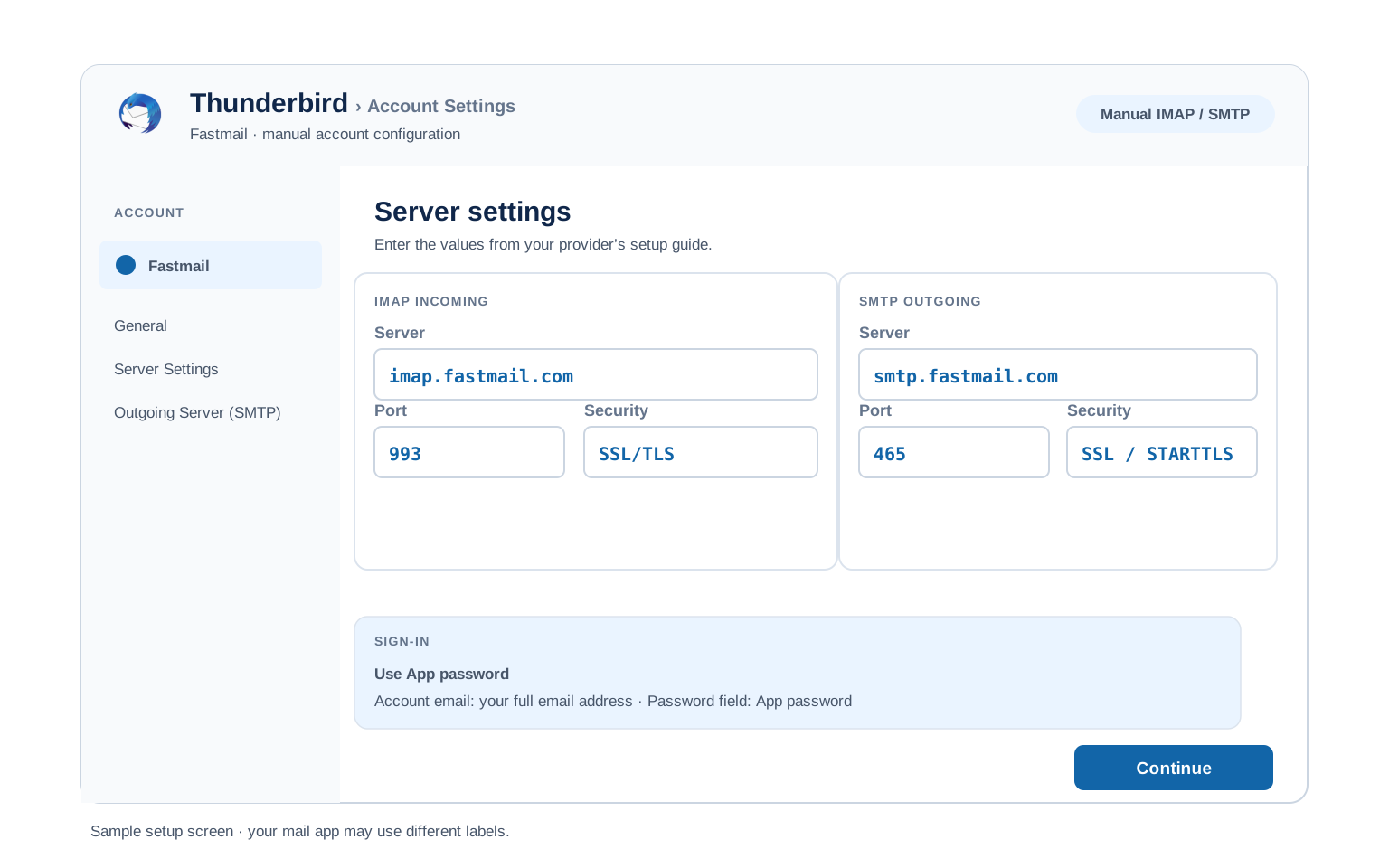
Outlook (Windows and Mac)
- In Outlook go to File, then Add Account. New Outlook hides the same option under Settings, then Accounts.
- Enter your Fastmail address, open Advanced options and check "Let me set up my account manually".
- Choose IMAP and enter
imap.fastmail.comport993(SSL) andsmtp.fastmail.comport587(STARTTLS). - Paste your app password when Outlook asks. Your account password will be turned away.
- Send yourself a test message once setup finishes, which proves sending and receiving in one go.
Apple Mail (macOS)
- In Apple Mail go to Settings, open Accounts, then Add Account.
- Choose Other Mail Account. Apple does not list Fastmail among its built in providers.
- Enter your name, address and app password, then continue.
- Should it ask for server names, copy them from the IMAP and SMTP tables higher up.
- Turn off "Automatically detect and preserve server settings" for this account. Apple Mail otherwise overwrites what you typed with its own guesses, which is a known headache on Fastmail.
iPhone and iPad
- On iOS open Settings, then Apps, then Mail, then Mail Accounts, then Add Account.
- Tap Other → Add Mail Account. iOS carries no Fastmail entry in its provider list.
- Enter your details with the app password, then tap Next.
- Leave IMAP chosen, filling in the incoming and outgoing hosts should iOS prompt for them.
- Tap Save, then give iOS a moment to check the account works.
Android
- Open whichever mail app you use on Android, then choose Add account.
- Pick Other, then IMAP, since Fastmail will not appear in the provider list.
- Enter your address and app password. If auto setup fails, pick Manual setup.
- Enter the servers:
imap.fastmail.com993 SSL incoming,smtp.fastmail.com465 SSL outgoing. - Complete setup, then pull down on the inbox to start the first sync.
Thunderbird
- In Thunderbird open Account Settings, then Account Actions, then Add Mail Account.
- Enter your name, address and app password, then select Continue.
- Thunderbird finds the Fastmail servers on its own in most cases. Check that IMAP is the chosen option.
- Where detection comes up short, switch to Configure manually and type the values from the tables.
- Choose Done, at which point your folders begin syncing.
Sending From an Alias in Your Mail App#
Aliases are one of the reasons people pay for Fastmail, though they trip up almost everyone the first time. Receiving on an alias works from the moment you create it. Sending from that same address is a separate permission, so a perfectly configured client will still refuse to send until you grant it.
| What you see | Why | What to do |
|---|---|---|
| 5.7.1 Not authorised to send from this header address | The From address is not an alias on your account | Add it under Settings → My email addresses. Fastmail blocks this by default to stop people spoofing addresses through its servers. |
| To send as this address you must first verify that you own it | The address belongs somewhere else | Use the Fix it button beside the address. You either prove you receive mail there or point Fastmail at that provider's own SMTP server, which Fastmail recommends for deliverability. |
| Recipient address rejected: User unknown in virtual mailbox table | The alias is brand new | Wait. Fastmail says an alias can take up to 15 minutes to take effect. Rebuilding it restarts the clock rather than fixing anything. |
Fastmail Webmail Settings#
The values above connect your apps. This next group governs how the mailbox itself behaves. All of it lives in webmail under Settings.
Signature
Settings has its own signature area, with a separate signature possible per sending identity. Anything you save there applies to webmail. Outlook and Apple Mail keep their own, so expect to write it twice.
Vacation Auto Reply
Fastmail calls this the vacation responder. Give it a start date and an end date so it switches itself off. It runs on the server, so replies keep going out with every device of yours powered down.
Filters and Folders
Rules run on the server, sorting mail before any device fetches it. Fastmail builds these on Sieve. It will let you edit the Sieve directly once the rule builder runs out of room. A rule inside Outlook only fires while Outlook is open.
Spam and Blocked Senders
Block single addresses or whole domains from the spam area. Fastmail also offers Masked Email, which hands out a throwaway address per signup so you can kill one off without touching your real one.
Fastmail POP3 vs IMAP#
| Feature | IMAP | POP3 |
|---|---|---|
| Where mail lives | On the Fastmail server | Downloaded to 1 device |
| Multiple devices | ✅ Everything stays in sync | ❌ Each device sees different mail |
| Sent and deleted mail | ✅ Synced everywhere | ⚠️ Stays only on that device |
| Offline reading | ⚠️ Cached mail only | ✅ Full local copy |
| Server storage used | Yes, counts against your quota | Can be freed after download |
| Best for | Phone + computer, everyday use | Single PC, local archives |
Fastmail Plan and Storage Limits#
Fastmail sets these by plan rather than publishing one universal figure, so check your own subscription for the exact numbers. What matters most for setting up a client is the top row.
| Client access (IMAP, POP, SMTP) | Included on Individual, Duo, Family, Standard and Professional. Absent on Basic |
| Mailbox storage | Set by plan. Basic sits around 6 GB in total, while Standard and Individual run to roughly 60 GB per user |
| Free tier | None. Fastmail is subscription funded, with a 30 day trial that needs no card |
| Aliases and domains | Hundreds of aliases on one mailbox, plus Masked Email for throwaway addresses. Up to 100 domains can sit in a single account |
| Sending limits | Set per plan and aimed at personal and small business use. Fastmail does not publish one figure that covers every subscription |
| Going over storage | Fastmail soft bounces incoming mail for roughly a week rather than billing you for the overage, so clear space quickly |
Troubleshooting Fastmail Connections#
Almost every Fastmail connection failure traces back to one of three things: the plan, the password type or the access scope. Find your symptom below.
| Error you see | What it means | Fix |
|---|---|---|
| Password error, though the password is right | You entered your account password or your 2FA password | Neither works in a client. Create an app password and paste that instead. |
| Cannot create an app password at all | You are on a Basic plan | Basic excludes IMAP, SMTP, CalDAV and CardDAV. See which plan you are on. Webmail and the Fastmail app still work normally. |
| Signs in but will not send or receive | The app password has the wrong access scope | Check the scope in brackets beside its name in Settings → Privacy & Security. It needs Mail, not Files. |
| Cannot connect to server | Wrong port or encryption | Check IMAP 993 SSL and SMTP 465 or 587. Antivirus software and VPN apps block these ports more often than people expect. |
| Password keeps being asked | Saved credential is not an app password | Remove the stored password and enter an app password. If it was working until recently, check whether the plan was downgraded to Basic. |
| Refuses to send from one of your aliases | The From address is not authorised on the account | See sending from an alias above. Receiving on an alias does not grant permission to send from it. |
| Messages stuck in Outbox | SMTP authentication is off | Switch on the outgoing authentication option, giving it the same credentials as incoming. |
Reader Reported Fixes
Apple Mail quietly rewriting your server settings. Someone enters the Fastmail hosts correctly, the account works, then it breaks days later with no change made. Apple Mail had re-detected the settings and replaced them. Turning off "Automatically detect and preserve server settings" for that account stops it happening again.
A working setup that died after a billing change. Moving down to a Basic plan disables every app password on the account. The mail app keeps the saved credential and keeps failing, which points suspicion at the server rather than the subscription. Moving back up to a plan with client access restores it, though you will need to create fresh app passwords.
Moving To or From Fastmail?#
Coming in from another provider? Fastmail has its own import that pulls mail across over IMAP, so you need the other side's server settings rather than these. Bring your custom domain with you and the values on this page do not change at all.
Moving mail out? Use IMAP on both ends. On the Fastmail side that means the hosts above with an app password scoped to Mail, because a migration tool is another external client as far as Fastmail is concerned.
Cancelling the subscription? Back up the mailbox first. This is a paid service with no free tier to fall back to, so access ends when billing does. Take your copy while you can still sign in.
Taking your mail to a new account? The Univik Email Migration Tool copies every folder from the old account to the new one. Enter the IMAP settings from this page for the Fastmail side and your new provider's settings for the other.
Rather not do it yourself? The Email Migration Services team scopes the move, carries it out, then checks every folder landed.
Use These Settings in Univik Email Backup#
The same IMAP settings above let you download your complete Fastmail mailbox to your computer. Univik Email Backup writes the lot to PST, MBOX, EML or PDF, which stay yours after the subscription lapses.
- Install Univik Email Backup on a Windows machine.
- Choose Fastmail as the source. Where it is absent from the list, pick the generic IMAP option.
- Sign in with your full email address and an app password scoped to Mail. A backup tool is an external client, so your account password fails here too.
- If the tool asks for server details, use
imap.fastmail.comwith port993and SSL from the IMAP table above. - Choose an output format and destination folder, then begin. A big mailbox keeps downloading while you get on with something else.
Univik Tools That Use These Settings#
Plenty of readers arrive mid migration or mid archive. These 3 tools all run on the IMAP values above:

Email Backup
Download your complete Fastmail mailbox to PST, MBOX, EML or PDF before switching or closing the account.
Email Backup Tool →
Email Migration Tool
Copy every folder from Fastmail straight into Gmail, Microsoft 365 or any other account. No manual export needed.
Email Migration Tool →
Email Converter Tool
Holding MBOX, EML or OST files from a previous export? Turn them into PST, PDF or whichever format your next app reads.
Email Converter Tool →Prefer to hand the whole migration to experts?
Nobody has to become an expert in ports and scopes. The Univik migration team runs the whole thing, planning through transfer through verification, finishing with a report confirming each folder landed. We have done this since 2013, for lone mailboxes as well as entire companies.
Email Settings Glossary#
IMAP
Internet Message Access Protocol. Reads mail that stays on the server, so all your devices see the same inbox, folders and read status.
POP3
Post Office Protocol version 3. Downloads mail to 1 device and can remove it from the server. Older method, still useful for local archives.
SMTP
Simple Mail Transfer Protocol. Sends your outgoing mail. Every account needs it next to IMAP or POP3, which only receive.
SSL / TLS / STARTTLS
Encryption for the connection. SSL/TLS encrypts from the start (ports 993, 995, 465). STARTTLS upgrades a plain connection (port 587).
App Password
A separate code standing in for your real password inside an app. Safer, because revoking one app leaves your main password alone. On Fastmail each app password also carries an access scope deciding what it may reach.
OAuth
Signing in through the provider's own window rather than typing a password into the app. Fastmail takes a different route, using scoped app passwords, so you will not see an OAuth window when adding a Fastmail account by hand.
How We Verify These Settings#
Univik has built email backup, migration and converter software since 2013. Our tools sign in to Fastmail over IMAP and SMTP every day for thousands of users, so a changed server, port or login rule shows up in our connection logs before most guides notice it.
Every value on this page is confirmed with 3 checks: a live IMAP and SMTP connection from Univik Email Backup, a comparison against Fastmail's own help documentation and a fresh app password created through the current settings flow. Any announcement from Fastmail triggers a recheck. We revisit the page quarterly regardless.
Spotted something that no longer matches your Fastmail screen? Let us know. We retest, correct the page, then record it in what changed recently.
 Help & Support
Frequently Asked Questions
Use imap.fastmail.com on port 993 with SSL/TLS. Your username is the full email address, including a custom domain if you use one. The password must be an app password. The complete table sits in the IMAP settings section.
Because Fastmail refuses that password by design. Outside clients take an app password and nothing else, not your account password and not your two step verification password. Create an app password and paste that in. If the screen will not let you create one, you are on a Basic plan, which has no client access at all.
IMAP for almost everyone. It keeps your phone, computer and webmail in sync. POP3 fits only a single computer setup where you want a local download. Full comparison here.
Yes. On Fastmail that holds for your address too. The same three hosts serve @fastmail.com addresses, Fastmail's other domains and your own custom domain. Only the menus move around, which is what the client setup guides handle.
No. Fastmail displays it once and never again. Delete that entry under Settings → Privacy & Security, then create a replacement. Your other app passwords keep working, which is the reason to name each one after its device.
Yes. An app password is safer than your real one, since it reaches only what its scope allows and can be revoked on its own. Keep two step verification on for your account, then look through the app password list occasionally and delete any belonging to a device you no longer use.
An IMAP client pulls mail down as it syncs, though a dedicated backup tool works faster and writes standard files that open anywhere. See how to back up your Fastmail mailbox. Sitting on an old export in some other format? An email converter turns it into PST, PDF or whatever your next app reads.
On Fastmail there are two usual suspects. A plan downgrade to Basic disables every app password on the account. Separately, Apple Mail can silently re-detect and overwrite server settings you entered by hand. Both look like a server problem. Check what changed recently and the reader reported fixes.
An email migration tool copies mail directly between the 2 accounts over IMAP. You need the Fastmail IMAP settings and an app password scoped to Mail for this side, plus the same details for the destination account. Every folder, label and date stays intact.
Where the stakes are high or the account count is large, our managed email migration service takes the whole thing off your hands.
Other Email Provider Settings
Summary: Fastmail Settings at a Glance
- IMAP: imap.fastmail.com, port 993, SSL/TLS
- POP3: pop.fastmail.com, port 995, SSL/TLS
- SMTP: smtp.fastmail.com, port 465 (SSL) or 587
- Username is always your full email address
- App password always required, never your account password
- Give it the Mail access scope
- Basic plan has no IMAP at all
- Custom domains use the same servers